[Discussion] Allow development of node applications in an Nx Repo
What are some things that people would like to see in this area?
Current Behavior
No easy way to develop backend applications within a Nx Repo
Expected Behavior
Developers should be able to develop a backend application within a Nx Repo
 FrozenPandaz
All 11 comments
I'll start with some ideas:
- Easily setting up and developing both frontend and backend concurrently
- Reuse types between frontend and backend so changing contracts or schemas triggers retests and rebuilds of both frontend and backend
- Generation of dependency graphs to show which frontends depend on which backends
FrozenPandaz
on 13 Sep 2018
Great idea 👍
Am I able to build any node app with it? What are the limitations/requirements when using it?
Maybe adding the possibility to define scripts of package.json within the options of the build target as pre or post step could help out in some situations. It would for edge cases allow to define custom builders by just defining the scripts, what to execute when e.g. affected:build is called (or the basic cli commands and the usage of ng run). Something like:
"architect": {
  "build": {
    "builder": "@nrwl/builders:script-build",
    "options": {
      "preScript": "my-build-pre-script",
      "mainScript": "my-build-step-script",
      "postScript": "my-build-post-script -- --output-path dist/apps/my-custom-app"
  }
}
It should be possible to also show dependencies based on the typescript imports, or the implicit dependencies defined - if it is a typescript project, right?
 skydever
on 15 Sep 2018
skydever
on 15 Sep 2018
some brainstorming I came up with concerning the affected script:
- You can define a default project in
angular.json. This project is calledaffected. - The project
affectedhas defined some targets:
build,testthat have some configurations:uncommited,staged,pr,ci... that just pass the right parameters to the execution, scripts defined for the script builder ...
... then you can run ng test to run the affected script by default (using the defaults defined at angular.json), or ng test --configuration=pr or ng run test:pr explicitly ...
skydever
on 16 Sep 2018
As per the flexibility of the node builder:
I won't say it builds any node app just for the possibility that it doesn't :stuck_out_tongue: but I'll say it is quite flexible. :)
Users will be able to see dependencies based on typescript as well as create implicit dependencies:
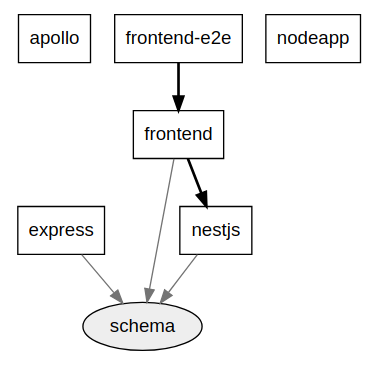
I've tested with Express, Apollo, NestJS, TensorflowJS.
What are people using for their backends with their Angular Projects?
Any thoughts? I'd love to hear.
@skydever Thanks for the feedback. Is there a reason running affected through ng run is preferable over nx affected? I also think running scripts is done well enough by npm and does not require an angular builder.
FrozenPandaz
on 17 Sep 2018
I see ;-) ... I like it! Really, really nice!!
I am using Java for most of my backends, the only node backend I am running at the moment is using Express. I am planning to integrate it into my monorepo and the nx workspace, now that I have the possibility 👍 The frontend is already a target for the monorepo, but maybe I start to integrate the server first ;-) The frontend is an AngularJS app, no ng-update or anything, it will be a big bang migration - maybe I can also integrate it without the need to touch the app itself? Once it is in, the process will start much easier...
... and that leads me to the script idea I was talking about. The thing is, you have certain tasks that are the same for every app and lib, like build, test and so on, even if they are not an Angular project. By using a script builder I would be able to run this tasks for every app/lib I am working on with the same commands, ng <task> could build my AngularJS app by pointing to the existing scripts that I would normally run through npm run <task>. e.g. serving my existing backend ng run my-backend:serve, that would be possible with a few lines of configuration. As I said, maybe just useful for some edge cases - but any teammember could use the default ng scripts to execute certain tasks, and does not have to check a readme for that - just use the ng scripts and you are fine, no -- for script params, usually the angular cli is installed globally... but I totally agree, running scripts is done done great by npm, but I think it could make some things even easier.
Maybe a bit off topic, but it fits the default ng scripts I was mentioning. I am creating some workspace schematics at the moment. I am making some modifications after the basic schematics ran, that are not covered via configuration, because they are too specific (e.g. adding some custom decorators on every newly created component, but this should be done by default). I am extending the @nrwl/schematics by using the default ones + extra tasks. I just added a collection.json inside tools/schematics to do so. Now I try to set my workspace schematics as the defaultCollection at angular.json, I am wondering if that could work (just in the middle of trying that). I would be able to use ng g lib, the default ng command, but would create the lib with some custom extensions. Teammembers do not have to care about that, they just use the ng scripts theay already know - and the schematics code lives in the workspace, is updated for usage right away for the next execution of the schematic ...
skydever
on 17 Sep 2018
... I also created a custom cli for my workspace, and I use the ng run options quite heavily, passing the same kind of params to my cli. I extended the first param to be something like a project evaluator like affected is, I also allow a list of projects comma separated or wildcards, reserved words like apps for all apps and libs. I may can replace my cli with the ng run command if I am able to add pre/post scripts e.g. for ci (affected:e2e:staging:ci or affected:e2e:staging-ci), or can keep it alive easier if I am able to do that : )
skydever
on 18 Sep 2018
...just realized that there is already a discussion going on about the workspace schematics and the usage of ng g at #771. I am stuck when it comes to the typescript compiling, I am not able to compile the schematic automatically prior the ng run call, there is no pre-hook I can use or possibility to use ts-node here? But I will comment on #771 concerning that... and use my custom cli that is redirecting to the workspace-schematic script...
skydever
on 20 Sep 2018
i am experimenting with nx workspace to add nestjs under apps
https://github.com/xmlking/ngx-starter-kit
my ask is, to integrate ng g approach for scaffolding nest artifacts. today we have to do: nest g controller mymodule --dry-run
 xmlking
on 20 Sep 2018
xmlking
on 20 Sep 2018
Hi, I can see that 'feat(builders): introduce node build and execute builders' has been merged and released with version 6.4.0. Are there any docs on how to actually use it? I am quite new to node.js development but I would appreciate easy way of sharing code between frontend and backend.
 Bielik20
on 19 Oct 2018
Bielik20
on 19 Oct 2018
@Bielik20 There is an article on their blog: https://blog.nrwl.io/building-full-stack-applications-using-angular-cli-and-nx-5eff205248f1
 stijnvn
on 19 Oct 2018
stijnvn
on 19 Oct 2018
I'm going to close this discussion here as the feature has shipped. Please open any new ideas as Feature Requests. Enjoy!
FrozenPandaz
on 23 Nov 2018
Related issues
 kmkatsma
·
3Comments
kmkatsma
·
3Comments
 olakara
·
3Comments
olakara
·
3Comments
 ZempTime
·
3Comments
ZempTime
·
3Comments
 zachnewburgh
·
3Comments
zachnewburgh
·
3Comments
 Koslun
·
3Comments
Koslun
·
3Comments
Most helpful comment
@Bielik20 There is an article on their blog: https://blog.nrwl.io/building-full-stack-applications-using-angular-cli-and-nx-5eff205248f1