Nx: Project structure. Best practices for libs.
Trying to figure it out what the best way of building application structure.
Consider following libs structure:

Common folder contains modules that could be shared across all applications.
I just can't decide what's better - one big lib that called common or each nested module of common should be lib on it's own.
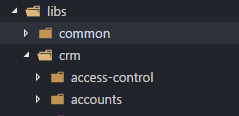
Same for app-related libs:
 ph55
ph55
All 9 comments
@ph55 great question. I prefer the second, because I am assuming you have multiple apps and that might import from common. If you think every application will need everything in common, it would make sense to have a single common.module.
For app related libraries, a similar logic apply. Ex:
1 ) crm is your grouping folder, all the libraries related to crm app will be in this folder. Libraries would be named as crm/access-control(feature1), crm/accounts(feature2), crm/state, crm/ui...
2) or you can choose a flatter option, and have a library for each feature. If you have multiple apps, option 1 works better.
We are working on a style guide. I will update nx-examples repo accordingly soon.
 Yonet
on 1 Aug 2018
Yonet
on 1 Aug 2018
should common or shared in this case be a lib as well? even if the resources are only shared among the libs? If I add for instance a shared module I get a lint error that the shared module is not a project.
I posted a question on stack overflow, but no answers up to now:
https://stackoverflow.com/questions/51787957/nrwl-create-shared-module-between-libraries
 dgroh
on 10 Aug 2018
dgroh
on 10 Aug 2018
Similar questions I ask myself each time.
You can leave shared folder as is in libraries fro structuring only.
And add libraries to it.
Then you have few options:
- Add
svglibrary to shared folder. And add your svg service to it. Import svg module then.
ng g lib svg --directory shared
ng g service svg --project shared-svg
But it seems overkill for one service.
- Add some kind of
common-serviceslibrary. And add your svg service to it. Import svg service then.
ng g lib services --directory shared
ng g service svg --project shared-services
But then with time this lib will grow and you will have many services there.
And each time you add service there, each app that depends on this lib will be shown ass affected.
Also you will have unused module, since you will probably import services one by one rather importing whole module with not used services.
- Add custom lib manually.
Edit nx.json
    "shared-services": {
      "tags": []
    }
Edit angular.json
    "shared-services": {
      "root": "libs/shared/services",
      "sourceRoot": "libs/shared/services/src",
      "projectType": "library"
    },
Edit tsconfig.json
      "@YOUR-NAMESPACE/shared/services": [
        "libs/shared/services/index.ts"
      ],
Your structure will be.
libs/shared/services/src/svg.service.ts
libs/shared/services/index.ts
Here it more cleaner you don't have module generated. You can export service one by one.
You still have problem with depths graph and affected apps.
Every app that using shared-services will be shown as affected when you change any service in it.
Ideally you need to create custom angular-cli schematics for it to generate such custom libs automatically.
Thats a lot of letters.
ph55
on 10 Aug 2018
Wow! That was very informative., much appreciated! So as I understand for now there is not a perfect solution. Then I would rather duplicate the services? So every lib which lies on svg-service will have its own svg-service. Sounds horrible, but in in this case I would rather go for KISS than for DRY!?!?!?
If I create my own schematics there is no point of using nrwl/nx?
dgroh
on 11 Aug 2018
@Yonet @vsavkin I think this question still not fully answered. Well, Victor did an amazing job in the Angular Enterprise Monorepo Patterns book to give a broader view of this topic. (thank you so much for having shared that with the open source community). Still, I'm not sure about the subtle difference between common and shared library. As per example in the book, ui-buttons is part of common instead of shared folder. Does it mean that common libraries are a specific type of shared but not all shared are common libraries? Could you please describe the subtleties of common vs shared? Thank you so much!
 mathpaquette
on 31 Mar 2019
mathpaquette
on 31 Mar 2019
I have another question about services. For example, I have a data-access library in my sub-domain.
It looks like this:
libs/
  sub-domain/
    feature-shell/
    feature-foo/
    data-access/
My problem is, that it does not make any sense to create an angular library for the data-access library. Most of the time, there are only some services or resolver and I need to export them one by one as I need them for routing or DI. It is a bit the same, as the core module from Angular.
I do not get the benefits of having them all in an Angular module and export this. Hence I do not know how to use them with a module, because I need to import the services directly.
 FlorianLeitgeb
on 5 Jul 2019
FlorianLeitgeb
on 5 Jul 2019
Maybe this issue should be reopened? There are many unanswered questions on Nx project structure floating around. We need more guidance from the Nx core team.
 demisx
on 19 Nov 2019
demisx
on 19 Nov 2019
Any updates on this one? I think there should be a official style guide as part of the documentation.
 chan-dev
on 23 May 2020
chan-dev
on 23 May 2020
More info: https://github.com/nrwl/nx/issues/259
 intellix
on 23 Jun 2020
intellix
on 23 Jun 2020
Related issues
 danieldanielecki
·
3Comments
danieldanielecki
·
3Comments
 markphip
·
3Comments
markphip
·
3Comments
 olakara
·
3Comments
olakara
·
3Comments
 jon301
·
3Comments
jon301
·
3Comments
 kmkatsma
·
3Comments
kmkatsma
·
3Comments
Most helpful comment
Maybe this issue should be reopened? There are many unanswered questions on Nx project structure floating around. We need more guidance from the Nx core team.