======== TEMPLATE BUG FORM ========
NWJS Version : nwjs-sdk-v0.32.0-win-x64
Operating System : win10
Expected behavior
Vue-devtools should work
Actual behavior
error: Proxy injection failed
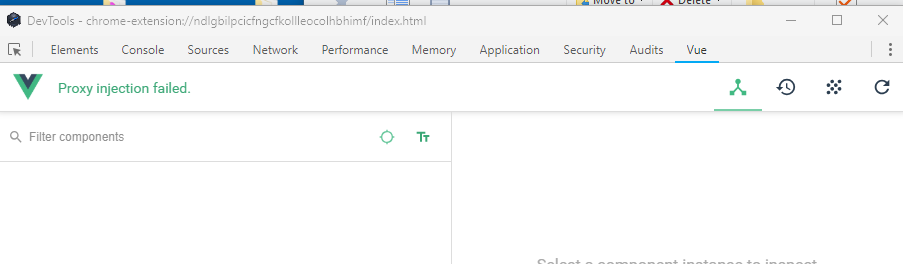
How to reproduce
- Unzip test.zip to some folder
- cd to selected folder
- npm install
- npx nw .
 fprijate
All 5 comments
Having the same issue. I could reproduce this.
 Mxkkxa
on 3 Aug 2018
Mxkkxa
on 3 Aug 2018
I think It's a permission issue related to the chrome extension. I had this problem too so I added a new permission url pattern in the manifest.json of the extension and now It's working just fine :
"permissions": [
     "http://*/*",
     "https://*/*",
     "file:///*",
     "contextMenus" ,
     "*://*/*"
    ]
 DimPaDev
on 4 Aug 2018
DimPaDev
on 4 Aug 2018
Also a reminder for everyone out there, you must have Vue.config.devtools = true; for Vue tab to appear.
Mxkkxa
on 13 Sep 2018
I have created a package to automate this:
Follow the instructions there.
 TheJaredWilcurt
on 21 Nov 2018
TheJaredWilcurt
on 21 Nov 2018
@fprijate @Mxkkxa @DimPaDev
@masterjg's fix has been merged into nw-vue-devtools and a new release (1.3.0) has been published to npm. Closing this issue.
TheJaredWilcurt
on 3 Mar 2019
Related issues
 bambooCZ
·
3Comments
bambooCZ
·
3Comments
 loretoparisi
·
3Comments
loretoparisi
·
3Comments
 nawazishali
·
3Comments
nawazishali
·
3Comments
 azer
·
3Comments
azer
·
3Comments
 xland
·
3Comments
xland
·
3Comments
Most helpful comment
I think It's a permission issue related to the chrome extension. I had this problem too so I added a new permission url pattern in the manifest.json of the extension and now It's working just fine :
"permissions": [
     "http://*/*",
     "https://*/*",
     "file:///*",
     "contextMenus" ,
     "*://*/*"
    ]