Nw.js: "--enable-features=GamepadExtensions" Chromium Arg Doesn't Work With Certain User-Agents
Information
NWJS Version : v0.29.0
Operating System : Windows 7 (SP1)
Expected behavior

Adding this to the manifest should enable the _experimental gamepad extensions API_ but it doesn't seem to work. Am I doing something wrong or is this js flag not supported yet?
Actual behavior
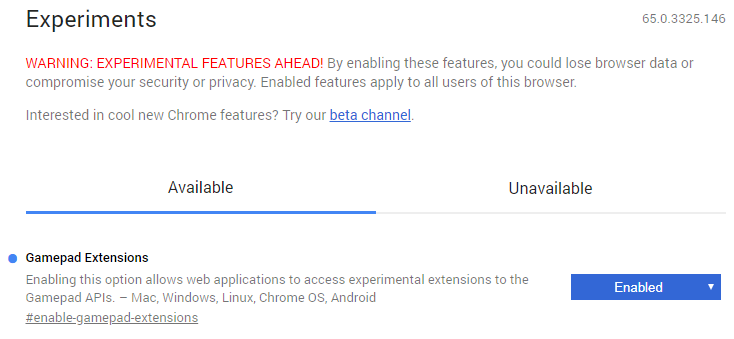
Adding the flag to the manifest should work just like manually enabling it in chrome://flags/.
Example for reproduction
Download: package file.zip
How to reproduce
- Run package file with NW.js running on M65 or newer
- Wait until haptic feedback testing website is loaded
- Test haptic feedback using a controller that supports it (e.g. XBox 360 gamepad)
- Connect gamepad and press button, it should be automatically selected on the top-left
- Fill in the required information (e.g. 0 | 1.0 | 1.0 | 1000)
- Click on "rumble" button
- Notice it doesn't work as expected because js flag isn't properly enabled
 TheRealDannyyy
All 25 comments
@TheRealDannyyy , I try it on Windows 10 with nwjs-sdk-v0.29.0. The result is 'haptic effect errored' after clicking 'rumble' button. Is this the same as yours?

 Christywl
on 14 Mar 2018
Christywl
on 14 Mar 2018
@Christywl yes same for me, it's because the required js-flag isn't enabled.
I'm not sure why it isn't since I did everything based on the NW.js documentation.
TheRealDannyyy
on 14 Mar 2018
This should be used: --enable-features=GamepadExtensions
 rogerwang
on 19 Mar 2018
rogerwang
on 19 Mar 2018
@rogerwang I've tried that as a js-flag, chromium-arg and also added it to a shortcut as a command-line argument and nothing worked.
Does it work on your end or am I doing something wrong?
TheRealDannyyy
on 19 Mar 2018
I didn't try it with your sample. I verified that the API is there with the switch.
rogerwang
on 19 Mar 2018
btw, I put it in the command line. chromium-arg should work too. but it's not a 'js-flag'.
rogerwang
on 19 Mar 2018
@rogerwang Still doesn't work for me, not sure what's wrong. (Tested in Nw.js v0.29.0)
This is what I'm using: Package File With Arg.zip
TheRealDannyyy
on 19 Mar 2018
@rogerwang Nothing work for me either
I've also tried with a vanilla NW.js app and a minimal package.json file
nw.zip
npm run start or npm run startArg
 Armaldio
on 21 Mar 2018
Armaldio
on 21 Mar 2018
@rogerwang Did you have the time to look into whats going wrong yet?
I would really appreciate if this gets fixed in the v0.30.0 stable release if possible.
TheRealDannyyy
on 29 Mar 2018
Yeah, will try to fix it before 0.30.0 release.
rogerwang
on 31 Mar 2018
btw, can it be tested without any gamepad device?
rogerwang
on 31 Mar 2018
@rogerwang I guess the easiest way to test if it works without a gamepad would be by doing the following:
- Start nw.exe with fixed chromium arg
- Press F12 to open Dev-tools
- Go to "Console" tab and run: _window.open('chrome://flags/');_
- Search for "Gamepad Extensions" flag and check if it's enabled
(You can also feel free to share a testing build so we can do the testing for you.)
TheRealDannyyy
on 31 Mar 2018
@TheRealDannyyy It's Default here -- means the end user doesn't set the flag. It should be enabled by the command line.
rogerwang
on 2 Apr 2018
@rogerwang It works using a shortcut and command-line but I would like to enable it using the manifest.
Could you add support for it in the manifest or fix it if it's not working as intended if possible?
(Tested using NW.js v0.30.0-beta1)
TheRealDannyyy
on 2 Apr 2018
--enable-features is supposed to work in chromium-args in manifest. Does it work for you?
rogerwang
on 2 Apr 2018
@rogerwang I tried _--enable-features=GamepadExtensions_ with both my and Armaldio's examples above and they didn't work. There must be an issue with NW.js not reading or activating it properly.
TheRealDannyyy
on 2 Apr 2018
I tried with the following manifest and it should be enabled:
{
  "name": "nw-demo",
  "chromium-args": "--enable-features=GamepadExtensions",
  "main": "index.html"
}
I should add that since it's shown "Default" in "chrome://flags", meaning it's default according to the source code and the code enabling this is hit when I use that manifest. That's what I mean by "should be enabled". It should be better with a test case that don't require a physical device.
rogerwang
on 3 Apr 2018
@rogerwang I found the issue, thanks for providing the manifest example!
This line inside my manifest file is causing the "GamepadExtensions" chromium arg to not work:
"user-agent": "Mozilla/5.0 (%osinfo) AppleWebKit/%webkit_ver (KHTML, like Gecko, Chrome, Safari)
Do you know why that's causing an error? All the other chromium args work fine, despite the user-agent.
(Below are both manifest files, one is working the other one is broken because of the user-agent.)
TheRealDannyyy
on 3 Apr 2018
Interesting. But your broken manifest works here.
rogerwang
on 3 Apr 2018
@rogerwang are you sure that it does?
It works with all chromium args except GamepadExtensions on my end.
TheRealDannyyy
on 3 Apr 2018
I am pretty sure by the means I said above. I think it is that your app is
in more complex situation.
On Tue, Apr 3, 2018, 10:17 PM TheRealDannyyy notifications@github.com
wrote:
@rogerwang https://github.com/rogerwang are you sure that it does?
It works with all chromium args except gamepad extensions on my end.—
You are receiving this because you were mentioned.
Reply to this email directly, view it on GitHub
https://github.com/nwjs/nw.js/issues/6512#issuecomment-378265688, or mute
the thread
https://github.com/notifications/unsubscribe-auth/AAKGGQpeXtm2F15IDhxbpdF--zTSgWm7ks5tk4RrgaJpZM4So3xl
.
rogerwang
on 3 Apr 2018
@rogerwang I honestly have no clue why it would work on your end and not on mine. I'm pretty sure that the user agent is at fault on my end but I don't know what I could do about it.
Here is the project with the "broken" package file, feel free to take a look and test it. I don't know what to do next, besides waiting another year for the Chromium Dev's to finally make this feature available to everyone.
Thanks a lot for your help so far, hoping that you'll maybe find a good workaround.
TheRealDannyyy
on 3 Apr 2018
The problem is that I don't have the physical device to test it. Maybe the
user agent change triggered some issue in your application...
On Tue, Apr 3, 2018, 10:36 PM TheRealDannyyy notifications@github.com
wrote:
@rogerwang https://github.com/rogerwang I honestly have no clue why it
would work on your end and not on mine. I'm pretty sure that the user agent
is at fault on my end but I don't know what I could do about it.
Are there any other ways to activate this inside my project? Maybe with
Javascript or something like that?Here
https://github.com/nwjs/nw.js/files/1871950/Broken.Package.File.Project.zip
is the project with the "broken" package file, feel free to take a look and
test it. I don't know what to do next, besides waiting another year for the
Chromium Dev's to finally make this feature available to everyone.Thanks a lot for your help so far, hoping that you'll maybe find a good
workaround.—
You are receiving this because you were mentioned.
Reply to this email directly, view it on GitHub
https://github.com/nwjs/nw.js/issues/6512#issuecomment-378272665, or mute
the thread
https://github.com/notifications/unsubscribe-auth/AAKGGVfLoEoiqIfrqwAcuqUSBtrSOoWIks5tk4j9gaJpZM4So3xl
.
rogerwang
on 3 Apr 2018
Maybe the user agent change triggered some issue in your application...
I think so too but I have no idea how I could fix this or find out whats going wrong. The console is empty and the flag is even marked as "enabled" so there must be some hidden error going on in the background
TheRealDannyyy
on 3 Apr 2018
Related issues
 mmommo
·
4Comments
mmommo
·
4Comments
 chino23
·
3Comments
chino23
·
3Comments
 rumax
·
4Comments
rumax
·
4Comments
 gengshenghong
·
3Comments
gengshenghong
·
3Comments
 jportoles
·
3Comments
jportoles
·
3Comments
Most helpful comment
@rogerwang Did you have the time to look into whats going wrong yet?
I would really appreciate if this gets fixed in the v0.30.0 stable release if possible.