Nw.js: Use the same internal implementation of the browser native window
Currently the native window of NW application is implemented with the one from Chrome App. It need to be changed to the implementation of the Browser native window.
 rogerwang
All 67 comments
Quick question regarding this subject, will this enable tabs to be opened/used or it will not change in this regard?
The advantage of this would be for them to have their own process instead of being iframes tied to the same window process. (#242)
EDIT: Only now I noticed this issue was already one year old, apologies.
 Yonezpt
on 26 Feb 2018
Yonezpt
on 26 Feb 2018
Yes. It could help on enabling tabs as in Chrome browser.
rogerwang
on 10 Apr 2018
@rogerwang How do you plan on implementing tabs? Will we be able to program then just like we do with menubar?
Also, will each tab have it's own instance of the menubar?
 elpeleq42
on 31 Dec 2018
elpeleq42
on 31 Dec 2018
The plan is to reuse the tab provided by Chrome browser and the API as well: https://developer.chrome.com/extensions/tabs . Please continue the discussion about tabs and make your proposal in #1136. Thanks.
rogerwang
on 2 Jan 2019
0.35.4 is just released with a testing version of this. Please help testing it: https://nwjs.io/blog/v0.35.4/ . Currently it's under --enable-features=nw2 switch. The plan is to make the switch default after 2-3 major releases and then start to remove the old implementation later.
rogerwang
on 4 Jan 2019
Would very much appreciate a new page in the manual, regarding all the changes and new features.
 TheRealDannyyy
on 4 Jan 2019
TheRealDannyyy
on 4 Jan 2019
My windows 10 blocked the startup of my application when I changed it to the last version and used the flag(was working with v0.35.2)
And even after unblocked, it took a long time to show up the screen(A loading icon showed before my icon, I think that could be removed. It also shows when I refresh the application). Other windows opened by the main window also take a lot longer to load.
It seems that CTRL+S, CTRL+O and other shortcuts are always opening the file dialogs. And new undesired options were added to the right-click both inside the window and on the top border(Things such as reload, open in browser, print, zoom, task manager,etc) .
Also, the window seems to be a bit bigger than before, but that is not a problem.
Edit: Oh would you look at that, CTRL+F opens the find tool of chrome. Not interesting for my applicatron but cool.
elpeleq42
on 4 Jan 2019
Could you please provide a reproduce?
On Fri, Jan 4, 2019, 10:45 AM elpeleq42 <[email protected] wrote:
My windows 10 blocked the startup of my application when I changed it to
the last version(was working with v0.35.2)—
You are receiving this because you were mentioned.
Reply to this email directly, view it on GitHub
https://github.com/nwjs/nw.js/issues/5875#issuecomment-451340432, or mute
the thread
https://github.com/notifications/unsubscribe-auth/AAKGGfEik-vmUGTPEIV9uAavRSamKnCaks5u_sBLgaJpZM4NIZYq
.
rogerwang
on 4 Jan 2019
Could you please provide a reproduce?
…
On Fri, Jan 4, 2019, 10:45 AM elpeleq42 @.* wrote: My windows 10 blocked the startup of my application when I changed it to the last version(was working with v0.35.2) — You are receiving this because you were mentioned. Reply to this email directly, view it on GitHub <#5875 (comment)>, or mute the thread https://github.com/notifications/unsubscribe-auth/AAKGGfEik-vmUGTPEIV9uAavRSamKnCaks5u_sBLgaJpZM4NIZYq .
Well by simply downloading and executing it, without any application loaded and not even adding the flag, Windows 10 tries to block nwjs. Then by adding the flag to package.json and loading any html file, all the problems I said with exception of the slow loading shows up.
Loading my application(which is "heavy", having nearly 2MB of javascript to be loaded and parsed) now doesn't seem to have any big extra delay anymore(there's just a small one, I wold say like 100ms extra time to load). I think it was the first startup of NW.js with that flag that had a really slow loading, but once chromium cache up stuff, it doesn't have anymore. Or maybe it was a problem with my computer, but I couldn't reproduce it anymore.
EDIT: Forgot to say: all of that tested in the "normal" build
elpeleq42
on 4 Jan 2019
OSX 10.13.6 (High Sierra)
Transparency broken - tried the new switch with 0.35.0-sdk and 0.35.5-sdk.
0.35.0 Works OK with --enable-features=nw2 --disable-gpu-compositing --force-cpu-draw
0.35.5 fails with --enable-features=nw2 --disable-gpu-compositing --force-cpu-draw
will only show window bar.
If I remove compositing switch the window body will show but is broken
Each test done after app profile deleted.
Sample app attached with snaps -
Fail - 0.35.5

OK - 0.35.0
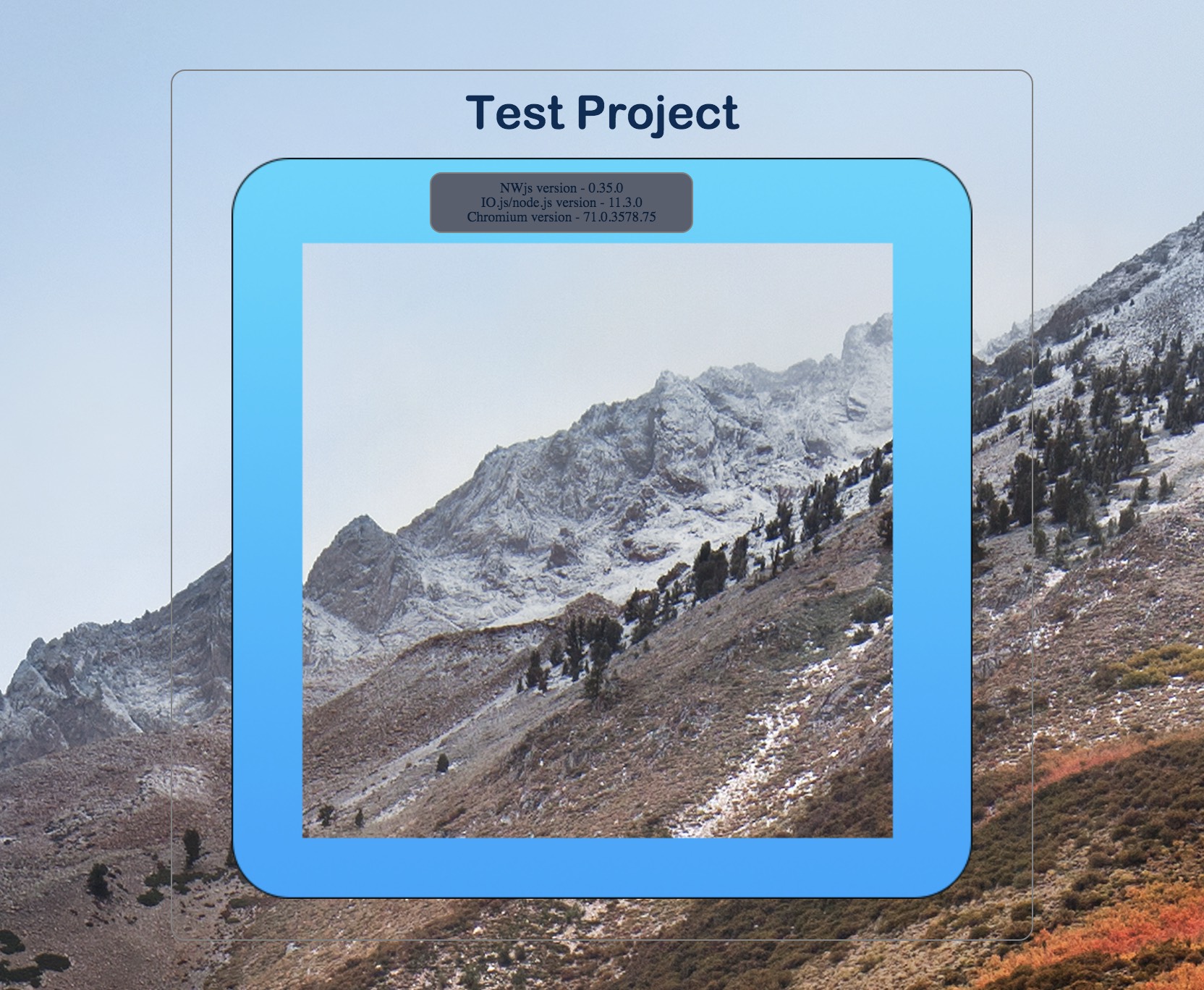
Additional Notes:
App used to open in center of screen but now opens in top left of screen.
Window sizing appears more accurate (on OSX at least). Without the switch the window height appeared to exclude the top window bar ( so height + 22px) but with the switch the height is the actual window height specified (top window bar inclusive).
setTitleInternal error -

this proved to be this bit of code -
96 win.title = nw.App.manifest.name;
if line 96 was remmed out app worked OK.
Link status messages appear at bottom of window (eg: when tabs are hovered/clicked) - this is OK for a browser but not really desirable in desktop app -
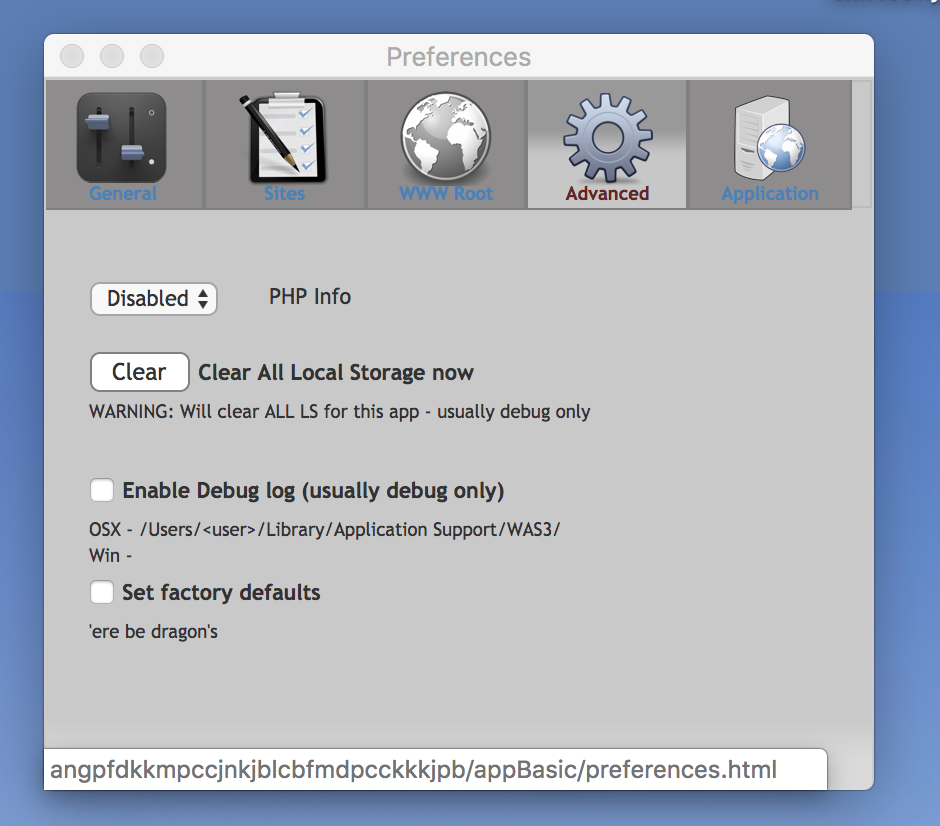
 Blatman
on 5 Jan 2019
Blatman
on 5 Jan 2019
I can confirm status messages appearing on Windows 10 too.
elpeleq42
on 5 Jan 2019
Corker - just tried above fixes with latest and all fixed OK (I tested OSX only).
Just noted - Quit App(CMD-Q ) from top OSX menu is not working - right-click quit from dock icon works OK.
This is reproducible with above test app and appears to have happened from the original new switch build.
Blatman
on 6 Jan 2019
Just noticed in another app that doing stuff when closing windows appears broken when the switch is implemented. The app windows will close but the interim action (clearing a folder not done).
Relevant code -
var mainWin = nw.Window.open('index.html', {
"fullscreen": false,
"resizable": false,
"title": "",
"frame": true,
"width": 1295,
"height": 1322,
"position": "center",
"show": true
//});
}, function (mainWin) {
mainWin.on('loaded', function () {
    console.log('Background Window - Launched!!!!');
    mainWin.focus();
    mainWin.setAlwaysOnTop(true);
});

mainWin.on('closed', function () {
});

mainWin.on('close', function () {
    console.log('Closing ......')
    clearFolder();  // app & all win will close when cleared
});
});
async function clearFolder() {
var target = path.join(localStorage.pref_appUserDataPath, 'wkgFolder');
try {
await fse.emptyDir(target)
console.log('wkgFolder Cleared!')
} catch (err) {
console.error(err)
}
nw.App.closeAllWindows();
nw.App.quit();
mainWin = null;
}
This code is from startApp.js (as set in main of package.json) and HTML window is opened by this - all OK if the switch is not used - tested with 0.35.5-sdk. Basically it is clearing a transient folder when app closed. Same occurs with 0.36.0b1 which appears to implement nw2 also.
Also window position: center is ignored and opens top left of screen.
Blatman
on 7 Jan 2019
Thanks. What does it do when it's broken?
On Tue, Jan 8, 2019, 6:25 AM Blatman <[email protected] wrote:
Just noticed in another app that doing stuff when closing windows appears
broken when the switch is implemented.Relevant code -
var mainWin = nw.Window.open('index.html', {
"fullscreen": false,
"resizable": false,
"title": "",
"frame": true,
"width": 1295,
"height": 1322,
"position": "center",
"show": true
//});
}, function (mainWin) {mainWin.on('loaded', function () {
console.log('Background Window - Launched!!!!');
mainWin.focus();
mainWin.setAlwaysOnTop(true);
});mainWin.on('closed', function () {
});mainWin.on('close', function () {
console.log('Closing ......')
clearFolder(); // app & all win will close when cleared
});});
This code is from startApp.js (as set in main of package.json) and HTML
window is opened by this - all OK if the switch is not used - tested with
0.35.5-sdk. Basically it is clearing a transient folder when app closed.
Same occurs with 0.36.0b1 which appears to implement nw2 also.Also window position: center is ignored and opens top left of screen.
—
You are receiving this because you were mentioned.
Reply to this email directly, view it on GitHub
https://github.com/nwjs/nw.js/issues/5875#issuecomment-452104008, or mute
the thread
https://github.com/notifications/unsubscribe-auth/AAKGGUbDdtdSk2cE14KT_p8CmqEsV2yVks5vA8logaJpZM4NIZYq
.
rogerwang
on 8 Jan 2019
@rogerwang - The app closes OK but the clearFolder() doesn't happen. In the code above the actions under mainWin.on('loaded', etc work OK but nothing appears to happen with the 'closed' or 'close' options but they do work alright without the switch. I set an alert inside the 'close', function and it was not triggered at all with the switch in use but triggered when switch not used.
Blatman
on 8 Jan 2019
@rogerwang - thanks for close event fix it now allows 'tidyup' code to work however I find it now takes 2 clicks to close the window and CMD-Q on menu still not working.
I have attached a wee test app to demonstrate.
The simple mode should just invoke nw.App.closeAllWindows() on the close event but isn't honoured (neither is nw.App.quit()).
With the html and js start modes using the 'tidyup' code the first window close will do the tidy up (clear wkgFolder) but window remains open until second click.
Test app currently set for simple test.
Window position: center still not honouring.
Also noted that right-click context menu will offer saveas webpage option as per browser function - this didn't happen prior to switch.

Cheers
Blatman
on 9 Jan 2019
@rogerwang - Excellent - all seems good now
Thanks
Blatman
on 10 Jan 2019
@rogerwang With this new implementation, would it be possible to improve the transparent window feature? Specifically the following things:
- Make them work with non Aero based Windows themes
- Make them click-through without the requirement to disable GPU
TheRealDannyyy
on 10 Jan 2019
@TheRealDannyyy I'm CCing @jtg-gg who is the expert on this. He implemented it and has been maintaining this feature.
rogerwang
on 11 Jan 2019
@TheRealDannyyy transparency was an experimental feature, I personally not using it anymore, so won't spend more time in developing it (i.e. supporting non aero)
as for disable gpu, it is only the compositing
for click through to work the final composited result must be in main memory (CPU memory)
so either you just do the compositing by CPU, or if you really want GPU compositing, you can copy back the GPU texture to CPU, but these require more work, and GPU texture read is very very slow on most GPU, so it is not very useful
 jtg-gg
on 11 Jan 2019
jtg-gg
on 11 Jan 2019
@jtg-gg Thanks for all the useful information!
Despite not actively working on it anymore. Would you consider porting the existing features over to the new window system or will this whole feature be removed?
TheRealDannyyy
on 11 Jan 2019
@TheRealDannyyy the transparency features have been ported to nw2 mode. You can try it with the latest nightly 0.35.5.
rogerwang
on 11 Jan 2019
@rogerwang with 0.35.4, any windows opened with nw.Window.open are producing errors that nw is not defined. Is there another flag to force these new Chrome windows to be in nw context - or maybe don't use nw.Window.open anymore?
 tolrtd
on 11 Jan 2019
tolrtd
on 11 Jan 2019
@tolrtd could you please provide a reproduce? It works for me.
rogerwang
on 12 Jan 2019
@rogerwang I think it is when you have "show": false in the window manifest. In the attached example the Main Window should open fine, but the Child Window does not (on my Win 10 x64, SDK version, it freezes and does either white screen or sometimes black screen, no frame)
tolrtd
on 13 Jan 2019
@tolrtd I just fixed it in git and it will be available in the next nightly build.
rogerwang
on 14 Jan 2019
Just discovered that using a nativemenu on Mac OS will break CMD-Q/Quit from menubar
Updated test app attached - it starts on index-simple.html and uses osxmenu.js
Essential code -
var nw,
win = nw.Window.get();
var nativeMenuBar = new nw.Menu({
type: "menubar"
});
nativeMenuBar.createMacBuiltin('appname', {
});
win.menu = nativeMenuBar; // CMD-Q works ok if this line remmed out
OSX 10.13.6
Tested with 0.35.6-sdk and 0.36.0-sdk
Blatman
on 18 Jan 2019
@Blatman Thanks. Fixed only on nw36 branch since it's the new nightly and will be the next release.
rogerwang
on 18 Jan 2019
I've tested the new implementation and found some issues with it, in comparison with the existing one.
(Tested using NWjs v0.36.0 and this Sample Project.)
Fullscreen Mode:
- F11 fullscreen key should be blocked by default
- Fullscreen notification should not be displayed
- Moving mouse pointer to top of the screen should not display "X" button
TheRealDannyyy
on 3 Feb 2019
@TheRealDannyyy thanks. Will fix those issues.
rogerwang
on 4 Feb 2019
Referencing #5337 for potential future fix.
TheRealDannyyy
on 27 Feb 2019
@rogerwang Would it be worth pinning this issue until closed since it is P1 and a new feature? - it tends to get lost in the issues list and folk are creating separate issues that relate to the nw2 switch.
Blatman
on 16 Mar 2019
@Blatman done
rogerwang
on 17 Mar 2019
@rogerwang I've tested the most recent nw.js v0.37.1 release and there is still one small fullscreen issue left. Moving the mouse pointer to top of the screen still displays the "X" button.
I believe this feature has a flag so it might just require that flag to be disabled by default.
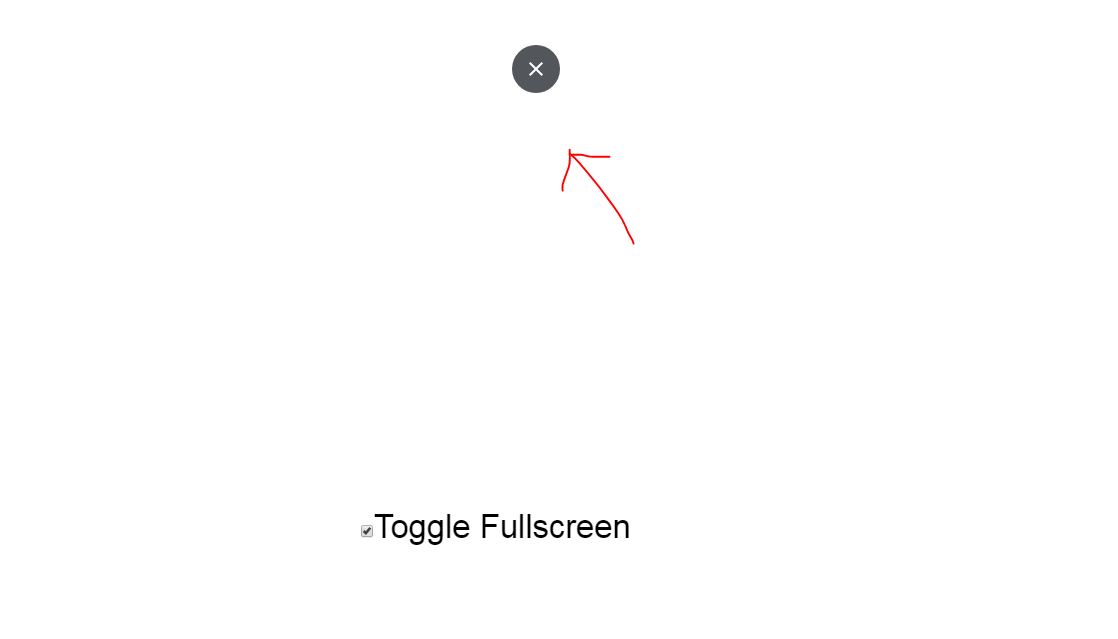
TheRealDannyyy
on 28 Mar 2019
@TheRealDannyyy I just fixed the fullscreen button issue in git. It will be available in the next nightly build.
rogerwang
on 10 Apr 2019
@rogerwang Thanks for the fix! Can confirm that all fullscreen issues have been fixed.
The only major issue left is the window dimension issue as previously mentioned. If you could fix or provide a workaround for that would be amazing. (Tested using NWjs v0.37.4 and this Resolution_Test.zip.)
_Reproduction:_
- Run with most recent version of NW.js
- Notice wrong window dimensions being used
(Left and right sides of the canvas.)
_Screenshot:_

TheRealDannyyy
on 15 Apr 2019
@TheRealDannyyy I don't notice any difference under the 2 modes with 0.38.0. Could you try again?
rogerwang
on 29 Apr 2019
@rogerwang I can still reproduce using nw.js v0.38.1, nothing has changed for me.
TheRealDannyyy
on 30 Apr 2019
@rogerwang - FWIW I tried the test zip with 0.38.2-sdk and get the same as screenshot above but only if nw2 enabled in manifest - just get a black cross without nw2 which I guess is the desired outcome.
10.13.6 used.
Blatman
on 30 Apr 2019
Just noticed - maybe a patch still to go into alpha build?
High Sierra 10.13.6
Using 0.39.0a1 I get Uncaught TypeError: win.getPrinters is not a function - was OK on 0.38.2 and earlier. Works OK without nw2 feature enabled. Normally should get a printer json object if win.getPrinters(console.log) done.
Blatman
on 6 May 2019
Bonza - getPrinters works fine
Blatman
on 15 May 2019
Getting Uncaught Errors concerning onDocument properties with 0.39 (only with nw2 enabled) - not sure if this is going to be a problem ....
No errors if 0.38.4 is used.

Test app will show errors in background-context
Blatman
on 21 May 2019
@rogerwang - not sure if this last commit was meant to address the Uncaught errors (BLESSED_EXTENSION) but still happens with latest build (Index of /live-build/nw39/06-05-2019/9836f0de6/). Note: the errors have occurred since the first 0.39a1 build.
Blatman
on 5 Jun 2019
@rogerwang Will this be enabled by default in the next NW.js v0.40.0 stable release?
TheRealDannyyy
on 17 Jul 2019
@TheRealDannyyy unfortunately no... It was the plan, but it was delayed due to API implementation rework in 0.39.0 to cope with upstream change in Chrome 75.
The nightly tests under NW2 mode was integrated in the buildbot and there are a few tests failing. It will be released after those failure are resolved.
rogerwang
on 19 Jul 2019
Alright, thanks for the info.
TheRealDannyyy
on 19 Jul 2019
@rogerwang I found another issue with nw40 using "nw2"
in Windows, if the nw.js app has several windows, closing all window using right click from taskbar, will close all but 1 window
this doesn't happen with nw39
jtg-gg
on 19 Aug 2019
Will fix it soon. Thanks for the report.
On Mon, Aug 19, 2019 at 7:09 AM jtg-gg notifications@github.com wrote:
@rogerwang https://github.com/rogerwang I found another issue with nw40
using "nw2"
in Windows, if the nw.js app has several windows, closing all window using
right click from taskbar, will close all but 1 windowthis doesn't happen with nw39
—
You are receiving this because you were mentioned.Reply to this email directly, view it on GitHub
https://github.com/nwjs/nw.js/issues/5875?email_source=notifications&email_token=AABIMGJEUVFFCK3LMI5RA3TQFJ5PBA5CNFSM4DJBSYVKYY3PNVWWK3TUL52HS4DFVREXG43VMVBW63LNMVXHJKTDN5WW2ZLOORPWSZGOD4SRGTA#issuecomment-522523468,
or mute the thread
https://github.com/notifications/unsubscribe-auth/AABIMGIHVYTDPWMSSCUZ5KLQFJ5PBANCNFSM4DJBSYVA
.
rogerwang
on 20 Aug 2019
MacOS 10.13.6 - tested with 0.41.2-sdk/0.39.0-sdk/0.38.4-sdk.
Appears to be a wee anomaly with win.on('close', etc.
Have attached a test sample which will work OK if nw2 not enabled or pre-0.39.0 build of nwjs (eg: 0.38.4) is used. Run the sample and use the Application Readme menu - on close the hide/show will work fine but the close gives an error -
Unchecked runtime.lastError: cannot find browser window
Bad example (nw2 enabled) -
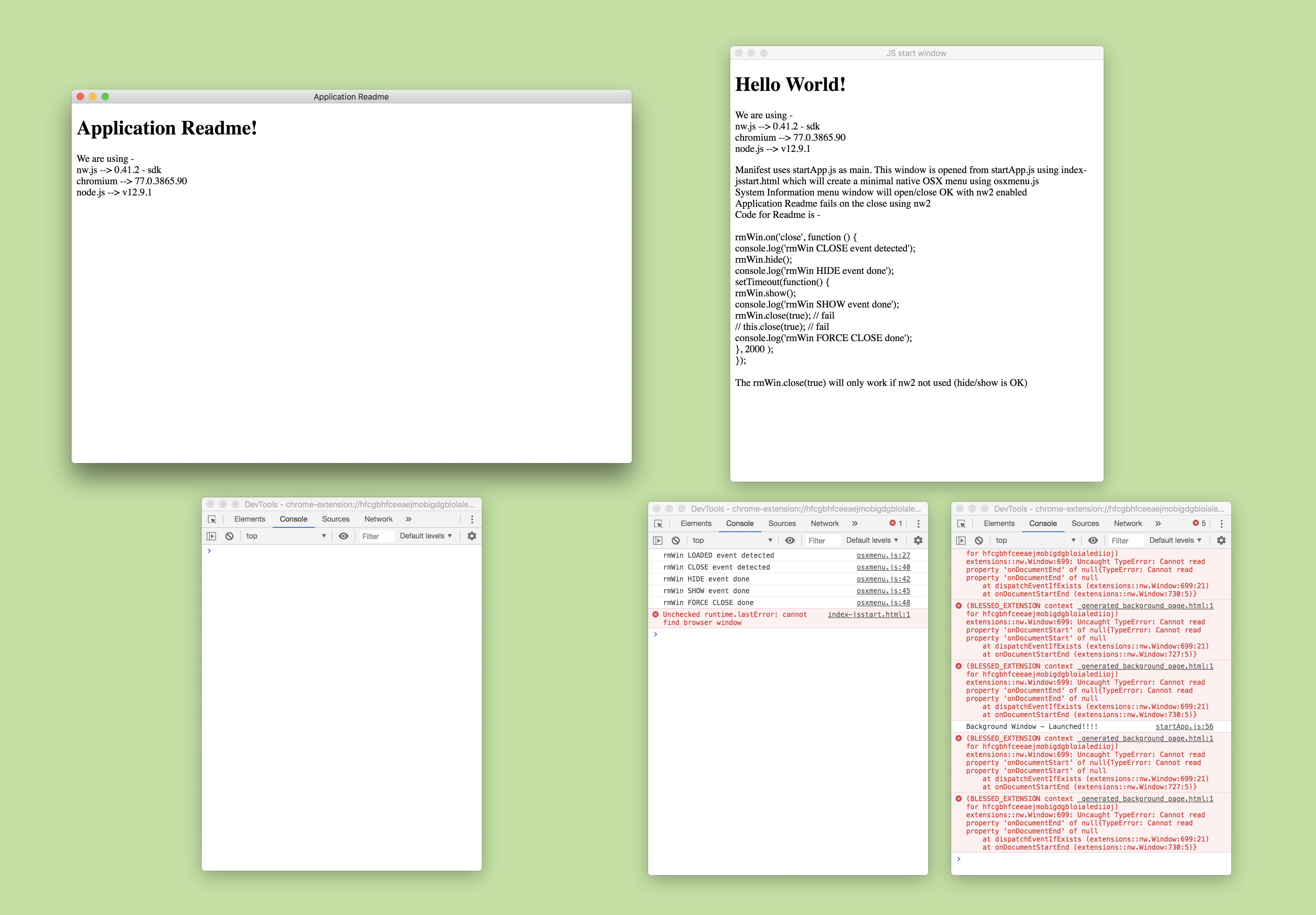
Good example (nw2 not enabled) -
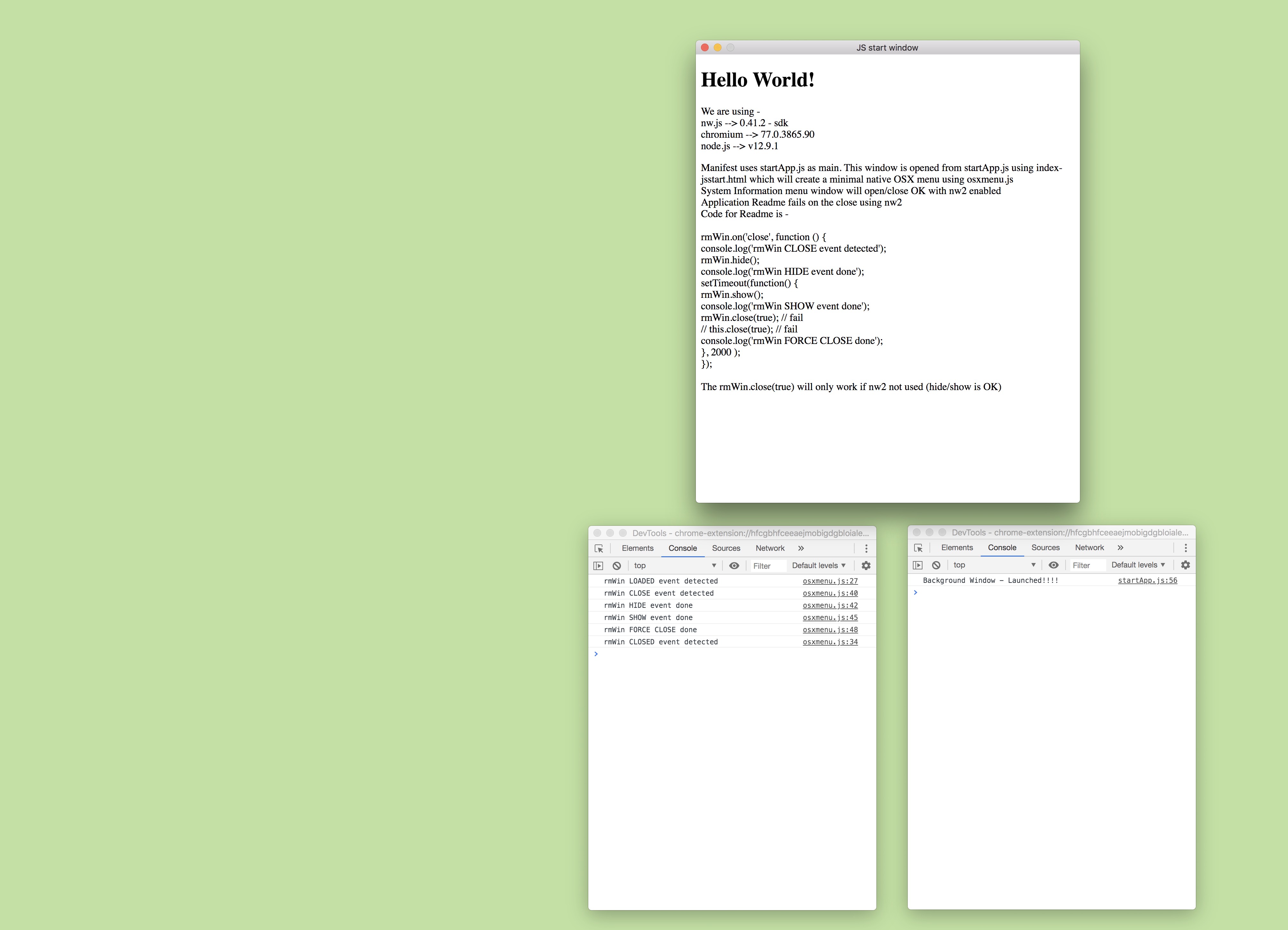
Not sure if this also ties in with the BLESSED EXTENSION logs which started appearing at 0.39.0
Blatman
on 22 Sep 2019
Any progress on this? Only 4 SDK builds seem to be failing to build still.
NW2 fixes a lot of issues with 3rd party apps like Steam. Would really like this to be shipped by default so I don't have to use the flag anymore.
TheRealDannyyy
on 5 Nov 2019
@TheRealDannyyy could you please list some of the issues it fixed on your side?
The next step would be look into the test regressions in NW2 mode, which is 5 more test case failures according to the CI. Once they are fixed and the issues listed in this thread are fixed, the NW2 mode can be switched to default.
It will begin soon with the rework described in https://github.com/nwjs/nw.js/issues/5875#issuecomment-513270200 stablized in recent versions.
rogerwang
on 6 Nov 2019
Some of things that NW2 seems to improve or even fix:
- Older systems display weird inner-bounds window content
- Some 3rd party video recorders are able to record the window
- Steam overlay displays more consistently for some users
- Slightly faster startup (before the startup performance regression was happening)
I didn't report the window content issue yet, since I don't have a reliable way to reproduce it.
I could just recently manage to reproduce it on my Win7 system. Win10 doesn't seem to be affected. Again, NW2 doesn't have this issue at all. Below is a screenshot of it happening.
TheRealDannyyy
on 6 Nov 2019
I found another issue with nw40 using "nw2"
in Windows, if the nw.js app has several windows, closing all window using right click from taskbar, will close all but 1 window
@jtg-gg I can't reproduce this with latest build: http://dl.nwjs.io/live-build/nw42/11-06-2019/c0bcf795f/v0.42.3/ . Could you please confirm? If it still breaks on your side, please provide a sample. Thanks.
rogerwang
on 7 Nov 2019
@rogerwang thank you the issue has been fixed
jtg-gg
on 7 Nov 2019
Excellent - win.close now works well with 0.42.3 and the BLESSED EXTENSION logs disappeared in an earlier build.
Just tried 0.42.3 on the resolution bug found above by @TheRealDannyyy (using Resolution_Test.zip) and it still fails with black edges on left and right but is OK if nw2 disabled in manifest.
Cheers.
Blatman
on 7 Nov 2019
I found a regression regarding the window icon. It's not being applied and it displays a corrupted icon inside the taskbar. I couldn't reproduce using NW1 on Windows 7, could also affect NW1 on newer OS's.
Repro: NW2_NoIconTest.zip
Steps:
- Run project using NWjs 0.42.0+
- Wait for startup and loading to finish
- Notice "Construct 2" icon not being applied and corrupted icon
Screenshot:

TheRealDannyyy
on 8 Nov 2019
Latest build: https://dl.nwjs.io/live-build/nw42/11-13-2019/84f82c545/v0.42.4/ with the fix for icon and dimension.
@TheRealDannyyy @Blatman the window dimension is tested with cases in https://github.com/nwjs/nw.js/tree/nw42/test/sanity/issue5093-window-size-match-package-json and https://github.com/nwjs/nw.js/tree/nw42/test/sanity/issue4221-win-open-manifest etc.
In your case Resolution_Test.zip the given window size seems to be changed by C2 runtime somehow -- even with the good case under nw1 mode, the created window's dimension is different with package.json. So I don't use it in my test.
rogerwang
on 13 Nov 2019
@rogerwang - Tried out the build above for the window dimension and I find a difference between the main window and sub windows (in this case opened from the native menu). In the osxmenu.js the nw.Window.open parameters are set for 800 and 600 as they are in the manifest for the main window.
I've attached a test case using the 5093 test parameters as above which shows the main window overall height including the title bar as 600px but the same html will open in a window from the menu as 622px (600 + the title bar). Should this be the case?
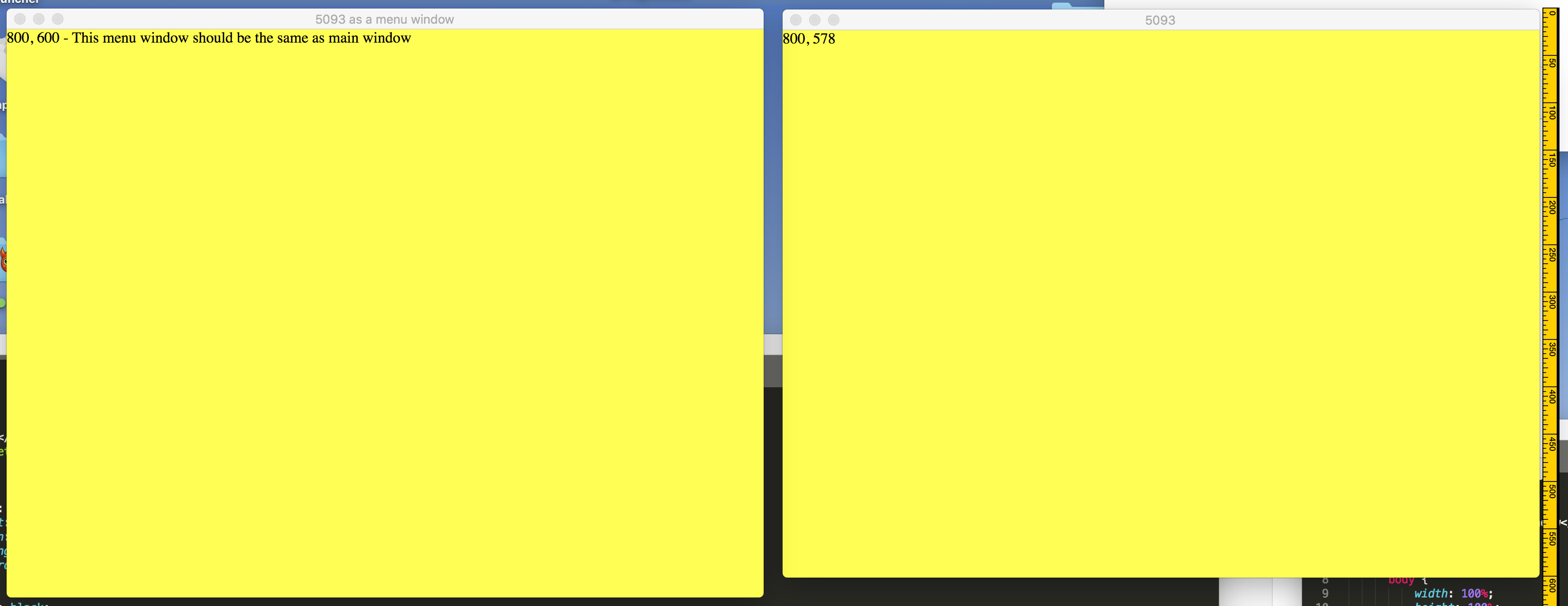
Blatman
on 13 Nov 2019
@Blatman it should be a bug -- they should be the same and the parameter should be the inner dimension. And it's interesting to see the test on the MacOS CI machine was passed ...
rogerwang
on 13 Nov 2019
@rogerwang Can confirm the icon fix thanks. Also thanks for releasing NW2!
The resolution test still fails, not sure if you can fix it at this point. The creator of C2 actually gave me a "hack" that the runtime might be using already. I'm not sure if that'll help to come up with a built-in workaround but that hack seems to work.
_Test using 0.42.4:_
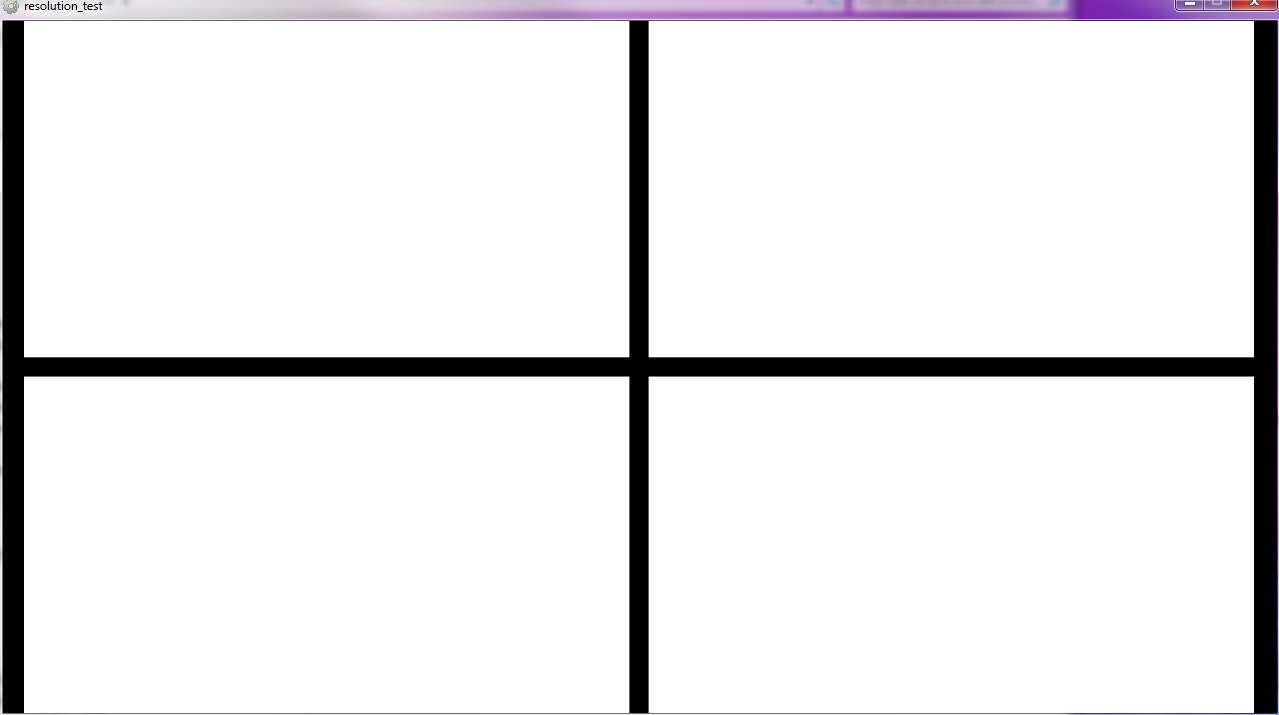
TheRealDannyyy
on 13 Nov 2019
This doesn't seem to be a major problem but NWjs v0.42.4 generates a log file with an error inside.
Here is my: debug.log
TheRealDannyyy
on 13 Nov 2019
Corker - 0.42.5 does the job nicely, win height parameter is the inner dimension on all windows.
Thanks
Blatman
on 13 Nov 2019
0.42.5-sdk OSX High Sierra (10.13.6)
Seems to be an issue using win.setAlwaysOnTop(true); during runtime.
Works OK with nw2 disabled and will work if set as a win.open parameter in manifest.
Can be tested with Window-Size-test.zip above - just add win.setAlwaysOnTop(true); at end of osxmenu.js
Blatman
on 19 Nov 2019
Unrelated question. Would it be a good idea to close this issue now and create individual issues for NW2 related bugs? Might make issues easier to find and reproduce.
TheRealDannyyy
on 21 Nov 2019
0.42.6-sdk OSX High Sierra (10.13.6)
Was trying to rework a transparent app and unable to get rid of window shadow - found this also to be the case with normal framed windows as well. I tried using win.setShadow(false) in the js and the app just crashes on startup with trap 14.
To reproduce just add win.setShadow(false) to the end of the osxmenu.js in the Window-Test app above - the disabling of the shadow will work OK with nw2 disabled.
Blatman
on 21 Nov 2019
Yes. I'm closing this issue as it would be easier to follow individual issues. Please file individual issues for nw2. Thanks.
rogerwang
on 22 Nov 2019
I am not sure if I need to start a new issue on this, but I can't access variables I set in the winndow (NWindow) variable from parent vise-versa. This took me DAYS to figure out that this was the issue since this was crashing everything including Devtools on my project. Kinda important now since this is now the default implementation.
I.e var mainWin = nw.Window.open('index.html', options, function (mainWin) { mainWin.test = "hi";}
That won't be accessible inside that window. If there is another way to talk between Windows let me know. Also I heard this also will enable seperate instances of windows but can still talk to each other (i.e what I am trying to do)?
Edit: I realise this means by default it's now "mixed context". Anyway, still willing to hear how to talk between the windows securely with this implementation.
Edit2: Currently figured I could utilize BoradcastChannel to talk between windows. Not sure how secure this is though. Might do an encryption key handshake first and then go on from there?
 anesuc
on 20 Mar 2020
anesuc
on 20 Mar 2020
Related issues
 bambooCZ
·
3Comments
bambooCZ
·
3Comments
 Asp3ctus
·
4Comments
Asp3ctus
·
4Comments
 azer
·
3Comments
azer
·
3Comments
 hooker99
·
4Comments
hooker99
·
4Comments
 jportoles
·
3Comments
jportoles
·
3Comments
Most helpful comment
Would very much appreciate a new page in the manual, regarding all the changes and new features.