Nw.js: Chrome 53 integrates Cast, will NWJS support it as well?
The recent Chrome update 53 linked to NWJS version 0.17.0 comes with integrated Cast feature: https://chrome.googleblog.com/2016/08/google-cast-is-now-built-in-to-chrome.html
However, due to problem https://github.com/nwjs/nw.js/issues/5245 we cannot access this feature. Will NWJS support it and/or is there any way to try it out through NWJS?
 Yonezpt
All 38 comments
Is it available in Chromium? NW supports whatever Chromium supports.
 rogerwang
on 4 Sep 2016
rogerwang
on 4 Sep 2016
That is what I don't know and the reason why I was asking. Due to the problem mentioned above I cannot check its availability simply by pressing Right-click and see if "Cast..." is present in the context menu.
Yonezpt
on 4 Sep 2016
It appears to be in chromium but the interface (the one available in chrome) is probably lacking, making this feature almost impossible to use for developers that do not know their way around it: https://cs.chromium.org/chromium/src/media/cast/?q=cast&sq=package:chromium
Yonezpt
on 4 Sep 2016
I don't see why it is impossible or why would need the original context menu to perform this task.
Have you tried accessing the cast api through Chrome.* , How far did you get?
 mscreenie
on 5 Sep 2016
mscreenie
on 5 Sep 2016
@mscreenie having the method that is already available in Chrome would make this task completely automatic and independent to api changes, let alone the difficulty of replicating the functionality and UI that is already available in Chrome.
Having just the api is not better than implementing the Cast SDK manually. If the api is the only way then it will be a barrier for anyone that wishes to offer Cast in their apps and discourage its availability, like me, for example. If the feature is complete then all it will take will be minor changes to enable it, but without the context menu I can't confirm it.
Yonezpt
on 5 Sep 2016
I have to say I don't agree. Making a ui similar to chromes would be straightforward and you shouldn't consider this a barrier.
I do see a very small appeal in enabling the dialog but having the cast api exposed is better for developers - I plan to use the same cast API in my app in the future (not yet tested the api but it does seem complete enough for a similar chrome dialog).
There are other problems with relying with native Chrome dialogs. One example if your use case requires persistence to the same cast device how would you do that with Chrome's dialog?
Changes to the api could happen and it's normal to expect this between versions (The ui would probably change more often than the api). If it does the developers job is to adjust these changes.
mscreenie
on 5 Sep 2016
I have to say I don't agree. Making a ui similar to chromes would be straightforward and you shouldn't consider this a barrier.
Perhaps you could say that to others that have been trying to do the same thing before: https://github.com/electron/electron/issues/7024
Having the cast api exposed is better for developers
The api is always exposed, this does not change that.
As one example if your use case changes to require persistence in to the same cast device how would you do that with Chrome's dialog?
I don't understand what you are trying to say, but whatever the case may be you always have access to the api so you should be able to do whatever you want.
My question has been made clearly and just having the api is not better than implementing the Cast SDK, as I already explained. It is a barrier that discourages me to enable it in apps and any other developers in similar positions, which is why I opened this issue.
Yonezpt
on 5 Sep 2016
Maybe I don't understand the scope of this / your issue. I'll read into the references you posted to understand better. But from preliminary skimming the problems theoretically are solvable with exposed native chrome.cast in nwjs. Although I may reach similar conclusions when I have completely introduced cast inside my application.
mscreenie
on 5 Sep 2016
Maybe I don't understand the scope of this / your issue.
Chromium contains the cast api, but that is only half of the Cast mechanism, the other parts are the UI and discoverability of devices, and probably other things I do not know, which are available after selecting "Cast..." via right-click context menu, an example of which I already linked in the first post: https://chrome.googleblog.com/2016/08/google-cast-is-now-built-in-to-chrome.html
My issue is that because of the problem I linked in the first post (standard right click context menu is not available in nwjs) I cannot confirm or verify whether Cast is fully implemented or if it is just half of it, the api part and nothing else.
Yonezpt
on 5 Sep 2016
@Yonezpt
From user's perspective, does Cast work in Chromium browser?
And you said you're blocked by the context menu, which SDK build supports. So if Chromium browser supports it, does SDK build work for you?
rogerwang
on 6 Sep 2016
From user's perspective, does Cast work in Chromium browser?
Yes it does, just downloaded the latest Chromium version (not Chrome browser) to try it:
Cast option present in context menu

Cast UI and functionality working, although I don't have a receiver connected:

And you said you're blocked by the context menu, which SDK build supports. So if Chromium browser supports it, does SDK build work for you?
It is my understanding that the SDK context menu is custom made, which means the normal right click options are never available in that menu, such as the ones present in my first screenshot. Because of that the Cast option is not there as well.
Yonezpt
on 6 Sep 2016
And I was able to confirm that the app is included in the Chromium clone that NWJS is using:
https://github.com/nwjs/chromium.src/blob/nw17/chrome/app/media_router_strings.grdp#L85
(That's the welcome string that is displayed in my previous screenshot, part of the media router app which is part of chromium)
Don't get me wrong, I am not asking for the entire Cast to be made from the ground up. What I am asking is that if it is already completely functional inside NWJS (since it is also fully working on chromium) and all it takes is for the right click context menu display the correct option then it would be great to offer that ability to the developers and the users of their apps.
The only problem I can see so far is the fact that the default/standard right click menu is apparently completely redone (in SDK) or absent (in normal versions), so I cannot check whether Cast is working on NWJS or not.
If it isn't then that's ok, it is not a big loss. But if it is working then this will bring a lot of value for NWJS apps.
Yonezpt
on 6 Sep 2016
I'll look to enable Cast. It shouldn't be too hard. The context menu in NWJS is based on the one in Chromium.
rogerwang
on 6 Sep 2016

I have enabled this but according to Google engineer this feature is in Chrome official build only:
https://groups.google.com/a/chromium.org/d/msg/chromium-dev/xbrVTZUOPEk/1LRaudLsBwAJ
rogerwang
on 13 Sep 2016
It's great that you were able to enable it! But what does it mean for NWJS in relation to the feature being in official build only? Will it eventually not work any longer or that the feature is incomplete, which will fail to connect or find any devices?
I was trying to implement Cast SDK on the app directly while I was waiting for some progress, but unfortunately I was never able to get it to work. Don't know what must be done to get it to function, followed the instructions Google provided as well. If the native Cast is not going to be working on NWJS for much longer, or not at all, it will be a problem seeing that neither the Cast SDK appears to run in it.
Yonezpt
on 13 Sep 2016
I didn't dig into the details, but normally we will only see a browser feature when it's working in Chromium.
rogerwang
on 13 Sep 2016
close for now since Chromium upstream doesn't support it.
rogerwang
on 19 Sep 2016
Does this mean Chromium will be supporting Chromecast because this was fixed? https://bugs.chromium.org/p/chromium/issues/detail?id=634168
It appears like it was always supported, but that bug was preventing it from working correctly.
EDIT: And it sounds like this is correct, people shared a temporary solution for the problem that that Chromium version introduced http://askubuntu.com/questions/825903/using-chromium-v52-chromecast-no-longer-works-and-cant-find-device/825904#825904
Yonezpt
on 6 Mar 2017
@Yonezpt I haven't looked into it. But recently came across a talk that it might be working with Chromium. So reopen this issue to track it and will look into the chromecast support at some point.
rogerwang
on 6 Mar 2017
@rogerwang Any news on this? Cast should already be cooked in Chromium, but enabling the flag --load-media-router-component-extension doesn't appear to work. See https://groups.google.com/a/chromium.org/forum/#!topic/chromium-dev/iK382egkGPs
A commit appears to be missing from NWJS in order for this to work? Perhaps I am understanding this wrong.
- Adds a --load-media-router-component-extension flag to control loading of the
Media Router component. This is default on in Chrome and default off in
Chromium. (crbug.com/646170)
https://chromium.googlesource.com/chromium/src.git/+/ac0030f5d07e66752b93695bc373bcb55ab26602
Yonezpt
on 1 Dec 2017
Thanks for the link. I didn't know it.
The commit is in NW code. Could you please check whether it's working? We'll fix it if it's not.
rogerwang
on 1 Dec 2017
I am unable to check it since the main issue mentioned throughout the thread is still present: I don't have the default context menu available in order to access the Cast... feature, so no, I cannot check it on my end, unfortunately.
Yonezpt
on 1 Dec 2017
I'll see to put the menu item behind a switch and check it.
rogerwang
on 1 Dec 2017
I was able to get casting to work by loading the extension manually ([...]\User Data\Default\Extensions\pkedcjkdefgpdelpbcmbmeomcjbeemfm), but not via the --load-media-router-component-extension flag.
 hensm
on 18 Jan 2018
hensm
on 18 Jan 2018
@hensm Could you explain how you achieved that?
Yonezpt
on 18 Jan 2018
@Yonezpt You can find the cast extension in a Chrome(ium?) profile with the ID pkedcjkdefgpdelpbcmbmeomcjbeemfm. I couldn't find it in NW, but I assume it must be distributed with Chromium somehow.
Load it like: "chromium-args": "--load-extension=<extension dir>"
Then trigger casting via the sender API, rather than the Cast... menu item.
Demo:
nwcastdemo.zip
hensm
on 18 Jan 2018
The cast extension is downloaded automatically by the browser itself if the browser is Chrome or Chromium, if I remember correctly and I already moved it to the NWJS root folder, however the traditional flag methods yield no success, as you said.
I will try it your way then, thanks for the sample as well.
Yonezpt
on 18 Jan 2018
@hensm Got it working, but can't confirm full functionality since I don't have any Cast receiver, will have to try it out with a friend's help later.
I had to change the extension path, included the "package.nw" prefix since it was trying to search for the extension in the root folder, which got me curious; what setup do you usually have? You just move your demo inside the nwjs root folder or do you use the package.nw folder method?
Yonezpt
on 18 Jan 2018
@Yonezpt Oh, I didn't think about that. I was just running the nw binary from the project folder, so it was picking up the relative path.
hensm
on 18 Jan 2018
For any users that might be wondering, I was still unable to test this on my end with a cast receiver, but I am still trying to find one. Friend's Cast broke down, so I am currently without an easy way to test it for myself.
Yonezpt
on 7 Feb 2018
I was finally able to do a basic test and the results do not appear to be very positive. Cast is effectively being loaded and instantiated in the NWJS app, but the cast devices are nowhere to be found when scanning for them:
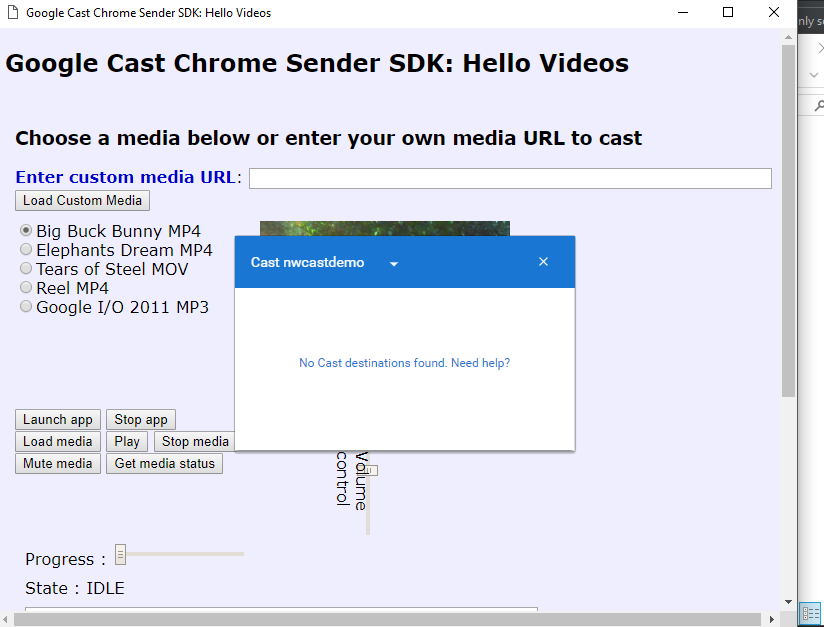
Same moment as above I was testing the equivalent in Chrome browser and it detected the devices correctly:
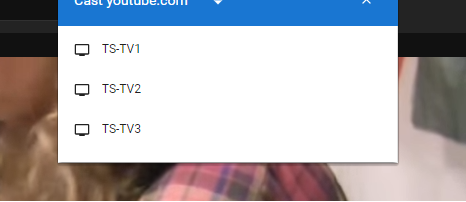
It feels like there is something more missing for the cast feature to detect the devices correctly or it might just be broken on Chromium.
Yonezpt
on 10 Feb 2018
Broken in 0.28.1, empty destination list.
hensm
on 10 Feb 2018
Interesting, and is it also broken in 0.28.0? Because if it is then it might be a bug caused by the mitigation of spectre attacks introduced from that version onwards: https://nwjs.io/blog/v0.28.0/
@rogerwang Is there any way to find out what is causing broken cast device scan after 0.27.5 or 0.28.0 if it is not broken in that version as well?
Yonezpt
on 10 Feb 2018
Seems like it does work, actually. Weird, probably just bad wifi. Can't reproduce.
hensm
on 10 Feb 2018
Most weird is that on my end it did not work once and I was using the sample you provided. Will try it again when I have the possibility to see if it wasn't a one time thing like yours as well.
Just to make sure, that means that it is also working well for you on latest 0.28.1, correct?
Yonezpt
on 10 Feb 2018
@Yonezpt Working on all versions, yep.
hensm
on 10 Feb 2018
I haven't had the chance to test it again, hoping tomorrow I'll be able to, but I believe that the reason as to why it wasn't working those times was because there was already another service occupying the ports for cast scanning. In our case that would be the Chrome browser, which comes with integrated Cast service.
I say this because it wouldn't be the first time a service does not work correctly if its ports are occupied and because you and I both had Chrome opened when your sample did not work, which might have "occupied" the ports before the sample had a chance to do it itself.
Yonezpt
on 13 Feb 2018
I was finally able to test to the best of my possibilities and the verdict is Cast is working, it is scanning the available cast destinations correctly (could not really cast because the TVs were not mine, they were publicly exposed, so I didn't want to interfere with their use).
Bad news is I wasn't able to find the devices using the provided sample above, but I was able to do it by loading a YouTube page with the loaded extension which is required for all of this to work. There must be something I might be doing wrong with the sample, but that's beside the point.
Since the API is fully working, this case can be closed seeing that it is already available in Chromium and NWJS does not appear to block/break it.
Yonezpt
on 26 Feb 2018
Related issues
 sorty-zz
·
4Comments
sorty-zz
·
4Comments
 xzh-loop
·
3Comments
xzh-loop
·
3Comments
 daverave1212
·
3Comments
daverave1212
·
3Comments
 xland
·
3Comments
xland
·
3Comments
 rumax
·
4Comments
rumax
·
4Comments