Nw.js: React devtools extension in webview stuck "Connecting to React..."
NW.js 0.15 RC2 SDK x64
Windows 10 x64
React devtools extension 0.14.9
I'm using a webview to load my React app
I'm trying to get the React devtools extension working but it's always stuck trying to connect. When you open the React tab in devtools it says the following:
Connecting to React... If this is React Native, you need to interact with the app (just tap the screen) in order to establish the bridge.
I've followed the directions here:
http://docs.nwjs.io/en/v0.13.0-beta7/For%20Users/Debugging%20with%20DevTools/
Devtools extensions are fully supported, including the one for ReactJS etc. To use it, add the permission “chrome-extension://*” to manifest.json of the devtools extension, and load it with ‘–load-extension=path/to/extension’ when nw is started. The files for devtools extensions can be copied from extension folder of Chrome browser after you install them from Chrome Web Store.
Am I doing something wrong?
 frankhale
All 67 comments
We have a test case with sample React app and the React devtools extension to guard this feature. Could you please try it first to make sure your steps are correct?
https://groups.google.com/d/msg/nwjs-general/jcsYqmqhQfE/v0lH0badEQAJ
https://github.com/nwjs/nw.js/tree/nw14/test/sanity/react-devtools-extension
 rogerwang
on 23 May 2016
rogerwang
on 23 May 2016
merge this issue with #612
rogerwang
on 23 May 2016
Not sure what you want me to try. I am doing what the docs website says but I get the results stated above.
frankhale
on 23 May 2016
You can try it first with our copy of React devtools extension and the sample app.
rogerwang
on 23 May 2016
Yes your test case works. I should have mentioned I am using a webview to load my React app.
frankhale
on 23 May 2016
I've edited my initial issue to denote that I am doing this from a webview. React devtools loads fine but will never connect to my code. Can this issue be reopened as it pertains to devtools extensions inside a webview?
frankhale
on 23 May 2016
Is it supported with webview in the Chromium browser?
rogerwang
on 23 May 2016
I don't know
frankhale
on 23 May 2016
I don't think it's supported. So please submit the issue to React Devtools Extension project.
rogerwang
on 23 May 2016
To be fair, opening my app directly inside NW.js the React devtools still don't work. I get a message saying "Waiting for roots to settle.. blah blah". Opening my app in Chrome it works fine and React devtools extensions is okay and usable.
frankhale
on 23 May 2016
Then could you please upload your app so I can reproduce it?
rogerwang
on 23 May 2016
If I am able to create a small reproducible test case I'll link it here.
frankhale
on 23 May 2016
hello @frankhale how to resolve this requirements at last, and i have met this problem now?
 JasonFang93
on 17 Jul 2017
JasonFang93
on 17 Jul 2017
@JasonFang93 I've never got it to work. React devtools loads but it never connects to my app.
frankhale
on 17 Jul 2017
On the other hand react-devtools works fine when I load my app in Electron
frankhale
on 17 Jul 2017
@frankhale i don't know how to load devtools extension for webview tag, could you write some example codes ?
btw, because devtool of webview in Electron can't be docked in right instead of a new window, i use nwjs at last.
JasonFang93
on 17 Jul 2017
You don't need to do anything special to make the react devtools load on a webview. You just start up nw.js using --load-extension /path/to/react/devtools
Additionally you need to add “chrome-extension://*” to the permissions array in the react devtools manifest.js.
Even with that said, the devtools are being blocked from running which is why it always says "connecting to react..."

frankhale
on 17 Jul 2017
Thanks a lot @frankhale
JasonFang93
on 17 Jul 2017
Even using a webview partition doesn't seem to allow the react-devtools code to load
frankhale
on 17 Jul 2017
I just made a simple test case to demonstrate the problem, I'll upload it to github and post a link here:

frankhale
on 17 Jul 2017
Here is a simple example to demonstrate the issue: https://github.com/frankhale/nwjs-react-devtools-webview-example
frankhale
on 17 Jul 2017
I try above sample on Windows 8.1 with nwjs-sdk-v0.24.4. This issue is still reproduced.
nwjs-sdk-v0.24.4-win-x64\nw.exe --load-extension=react-devtools react-app
 Christywl
on 29 Aug 2017
Christywl
on 29 Aug 2017
Just tried my simple test case (link above) in NW 0.25.2 and it's still the same problem. React Devtools still cannot connect to the app.
VM71:5 GET chrome-extension://fmkadmapgofadopljbjfkapdkoienihi/build/backend.js net::ERR_BLOCKED_BY_CLIENT
frankhale
on 19 Sep 2017
Just to add a bit more clarity to when @rogerwang said he didn't think this was supported. This scenario works fine in Electron so React devtools does indeed work inside a webview. Chromium supports this. I'm not sure how to work around this in NW.js though. Any help would be greatly appreciated as I prefer NW.js over Electron due to it's fast paced releases and it's always current with Chrome and Node.
frankhale
on 19 Sep 2017
Adding the following to the manifest of the React devtools extension makes the ERR_BLOCKED_BY_CLIENT go away but it still doesn't make the React devtools work unfortunately. It'll just say "Connecting to React..." forever.
 "webview": {
     "partitions": [
        {
          "name": "trusted",
          "accessible_resources": [ "<all_urls>" ]
        }
     ]
  }
frankhale
on 19 Sep 2017
@Christywl any ideas? This issue is quite old now and there doesn't seem to be any way to get devtools to work when the app is loaded in a webview. Is there any work around I can try?
Additionally I tried the Vue Devtools and a Vue app loaded in a webview with similar results. Devtools load but app is never detected by the devtools extension. Just like React.
frankhale
on 20 Sep 2017
Additionally it doesn't appear as though devtools work for pages loaded in iframes either. The react devtools aren't loading at all for a React app in an iframe.
frankhale
on 20 Sep 2017
FYI, for those that may trip up on this issue and need a workaround, I just found one. It involves using the React-Devtools native app. https://github.com/facebook/react-devtools/tree/master/packages/react-devtools
This should work fine until devtools extensions like React and Vue work in webviews/iframes in NW.js
frankhale
on 20 Sep 2017
Maybe you can empower me to help work on this issue. Do you have any pointers on where to start looking in the code for this sort of thing?
frankhale
on 21 Sep 2017
Unfortunately this issue still exists in NW.js 0.26.0-beta1.
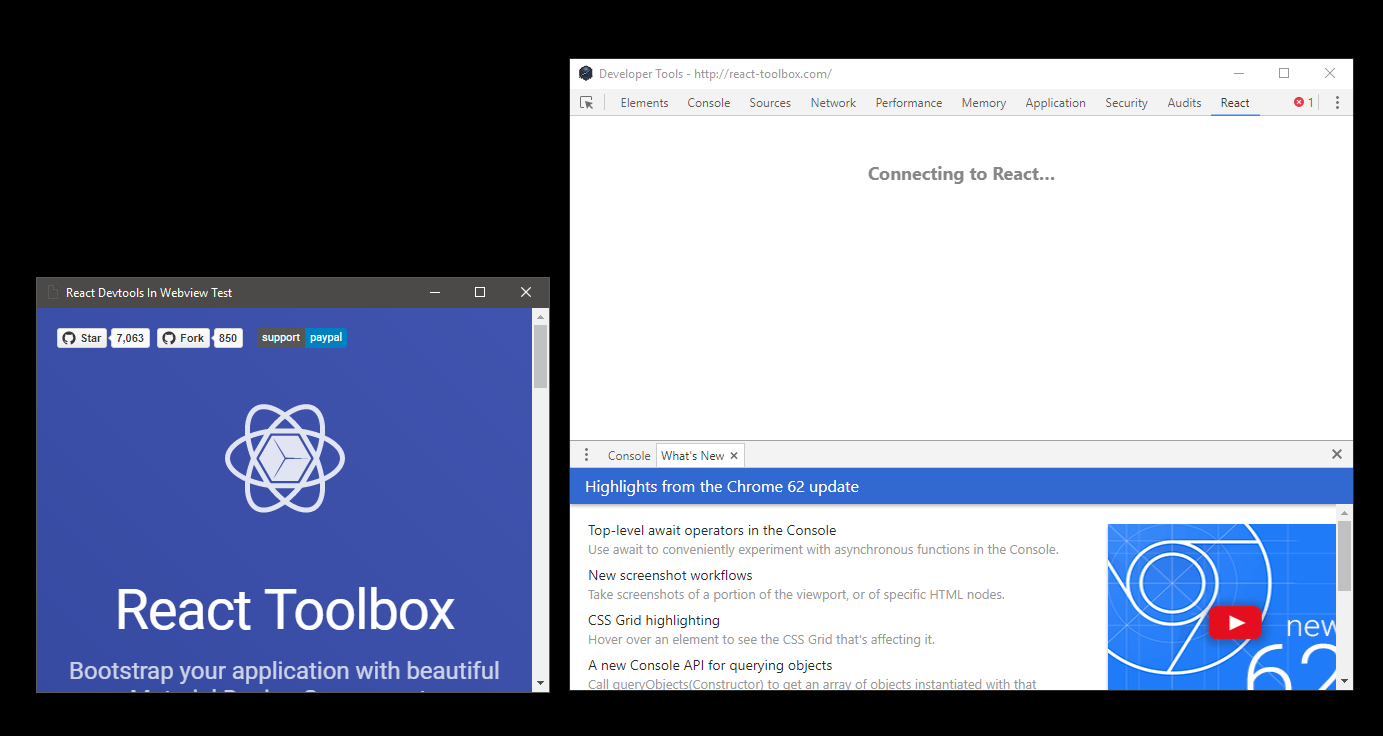
frankhale
on 22 Sep 2017
will see this soon. @Christywl could you please try with Chromium browser and see whether it reproduces with it?
rogerwang
on 25 Sep 2017
@rogerwang , how should I run this webview sample with the chrome? I just open the nwjs-react-devtools-webview-example-master\react-app\index.html with the chrome(React Devtools extension has added to chrome), it displays a blank page.
If I open http://react-toolbox.com with the chrome directly, react devtools extension works fine.
@frankhale , I see you tried your app in the chrome before and react devtools extension works fine in the https://github.com/nwjs/nw.js/issues/4878#issuecomment-220889624. Could you please share the way to check your sample and react devtools extension with the chrome?
Christywl
on 25 Sep 2017
I actually don't know how to run this in Chrome to be honest. I do know that this scenario works fine in Electron. Additionally I tested the app running in NW.js using react-devtools app (link below, which provides an external way to debug react apps) and I was able to debug this app just fine.
https://github.com/facebook/react-devtools/tree/master/packages/react-devtools
frankhale
on 25 Sep 2017
I'll take some time to figure out how to make this into a chrome app for testing this scenario
frankhale
on 25 Sep 2017
I created a Chrome App to test this but devtools extensions like Vue and/or React aren't loading for Chrome Apps so I am not sure how to test this.
frankhale
on 25 Sep 2017
Normally I'd just let this go as there is a working solution using the React Devtools native app but Electron seems to be able to handle this scenario just fine so it can work I just don't know what is going on in NW.js that prevents React Devtools from connecting to apps inside a webview. I'll try to dig into Electron to see if they added any specific magic to allow Devtools extensions to work out of the box with pages loaded in webviews.
frankhale
on 25 Sep 2017
The last comment in this summarizes what I found yesterday. I actually made a comment about it but deleted it because I was a little unsure but yeah it seems to be the case.
https://github.com/vuejs/vue-devtools/issues/249#issuecomment-332139702
in nwjs webView chrome.devtools.inspectedWindow.tabId got null , so there will no message between the app context and chrome/src/devtools.js .
may be you have to modify the code , implement this code like shells/dev/src/devtools.js
enjoy~
frankhale
on 26 Sep 2017
Okay so in a normal window React devtools (and I suspect others as well) work fine because chrome.devtools exists and has APIs needed by the devtools extensions. When using a webview and trying to use the devtools extensions chrome.devtools is undefined and breaks the devtools extensions. They cannot connect to the app because there are API's missing.
frankhale
on 27 Sep 2017
@frankhale thanks for your investigation. Will see why chrome.devtools is not defined there.
rogerwang
on 29 Sep 2017
This is fixed in git and will be available in the next nightly build.
support for chrome.devtools.inspectedWindow.tabId in webview was added.
rogerwang
on 29 Sep 2017
Thank you @rogerwang !!!
frankhale
on 29 Sep 2017
Just tested the nightly build and it WORKS! THANKS YOU @rogerwang !!!!!!!!!!!

frankhale
on 29 Sep 2017
Good to know it works.
rogerwang
on 30 Sep 2017
@rogerwang I'm trying to find the commit that has this change but I've been unable to find it. I'd like to see the code change that fixed this. Can you (somebody) link me to the actual commit?
frankhale
on 5 Oct 2017
@frankhale it's fixed in the chromium repo. And the code we developed in that repo has been under a master patch after 0.13. So it's not directly linked with specific bug fix. In 0.12 and previous versions we kept small commits there, but it was hard to rebase to new Chromium version in that way.
The fix is in the follow files if you're interested:
chrome/browser/extensions/api/tabs/tabs_api.cc
chrome/browser/extensions/extension_tab_util.cc
Thank you. I'll take a look at it. =)
frankhale
on 5 Oct 2017
I found it in the nwjs/chromium.src repo. I was actually looking in the nwjs repo which is why I couldn't find it. Thanks again for pointing me in the right direction!
frankhale
on 5 Oct 2017
Is in 10-13-2017 build ? I found it is not fixed in osX in this.
 foolishchow
on 13 Oct 2017
foolishchow
on 13 Oct 2017
The issue still also occurs for me. @frankhale , which version do you use in https://github.com/nwjs/nw.js/issues/4878#issuecomment-333217674, I try the latest nwjs nightly build on Windows, this issue still happens. I download your sample and the cmd is:
C:\nwjs\bugs\4878\nwjs-react-devtools-webview-example-master>..\..\..\..\Users\WebQA\Downloads\nwjs-sdk-v0.26.0-win-x64\nw.exe react-app --load-extension=react-devtools
Is there something missing in my test?
Christywl
on 16 Oct 2017
Could be a regression in nw26 branch. Reopen
rogerwang
on 16 Oct 2017
@Christywl, I tried the nightly 0.25.5 build from when Roger said it was working. I also tried a few days later but have not updated since. I was waiting for 0.25.5 to be officially released first.
I did not try the 0.26 branch at all so I can't comment on if it works in that branch or not.
frankhale
on 16 Oct 2017
@Christywl it's working for me with the nightly build you referred to. So close as no regression.
@frankhale there won't be any 0.25 release any more, as 0.26.0 will be released soon.
rogerwang
on 16 Oct 2017
Awesome thanks @rogerwang !!!
frankhale
on 16 Oct 2017
Fix confirmed working in 0.26.0. Thanks so much @rogerwang !!!!
frankhale
on 18 Oct 2017
The issue seems to be back again. React devtools (3.6.0 and 4.0.6) work with nwjs 0.31.5, but not with 0.32.0 or any newer. (React tab in devtools is either empty or gets stuck on "Connecting to React...")
 AlexIII
on 27 Aug 2019
AlexIII
on 27 Aug 2019
Will check it out. The test case with react devtools is passing...
On Tue, Aug 27, 2019 at 2:48 PM Alexander Blk notifications@github.com
wrote:
The issue seems to be back again. React devtools (3.6.0 and 4.0.6) work
with nwjs 0.31.5, but not with 0.32.0 or any newer. (React tab in devtools
is either empty or gets stuck on "Connecting to React...")—
You are receiving this because you were mentioned.
Reply to this email directly, view it on GitHub
https://github.com/nwjs/nw.js/issues/4878?email_source=notifications&email_token=AABIMGJP6MG2SZGVZD42OLDQGTE4PA5CNFSM4CEQXK2KYY3PNVWWK3TUL52HS4DFVREXG43VMVBW63LNMVXHJKTDN5WW2ZLOORPWSZGOD5GV5YA#issuecomment-525164256,
or mute the thread
https://github.com/notifications/unsubscribe-auth/AABIMGODRPWUQ4NC4OZJVNLQGTE4PANCNFSM4CEQXK2A
.
rogerwang
on 22 Sep 2019
Any news on that one? Still relevant.
AlexIII
on 26 Dec 2019
@AlexIII I just tried the latest version. It works for me in the same way as in the test case: https://github.com/nwjs/nw.js/blob/nw43/test/sanity/react-devtools-extension/
rogerwang
on 26 Dec 2019
@rogerwang I will try to reproduce the error and report here shortly.
AlexIII
on 26 Dec 2019
@rogerwang I see that react devtools in the test are heavily outdated. Here's the latest version react-devtools-4.2.1_0.zip, which allows to replicate the bug. I believe any version 3.x.x or 4.x.x have this issue, as I previously have tried maybe ten different versions in futile attempt to find one that works.
AlexIII
on 26 Dec 2019
@AlexIII I am using the latest version, as I said in the previous comment...
rogerwang
on 26 Dec 2019
@rogerwang I thought you meant you used the latest NWjs version... Well I just tried clean win10 x64 + latest nw + latest react devtools and it still doesn't work. I just don't know what I'm doing wrong... Here's my whole test folder (Without nwjs, had to remove it from zip. It's too big.).
nwjs-sdk-v0.43.2-win-x64 - from nwjs.io
react-devtools-4.2.1_0 - from chrome browser extension folder
react-devtools-extension - test app from the link you gave
run.cmd - the command I run the app with:
start nwjs-sdk-v0.43.2-win-x64\nw.exe --load-extension=react-devtools-4.2.1_0 react-devtools-extension
@AlexIII I haven't tried you app but here is what is working for me:
nwjs.app/Contents/MacOS/nwjs --load-extension=4.2.1 --url=https://reactjs.org/docs/hello-world.html
rogerwang
on 26 Dec 2019
@rogerwang Interesting, the command you gave works for me too! Maybe because it's loaded via --url, I don't know. Btw, it was NOT _my_ app. It's the same app from the link you gave.
At this point I hope someone will try and confirm my finding, I really hope I'm not crazy 😄 😞
AlexIII
on 26 Dec 2019
That app will not work because it's using a very old version of react,
which is not supported by the latest version of the extension.
On Thu, Dec 26, 2019, 6:04 PM Alexander Blk notifications@github.com
wrote:
@rogerwang https://github.com/rogerwang Interesting, the command you
gave works for me too! Maybe because it's loaded via --url, I don't know.
Btw, it was NOT my app. It's the same app from the link you gave
https://github.com/nwjs/nw.js/blob/nw43/test/sanity/react-devtools-extension/
.
At this point I hope someone will try and confirm my finding, I really
hope I'm not crazy 😄 😞—
You are receiving this because you were mentioned.
Reply to this email directly, view it on GitHub
https://github.com/nwjs/nw.js/issues/4878?email_source=notifications&email_token=AABIMGIQIRLRMXES3DGEMV3Q2R6T5A5CNFSM4CEQXK2KYY3PNVWWK3TUL52HS4DFVREXG43VMVBW63LNMVXHJKTDN5WW2ZLOORPWSZGOEHVLEXQ#issuecomment-569029214,
or unsubscribe
https://github.com/notifications/unsubscribe-auth/AABIMGMUTI7WR7A3JXYOGGTQ2R6T5ANCNFSM4CEQXK2A
.
rogerwang
on 26 Dec 2019
btw, you'll need to change manifest.json in the extension so it will work on chrome-extensions protocol, which NW.js app uses.
rogerwang
on 26 Dec 2019
btw, you'll need to change
manifest.jsonin the extension so it will work onchrome-extensionsprotocol, which NW.js app uses.
@rogerwang that was it. Thank you!
AlexIII
on 26 Dec 2019
Related issues
 daverave1212
·
3Comments
daverave1212
·
3Comments
 sorty-zz
·
4Comments
sorty-zz
·
4Comments
 jportoles
·
3Comments
jportoles
·
3Comments
 Asp3ctus
·
4Comments
Asp3ctus
·
4Comments
 adam-lynch
·
4Comments
adam-lynch
·
4Comments