Nvm: $(nvm_sanitize_path "${NPM_CONFIG_PREFIX}");: command not found
Getting this in my shell when I open a new bash tab:
$(nvm_sanitize_path "${NPM_CONFIG_PREFIX}");: command not found
in my ~/.bashrc I have:
export NVM_DIR="$HOME/.nvm"
[ -s "$NVM_DIR/nvm.sh" ] && \. "$NVM_DIR/nvm.sh"  # This loads nvm
[ -s "$NVM_DIR/bash_completion" ] && \. "$NVM_DIR/bash_completion"  # This loads nvm bash_completion
i remember seeing the NPM_CONFIG_PREFIX stuff somewhere but don't see it now - I am on ubuntu 18.04
Operating system and version: ubuntu 18.04
nvm debug output:
nvm --version: v0.35.3
$SHELL: /bin/bash
$SHLVL: 1
${HOME}: /home/oleg
${NVM_DIR}: '${HOME}/.nvm'
${PATH}: ${HOME}/Android/Sdk/tools:${HOME}/Android/Sdk/tools/bin:${HOME}/.opam/system/bin:/usr/local/opt/bison/bin:/usr/local/opt/openldap/sbin:/usr/local/opt/openldap/bin:/opt/local/bin:/opt/local/sbin:/usr/local/opt/openldap/sbin:/usr/local/opt/openldap/bin:${HOME}/.oresoftware/bin:${HOME}/.local/bin:${HOME}/.oresoftware/bin:${HOME}/.local/bin:${NVM_DIR}/versions/node/v12.16.1/bin:/usr/local/sbin:/usr/local/bin:/usr/sbin:/usr/bin:/sbin:/bin:/usr/games:/usr/local/games:/snap/bin:${HOME}/.dotnet/tools:/usr/local/go/bin:/usr/local/go/bin:${HOME}/.rvm/bin:${HOME}/.local/bin:${HOME}/.rvm/bin
$PREFIX: ''
${NPM_CONFIG_PREFIX}: ''
$NVM_NODEJS_ORG_MIRROR: ''
$NVM_IOJS_ORG_MIRROR: ''
shell version: 'GNU bash, version 4.4.20(1)-release (x86_64-pc-linux-gnu)'
uname -a: 'Linux 4.15.0-91-generic #92-Ubuntu SMP Fri Feb 28 11:09:48 UTC 2020 x86_64 x86_64 x86_64 GNU/Linux'
OS version: Ubuntu 18.04.4 LTS
curl: /usr/bin/curl, curl 7.58.0 (x86_64-pc-linux-gnu) libcurl/7.58.0 OpenSSL/1.1.1 zlib/1.2.11 libidn2/2.0.4 libpsl/0.19.1 (+libidn2/2.0.4) nghttp2/1.30.0 librtmp/2.3
wget: /usr/bin/wget, GNU Wget 1.19.4 built on linux-gnu.
git: /usr/bin/git, git version 2.17.1
grep: /bin/grep (grep --color=auto), grep (GNU grep) 3.1
awk: /usr/bin/awk, awk: not an option: --version
sed: /bin/sed, sed (GNU sed) 4.4
cut: /usr/bin/cut, cut (GNU coreutils) 8.28
basename: /usr/bin/basename, basename (GNU coreutils) 8.28
rm: /bin/rm, rm (GNU coreutils) 8.28
mkdir: /bin/mkdir, mkdir (GNU coreutils) 8.28
xargs: /usr/bin/xargs, xargs (GNU findutils) 4.7.0-git
nvm current: v12.16.1
which node: ${NVM_DIR}/versions/node/v12.16.1/bin/node
which iojs:
which npm: ${NVM_DIR}/versions/node/v12.16.1/bin/npm
npm config get prefix: ${NVM_DIR}/versions/node/v12.16.1
npm root -g: ${NVM_DIR}/versions/node/v12.16.1/lib/node_modules
nvm ls output:
oleg@xps:~$ nvm ls
        v6.17.1
        v7.10.1
        v8.15.1
        v9.11.2
        v10.7.0
       v10.19.0
        v11.3.0
       v11.11.0
       v11.15.0
        v12.6.0
        v12.9.0
->     v12.16.1
        v13.9.0
       v13.11.0
         system
default -> 12 (-> v12.16.1)
node -> stable (-> v13.11.0) (default)
stable -> 13.11 (-> v13.11.0) (default)
iojs -> N/A (default)
unstable -> N/A (default)
lts/* -> lts/erbium (-> v12.16.1)
lts/argon -> v4.9.1 (-> N/A)
lts/boron -> v6.17.1
lts/carbon -> v8.17.0 (-> N/A)
lts/dubnium -> v10.19.0
lts/erbium -> v12.16.1
How did you install nvm?
The curl script
Is there anything in any of your profile files that modifies the PATH?
Yes definitely
 ORESoftware
All 14 comments
Please fill out the entire issue template, no exceptions - it's there for a reason.
 ljharb
on 24 Mar 2020
ljharb
on 24 Mar 2020
I guess I have to open a new issues to see the original template
ORESoftware
on 24 Mar 2020
You'd open the page to create a new issue, copy the contents, close the tab without creating one, and then paste them into the OP of this one.
ljharb
on 24 Mar 2020
yep updated the OP
ORESoftware
on 24 Mar 2020
Are you sourcing .bashrc in .bash_profile?
ljharb
on 24 Mar 2020
Also, note that that particular command (from the OP) only happens when you run nvm debug. Do you perhaps have nvm debug somewhere in your profile files?
ljharb
on 24 Mar 2020
.bashrc and .bash_profile both source a 3rd shared file called ~/.alex.rc.sh and that file is only sourced once by the shell since I flip a boolean
ORESoftware
on 24 Mar 2020
I think what's confusing is this:
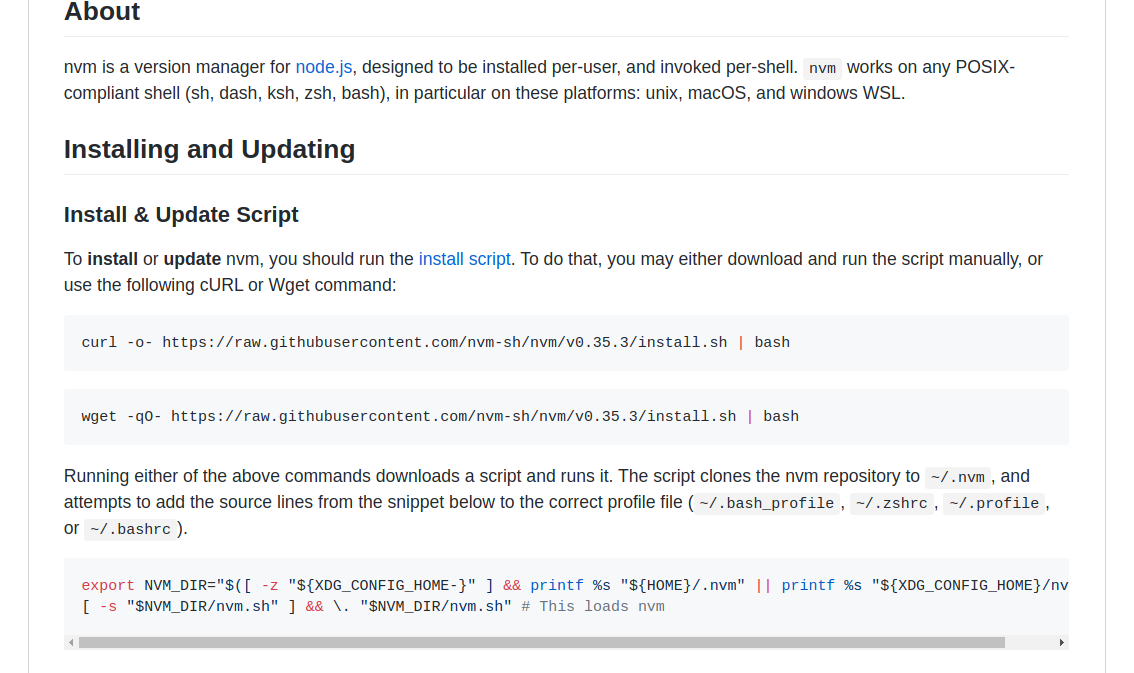
so does this belong in ~/.bashrc?
# 1
export NVM_DIR="$([ -z "${XDG_CONFIG_HOME-}" ] && printf %s "${HOME}/.nvm" || printf %s "${XDG_CONFIG_HOME}/nvm")"
[ -s "$NVM_DIR/nvm.sh" ] && \. "$NVM_DIR/nvm.sh" # This loads nvm
or does _this_ belong in ~/.bashrc?
# 2
export NVM_DIR="$HOME/.nvm"
[ -s "$NVM_DIR/nvm.sh" ] && \. "$NVM_DIR/nvm.sh"  # This loads nvm
[ -s "$NVM_DIR/bash_completion" ] && \. "$NVM_DIR/bash_completion"  # This loads nvm bash_completion
I think at some point I threw the first one into the env and that's what is causing the issue idk
ORESoftware
on 24 Mar 2020
Either should work the same unless you have XDG vars set.
ljharb
on 26 Mar 2020
i have the same problem, when i put "set -a"(or "export -f nvm") in .bash_profile.
set -a
[ -f "$NVM_DIR/nvm.sh" ] && . "$NVM_DIR/nvm.sh" 2> /dev/null  # This loads nvm
set +a
i want to export nvm globally, so that i don't need to source it .bashrc.
 kaiwk
on 14 Apr 2020
kaiwk
on 14 Apr 2020
@kaiwk nvm brings 113 functions into your shell and 5 or more env vars, it's just not practical to export them all globally.
ljharb
on 14 Apr 2020
@ljharb you misunderstood, I am probably doing the same thing - its because we are both using set -a as a wrapper around a bunch of code which includes the NVM calle.
ORESoftware
on 14 Apr 2020
I haven't tested or documented any support for using set -a in this way with nvm; while it might work, I wouldn't be surprised if it didn't. That you were using any bash options wasn't communicated in the OP; any bash option being set might cause issues and needs to be looked into.
ljharb
on 15 Apr 2020
When I posted the OP I hadn't yet realized the set -a was causing it, but I use that liberally, so probably it, if @kaiwk is experience the same problem as me
ORESoftware
on 15 Apr 2020
Related issues
 markedcahinde
·
5Comments
markedcahinde
·
5Comments
 ssbothwell
·
4Comments
ssbothwell
·
4Comments
 kas
·
3Comments
kas
·
3Comments
 swateek
·
3Comments
swateek
·
3Comments
 goalidea
·
3Comments
goalidea
·
3Comments
Most helpful comment
When I posted the OP I hadn't yet realized the
set -awas causing it, but I use that liberally, so probably it, if @kaiwk is experience the same problem as me