Nvm: Manjaro: `nvm is not compatible with the npm config "prefix" option: currently set to ""`
All of a sudden nvm stopped working :-( I've done a clean install of nvm. It goes well. Then when I do nvm install lts/dubnium I get the following error.
nvm is not compatible with the npm config "prefix" option: currently set to ""
Run `npm config delete prefix` or `nvm use --delete-prefix v10.15.0` to unset it.
Since, lts/dubnium was successfully installed, I also tried nvm use lts/dubnium I get the same error.
If I run nvm use --delete-prefix v10.15.0, then the system node get used, and I cannot get it to use lts/dubnium.
There is no .npmrc file. I use zsh.
Operating system and version:
4.19.12-2-MANJARO #1 SMP PREEMPT x86_64 GNU/Linuxnvm debugoutput:
nvm --version: v0.33.11
$SHELL: /bin/zsh
$SHLVL: 1
$HOME: /home/naturgewalt
$NVM_DIR: '$HOME/.nvm'
$PATH: /usr/local/bin:/usr/local/sbin:/usr/bin:/opt/android-sdk/platform-tools:/opt/android-sdk/tools:/opt/android-sdk/tools/bin:/opt/cuda/bin:/usr/lib/jvm/default/bin:/usr/bin/site_perl:/usr/bin/vendor_perl:/usr/bin/core_perl:/var/lib/snapd/snap/bin:$HOME/.gem/ruby/2.5.0/bin
$PREFIX: ''
$NPM_CONFIG_PREFIX: ''
$NVM_NODEJS_ORG_MIRROR: ''
$NVM_IOJS_ORG_MIRROR: ''
shell version: 'zsh 5.6.2 (x86_64-pc-linux-gnu)'
uname -a: 'Linux 4.19.12-2-MANJARO #1 SMP PREEMPT Sun Dec 23 19:08:00 UTC 2018 x86_64 GNU/Linux'
OS version: Manjaro Linux   () ()
curl: /usr/bin/curl, curl 7.62.0 (x86_64-pc-linux-gnu) libcurl/7.62.0 OpenSSL/1.1.1a zlib/1.2.11 libidn2/2.0.5 libpsl/0.20.2 (+libidn2/2.0.4) libssh2/1.8.0 nghttp2/1.34.0
wget: /usr/bin/wget, GNU Wget 1.19.5 built on linux-gnu.
git: /usr/bin/git, git version 2.19.2
grep: grep: aliased to grep --color=auto (grep --color=auto), grep (GNU grep) 3.1
awk: /usr/bin/awk, GNU Awk 4.2.1, API: 2.0 (GNU MPFR 4.0.1, GNU MP 6.1.2)
sed: /usr/bin/sed, sed (GNU sed) 4.5
cut: /usr/bin/cut, cut (GNU coreutils) 8.30
basename: /usr/bin/basename, basename (GNU coreutils) 8.30
rm: /usr/bin/rm, rm (GNU coreutils) 8.30
mkdir: /usr/bin/mkdir, mkdir (GNU coreutils) 8.30
xargs: /usr/bin/xargs, xargs (GNU findutils) 4.6.0
nvm current: system
which node: /usr/bin/node
which iojs: iojs not found
which npm: /usr/bin/npm
npm config get prefix: /usr
npm root -g: /usr/lib/node_modules
  ```
  </details>

- `nvm ls` output:
  <details>
  <!-- do not delete the following blank line -->

```sh
       v10.15.0
->       system
default -> lts/dubnium (-> v10.15.0)
node -> stable (-> v10.15.0) (default)
stable -> 10.15 (-> v10.15.0) (default)
iojs -> N/A (default)
lts/* -> lts/dubnium (-> v10.15.0)
lts/argon -> v4.9.1 (-> N/A)
lts/boron -> v6.16.0 (-> N/A)
lts/carbon -> v8.15.0 (-> N/A)
lts/dubnium -> v10.15.0
  ```
  </details>

- How did you install `nvm`? (e.g. install script in readme, Homebrew):

- What steps did you perform? What happened?

```sh
curl -o- https://raw.githubusercontent.com/creationix/nvm/v0.33.11/install.sh | bash
which worked great.
Then I ran nvm install lts/dubnium resulting in
  % Total    % Received % Xferd  Average Speed   Time    Time     Time  Current
                                 Dload  Upload   Total   Spent    Left  Speed
100 12819  100 12819    0     0   1347      0  0:00:09  0:00:09 --:--:--  2268
=> Downloading nvm from git to '/home/naturgewalt/.nvm'
=> Cloning into '/home/naturgewalt/.nvm'...
remote: Enumerating objects: 267, done.
remote: Counting objects: 100% (267/267), done.
remote: Compressing objects: 100% (242/242), done.
remote: Total 267 (delta 31), reused 86 (delta 15), pack-reused 0
Receiving objects: 100% (267/267), 119.47 KiB | 26.00 KiB/s, done.
Resolving deltas: 100% (31/31), done.
=> Compressing and cleaning up git repository

=> nvm source string already in /home/naturgewalt/.zshrc
=> bash_completion source string already in /home/naturgewalt/.zshrc
npm ERR! missing: semver@~5.3.0, required by [email protected]
=> You currently have modules installed globally with `npm`. These will no
=> longer be linked to the active version of Node when you install a new node
=> with `nvm`; and they may (depending on how you construct your `$PATH`)
=> override the binaries of modules installed with `nvm`:

/usr/lib
├── [email protected]
├── [email protected]
└── [email protected]
=> If you wish to uninstall them at a later point (or re-install them under your
=> `nvm` Nodes), you can remove them from the system Node as follows:

     $ nvm use system
     $ npm uninstall -g a_module

=> Close and reopen your terminal to start using nvm or run the following to use it now:

export NVM_DIR="$HOME/.nvm"
[ -s "$NVM_DIR/nvm.sh" ] && \. "$NVM_DIR/nvm.sh"  # This loads nvm
[ -s "$NVM_DIR/bash_completion" ] && \. "$NVM_DIR/bash_completion"  # This loads nvm bash_completion
which installed the v10.15.0, but gave the error
nvm is not compatible with the npm config "prefix" option: currently set to ""
Run `npm config delete prefix` or `nvm use --delete-prefix v10.15.0` to unset it.
 Jan-Jan
All 66 comments
I tried the following workaround (in .zshrc):
export NVM_DIR=~/.nvm
source "$NVM_DIR/nvm.sh"
export PATH=$NVM_DIR/versions/node/v10.14.0/bin:$PATH
Which does result in the correct which node or which npm, but if I try node I get segmentation fault (core dumped) node
Jan-Jan
on 27 Dec 2018
ok, so first, you def don’t need to manually overwrite the path.
as for the segmentation fault; what is manjaro? is there a chance that it’s 32-bit, which means node 10+ might not work on it? Does node 8 or 9 work?
 ljharb
on 27 Dec 2018
ljharb
on 27 Dec 2018
it is 64 bit, and till the latest version everything worked.
there is a system node installed under /usr/bin/node and that works fine
if I don't override the $PATH, then ~/.nvm/versions/node/v10.14.0/bin/node also works fine, just that nvm doesn't
Jan-Jan
on 27 Dec 2018
OK - so you're saying that ~/.nvm/versions/node/v10.14.0/bin/node --version works, but when which node prints out that identical path, node --version does not?
ljharb
on 27 Dec 2018
~/.nvm/versions/node/v10.14.0/bin/node --versionworks- however
which nodeprints out/usr/bin/node, and nvm is incapable of changing that - (
node --versionalso works, and it gives the version as per/usr/bin/node)
Jan-Jan
on 28 Dec 2018
OK, so, let's see.
What's the output of the following?
echo $PATH
nvm use node --delete-prefix
echo $PATH
I'm getting the same behavior as @Jan-Jan, with exactly the same OS version. However, if I switch to node v8.15.0 everything seems to work fine
 davidgf
on 28 Dec 2018
davidgf
on 28 Dec 2018
/usr/local/bin:/usr/local/sbin:/usr/bin:/opt/android-sdk/platform-tools:/opt/android-sdk/tools:/opt/android-sdk/tools/bin:/opt/cuda/bin:/usr/lib/jvm/default/bin:/usr/bin/site_perl:/usr/bin/vendor_perl:/usr/bin/core_perl:/var/lib/snapd/snap/bin
and
/home/naturgewalt/.nvm/versions/node/v10.14.0/bin:/usr/local/bin:/usr/local/sbin:/usr/bin:/opt/android-sdk/platform-tools:/opt/android-sdk/tools:/opt/android-sdk/tools/bin:/opt/cuda/bin:/usr/lib/jvm/default/bin:/usr/bin/site_perl:/usr/bin/vendor_perl:/usr/bin/core_perl:/var/lib/snapd/snap/bin
however, if I run node after the second command I get seg fault
Jan-Jan
on 28 Dec 2018
I could replicate the behaviour @davidgf saw:
nvm works 100% with node v8.15.0, but fails with v10.* and v11.6.0
Jan-Jan
on 28 Dec 2018
I've tried building from source the problem remains exactly the same
Jan-Jan
on 28 Dec 2018
My hunch is that there’s something in your PATH that’s a shared library, that works with your system node (and node 8) but makes node 10+ crash - i assume of you upgraded your system node to 10 or 11, either 1) it’d fix nvm for node 10+ but break it for < 10; or 2) your system node would start crashing in the same way.
I’m not sure how to debug it; but it might be worth filing an issue on node itself - when which node points to an nvm-installed node, at that point nvm has done its job :-/
Let’s keep this open in case more ideas surface about a direction.
ljharb
on 28 Dec 2018
My system node is node 11. nvm on node 11 does not work
Jan-Jan
on 28 Dec 2018
Hmm, that's very strange. Still, the segmentation fault seems to be an issue with node, specifically - I'd still suspect that uninstalling your system node might fix the problem.
ljharb
on 28 Dec 2018
i am noticing the same behavior on archlinux. signal1 fails to build because of this nvm issue
at https://aur.archlinux.org/packages/signal/
```==> Starting prepare()...
==> Starting build()...
v10.13.0 is already installed.
nvm is not compatible with the npm config "prefix" option: currently set to ""
Runnpm config delete prefixornvm use --delete-prefix v10.13.0to unset it.
Found '/tmp/yaourt-tmp-user/aur-signal/src/signal-git-repo/.nvmrc' with version <10.13.0>
v10.13.0 is already installed.
nvm is not compatible with the npm config "prefix" option: currently set to ""
Runnpm config delete prefixornvm use --delete-prefix v10.13.0to unset it.
Found '/tmp/yaourt-tmp-user/aur-signal/src/signal-git-repo/.nvmrc' with version <10.13.0>
nvm is not compatible with the npm config "prefix" option: currently set to ""
Runnpm config delete prefixornvm use --delete-prefix v10.13.0` to unset it.
```
 myf
on 30 Dec 2018
myf
on 30 Dec 2018
ok i did some digging around but because i am really not familar with the codebase itself i think someone might be better equipped at fixing this than me.
the problem seems to be that line 2177 at nvm.sh https://github.com/creationix/nvm/blob/master/nvm.sh#L2177 cannot be executed correctly. $(npm config get prefix) returns nothing, and actually $(npm ANYTHING) will return nothing. just to test myself not going crazy i swapped it with $(date) or $(python SOMETHING) which both worked. there might be some phrase in this gigantic file that bars node or npm from executing and if prefix is derived from npm then this won't work. i think it's a simple fix though but i am unable to correctly identify what caused it..
myf
on 30 Dec 2018
npm config get prefix should definitely return something on that line; at the point where that "returns nothing" for you, what does type npm and which npm print out?
ljharb
on 30 Dec 2018
which npm give me /home/myf/.nvm/versions/node/v10.13.0/bin/npm
ahh now i remember when i tried to use this version by nvm --delete-prefix use v10.13.0 i got coredump. maybe that's the reason of no return??
myf
on 30 Dec 2018
@myf certainly if node and npm won't both compile and execute properly, such that you get a core dump, then there's not much nvm can do :-/
ljharb
on 30 Dec 2018
@ljharb i just tried to run node and npm directly from .nvm/versions/node/v10.13.0/bin/ it works correctly
myf
on 30 Dec 2018
That is baffling! Why would invoking it directly work, but PATH=".nvm/versions/node/v10.13.0/bin/:$PATH" node fail? Does PATH=".nvm/versions/node/v10.13.0/bin/" node also fail?
ljharb
on 30 Dec 2018
@ljharb
➜  ~ PATH=".nvm/versions/node/v10.13.0/bin/:$PATH" node
[1]    11838 segmentation fault (core dumped)  PATH=".nvm/versions/node/v10.13.0/bin/:$PATH" node
➜  ~ PATH=".nvm/versions/node/v10.13.0/bin/" node
[1]    11862 segmentation fault (core dumped)  PATH=".nvm/versions/node/v10.13.0/bin/" node
myf
on 30 Dec 2018
yet .nvm/versions/node/v10.13.0/bin/node sends you into the repl?
ljharb
on 30 Dec 2018
if so, this really seems like something you'd need to file on node itself.
ljharb
on 30 Dec 2018
@ljharb yup that is the behavior! from that signal aur error posted above i think i am not alone in this. we are using [email protected] at the moment
myf
on 30 Dec 2018
Given that everyone with this issue is on "manjaro" I still am inclined to believe it's an issue with node itself, not nvm.
ljharb
on 30 Dec 2018
@ljharb one sec, i think v10.13.0 is the one that is affected. v8.9.3 worked fine on my system
PATH=".nvm/versions/node/v8.9.3/bin/" node would drop me in the repl
myf
on 30 Dec 2018
I'm having the same message printed on Archlinux (Manjaro is based on it).
But I get no segfault.
 barraponto
on 1 Jan 2019
barraponto
on 1 Jan 2019
I'm having this issue as well, on OSX Mojave with node v10.15.0
 CrowderSoup
on 2 Jan 2019
CrowderSoup
on 2 Jan 2019
@CrowderSoup everyone else seems to be using Arch or Manjaro; you're the first that's using OS X. Can you provide your nvm debug output? If you have a system node, how did you install it and what version is it? If you try the steps here, what happens?
ljharb
on 3 Jan 2019
ok, so I do get the segmentation fault.
here's the output of nvm debug: https://gist.github.com/139e17ab66b6e8ee81250b910c2f2b9b
barraponto
on 3 Jan 2019
Is everyone affected using zsh, or is someone seeing this in bash?
ljharb
on 3 Jan 2019
@ljharb I tried it from bash (inside of zsh) and it segfaults during the nvm use --delete-prefix v11.6.0.
EDIT: changed my default shell to bash, tried it again and got segfaults _during the nvm command_.
barraponto
on 3 Jan 2019
nvm use runs npm config get prefix; so that's the thing that's probably segfaulting.
ljharb
on 3 Jan 2019
@ljharb but on zsh it doesn't segfault _during the nvm command_.
barraponto
on 3 Jan 2019
That's very interesting - meaning that the nvm use completes, but node segfaults, i assume.
ljharb
on 3 Jan 2019
i guess it means during the nvm command it uses the system node.
barraponto
on 3 Jan 2019
btw, removing system node DOES fix the issues :/
barraponto
on 3 Jan 2019
Does the system node segfault for you, prior to removing it?
ljharb
on 3 Jan 2019
nope, it only segfaults if I try to use nvm.
barraponto
on 4 Jan 2019
btw, nvm still works after reinstalling node.
thinking it could be a conflict during compilation, i uninstalled and reinstalled v11.6 through nvm _after_ reinstalling the system node. it still works.
barraponto
on 4 Jan 2019
Okay, so I found a fix on my system. I installed bitwarden-cli with homebrew (osx). That installed node on my system. For whatever reason having the system node broke nvm. I removed the system node/npm and it works just fine now.
CrowderSoup
on 7 Jan 2019
I resolve it with this issuse
 santiini
on 8 Jan 2019
santiini
on 8 Jan 2019
v0.34.0 is released; can all of you try updating and see if the problem is still there? I don't expect it'll fix things, but it's worth a shot.
ljharb
on 8 Jan 2019
@ljharb tested, same issue with v10.x node branches
myf
on 9 Jan 2019
@ljharb if you can check out this related issue: https://github.com/lukechilds/zsh-nvm/issues/52. I had the same problem whether I tried archlinux's nvm package or zgen's zsh-nvm package.
Wondering why /usr/bin/env seemingly causes so many problems ^^
 AdrienLemaire
on 17 Jan 2019
AdrienLemaire
on 17 Jan 2019
Considering it's a best practice to always filter everything through /usr/bin/env, i'm not really sure what to do there :-/
ljharb
on 17 Jan 2019
I'm getting a segfault when trying to use npm after changing my node version through nvm. It returns me:
nvm is not compatible with the npm config "prefix" option: currently set to ""
Run `npm config delete prefix` or `nvm use --delete-prefix v10.10.0` to unset it.
Currently i'm using Arch Linux too.
 cryptosalomao
on 28 Mar 2019
cryptosalomao
on 28 Mar 2019
Same issue here as well on Manjaro with nvm 0.34. Can use previous LTS versions just fine but not dubnium
 DimitrK
on 2 Apr 2019
DimitrK
on 2 Apr 2019
I'm also able to reproduce this issue on my Manjaro Linux running nvm version: 0.34.0.
Following versions of node works:
- v8.15.1(Latest LTS: Carbon) until v9.11.2
- v11.7.0 until v11.13.0
However, nvm fails to switch over to following versions of node:
- v10.0.0 until v11.6.0
 knshetty
on 6 Apr 2019
knshetty
on 6 Apr 2019
This then seems like an issue with node itself, and its compatibility with Manjaro - and not something nvm can fix. Has an issue been filed on node?
ljharb
on 6 Apr 2019
I am having same issue on one of my OSX machines at work. Installing node v11 standalone works though.
DimitrK
on 6 Apr 2019
@DimitrK can you file a separate issue about your OS X problem? There's a few comments on this issue unrelated to manjaro but it'd be great if you could file something separate (@CrowderSoup figured out their problem, and it was unrelated)
ljharb
on 7 Apr 2019
nvm 0.34, fresh manjaro, oh-my-zsh, facing the same issue while trying to switch to node 10:
8.15.1 - works
9.11.2 - works
10.15.3 - doesn't work
11.14.0 - works
 srgl
on 16 Apr 2019
srgl
on 16 Apr 2019
For the time being, after trying out many things suggested, I think the easiest solution on manjaro/zsh to just install the version in the repo, which works fine if you only need 10.15.3 node:
sudo pacman -S nodejs-lts-dubnium npm
 mikeehun
on 18 Apr 2019
mikeehun
on 18 Apr 2019
This clearly seems to be an issue with node 10 and Manjaro.
If there ends up being a simple workaround nvm can detect and apply to make it work, I’ll happily reopen this and add it.
Otherwise, please file an issue on one or both of node or manjaro, since it’s a bug with one of them (probably not node).
ljharb
on 18 Apr 2019
I figured this out on my system. For other Arch/Manjaro users here's how you can find the cause:
- Install the crashing version of node with nvm.
- Add the crashing version to your path so when you run
nodeit executes:
export PATH="/home/foo/.nvm/versions/node/v10.15.3/bin:$PATH" - Run
node, have it segfault. - Run
coredumpctl gdb -1. You'll see information from the core dump. At the very bottom you will likely see a .so file referenced, here's mine:
`
0 0x00007fea7b0f114d in v8::FunctionTemplate::New(v8::Isolate, void ()(v8::FunctionCallbackInfo const&), v8::Local, v8::Local, int, v8::ConstructorBehavior) () from /usr/lib/popcorntime/0.3.10/libnw.so
`
So for me it was Popcorn Time installed from the AUR (popcorntime-bin). After I removed Popcorn Time all versions of node worked.
 agaskell
on 22 Apr 2019
agaskell
on 22 Apr 2019
@agaskell Good eye
I'm on arcolinux here and my output definitely points to libnw.so, but says nothing about where it is from (i.e. popcorntime), however I did have popcorntime-bin installed. After removing popcorntime, I didn't even have to close my terminal; but instead ran node again and it worked!
Thank you!
EDIT:
I have installed this popcorntime (https://aur.archlinux.org/packages/popcorntime-git/) and it works with NVM. It does take a bit to download, compile and install (about 4 mins for me).
 smac89
on 27 Apr 2019
smac89
on 27 Apr 2019
I'm having the same issue but with Kubuntu. As said here: https://github.com/nvm-sh/nvm/issues/1968#issuecomment-480516793, the same versions give me the "prefix" error and "npm" fails to execute. The only difference is that I don't get a segfault but "zsh: command not found: npm" message.
I got a segfault once but can't seem to reproduce it and afterwards "node" and "npm" run just fine if executed from ".nvm" folder, "npm" does not work at all. both "node" and "npm" are not found when trying to change to v10.x branches.
 Gamuza469
on 7 May 2019
Gamuza469
on 7 May 2019
just changing the nvm_dir script code on my zshrc fixed it:
  export NVM_DIR="$(realpath ~/.nvm)"
  [ -s "$NVM_DIR/nvm.sh" ] && \. "$NVM_DIR/nvm.sh"                   # This loads nvm
  [ -s "$NVM_DIR/bash_completion" ] && \. "$NVM_DIR/bash_completion" # This loads nvm bash_completion
 dagadbm
on 8 May 2019
dagadbm
on 8 May 2019
@dagadbm that’s because nvm doesn’t work if NVM_DIR or HOME are symlinks. See #617.
ljharb
on 8 May 2019
yh I know. I thought this might be related. or someone else might come in here and try and look for answers as I did.
My case was because I was using WSL (wsl even does some crazy permissions on the sym linked folders that made zsh complain lol).
dagadbm
on 8 May 2019
just changing the nvm_dir script code on my zshrc fixed it:
export NVM_DIR="$(realpath ~/.nvm)"
This is what fixed me. My work system has my home directory symlinked to a different volume.
 mikelane
on 13 Jul 2020
mikelane
on 13 Jul 2020
@mikelane see #617.
ljharb
on 13 Jul 2020
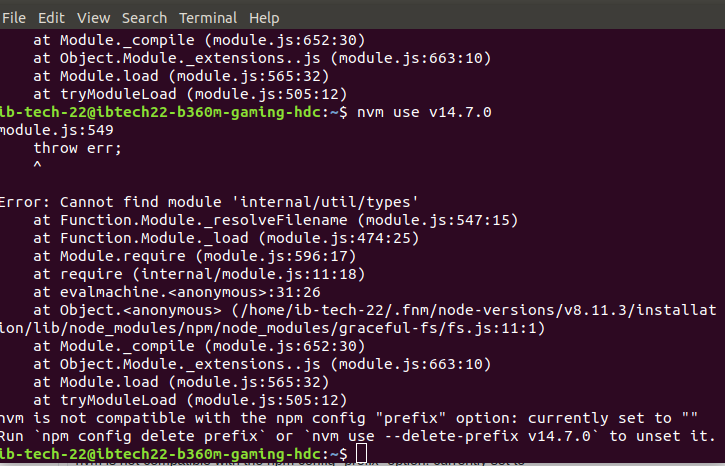
can any one help me to get out of this.
nvm is not compatible with the npm config "prefix" option: currently set to ""
Run npm config delete prefix or nvm use --delete-prefix v14.7.0 to unset it.
im using ubuntu 18.04.4 .
 Devendrateja
on 7 Aug 2020
Devendrateja
on 7 Aug 2020
@Devendrateja that error message says you're using fnm, which is a different project than nvm. it's likely the combination conflicts.
ljharb
on 7 Aug 2020
Also I have since moved on and I know use asdf and asdf-direnv and it is amazing check my dotfiles if you want to see it and if you need help talk to me
dagadbm
on 8 Aug 2020
Related issues
 peteringraham
·
61Comments
peteringraham
·
61Comments
 Pana
·
44Comments
Pana
·
44Comments
 apaternite
·
167Comments
apaternite
·
167Comments
 YourDeveloperFriend
·
52Comments
YourDeveloperFriend
·
52Comments
 kmalakoff
·
64Comments
kmalakoff
·
64Comments
Most helpful comment
I figured this out on my system. For other Arch/Manjaro users here's how you can find the cause:
nodeit executes:export PATH="/home/foo/.nvm/versions/node/v10.15.3/bin:$PATH"node, have it segfault.coredumpctl gdb -1. You'll see information from the core dump. At the very bottom you will likely see a .so file referenced, here's mine:`
0 0x00007fea7b0f114d in v8::FunctionTemplate::New(v8::Isolate, void ()(v8::FunctionCallbackInfo const&), v8::Local, v8::Local, int, v8::ConstructorBehavior) () from /usr/lib/popcorntime/0.3.10/libnw.so
`
So for me it was Popcorn Time installed from the AUR (popcorntime-bin). After I removed Popcorn Time all versions of node worked.