Here is my output on ubuntu:

I changed my "LS_COLORS", it takes effect on ls command. But the the color of nvm ls is still dark blue.
How can I change it to a readable color ?
 vestacp
All 39 comments
I use a white background, so I don't notice this.
Using LS_COLORS is an interesting idea. What have you set yours to?
 ljharb
on 5 Feb 2016
ljharb
on 5 Feb 2016
This is my color:
LS_COLORS=$LS_COLORS:'di=0;35:' ; export LS_COLORS
so, after researching LS_COLORS I don't think that's the right thing to respect - "installed node version", "not installed node version", "active node version", "alias" don't really have analogues to what ls outputs.
That said, if you can think of a sensible way to combine a setting for those 5 colors, i'd be happy to consider making them configurable.
ljharb
on 6 Feb 2016
I don't care which colors they should respect to, but please make it more readable. I think in most cases, the background of the shell is black.
I wonder why it's in darkblue? Any reason? If not, please change it to any other color that is readable.
vestacp
on 6 Feb 2016
And, I don't think it's a "feature requests".
vestacp
on 6 Feb 2016
The feature request would be to customize the colors. It's been these colors for the entirety of nvm's existence, and nobody's once brought it up before now, so I don't think "in most cases" is a credible claim, either for terminal background color or "unreadable". tbh, in your screenshot, the white doesn't even look white (it seems to have shades of green in it) - perhaps your OS's colors can be tweaked?
ljharb
on 6 Feb 2016
The OS is in a vm. The raw Ubuntu 15.
The snapshot was taken from my host machine.
Anyone can try it in a few minutes.
vestacp
on 6 Feb 2016
Sure, I've tried it just now, and it looks perfectly readable on a black background to me.
I'll leave this open as a feature request for nvm ls color customization, since color perception is variable and subjective - otherwise, feel free to close it.
ljharb
on 6 Feb 2016
Could you please paste a snapshot?
vestacp
on 6 Feb 2016
Sure, here's 4 of the color profiles in the default Mac OS X terminal:


ljharb
on 6 Feb 2016
I'd like to see the ability to remove color output altogether. Using the output of NVM in a scripted way is difficult because the output has bash color escape characters in it. For example, applying changes to all installed versions of Node, I get errors like:
N/A version is not installed...
bash: line 1: $'v6.3.1\E[0m': command not found
bash: line 2: $'system\E[0m': command not found
This is after a naive (i.e. simply parsed) loop on all the installed versions of node, e.g.
for v in $(nvm list node 2>&1 | awk '{print $NF}'); do nvm use "${v}"; done
Alternatively, provide a machine-readable output option.
 ghost
on 4 Aug 2016
ghost
on 4 Aug 2016
@jsilverman-blispay I'd like to add --no-color to every command, but in the meantime, you should be able to set the TERM environment variable to "dumb" to strip colors?
ljharb
on 4 Aug 2016
I will try that. Thanks
ghost
on 5 Aug 2016
Tried it; it didn't work.
Incidentally, my workaround is this:
for v in $(nvm list node 2>&1 | grep -v system | sed 's/\x1B\[[0-9;]*[a-zA-Z]//g' | awk '{print $NF}' ); do nvm use "${v}"; done
Note the "sed" part, which removes the non-printing escape characters:
sed 's/\x1B\[[0-9;]*[a-zA-Z]//g'
ghost
on 5 Aug 2016
@jsilverman-blispay what version of nvm are you using? if you update to the latest, TERM=dumb should work.
ljharb
on 6 Aug 2016
@jsilverman-blispay the next version will support --no-colors in nvm alias, nvm ls, and nvm ls-remote - per 0678652bd314726e63ac5e137e9fca538994d1f4
ljharb
on 10 Aug 2016
@naomiquinones and I are going to work on this as our next issue.
 gitburd
on 5 Aug 2020
gitburd
on 5 Aug 2020
@gitburd that's great; but it's very unclear what this feature would look like. Before making a PR, let's workshop things here?
ljharb
on 6 Aug 2020
@ljharb @naomiquinones It seems like the concern is mostly for dark background displays. The default colors could be what they are now and there could be an alternative color configuration with lighter text colors that might show up better on dark backgrounds. There could be a display flag that would allow users to switch between color configurations.
gitburd
on 10 Aug 2020
That's certainly a possibility; however i assume users would want configurability of individual colors. It's fine if we start with just a flag, but I'd want the design for full configurability to be thought about first, to ensure a smooth evolution.
ljharb
on 12 Aug 2020
Hi @ljharb, after discussing with @gitburd, it seems like we could set a flag --setcolors and either the user passes in an array of colors (e.g. nvm --setcolors bold-cyan magenta dim-yellow green), or when the user calls nvm --setcolors, we go through a set of prompts to have them choose from a set of available colors. We could store that info in some kind of configuration file or variable that contains those colors. There is already an NVM_COLORS, so maybe an array called NVM_USER_COLORS?
 naomiquinones
on 13 Aug 2020
naomiquinones
on 13 Aug 2020
That general approach seems good; prompts would have to be careful to not run in a non-TTY, and that array notation i don't think is likely to work (multiple arguments would be passed like --x=a --x=b --x=c or -x a -x b -x c, or it could maybe be --x=a,b,c altho comma-separated is uncommon.
ljharb
on 13 Aug 2020
Also note that POSIX doesn't have arrays (except for invocation arguments).
ljharb
on 13 Aug 2020
@ljharb @naomiquinones Would it make sense to do a prompt for each color and enter them one a time? How many are used? 5?
gitburd
on 14 Aug 2020
@gitburd I think nvm assumes that your shell is non-interactive. That would not include prompts.
 Yash-Singh1
on 14 Aug 2020
Yash-Singh1
on 14 Aug 2020
@ljharb @Yash-Singh1 @naomiquinones
multiple arguments would be passed like --x=a --x=b --x=c or -x a -x b -x c
so could something like this work: --display -a cyan -b yellow -c green -d magenta? or using the color codes instead of the words?
gitburd
on 14 Aug 2020
Hmm - typically command line arguments are either positional, or not; the non-positional ones are in the form -x y or --x=y. iow, each color would need to be its own independent parameter.
ljharb
on 14 Aug 2020
--color-one=blue, --color-two=green, --color-three=red?
gitburd
on 14 Aug 2020
I think cmatrix had a similar problem. Here is there man page:
 Usage: cmatrix -[abBcfhlsmVx] [-u delay] [-C color]
 -a: Asynchronous scroll
 -b: Bold characters on
 -B: All bold characters (overrides -b)
 -c: Use Japanese characters as seen in the original matrix. Requires appropriate fonts
 -f: Force the linux $TERM type to be on
 -l: Linux mode (uses matrix console font)
 -L: Lock mode (can be closed from another terminal)
 -o: Use old-style scrolling
 -h: Print usage and exit
 -n: No bold characters (overrides -b and -B, default)
 -s: "Screensaver" mode, exits on first keystroke
 -x: X window mode, use if your xterm is using mtx.pcf
 -V: Print version information and exit
 -u delay (0 - 10, default 4): Screen update delay
 -C [color]: Use this color for matrix (default green)
 -r: rainbow mode
 -m: lambda mode
They didn't do the --x=y option. I think that most people are used to the -x y option that is shown as the -C [color] option inside the cmatrix command. We should use the same way. Prompts should not be used because nvm does not require your shell to be interactive. Also, the --x=y is a bit messier because if someone writes in -x = y it won't be accepted without more complex computing on the arguments. On the other hand, -x y with a bunch of spaces are between the two of them will be accepted because parameters are never null unless they aren't given. Because of these reasons, I suggest -x y. I have not seen a CLI that allows configuration for multiple colors. That can quickly get complicated, messy, and unnecessary. The best option would be to give configuration to only one color. If that is your goal then the best option would be to do something like -C [colors]. The [colors] should be in the following form: red,blue,green. If you want color2 to be auto then you can do: red,auto,green. I am on Ubuntu 20.04 and nvm ls outputs the following:
->      v14.7.0
         system
default -> node (-> v14.7.0)
node -> stable (-> v14.7.0) (default)
stable -> 14.7 (-> v14.7.0) (default)
iojs -> N/A (default)
unstable -> N/A (default)
lts/* -> lts/erbium (-> N/A)
lts/argon -> v4.9.1 (-> N/A)
lts/boron -> v6.17.1 (-> N/A)
lts/carbon -> v8.17.0 (-> N/A)
lts/dubnium -> v10.22.0 (-> N/A)
lts/erbium -> v12.18.3 (-> N/A)
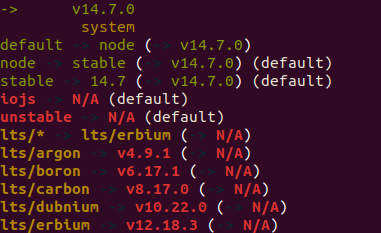
I have not customized the $LS_COLORS environment variables. It is probably because I have a different Ubuntu version.
Yash-Singh1
on 14 Aug 2020
Would a colon delimited array be acceptable?
After looking at this for a while, we could easily rename the NVM_COLORS to NVM_NUM_COLORS because it is only used as a function local variable here: https://github.com/nvm-sh/nvm/blob/9dc6f3e4a548658218d5c93bb55d0913cc65f5bf/nvm.sh#L72-L78
This would allow us to use the same colon delimited array format as a NVM_COLORS environment variable and as a --colors argument. Documenting this format would be important as well.
Example usages:
export NVM_COLORS=red:blue:green:magenta:cyan
or
nvm --colors red:blue:green:magenta:cyan
 mkcode
on 14 Aug 2020
mkcode
on 14 Aug 2020
Yes, the comma method that I gave was just a suggestion. I think that colon (:) would actually be better! :+1:
Yash-Singh1
on 14 Aug 2020
Even using a comma seems pretty rare and unidiomatic; using a colon seems wildly unintuitive and confusing.
ljharb
on 15 Aug 2020
What about eliminating the delimiter and always passing the colors in with a set order the way the LSCOLORS environment variable is set (e.g. LSCOLORS=gxfxCxgxBxGegcbhahechd) or the way hex colors are set for CSS/HTML (e.g. color=#b9feea)?
Example usage:
export NVM_COLORS=cyanyellowbluegreygreen
or
export NVM_COLORS=3633343732
or
nvm --colors cyanyellowbluegreygreen
naomiquinones
on 15 Aug 2020
Matching what LS_COLORS does seems pretty defensible!
ljharb
on 16 Aug 2020
@ljharb
@naomiquinones and I made a branch with a suggested change to the help menu that uses set-colors in a LS_COLORS-like string format and can proceed with adding functionality if you approve.
https://github.com/gitburd/nvm/commit/56dfb3c7825ab768431566027cb14160f7ba81a9
gitburd
on 18 Aug 2020
@ljharb we are also thinking of displaying the color options in their colors so the user can see immediately what the options would look like on their screen.
naomiquinones
on 18 Aug 2020
@ljharb,
@gitburd and I came up with the following way of displaying the colors in the help section:
https://github.com/naomiquinones/nvm/blob/8867948fac3e923877aaecd997ad01df7d2c2495/nvm.sh#L2420-L2428
naomiquinones
on 18 Aug 2020
Hmm, looks nice - however, it will have to use nvm_has_colors and skip the colors when that's false, and every command would need to support a --no-colors option as well. It'd be useful to also show what the default is, and i'd be curious to see what nvm set-colors' output looked like :-)
ljharb
on 19 Aug 2020
I noticed that LS_COLORS was a bunch of wildcards with an ANSI-Color. What wildcards will nvm match?
Yash-Singh1
on 19 Aug 2020
Related issues
 tsgan
·
51Comments
tsgan
·
51Comments
 robtweed
·
49Comments
robtweed
·
49Comments
 fabdrol
·
334Comments
fabdrol
·
334Comments
 isomorphisms
·
44Comments
isomorphisms
·
44Comments
 pensierinmusica
·
52Comments
pensierinmusica
·
52Comments
Most helpful comment
@jsilverman-blispay the next version will support
--no-colorsinnvm alias,nvm ls, andnvm ls-remote- per 0678652bd314726e63ac5e137e9fca538994d1f4