Nvim-tree.lua: Is there a way to remove this gray vertical bar?
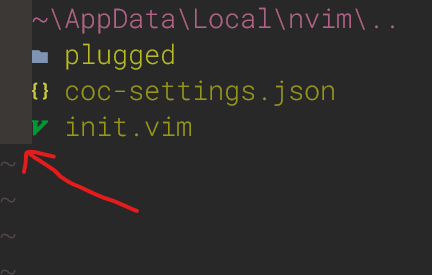
I have seen some screenshots of other users and this does not appear to them. I use Windows.
 gmr458
All 5 comments
It's signcolumn most likely. You can use after/ftplugin/ or autocmd FileType NvimTree localset signcolumn=<no|auto> to turn it off for NvimTree buffers only. Or change your global setting.
 cloggier
on 31 Mar 2021
cloggier
on 31 Mar 2021
Thanks
gmr458
on 31 Mar 2021
thanks @cloggier it is indeed :)
 kyazdani42
on 31 Mar 2021
kyazdani42
on 31 Mar 2021
It's
signcolumnmost likely. You can useafter/ftplugin/orautocmd FileType NvimTree localset signcolumn=<no|auto>to turn it off for NvimTree buffers only. Or change your global setting.
Write this autocmd FileType NvimTree localset signcolumn=no in my .vimrc should be work?, sorry, i am a beginner.
gmr458
on 1 Apr 2021
@gmr458 Yes, please have a look here, it will shed some light onto what it does: https://learnvimscriptthehardway.stevelosh.com/chapters/12.html
Also it's best to wrap autocmds with augroup: https://learnvimscriptthehardway.stevelosh.com/chapters/14.html
cloggier
on 1 Apr 2021
Related issues
 stsewd
·
9Comments
stsewd
·
9Comments
 seblj
·
6Comments
seblj
·
6Comments
 afonsocarlos
·
3Comments
afonsocarlos
·
3Comments
 peach-lasagna
·
5Comments
cloggier
·
8Comments
peach-lasagna
·
5Comments
cloggier
·
8Comments
Most helpful comment
thanks @cloggier it is indeed :)