Nvim-tree.lua: add option to avoid having the cursor over the icons
Hello, I love this plugin but I believe there is a serious flaw. As you can see from the screenshot below my cursor is sitting above an icon; look bro, I love freedom (both in software and life), but this is just way too much and this visual bug makes it very difficult for me to focus.
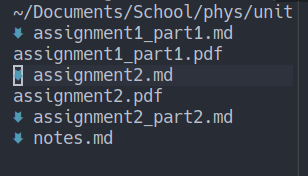
My suggested solution is to add some kind of tab + conceal to avoid the cursor going into an icon. Merci.
 ahmedkhalf
All 7 comments
This visual bug as you say is just not a bug, nor does it bothers me. If this is some kind of feature you wish to implement, go for it, i wouldn't mind.
 kyazdani42
on 11 Feb 2021
kyazdani42
on 11 Feb 2021
Do you want something like this? I have an autocmd for that but it doesn't work correctly on certain conditions (it's rare though) and it also depends on your terminal.
augroup HideCursor
  au!
  au WinLeave,FileType NvimTree set guicursor=n-v-c-sm:block,i-ci-ve:ver2u,r-cr-o:hor20,
  au WinEnter,FileType NvimTree set guicursor=n-c-v:block-Cursor/Cursor-blinkon0,
augroup END
au FileType NvimTree hi Cursor blend=100
 elianiva
on 26 Feb 2021
elianiva
on 26 Feb 2021
@elianiva Oh wow perfect, this is amazing.
I just have one follow up question: how can I make the current line highlight have greater contrast only for the NvimTree buffer?
ahmedkhalf
on 27 Feb 2021
Just add this autocmd and define your custom highlight group, NvimTreeLine in this case.
au WinEnter,FileType NvimTree setlocal winhighlight=CursorLine:NvimTreeLine
Problem Solved, tnx.
ahmedkhalf
on 27 Feb 2021
Do you want something like this? I have an autocmd for that but it doesn't work correctly on certain conditions (it's rare though) and it also depends on your terminal.
simplescreenrecorder-2021-02-26_19.21.49.mp4
augroup HideCursor
  au!
  au WinLeave,FileType NvimTree set guicursor=n-v-c-sm:block,i-ci-ve:ver2u,r-cr-o:hor20,
  au WinEnter,FileType NvimTree set guicursor=n-c-v:block-Cursor/Cursor-blinkon0,
augroup END
au FileType NvimTree hi Cursor blend=100
The latest version seem to not work when open new file.
 evolify
on 14 Apr 2021
evolify
on 14 Apr 2021
@evolify see #293
kyazdani42
on 14 Apr 2021
Related issues
 peach-lasagna
·
5Comments
peach-lasagna
·
5Comments
 afonsocarlos
·
3Comments
afonsocarlos
·
3Comments
 CantoroMC
·
7Comments
CantoroMC
·
7Comments
 GustavoPrietoP
·
6Comments
GustavoPrietoP
·
6Comments
 gmr458
·
6Comments
gmr458
·
6Comments
Most helpful comment
Do you want something like this? I have an autocmd for that but it doesn't work correctly on certain conditions (it's rare though) and it also depends on your terminal.
https://user-images.githubusercontent.com/51877647/109299592-ed1d0a00-7867-11eb-8d40-99c68a2dc78c.mp4