Nvim-tree.lua: feature request: open when entering a new directory
Hi,
I'd like to do a feature request, but I'm not sure if everyone will agree on this one :)
If there is a directory app/ and you do vim app, nvim-tree currently opens a empty file.
My feature request is that it could open the file explorer with that directory's listing. What do you think?
 brenol
All 15 comments
i'm not sure what you mean by directory listing. When i do nvim app it will open the app directory content in the tree view (if i have the on_enter variable on)
 kyazdani42
on 4 Nov 2020
kyazdani42
on 4 Nov 2020
@kyazdani42 that actually makes a lot of sense, sorry. I'll close this one. Thank you
brenol
on 4 Nov 2020
A bit late to the party on this one and this may not be what this issue was about, but with Netrw if you e directory/ it will open netrw and let you explore. This is something that I miss since if you do this in lua tree it will just try and edit the directory. Tbh I think this wouldn't be too complex to implement
autocmd BufEnter * if isdirectory('<afile>') | execute 'LuaTree '.expand('<afile>') | endif
It would be nice to be able to do this again however at present you can't open LuaTree to a specific directory so it doesn't work
 akinsho
on 10 Nov 2020
akinsho
on 10 Nov 2020
it already does that right ? when i do nvim ./dir it opens the tree. I'm not sure what you are asking. Maybe this is because you disabled loading the tree on start ?
kyazdani42
on 10 Nov 2020
@kyazdani42 what you're describing I believe only works when starting from a terminal session. I mean during an editing session when nvim has already been opened, say if you use gf of a directory path on an import. If Netrw was active it would just open an explorer buffer for example.
akinsho
on 10 Nov 2020
oh ok my bad, i didn't realize that. if someone provides some code i'll merge it. I'll add that to the rewrite when i have some time too.
kyazdani42
on 10 Nov 2020
👍🏾 I'll look into it this week
akinsho
on 10 Nov 2020
I'm also interested in this. I usually did a :split . with netrw (or ranger) and it would open in a new pane and then open the selected file in that new pane. Thanks for your work on this. Great plugin!
 boydkelly
on 24 Dec 2020
boydkelly
on 24 Dec 2020
Tbh I haven't been able to get this to work as easily as I'd hoped. The tree seems to insist on opening with an empty split beside it which creates a no name buffer and stops it responding correctly. Also hit a few other issues with it like ensuring it only opens when editing a dir and not for unnamed buffers or floating windows.
akinsho
on 27 Dec 2020
well i really have a hard time to understand the feature you guys need, maybe you could link a small video so i can understand what you mean ? I could try to implement it.
@akinsho well the whole tree init/setup is not well designed which makes it hard to extend it.
kyazdani42
on 27 Dec 2020
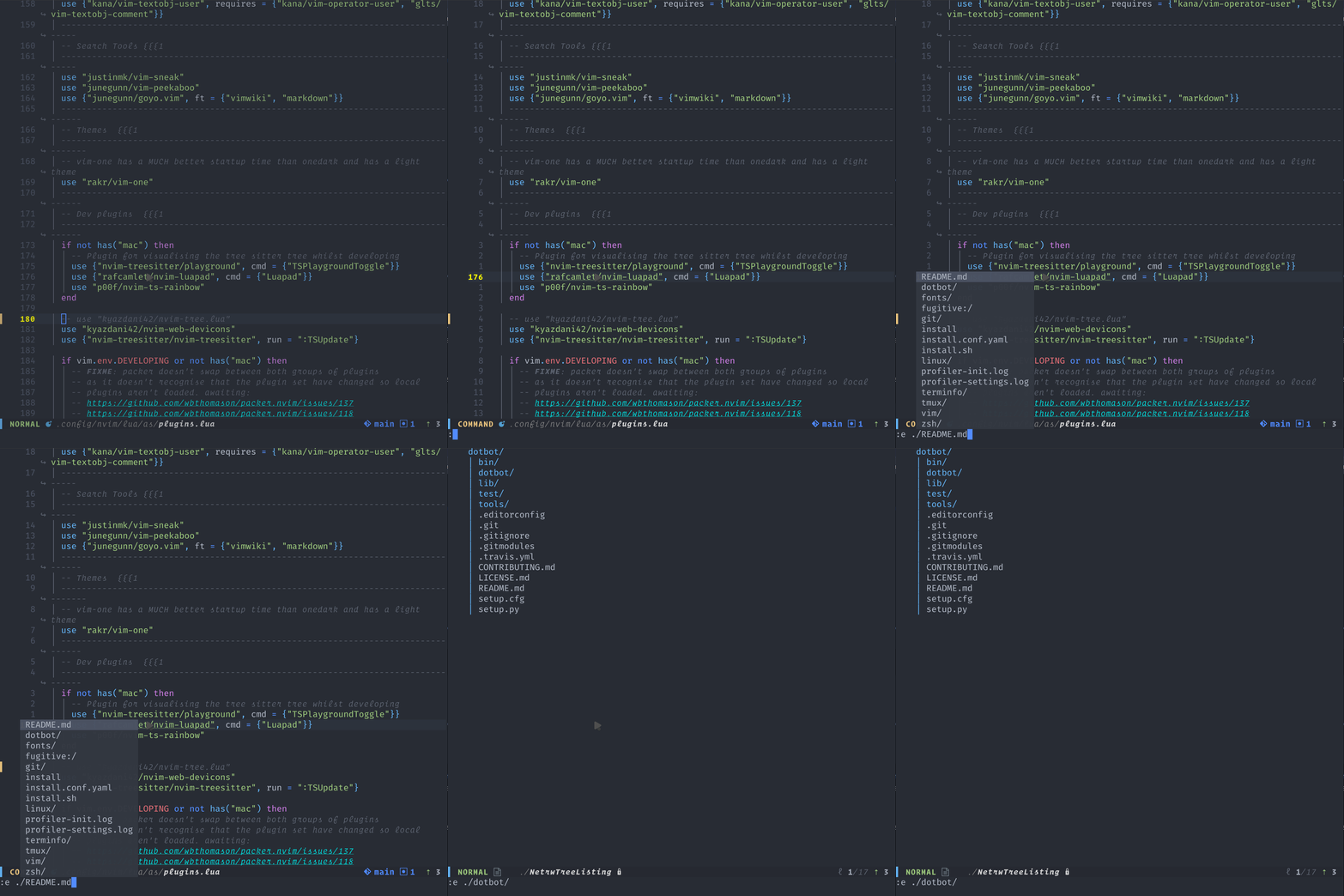
@kyazdani42 this is a gif using Netrw of the functionality I was trying to add. From the screenshot you can see that if you navigate to a directory in vim with Netrw it will open a tree window which you can then browse.
The value of something like that is say you are trying to edit a file but are not sure of the name. So you type :e /beginning/of/path/ and you decide you can't remember the name if you hit enter at that point the tree opens in the buffer you can then browse the directory /beginning/of/path/ till you find the file you want to open.
This is vs having to open LuaTreeToggle which opens the project root then find the subdir then go from there especially if it's a big repo this process can get quite tedious if it happens often. Also, say you press gf on a require("directory") (assuming you set up suffixes for lua) Netrw would then open the tree so you as a user might not have realised that "directory" was a dir and not a file but it will put you in a tree buffer and you can go from there.
Without Netrw the flow in nvim-tree is by default nvim will error or try an open a buffer called path (I think that's default behaviour, I have quite a lot of autocommands that stop this).
akinsho
on 27 Dec 2020
okay i understand. This is actually a big feature, which might not be small to implement because it would need to behave like a filesystem explorer and not a filesystem tree view. Netrw and rangers are actually file explorers, this plugin is not.
I would although accept a PR, but it might need a whole bunch of code in order to accomplish this.
kyazdani42
on 27 Dec 2020
This could be easier to implement when i'm done with the rewrite (which might not be that soon i'm afraid)
kyazdani42
on 27 Dec 2020
I'm not sure I know what the specific distinction between the viewer and explorer is. To my mind the core functionality is similar to how NERDTree handles it here i.e. register an autocommand on BufEnter that checks if the path entered is a directory. If so open LuaTree. The remaining functionality is already implemented e.g. opening files etc.
The main difficulty I had was
- Making sure Lua tree opens as the only buffer e.g. it should replace the currently opened buffer not open as a new split, since the user used the equivalent of an
editcommand. I got this working but it seems to behave strangely somewhere else not sure exactly whats going on (sorry it's been a while since I looked) - Being able to open the tree at the passed in directory. This one is harder since lua tree isn't designed I think to take a directory as an argument, it implicitly uses the current dir. This one seemed like it would need a reworking of how where Lua tree gets the dir to show but would be useful for other use cases like just specifying a dir and having it open
LuaTreeToggle <my-directory>
akinsho
on 27 Dec 2020
well i just think the whole tree initialization needs a rewrite. I might just drop the current rewrite i'm working on and provide a bit by bit rewrite that'll help with implementing new features.
kyazdani42
on 27 Dec 2020
Related issues
 CantoroMC
·
7Comments
CantoroMC
·
7Comments
 gmr458
·
6Comments
gmr458
·
6Comments
 michaelb
·
5Comments
michaelb
·
5Comments
 ziulev
·
8Comments
ziulev
·
8Comments
 cloggier
·
8Comments
cloggier
·
8Comments
Most helpful comment
well i just think the whole tree initialization needs a rewrite. I might just drop the current rewrite i'm working on and provide a bit by bit rewrite that'll help with implementing new features.