Nvim-lspconfig: Having trouble getting pyright to work
NVIM v0.5.0-906-gc348e816f
nvim-lspconfig latest
## Checking language server protocol configuration
    - INFO: html: configuration checked.
    - INFO: bashls: configuration checked.
    - INFO: vimls: configuration checked.
    - INFO: pyright: configuration checked.
    - INFO: jsonls: configuration checked.
    - INFO: cssls: configuration checked.

  health#completion_nvim#check
  ========================================================================
  ## general
    - OK: neovim version is supported

  ## completion source
    - OK: all completion source are valid

  ## snippet source
    - OK: You are using vim-vsnip as your snippet source
  """ nvim-lsp
  silent! lua << EOF
  local nvim_lsp = require('lspconfig')
  local on_attach = function(_, bufnr)
  vim.api.nvim_buf_set_option(bufnr, 'omnifunc', 'v:lua.vim.lsp.omnifunc')
          require'completion'.on_attach()
  end
  local servers = {'vimls', 'bashls', 'html', 'cssls', 'jsonls', 'pyright' }
          for _, lsp in ipairs(servers) do
                  nvim_lsp[lsp].setup {
                  on_attach = on_attach,
          }
  end
  EOF
  """vim.lsp.handler diagnostic
  silent! lua << EOF
  vim.lsp.handlers["textDocument/publishDiagnostics"] = vim.lsp.with(
          vim.lsp.diagnostic.on_publish_diagnostics, {
                  signs = false,
                  underline = true,
                  update_in_insert = false,
                  virtual_text = false,
          }
  )
  EOF
  autocmd CursorHold * lua vim.lsp.diagnostic.show_line_diagnostics()
No suggestions or diagnostics show up. How can I troubleshoot this and what information should I provide ?
 pyrr
pyrr
All 31 comments
I had the same issue went through git commit history of neovim and this bug got introduced in this pull request.
This is a pretty hacky way to fix this but I commented out this line in runtime files to fix this
 saadparwaiz1
on 6 Dec 2020
saadparwaiz1
on 6 Dec 2020
See discussion in https://github.com/neovim/neovim/pull/12638
 ChrisAmelia
on 6 Dec 2020
ChrisAmelia
on 6 Dec 2020
I had the same issue went through git commit history of neovim and this bug got introduced in this pull request.
This is a pretty hacky way to fix this but I commented out this line in runtime files to fix this
I commented out that line but it's still not working. Is pyright working for you?
Here is my error log:
[ ERROR ] 2020-12-14T22:58:47+0000 ] /usr/local/share/nvim/runtime/lua/vim/lsp/rpc.lua:455 ] "rpc" "pyright-langserver" "stderr" "Error: MethodNotFound\n at handleResponse (/usr/lib/node_modules/pyright/dist/pyright-internal/node_modules/vscode-jsonrpc/lib/common/connection.js:477:48)\n at processMessageQueue (/usr/lib/node_modules/pyright/dist/pyright-internal/node_modules/vscode-jsonrpc/lib/common/connection.js:292:17)\n at Immediate.<anonymous> (/usr/lib/node_modules/pyright/dist/pyright-internal/node_modules/vscode-jsonrpc/lib/common/connection.js:276:13)\n at processImmediate (node:internal/timers:463:21)\n"
 quantum-booty
on 14 Dec 2020
quantum-booty
on 14 Dec 2020
Sadly I never managed to get it to work.
I tried this back when I first opened this issue and then I gave up.
pyrr
on 15 Dec 2020
Have a look at the discussion in neovim/neovim#12638
saadparwaiz1
on 15 Dec 2020
Can all of you try https://github.com/neovim/nvim-lspconfig/pull/440
To clarify, I made the PR for workspace folders to eliminate a workaround that I had to implement in nvim-lspconfig due to our lack of support for workspace folders.
 mjlbach
on 15 Dec 2020
mjlbach
on 15 Dec 2020
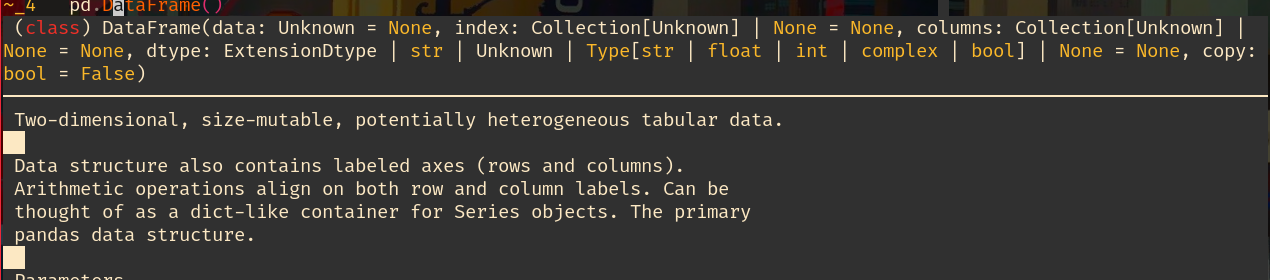
@mjlbach Thank you, it's working now! I have one more question: the hover preview is not showing inside a function call, is this a bug?

I'm expecting something like this:
quantum-booty
on 15 Dec 2020
Can you share with others what you did? Was it my PR?
This looks like a typestub bug. What is the second picture from? I highly doubt there is a regression on the neovim-client side.
mjlbach
on 15 Dec 2020
@mjlbach Yeah, I copied and pasted your code into nvim source file.
The second picture is using :lua vim.lsp.buf.hover() on the cursor word.
quantum-booty
on 15 Dec 2020
Ah, I see. I think it's because of parameter documentation hover, but I don't know. I can't imagine this is specific to pyright. If you show that pyright behaves differently than another language server, or that other language server clients (for vim, or for vscode) behave differently in general, then I would file a bug/feature request. I personally think this behavior is probably intended.
mjlbach
on 15 Dec 2020

The hover shows when I use palantir/pyls. idk it seems strange to me that vim.lsp.buf.hover() works, but the hover doesn't show in a function.
quantum-booty
on 15 Dec 2020
As I said, I'm fairly certain the difference is that pyright is giving argument documentation in the first case (hover inside parenthesis), and class documentation in the second case (hover on class name). You should try on vscode to see if there is a difference, regardless this is out of scope this issue and you should follow-up on IRC if vscode and neovim differ.
mjlbach
on 15 Dec 2020
Thank you so much! It looks like pyright does not have hover inside parenthesis in VS code too.
quantum-booty
on 15 Dec 2020
Hot damn.
Funny think I also tried your pull request a while ago and it didn't work because:
- it needs root_dir
- I have to save the file first
How can I use this for individual python scripts ?
pyrr
on 15 Dec 2020
I just checked if it works for individual scripts and indeed it doesn't work.
quantum-booty
on 15 Dec 2020
Hot damn.
Funny think I also tried your pull request a while ago and it didn't work because:
- it needs root_dir
- I have to save the file first
How can I use this for individual python scripts ?
Changinh the root_dir function to falling back to the buffer directory probably works:
```lua
local util = require("lspconfig/util")
lspconfig.pyright.setup({
root_dir = function(fname)
return util.root_pattern(".git", "setup.py", "setup.cfg", "pyproject.toml", "requirements.txt")(fname) or
util.path.dirname(fname)
end
})
 lithammer
on 15 Dec 2020
lithammer
on 15 Dec 2020
http://sprunge.us/UNY5Pa
I also thought of that but sadly I do not know lua. Could you please give me a hand ?
I'm honestly thinking of sperating all the lua stuff to it's own file at this point and start learning it.
pyrr
on 15 Dec 2020
@pyrr This is what I put in my init.vim
:lua <<EOF
local util = require("lspconfig/util")
require'completion'.on_attach()
require'lspconfig'.pyright.setup{
  root_dir = function(fname)
    return util.root_pattern(".git", "setup.py",  "setup.cfg", "pyproject.toml", "requirements.txt")(fname) or
      util.path.dirname(fname)
  end;
}
EOF
Btw because pyright doesn't show doc inside a function, I thought I could use pyls along with pyright, but I have disabled most of the features so that it only handles hover doc.
require'lspconfig'.pyls.setup{
settings ={
    pyls = {
        plugins = {
            jedi_completion = {enabled = false},
            jedi_definition = {enabled = false},
            yapf = {enabled = false},
            rope_completion = {enabled = false},
            pylint = {enabled = false},
            pyflakes = {enabled = false},
            pydocstyle = {enabled = false},
            preload = {enabled = false},
            mccabe = {enabled = false},
            jedi_symbols = {enabled = false},
            jedi_references = {enabled = false},

}}}}
If it's really important to you to show the documentation inside the function, I'm sure you could write an autocmd to trigger hover inside parenthesis. The functionality of pyright with respect to root directories should match every other language server in the repo.
mjlbach
on 15 Dec 2020
It seems like the pyright devs do not intend to implement hover inside functions and the function signature is sometimes not useable (see:this).
Fortunately it looks like I'm allowed to use pyls and pyright simultaneously. No longer do I have to endure the slow autocompletion of pyls! Thank you for your effort of adding pyright! @mjlbach
quantum-booty
on 15 Dec 2020
@mjlbach Regarding root_dir what about vimls, bashls, jsonls ?
pyrr
on 15 Dec 2020
I don't see hints that seem to be raised by pyright from this. Is this also a bug or is it something on my end? Using another LSP client seem to show hints (i.e. unused import).
 tzx
on 19 Dec 2020
tzx
on 19 Dec 2020
Did you try the PR?
mjlbach
on 19 Dec 2020
Did you try the PR?
By trying I did this:
lspconfig.pyright.setup {
  handlers = {
    -- pyright ignores dynamicRegistration settings
    ['client/registerCapability'] = function(_, _, _, _)
      return {
        result = nil;
        error = nil;
      }
    end
  }
}
I get warnings to show up, but I don't seem to get hints.
tzx
on 19 Dec 2020
What do you mean, "hints"? Can you replicate the issue on vscode?
mjlbach
on 19 Dec 2020
What do you mean, "hints"? Can you replicate the issue on vscode?
It shows in vscode and CoC from these two images:
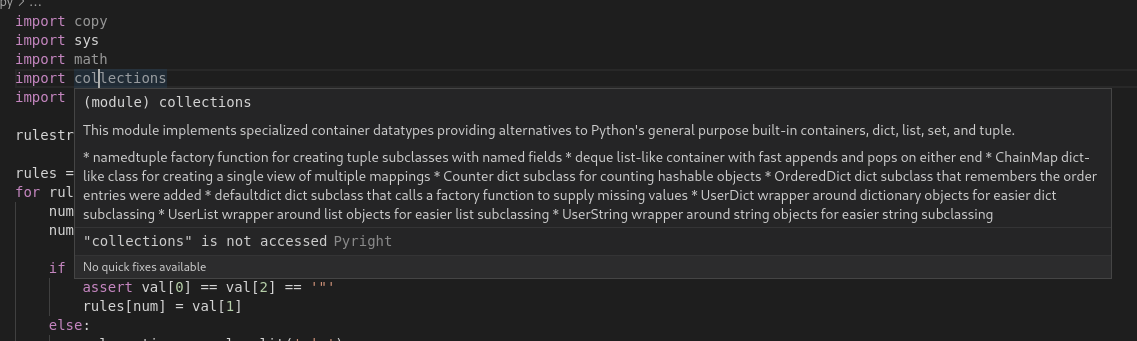
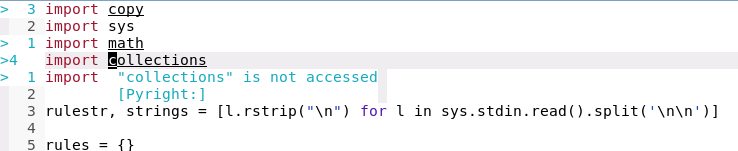
Warnings show up in all three of vscode, coc, and nvim-lsp. However, I do not get these "hint" diagnostics in nvim-lsp.
tzx
on 19 Dec 2020
Yeah, that's because the vscode plugin (which coc wraps) overrides the diagnostic severity settings for pyright.
See the options here:
https://github.com/microsoft/pyright/blob/master/docs/configuration.md#type-check-diagnostics-settings
Unused imports by default is set to "none" so it won't show up. You can override this here:
diff --git a/lua/lspconfig/pyright.lua b/lua/lspconfig/pyright.lua
index d9552bf..1def965 100644
--- a/lua/lspconfig/pyright.lua
+++ b/lua/lspconfig/pyright.lua
@@ -23,6 +23,9 @@ configs[server_name] = {
         analysis = {
           autoSearchPaths = true;
           useLibraryCodeForTypes = true;
+          diagnosticSeverityOverrides = {
+            reportUnusedImport = "warning";
+          };
         };
       };
     };
For organization sake, please file individual issues for specific problems with language servers.
mjlbach
on 20 Dec 2020
If someone wants to do the legwork of making a PR enabling the same diagnostic severity settings as vscode, then I think that would be welcome. I will say lsp-mode seems to be using the built-in pyright defaults, and I personally am fine with the current defaults, so I don't have a strong intuition as to what people would converge on as being reasonable.
mjlbach
on 20 Dec 2020
Yeah, that's because the vscode plugin (which coc wraps) overrides the diagnostic severity settings for pyright.
Yea I looked at the pyright configuration docs before commenting here, but I don't think overriding the severity to be a "warning" is quite right. I think hint is its own severity based on https://microsoft.github.io/language-server-protocol/specifications/specification-current/. Can you tell me where vscode overrides the severity settings for pyright? I thought it was using the default of "none" hence my confusion.
tzx
on 20 Dec 2020
Maybe it's not. I don't think this is a pyright specific problem though, but rather how the built-in language server client is handling hints. If you can find another language server that is accurately enabling hints in neovim, then file a specific issue here. Otherwise, you should file an issue against neovim core that hints aren't being handled correctly.
https://github.com/fannheyward/coc-pyright/issues/85#issuecomment-675173681
mjlbach
on 20 Dec 2020
I field a bug upstream. If anyone can contribute a PR to fix this please do, otherwise I will be taking a look at it. Meanwhile we will merge a mitigation in this repo
mjlbach
on 20 Dec 2020
Related issues
ChrisAmelia
·
3Comments
 ahmedelgabri
·
4Comments
ahmedelgabri
·
4Comments
 agriffis
·
5Comments
agriffis
·
5Comments
 DarkDefender
·
3Comments
DarkDefender
·
3Comments
 mcepl
·
8Comments
mcepl
·
8Comments
Most helpful comment
Changinh the
root_dirfunction to falling back to the buffer directory probably works:```lua
local util = require("lspconfig/util")
lspconfig.pyright.setup({
root_dir = function(fname)
return util.root_pattern(".git", "setup.py", "setup.cfg", "pyproject.toml", "requirements.txt")(fname) or
util.path.dirname(fname)
end
})