Nvim-lspconfig: Question: how can I possibly get a similar completion experience as e.g. coc.nvim?
I'm used to using coc.nvim style completion where the completion list is shown and updated as you type. But with omnifunc, you have to explicitly invoke it. Is there a workaround?
 K1DV5
K1DV5
All 25 comments
I don't use coc.nvim. Would you show me gif or video?
 h-michael
on 19 Feb 2020
h-michael
on 19 Feb 2020
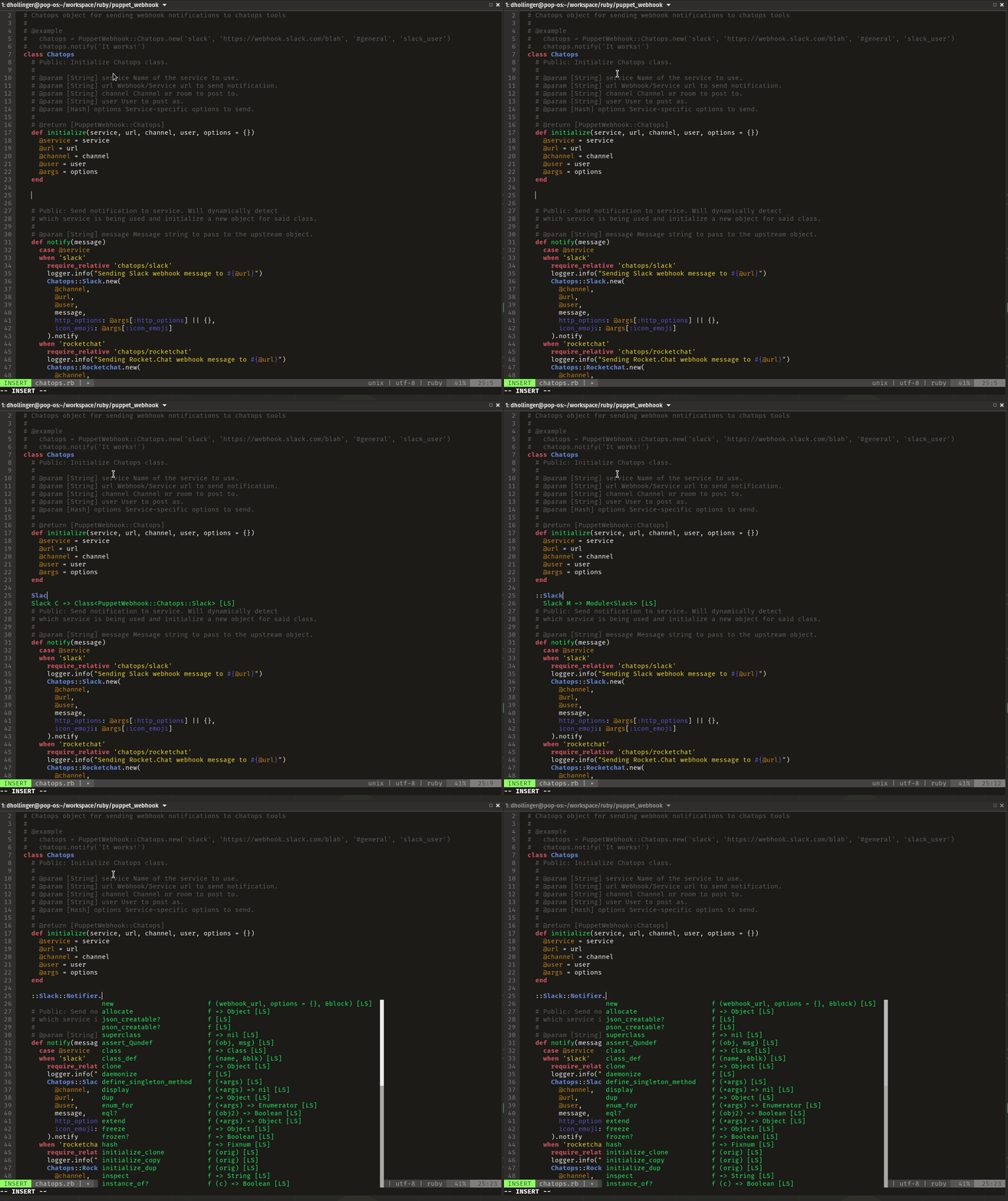
K1DV5
on 19 Feb 2020
@K1DV5 For now, you'll need to use an auto-completion plugin (although I'm hacking on a built-in lua solution because I would love to reduce my plugin count by 1)
I would recommend one of the following:
https://github.com/Shougo/deoplete.nvim
https://github.com/Shougo/deoplete-lsp (this needs to be installed in addition to the above plugin)
 mjlbach
on 19 Feb 2020
mjlbach
on 19 Feb 2020
@mjlbach, thank you!
So, auto-completion will be build-in in vim-lsp in future?
 Shatur95
on 19 Feb 2020
Shatur95
on 19 Feb 2020
I'm a fan of this. However it probably doesn't work the way you want/expect. I like the fact that it has a trigger (<Tab> in my case) instead of just popping up all the time causing a bunch of visual noise as you type. But that's subjective, I suppose.
 lithammer
on 19 Feb 2020
lithammer
on 19 Feb 2020
I'm a fan of this. However it probably doesn't work the way you want/expect. I like the fact that it has a trigger (
<Tab>in my case) instead of just popping up all the time causing a bunch of visual noise as you type. But that's subjective, I suppose.
In my case, it does in fact popup immediately after a trigger character (., :) etc.
mjlbach
on 19 Feb 2020
I'm a fan of this.
Sorry for a dump questions, how do you configured it with vim-lsp?
Shatur95
on 19 Feb 2020
These are all of the relevant lsp settings in my init.vim, including mucomplete.
" LSP settings
" log file location: /Users/michael/.local/share/nvim/vim-lsp.log
:lua << EOF
  local nvim_lsp = require('nvim_lsp')

  local on_attach = function(_, bufnr)
    vim.api.nvim_buf_set_option(bufnr, 'omnifunc', 'v:lua.vim.lsp.omnifunc')
    local method = 'textDocument/publishDiagnostics'

  local default_callback = vim.lsp.callbacks[method]
  vim.lsp.callbacks[method] = function(err, method, result, client_id)
    default_callback(err, method, result, client_id)
    if result and result.diagnostics then
      for _, v in ipairs(result.diagnostics) do
        v.uri = v.uri or result.uri
      end
      vim.lsp.util.set_qflist(result.diagnostics)
      end
    end

    -- Mappings.
    local opts = { noremap=true, silent=true }
    vim.api.nvim_buf_set_keymap(bufnr, 'n', 'gD', '<Cmd>lua vim.lsp.buf.declaration()<CR>', opts)
    vim.api.nvim_buf_set_keymap(bufnr, 'n', 'gd', '<Cmd>lua vim.lsp.buf.definition()<CR>', opts)
    vim.api.nvim_buf_set_keymap(bufnr, 'n', 'K', '<Cmd>lua vim.lsp.buf.hover()<CR>', opts)
    vim.api.nvim_buf_set_keymap(bufnr, 'n', 'gi', '<cmd>lua vim.lsp.buf.implementation()<CR>', opts)
    vim.api.nvim_buf_set_keymap(bufnr, 'n', '<C-k>', '<cmd>lua vim.lsp.buf.signature_help()<CR>', opts)
    vim.api.nvim_buf_set_keymap(bufnr, 'n', '<leader>D', '<cmd>lua vim.lsp.buf.type_definition()<CR>', opts)
    vim.api.nvim_buf_set_keymap(bufnr, 'n', '<leader>rn', '<cmd>lua vim.lsp.buf.rename()<CR>', opts)
    vim.api.nvim_buf_set_keymap(bufnr, 'n', 'gr', '<cmd>lua vim.lsp.buf.references()<CR>', opts)
    vim.api.nvim_buf_set_keymap(bufnr, 'n', '<leader>e', '<cmd>lua vim.lsp.util.show_line_diagnostics()<CR>', opts)
  end

  local servers = {'gopls', 'rust_analyzer', 'sumneko_lua', 'tsserver', 'vimls', 'pyls_ms', 'jsonls'}
  for _, lsp in ipairs(servers) do
    nvim_lsp[lsp].setup {
      on_attach = on_attach,
    }
  end
EOF

" Set up mucomplete
let g:mucomplete#enable_auto_at_startup = 1
set completeopt+=noinsert,noselect
Sorry for a dump questions, how do you configured it with vim-lsp?
You just need to make sure omnifunc is set to v:lua.vim.lsp.omnifunc.
@mjlbach I would suggest you use the on_attach callback. It's more dynamic since you don't have to hardcode the filetypes in your autocmd and doesn't create global mappings (i.e. plays nicer with non-lsp filetypes). Something like this:
local nvim_lsp = require('nvim_lsp')
local buf_set_keymap = vim.api.nvim_buf_set_keymap

local on_attach = function(_, bufnr)
  vim.api.nvim_buf_set_option(bufnr, 'omnifunc', 'v:lua.vim.lsp.omnifunc')

  -- Mappings.

  local opts = { noremap=true, silent=true }
  buf_set_keymap(bufnr, 'n', 'K', '<cmd>lua vim.lsp.buf.hover()<CR>', opts)
  buf_set_keymap(bufnr, 'n', '<C-k>', '<cmd>lua vim.lsp.buf.signature_help()<CR>', opts)
  buf_set_keymap(bufnr, 'n', ',rn', '<cmd>lua vim.lsp.buf.rename()<CR>', opts)
  buf_set_keymap(bufnr, 'n', '[I', '<cmd>lua vim.lsp.buf.references()<CR>', opts)
  buf_set_keymap(bufnr, 'n', ',e', '<cmd>lua vim.lsp.util.show_line_diagnostics()<CR>', opts)
end

local servers = {'gopls', 'rust_analyzer', 'sumneko_lua', 'tsserver'}
for _, lsp in ipairs(servers) do
  nvim_lsp[lsp].setup {
    on_attach = on_attach,
  }
end
You just need to make sure omnifunc is set to v:lua.vim.lsp.omnifunc.
Hm... I tried this with this configuration:
set completeopt+=menuone
set completeopt+=noinsert
let g:mucomplete#enable_auto_at_startup = 1
set omnifunc=v:lua.vim.lsp.omnifunc
MUcomplete works, but I do not have LSP suggestions. Tested with Python. I have pyls installed and neovim v0.5.0-387-ge8f160c82`.
Shatur95
on 19 Feb 2020
@lithammer Thanks, implemented your suggestions :)
@Shatur95, can you get suggestions when you manually trigger omnifunc? \
mjlbach
on 19 Feb 2020
@Shatur95, can you get suggestions when you manually trigger omnifunc?
How can I do it?
I newbie in Vim :)
Shatur95
on 19 Feb 2020
@Shatur95, can you get suggestions when you manually trigger omnifunc?
How can I do it?
I newbie in Vim :)
\
mjlbach
on 19 Feb 2020
@mjlbach, @lithammer, thank you a lot, I had a typo in Lua. Now everything works.
Shatur95
on 19 Feb 2020
You can look at the original edit of my comment before revised, but there will always be at least three lines in a lua heredoc
mjlbach
on 19 Feb 2020
@mjlbach, thanks, tested deoplete.nvim and ncm2, but I liked MUcomplete more.
I suggest to add this instructions in README.md.
Shatur95
on 20 Feb 2020
Thanks to everyone for suggesting various ways to address this issue.
@K1DV5 Do these answers solve your problem?Do these answers solve your problem?
h-michael
on 20 Feb 2020
Thank you so much, the biggest reason for me to switch from coc, which works great, is the fact that it depends on node. So since both deoplete and ncm2 rely on python, they have the same limitation. But mucomplete seems to be what I'm looking for. It's great. So thanks.
Should I close this or keep it open in case someone else has something to say?
K1DV5
on 20 Feb 2020
Should I close this or keep it open in case someone else has something to say?
If we do not lock an issue, even if we close it, we can comment on the issue so close it.
h-michael
on 20 Feb 2020
@h-michael it might be convenient to start populating the wiki with some of these tips/tricks from various github issue
mjlbach
on 20 Feb 2020
start populating the wiki
Let's avoid yet another source of truth. If there is really something actionable here, please send a doc update (to runtime/doc/lsp.txt in Neovim core repo). We already have too many documentation stores, we are trying to consolidate them.
 justinmk
on 20 Feb 2020
justinmk
on 20 Feb 2020
@justinmk, thank you, didn't know about this page.
I changed my configuration to this:
packadd nvim-lsp
:lua << EOF
  local nvim_lsp = require('nvim_lsp')
  nvim_lsp.pyls.setup{}
  nvim_lsp.gdscript.setup{}
  nvim_lsp.clangd.setup{}
EOF

nnoremap <silent> gD <cmd>lua vim.lsp.buf.declaration()<CR>
nnoremap <silent> gd <cmd>lua vim.lsp.buf.definition()<CR>
nnoremap <silent> K <cmd>lua vim.lsp.buf.hover()<CR>
nnoremap <silent> gi <cmd>lua vim.lsp.buf.implementation()<CR>
nnoremap <silent> <C-,> <cmd>lua vim.lsp.buf.signature_help()<CR>
nnoremap <silent> <leader>D <cmd>lua vim.lsp.buf.type_definition()<CR>
nnoremap <silent> gr <cmd>lua vim.lsp.buf.references()<CR>
au VimEnter * au FileType python,gdscript3,cpp setlocal omnifunc=v:lua.vim.lsp.omnifunc
I found mucomplete a little buggy and also felt that it does way more than what I need. So I made my own way:
" it works best with this option
set completeopt=menu,noinsert,noselect,menuone

function! Complete(direction) "{{{
    " direction: 1-forward, 2-backward, 0-show
    if pumvisible()
        if a:direction
            if a:direction == 1 "without shift, forward
                return "\<c-n>"
            endif
            " with shift, back
            return "\<c-p>"
        endif
    endif
    let chars = 2  " chars before triggering
    let pattern = '\(\w\|\d\)\{' . chars . '}'
    let col = col('.') - 1
    let line = getline('.')
    let last_chars = line[col-chars:col-1]
    if !a:direction && last_chars !~# pattern || !col || last_chars[-1] =~ '\s'
        " not at a completeable place
        return "\<tab>"
    endif
    " prevent keyword completion from making nvim unresponsive
    " check th[es]e| chars for previous attempts
    let before_match = line[col-chars-1:col-2]
    if !a:direction && len(before_match) && before_match =~# pattern
        return ''
    endif
    call feedkeys("\<c-n>")  " keyword completion
    if &omnifunc == 'v:lua.vim.lsp.omnifunc'  " lsp
        execute 'call' &omnifunc . '(0, "")'
    endif
    return ''
endfunction

" manual completion and cycling
imap <expr> <tab> Complete(1)
imap <expr> <s-tab> Complete(-1)
smap <expr> <tab> Complete(1)

" automatic completion
autocmd TextChangedI * call Complete(0)
- It shows suggestions from keyword completion first and requests omnifunc. If the omnifunc has any suggestions, the menu will be updated.
- It is triggered after at least two characters. But that can be changed by changing
chars. - At any time, if suggestions are not shown, you can make a request by using
<tab>.
EDIT: Added completeopt
K1DV5
on 27 Feb 2020
The only thing I missing is braces auto-insertion for methods. Is this LSP feature?
Shatur95
on 27 Feb 2020
I think so, yes.
K1DV5
on 27 Feb 2020
Related issues
 jacksonludwig
·
3Comments
mjlbach
·
8Comments
jacksonludwig
·
3Comments
mjlbach
·
8Comments
 ChrisAmelia
·
3Comments
justinmk
·
8Comments
ChrisAmelia
·
3Comments
justinmk
·
8Comments
 dlukes
·
4Comments
dlukes
·
4Comments
Most helpful comment
Let's avoid yet another source of truth. If there is really something actionable here, please send a doc update (to
runtime/doc/lsp.txtin Neovim core repo). We already have too many documentation stores, we are trying to consolidate them.