When selecting "other" under storage no file dialog box appears
 singltw
All 4 comments
I believe we're having the same issue.
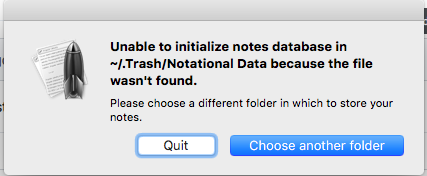
Before doing a tutorial, I uninstalled nvALT and it's folder in Application Support. Now when I launch the newly installed app, I get
Unable to initialize notes database in
~/.Trash/Notational Data because the file wasn't found.
And no way to select a new directory.
 tomulent
on 11 Oct 2017
tomulent
on 11 Oct 2017
Similar problem. After moving nvALT Notes folder from Dropbox to iCloud Drive, I get the "Unable to initialize notes database..." error msg. Clicking on "Choose another folder" closes the error msg, but no browser window opens to point to the new location of my nvALT Notes folder.
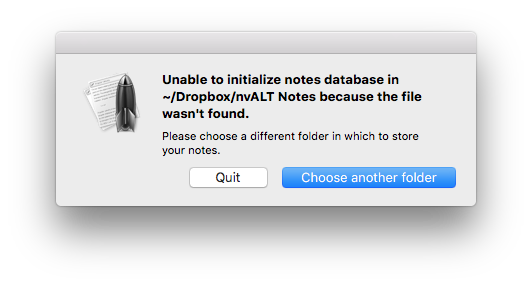
Opening nvALT Preferences (Notes tab), “Read notes from folder:” shows "Directory unknown" so I select “Other…” from the drop down menu, again expecting a browser window to appear enabling me to point to my nvAlt Notes folder on my iCloud Drive, but no such window appears.
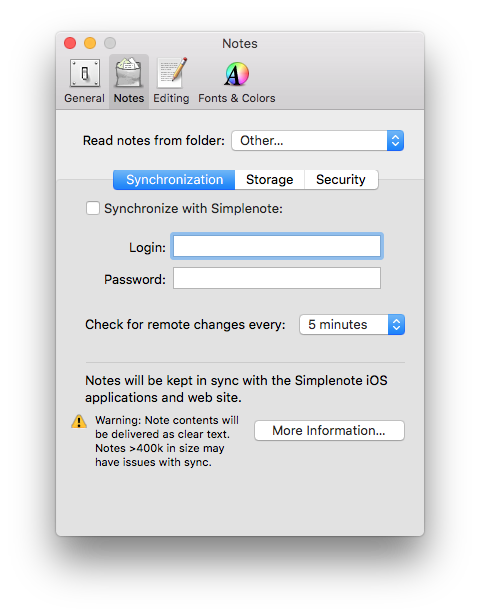
How can I point nvALT to the new location of my nvALT Notes folder?
 garygnc
on 31 Oct 2017
garygnc
on 31 Oct 2017
I've had luck with creating a directory with the name it's expecting in the place it expects to find the Notational Data folder. So in your case, @garygnc, try creating the directory ~/Dropbox/nvALT Data.
My apologies for not posting the solution when I actually had it weeks ago.
tomulent
on 1 Nov 2017
That worked! Thanks!! ... I copied the nvALT Folder to the new location in iCloud without removing it from Dropbox. nvAlt then allowed me to select the new folder location in preferences. Having done that, I deleted the folder from Dropbox and now all works fine.
garygnc
on 1 Nov 2017
Related issues
 ttscoff
·
9Comments
ttscoff
·
9Comments
 extracts
·
50Comments
extracts
·
50Comments
 arel
·
4Comments
arel
·
4Comments
 bunk3m
·
11Comments
bunk3m
·
11Comments
 mongobuggy
·
9Comments
mongobuggy
·
9Comments
Most helpful comment
I've had luck with creating a directory with the name it's expecting in the place it expects to find the Notational Data folder. So in your case, @garygnc, try creating the directory
~/Dropbox/nvALT Data.My apologies for not posting the solution when I actually had it weeks ago.