Nuxt.js: Jest coverage problem, 50% of non-existing branch is not tested
Version
Reproduction link
https://github.com/Uzwername/jest-coverage-problem-reproduction
Steps to reproduce
- Clone repository (see reproduction link).
- Install node_modules
- Run
npx jest --coverage - Go to coverage->lcov-report folder & open index.html in a browser.
- Check report for file "TheDesktopNavigation.vue"
- See the first line with
<template>tag highlighted with yellow. - Try to comment out all export's content in script tag of
TheDesktopNavigation.vue. - Repeat steps from 3 to 6 (the issue will persist).
What is expected ?
Report should show 100% coverage
What is actually happening?
The <template> tag is highlighted with yellow (which means uncovered branch) while there's only 5 lines of JS with 0 logical branches in the file.
Additional comments?
As a side note, other very similar components that follow the same folder/test structure work ok & show 100% coverage.
bug-report
 Uzwername
>All comments
@Uzwername When replacing your contents within <template> with
<FaIcon :icon="faCaretRight" />
I does show 100% coverage, also for branches.
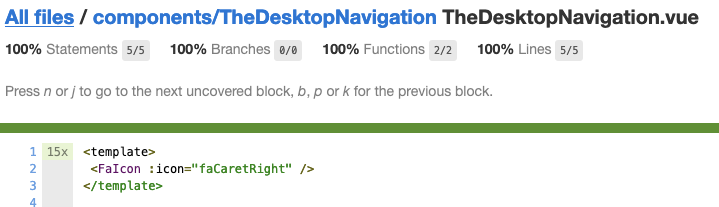
It seems you have to double check the contents of the <template>
 TimvdEijnden
on 13 May 2020
TimvdEijnden
on 13 May 2020
👍2
Was this page helpful?
0 / 5 - 0 ratings
Related issues
 surmon-china
·
3Comments
surmon-china
·
3Comments
 gary149
·
3Comments
gary149
·
3Comments
 VincentLoy
·
3Comments
VincentLoy
·
3Comments
 mikekidder
·
3Comments
mikekidder
·
3Comments
 mattdharmon
·
3Comments
mattdharmon
·
3Comments
Most helpful comment
@Uzwername When replacing your contents within
<template>with<FaIcon :icon="faCaretRight" />I does show 100% coverage, also for branches.
It seems you have to double check the contents of the
<template>