Nuxt.js: Trackback for errors during SSR shows "Missing stack frames"
Version
Reproduction link
https://codesandbox.io/s/ssr-error-uvu26
Steps to reproduce
Just open the reproduction link...
OR
- Cause an error in a component which means the SSR of a page will fail (see example)
- Navigate to the dev server URL fresh (i.e. not open already)
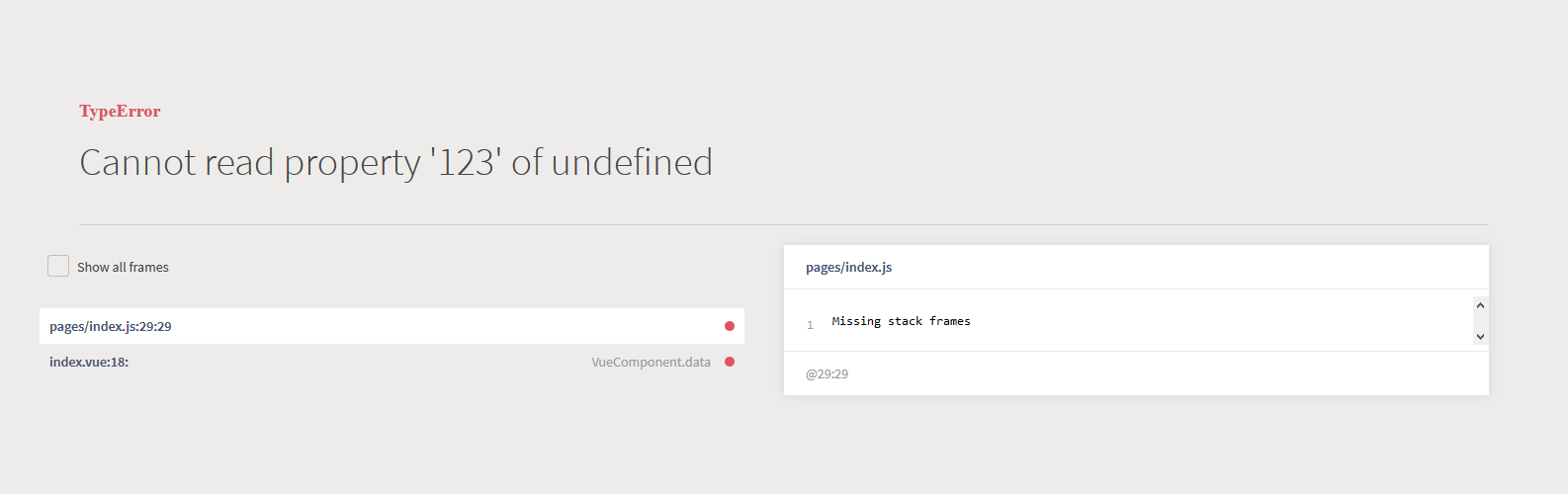
- You see the following error page, but the stack trace says "Missing stack frames" and some of the file names and line numbers are not showing correctly either
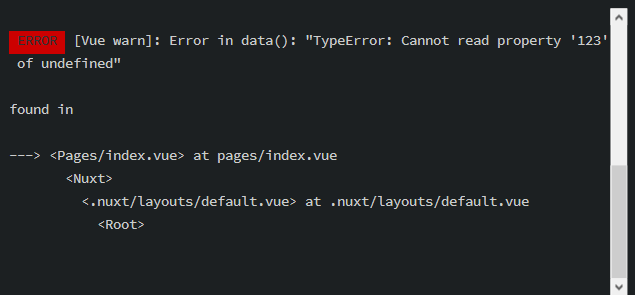
- Looking at the terminal too, the information emitted does not give any reference to a line number either
What is expected ?
Accurate tracebacks with correct file names, line numbers and file contents.
What is actually happening?
Missing tracebacks, confusing file names and line numbers.
Additional comments?
I have experimented with various settings for build config.devtool and these do appear to affect what is shown in the traceback, but I couldn't find a value that actually made it work correctly.
If you happen to trigger the error while you have a live frontend open (of force it by setting mode: 'spa'), the browser dev tools are able to find the correct lines in the debugger.
 philipmountifield
All 12 comments
Thanks for your contribution to Nuxt.js!
This issue has been automatically marked as stale because it has not had recent activity. It will be closed if no further activity occurs.
If you would like this issue to remain open:
- Verify that you can still reproduce the issue in the latest version of nuxt-edge
- Comment the steps to reproduce it
Issues that are labeled as pending will not be automatically marked as stale.
![stale[bot] picture](https://avatars3.githubusercontent.com/in/1724?v=4&s=40) stale[bot]
on 30 Nov 2019
stale[bot]
on 30 Nov 2019
Still awaiting response.
philipmountifield
on 2 Dec 2019
I'm also interested in this. Line numbers for these errors would be mightily helpful.
 mkstix6
on 2 Dec 2019
mkstix6
on 2 Dec 2019
Thanks for your contribution to Nuxt.js!
This issue has been automatically marked as stale because it has not had recent activity. It will be closed if no further activity occurs.
If you would like this issue to remain open:
- Verify that you can still reproduce the issue in the latest version of nuxt-edge
- Comment the steps to reproduce it
Issues that are labeled as pending will not be automatically marked as stale.
stale[bot]
on 1 Jan 2020
Still awaiting response.
philipmountifield
on 1 Jan 2020
Given the bug report is provided with full details, and a clean reproduction link, it's quite disappointing that there has been absolutely no comment from the developers whatsoever.
philipmountifield
on 1 Jan 2020
Any update on this?
 absalan
on 8 Mar 2020
absalan
on 8 Mar 2020
Very necessary, I'm very lost searching in all my files after a migration from Pure Vue to Nuxt.
 jonalxh
on 6 Jun 2020
jonalxh
on 6 Jun 2020
Yes, just yesterday I guided someone new to the project through an error in asyncData(). They are an experienced developer but new to Nuxt.
It was a simple enough error, an axios XHR request had 404’d, but they only had:
NuxtServerError
Request failed with status code 404.
Missing stack frames
…and a trace that only references files and line numbers from Nuxt internal processes.

Without a file and line number next to “Request failed with status code 404” they were understandably lost and frustrated.
_I love using Nuxt and what it gives me, thank you team, but it’s hard to defend it when developers run into this so early in their experience._
Using Nuxt v2.10.2
mkstix6
on 6 Jun 2020
Hi all. I can understand how much frustration it sometimes brings when stack traces are not available. The first issue will be improved by #7463. @mkstix6 Axios HTTP request traces are unfortunately not traceable because of how it throws the error. I will try to find a solution for it meanwhile any contribution to improvement is more than welcome :)
 pi0
on 6 Jun 2020
pi0
on 6 Jun 2020
I would love to see debugging a bit improved. Often I experience a bug, and get the "Missing stack frames" error. The trace in the console points to a minified file, so I have no idea where to start debugging.
 simplenotezy
on 5 Aug 2020
simplenotezy
on 5 Aug 2020
Same here.

Now i'm searching which products is undefined exactly.
 Warxcell
on 29 Sep 2020
Warxcell
on 29 Sep 2020
Related issues
 mattdharmon
·
3Comments
mattdharmon
·
3Comments
 bimohxh
·
3Comments
bimohxh
·
3Comments
 shyamchandranmec
·
3Comments
shyamchandranmec
·
3Comments
 maicong
·
3Comments
maicong
·
3Comments
 o-alexandrov
·
3Comments
o-alexandrov
·
3Comments