Nuxt.js: Nuxt + Vuetify production mode loading css late
Version
Reproduction link
https://github.com/amritk/vuetify-nuxt-repro
Steps to reproduce
Grab the repo, build and run in production mode. Make sure to have the network tab open to disable cache. You can see as you refresh that some vuetify styles load late and the elements change.
What is expected ?
There should be no jump in style as they should be loaded already from nuxt SSR.
What is actually happening?
The styles seem to be loaded via javascript so you can see the elements jump.
Additional comments?
I have also tested this with the latest vuetify 2 beta, the problem still occurs. As I wasn't sure if this was a vuetify or nuxt bug I did post it there as well.
 amritk
All 12 comments
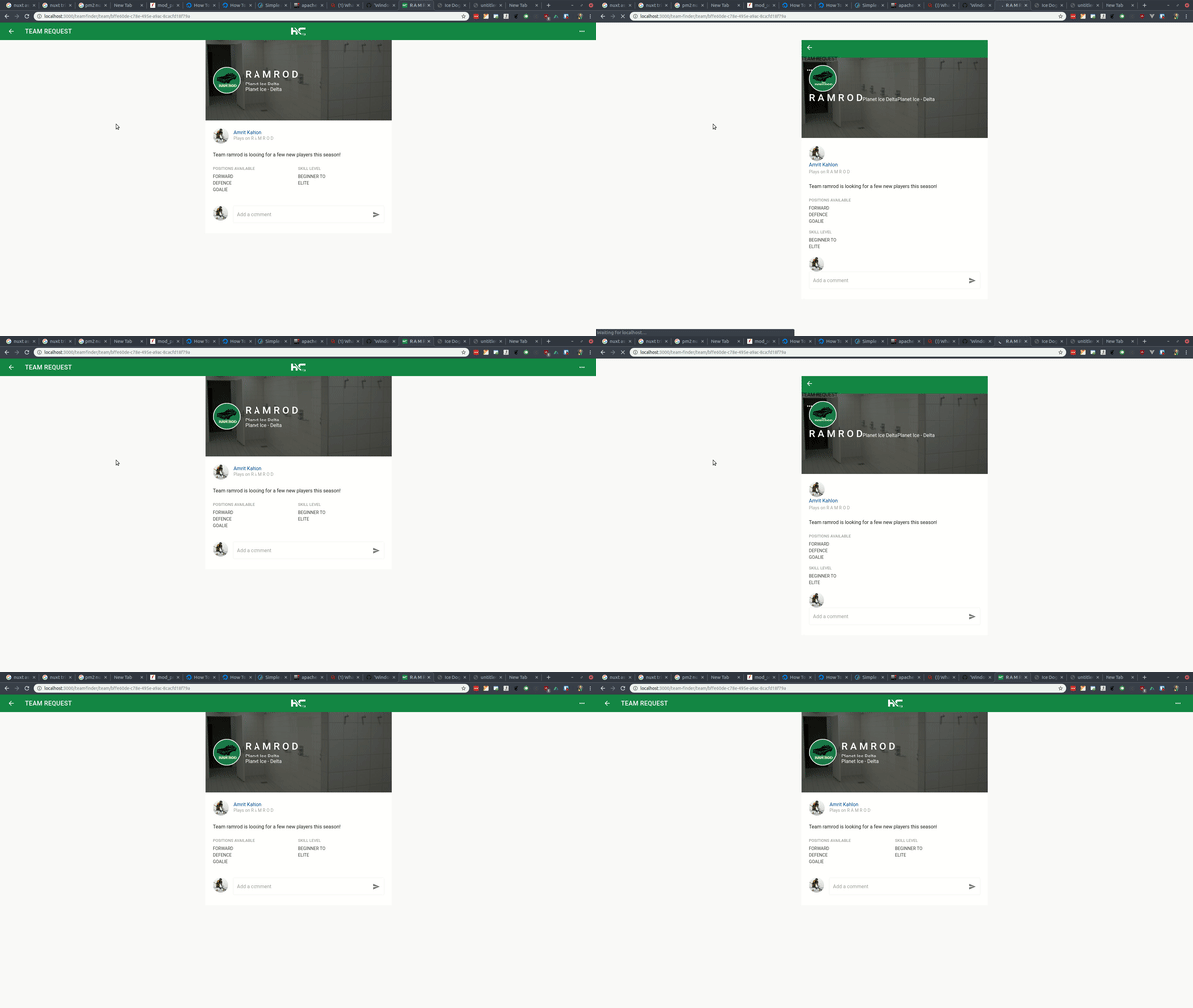
Here is a gif of what happens on my app I'm trying to take to production.
amritk
on 21 Jun 2019
As you can see here, there are a few style blocks that are added on the client but are not there on the server. How do I ensure these styles are loaded on the server?
Server:

Client:

amritk
on 26 Jun 2019
I've found a lot of CSS packages only work with nuxt in 'spa' mode that you can edit in the nuxt config, if you can isolate the components in question you can also wrap them in the <no-ssr></no-ssr> tag. This was the case with bootstrap among others
 edmundpf
on 26 Jun 2019
edmundpf
on 26 Jun 2019
hey @edmundpf thats good for when a component is breaking on the server side. My problem however is the opposite: styles are missing server side that should be there. I'm not sure how to configure nuxt to show these styles.
amritk
on 26 Jun 2019
Alright its the v-layout styles loading late. Any way I can pre-load them somehow?
amritk
on 27 Jun 2019
Closing as this is a vuetify issue
amritk
on 27 Jun 2019
Hello, @amritk! Have you solved the problem?
 mojereliev
on 9 Sep 2020
mojereliev
on 9 Sep 2020
Sorry I can't remember what fixed it! Are you using @nuxtjs/vuetify ?
amritk
on 10 Sep 2020
Yes, i am use @nuxtjs/vuetify.
registerStylesSSR do not helped me
https://gist.github.com/adrienbaron/ca34e89bdcc939278c3bfb5f9660908b
I am just used extractCss it is solve the problem.
mojereliev
on 10 Sep 2020
@mojereliev doesn't solve the problem 😪
 DanLowo
on 14 Sep 2020
DanLowo
on 14 Sep 2020
Sorry I can't for the life of me remember what it was that solved this specific issue. I still have the issue of the toolbar changing colour though which is sort of related.
amritk
on 28 Sep 2020
I've found a way to solve it...
I added vuetify style CDN ( https://cdn.jsdelivr.net/npm/[email protected]/dist/vuetify.min.css ) inside the nuxt.config.js head, as an external CSS link..
The page now loads properly..
DanLowo
on 29 Sep 2020
Related issues
 vadimsg
·
3Comments
vadimsg
·
3Comments
 pehbehbeh
·
3Comments
vadimsg
·
3Comments
pehbehbeh
·
3Comments
vadimsg
·
3Comments
 mikekidder
·
3Comments
mikekidder
·
3Comments
 uptownhr
·
3Comments
uptownhr
·
3Comments