Nuxt.js: Computed Property this IntelliSense broken
Version
Reproduction link
https://github.com/stefnotch/temp-nuxt-starter-app
Steps to reproduce
1) Create a new Nuxt project
2) Optionally upgrade nuxt to version v2.6.1
3) Type the following in a component
computed: {
    test() {
      return "" + this. // HERE!!
    }
}
Alternatively, clone the repo and take a look at index.vue
What is expected ?
Various IntelliSense suggestions such as this.$data, this.$emit, this.$nuxt should show up
What is actually happening?
None of them show up
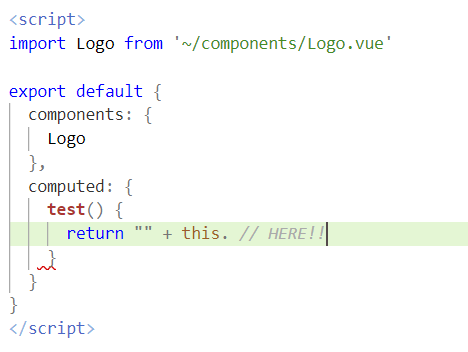
This doesn't work either:
    test2: function( ) {
      return "" + this. // HERE!!
    }
Additional comments?
In methods: { someMethod() {} }, the IntelliSense for this works as expected.
I also have issues with this.$router not showing up in the methods: {}, but that's a different issue.
 stefnotch
All 18 comments
Adding a tsconfig.json might fix it.
Edit: I was wrong about this.
stefnotch
on 12 Apr 2019
Have you solved it?
 njzydark
on 15 Apr 2019
njzydark
on 15 Apr 2019
@0njzy0 I took a look at it again, npm install vue seems to solve the issue.
stefnotch
on 15 Apr 2019
@stefnotch vue should be already installed as nuxt needs it 🤔
 manniL
on 15 Apr 2019
manniL
on 15 Apr 2019
@manniL I know. It might be a Vetur bug where Vetur only looks at the package.json to figure out which packages have been installed.
stefnotch
on 15 Apr 2019
The auto completion or IntelliSense works fine when I follow the steps below.
- I need
npm i vue,so the package.json will have a vue dependency - The vue file can't contain custom attributes or properties unique to nuxt such as layout,fetch,asyncData...
This is a example that works fine.
njzydark
on 17 Apr 2019
Sounds like quite a bug then.
The vue file can't contain custom attributes or properties unique to nuxt such as layout,fetch,asyncData...
One rather interesting point here is that I can get them to autocomplete, however when turning checkJs on, it shows an error.

@0njzy0 By the way, does this.$nuxt work for you? (It works for me)
stefnotch
on 17 Apr 2019
I extracted the files in node_modules/@nuxt/vue-app/types and placed them in nuxt.d.ts below the root path of the project. The IntelliSense works fine.
Because I don't know much about typescript, I don't know the specific reason.

njzydark
on 18 Apr 2019
@stefnotch I think it's Vetur issue which needs vue to be in root package.json.
Unless you switch to TypeScript, I don't really know what are the workarounds.
 kevinmarrec
on 18 Apr 2019
kevinmarrec
on 18 Apr 2019
@kevinmarrec Would it be a good idea to open an issue on the Vetur issue tracker then?
stefnotch
on 18 Apr 2019
I have opened an issue in Vetur.In Nuxt project,Auto completion/IntelliSense is not working properly
njzydark
on 18 Apr 2019
I think Vetur is providing Auto completion / IntelliSense without readading Vue typings, it's probably bound to the extension core. So i'm afraid you'll not be able to have everything working with Nuxt.
EDIT : Unless you want tro give a try to TypeScript, you'll also be able to have type checking this way.
kevinmarrec
on 18 Apr 2019
I think Vetur is providing Auto completion / IntelliSense without readading Vue typings, it's probably bound to the extension core. So i'm afraid you'll not be able to have everything working with Nuxt.
EDIT : Unless you want tro give a try to TypeScript, you'll also be able to have type checking this way.
I have a question, why when I extract the contents of node_modules/@nuxt/vue-app/types into a separate .d.ts file, the IntelliSense works fine. But the default does not work.
This is my modified, the nuxt.d.ts in root directory is what I extracted from it.Everything working.
njzydark
on 19 Apr 2019
@0njzy0 Oh alright I think I got it.
It's cause Vetur is using TypeScript services behind the scenes, and they must somehow tell to look for Vue types by default.
In a Nuxt TypeScript project, we need to explictly tell to look for @nuxt/vue-app types through a tsconfig.json.
So I guess you might need a tsconfig.json anyway so Vetur read it to resolve types, even if you do not use TypeScript.
kevinmarrec
on 19 Apr 2019
Thanks for your contribution to Nuxt.js!
This issue has been automatically marked as stale because it has not had recent activity. It will be closed if no further activity occurs.
If you would like this issue to remain open:
- Verify that you can still reproduce the issue in the latest version of nuxt-edge
- Comment the steps to reproduce it
Issues that are labeled as pending will not be automatically marked as stale.
![stale[bot] picture](https://avatars3.githubusercontent.com/in/1724?v=4&s=40) stale[bot]
on 10 May 2019
stale[bot]
on 10 May 2019
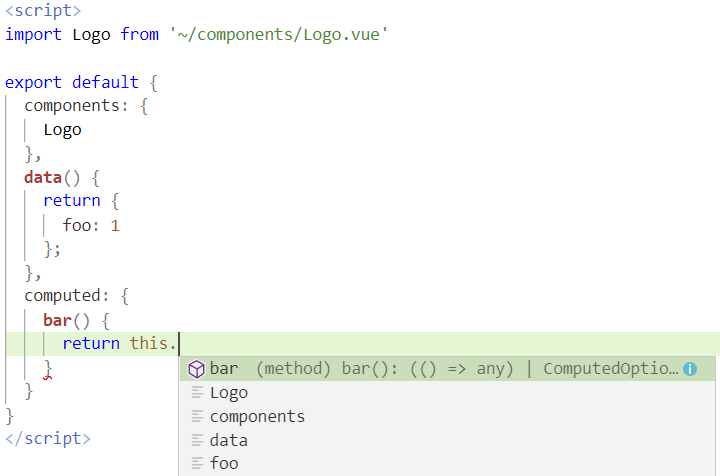
I can still reproduce this issue.
- Create a new Nuxt app
- Switch to nuxt-edge
- Type the following in a component
data() {
    return {
      foo: 1
    };
  },
  computed: {
    bar() {
      return this. // Put cursor here
    }
  }
CTRL+Spaceto open the autocomplete popup.
stefnotch
on 10 May 2019
Thanks for your contribution to Nuxt.js!
This issue has been automatically marked as stale because it has not had recent activity. It will be closed if no further activity occurs.
If you would like this issue to remain open:
- Verify that you can still reproduce the issue in the latest version of nuxt-edge
- Comment the steps to reproduce it
Issues that are labeled as pending will not be automatically marked as stale.
stale[bot]
on 31 May 2019
It appears that this issue does not exist anymore. As such, I can close it.
stefnotch
on 31 May 2019
Related issues
 vadimsg
·
3Comments
vadimsg
·
3Comments
vadimsg
·
3Comments
vadimsg
·
3Comments
 gary149
·
3Comments
gary149
·
3Comments
 lazycrazy
·
3Comments
lazycrazy
·
3Comments
 msudgh
·
3Comments
msudgh
·
3Comments