Version
Reproduction link
https://jsfiddle.net/a5skrmo2
https://codesandbox.io/s/kmjo3j09rr
Steps to reproduce
in layouts/default.vue, I try to use v-cloak to show loading spinner before app is ready. v-cloak works well in vue app, but it doesn't work in nuxt app.
<template>
  <div v-cloak>
    <nuxt />
  </div>
</template>
<style>

[v-cloak]>* {
    display: none !important;
}

[v-cloak]::before {
    content: " ";
    display: block !important;
    width: 16px;
    height: 16px;
    background-image: url('data:image/gif;base64,R0lGODlhEAAQAPIAAP///wAAAMLCwkJCQgAAAGJiYoKCgpKSkiH/C05FVFNDQVBFMi4wAwEAAAAh/hpDcmVhdGVkIHdpdGggYWpheGxvYWQuaW5mbwAh+QQJCgAAACwAAAAAEAAQAAADMwi63P4wyklrE2MIOggZnAdOmGYJRbExwroUmcG2LmDEwnHQLVsYOd2mBzkYDAdKa+dIAAAh+QQJCgAAACwAAAAAEAAQAAADNAi63P5OjCEgG4QMu7DmikRxQlFUYDEZIGBMRVsaqHwctXXf7WEYB4Ag1xjihkMZsiUkKhIAIfkECQoAAAAsAAAAABAAEAAAAzYIujIjK8pByJDMlFYvBoVjHA70GU7xSUJhmKtwHPAKzLO9HMaoKwJZ7Rf8AYPDDzKpZBqfvwQAIfkECQoAAAAsAAAAABAAEAAAAzMIumIlK8oyhpHsnFZfhYumCYUhDAQxRIdhHBGqRoKw0R8DYlJd8z0fMDgsGo/IpHI5TAAAIfkECQoAAAAsAAAAABAAEAAAAzIIunInK0rnZBTwGPNMgQwmdsNgXGJUlIWEuR5oWUIpz8pAEAMe6TwfwyYsGo/IpFKSAAAh+QQJCgAAACwAAAAAEAAQAAADMwi6IMKQORfjdOe82p4wGccc4CEuQradylesojEMBgsUc2G7sDX3lQGBMLAJibufbSlKAAAh+QQJCgAAACwAAAAAEAAQAAADMgi63P7wCRHZnFVdmgHu2nFwlWCI3WGc3TSWhUFGxTAUkGCbtgENBMJAEJsxgMLWzpEAACH5BAkKAAAALAAAAAAQABAAAAMyCLrc/jDKSatlQtScKdceCAjDII7HcQ4EMTCpyrCuUBjCYRgHVtqlAiB1YhiCnlsRkAAAOwAAAAAAAAAAAA==');
}
</style>
What is expected ?
loading spinner shows before vue ready.
What is actually happening?
it show page content instead of loading spinner.
 TonyLuo
All 7 comments
Please see: https://nuxtjs.org/api/configuration-loading-indicator
For a custom spinner, you can set this property to the path of a custom HTML.
 pi0
on 27 Mar 2019
pi0
on 27 Mar 2019
thanks for reply. but the loading indicator only work under "spa" mode. what about "universal" mode?
TonyLuo
on 27 Mar 2019
I'm also having these problem in universal mode.
 MarioC3
on 3 Apr 2019
MarioC3
on 3 Apr 2019
@TonyLuo @MarioC3 v-cloak gets removed during the template compilation by vue-server-renderer if I am not mistaken.
Since you are in universal mode you can put a loading indicator simply in the markup and on 'mounted` you can remove it with a v-if.
But you need to do this page by page and not in layout (or in a dedicated component)
I made a codesanbox with a basic example https://codesandbox.io/s/m7znzwvj8x
 DonNicoJs
on 14 Apr 2019
DonNicoJs
on 14 Apr 2019
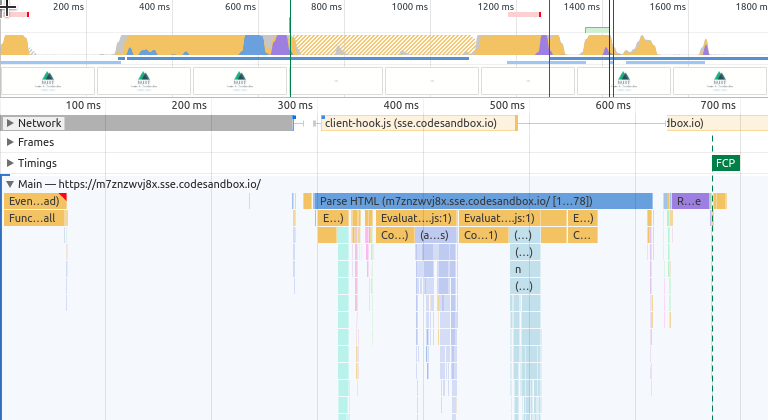
The entire point of using SSR is reducing the first contentful paint time. Adding a loading overlay to SSR is not really a good idea.
pi0
on 14 Apr 2019
@pi0 I agree 200% with you, I was just pointing out how to achieve the desired behaviour :) also i used v-if but v-show would be better allowing the ssr renderer to render the full subtree
DonNicoJs
on 15 Apr 2019
thanks @DonNicoJs
TonyLuo
on 15 Apr 2019
Related issues
 vadimsg
·
3Comments
vadimsg
·
3Comments
 shyamchandranmec
·
3Comments
vadimsg
·
3Comments
shyamchandranmec
·
3Comments
vadimsg
·
3Comments
 bimohxh
·
3Comments
bimohxh
·
3Comments
 msudgh
·
3Comments
msudgh
·
3Comments
Most helpful comment
@pi0 I agree 200% with you, I was just pointing out how to achieve the desired behaviour :) also i used v-if but v-show would be better allowing the ssr renderer to render the full subtree