Version
Reproduction link
Steps to reproduce
Run: yarn create nuxt-app project
Choose Linter and JestJs and SPA mode.
Without adding any additional content, run yarn test
What is expected ?
I expect the default test to pass.
What is actually happening?
I receive this error message:
yarn run v1.13.0
$ jest
 FAIL  test/Logo.spec.js
  ● Test suite failed to run

    Jest encountered an unexpected token

    This usually means that you are trying to import a file which Jest cannot parse, e.g. it's not plain JavaScript.

    By default, if Jest sees a Babel config, it will use that to transform your files, ignoring "node_modules".

    Here's what you can do:
     • To have some of your "node_modules" files transformed, you can specify a custom "transformIgnorePatterns" in your config.
     • If you need a custom transformation specify a "transform" option in your config.
     • If you simply want to mock your non-JS modules (e.g. binary assets) you can stub them out with the "moduleNameMapper" config option.

    You'll find more details and examples of these config options in the docs:
    https://jestjs.io/docs/en/configuration.html

    Details:

    /home/begueradj/Development/project/test/Logo.spec.js:1
    ({"Object.<anonymous>":function(module,exports,require,__dirname,__filename,global,jest){import { mount } from '@vue/test-utils';
                                                                                                    ^

    SyntaxError: Unexpected token {

      at ScriptTransformer._transformAndBuildScript (node_modules/jest-runtime/build/script_transformer.js:403:17)

Test Suites: 1 failed, 1 total
Tests:       0 total
Snapshots:   0 total
Time:        0.803s
Ran all test suites.
error Command failed with exit code 1.
info Visit https://yarnpkg.com/en/docs/cli/run for documentation about this command.
Note
This occurs only when I move the content of project to an other folder where of course I remove node_modes and .nuxt folders.
I need to copy the content of the generate folder to an other place because I am working with Git branches
 begueradj
All 20 comments
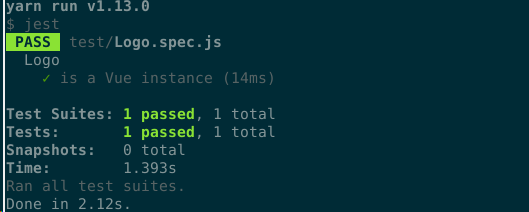
Can't reproduce
yarn create nuxt-app projectname- Select Linter
- Select Jest
- Select SPA
- Wait for the app generation
- Run
yarn test
7.
 manniL
on 30 Jan 2019
manniL
on 30 Jan 2019
Yes, you did not reproduce the issue because you did not perform the step I mentioned in the note :) But I found a solution for this issue by adding babel-preset-env. Thank you for trying to investigate the problem though @manniL
begueradj
on 30 Jan 2019
@begueradj could you elaborate? I have the same problem you are seeing.
@manniL is there something I'm missing?
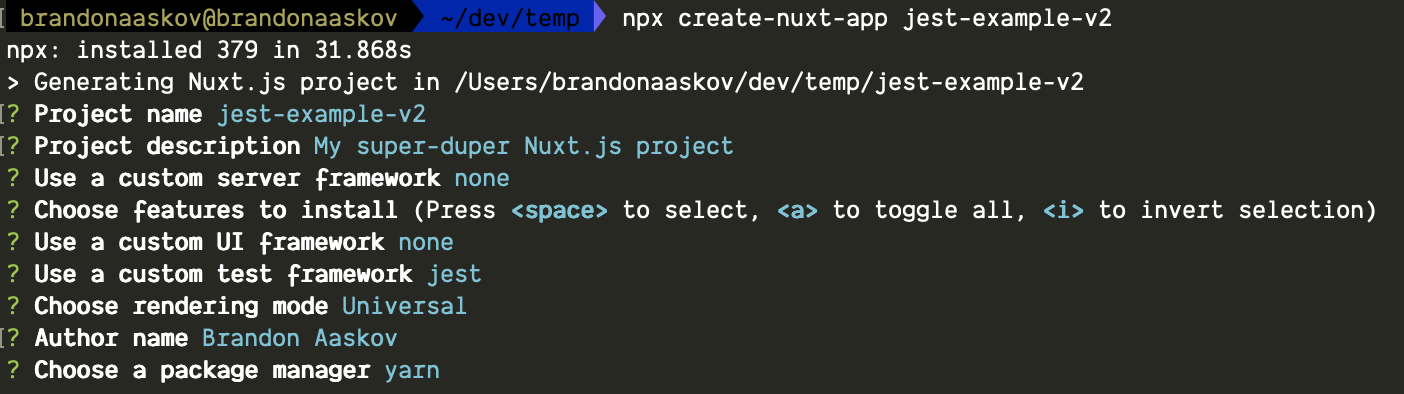
I run npx create-nuxt-app my-app-name, and after choosing my setup options, I immediately run yarn test and it fails.
Proof here (albeit a boring video): https://cl.ly/50d8c8f90d8b
 brandonaaskov
on 5 Mar 2019
brandonaaskov
on 5 Mar 2019
@brandonaaskov Interesting. Can you reproduce it without choosing a server framework?
manniL
on 7 Mar 2019
@brandonaaskov can you try again, there was a release of CNA that could fix it..
 aldarund
on 8 Mar 2019
aldarund
on 8 Mar 2019
@manniL I tried again with the same settings, got the same error. I also tried with the most basic settings and the tests still won't run due to the same problem.
@aldarund I guess that didn't fix it :sadpanda:
brandonaaskov
on 8 Mar 2019
same\similar problem https://github.com/nuxt/nuxt.js/issues/5142
aldarund
on 8 Mar 2019
@manniL so this is interesting... I tested this on my PC and it worked fine. So it just seems to not work in *nix based environments?

Any chance we can re-open this?
brandonaaskov
on 8 Mar 2019
@brandonaaskov does it work on codesandbox?
aldarund
on 8 Mar 2019
@aldarund the tests don't run at all on Codesandbox. Here's the same codebase that create-nuxt-app generated, imported into Codesandbox: https://codesandbox.io/s/github/brandonaaskov/jest-example
brandonaaskov
on 8 Mar 2019
@brandonaaskov what u mean by dont run at all ? You can run them if u fork it into you account .
I have forked your repo and tried . All fine -> https://i.imgur.com/sVqzoq0.png
aldarund
on 8 Mar 2019
@aldarund I see, I misunderstood how the tests ran in Codesandbox. I was looking at this section and not seeing any output.
Given that we have two instances where this works, any ideas what would cause it to _not_ work on my Mac? I'm running node 10.15.3.
Wondering if other Mac users are seeing this as well, or if it's just a small portion of us. But I've always seen this error so I want to get to the bottom of this if possible to help future travelers.
brandonaaskov
on 8 Mar 2019
@brandonaaskov can you try to update vue-jest to 4beta2 ?
aldarund
on 10 Mar 2019
@aldarund I still see the same error. And I did double check my node_modules/vue-jest/package.json file to make sure that it was actually using the correct version, but alas, I'm still seeing the same.
brandonaaskov
on 10 Mar 2019
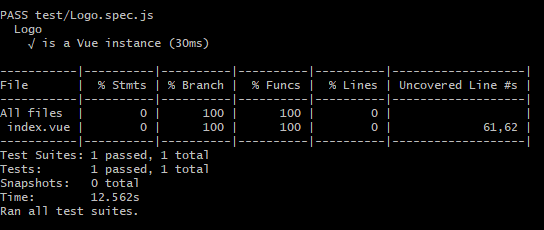
@brandonaaskov, I'm experiencing the same issue when running jest inside a docker container based on the vuejs/ci image.

The test passes when I run it in Git Bash on Windows 10
package.json
{
"name": "my app",
"version": "1.0.0",
"description": "My sensational Nuxt.js project",
"author": "author",
"private": true,
"scripts": {
"lint": "eslint --ext .js,.vue --ignore-path .gitignore .",
"precommit": "npm run lint",
"test": "jest",
"dev": "nuxt",
"build": "nuxt build",
"start": "nuxt start",
"generate": "nuxt generate"
},
"dependencies": {
"@nuxtjs/axios": "^5.3.6",
"@nuxtjs/vuetify": "0.5.5",
"nuxt": "^2.0.0"
},
"devDependencies": {
"@babel/preset-env": "^7.4.5",
"@nuxt/babel-preset-app": "^2.8.1",
"@nuxtjs/eslint-config": "^0.0.1",
"@nuxtjs/eslint-module": "^0.0.1",
"@vue/test-utils": "^1.0.0-beta.27",
"babel-core": "7.0.0-bridge.0",
"babel-eslint": "^10.0.1",
"babel-jest": "^24.1.0",
"eslint": "^5.15.1",
"eslint-config-prettier": "^4.1.0",
"eslint-config-standard": ">=12.0.0",
"eslint-plugin-import": ">=2.16.0",
"eslint-plugin-jest": ">=22.3.0",
"eslint-plugin-node": ">=8.0.1",
"eslint-plugin-nuxt": ">=0.4.2",
"eslint-plugin-prettier": "^3.0.1",
"eslint-plugin-promise": ">=4.0.1",
"eslint-plugin-standard": ">=4.0.0",
"eslint-plugin-vue": "^5.2.2",
"jest": "^24.1.0",
"nodemon": "^1.18.9",
"prettier": "^1.16.4",
"stylus": "^0.54.5",
"stylus-loader": "^3.0.2",
"vue-jest": "^3.0.3"
}
}
 tylerkoldenjtp
on 22 Jun 2019
tylerkoldenjtp
on 22 Jun 2019
@aldarund I see, I misunderstood how the tests ran in Codesandbox. I was looking at this section and not seeing any output.
Given that we have two instances where this works, any ideas what would cause it to _not_ work on my Mac? I'm running node 10.15.3.
Wondering if other Mac users are seeing this as well, or if it's just a small portion of us. But I've always seen this error so I want to get to the bottom of this if possible to help future travelers.
I'm experiencing same issue on my mac(Mojave). I spend the whole day to fix this problem. .
Can someone explain what's wrong?
 obaidsamadian
on 1 Nov 2019
obaidsamadian
on 1 Nov 2019
@aldarund I still see the same error. And I did double check my
node_modules/vue-jest/package.jsonfile to make sure that it was actually using the correct version, but alas, I'm still seeing the same.
I found the problem, You should add set NODE_ENV to test before running the jest
try this in your package.json file:
"scripts": {
   ....
    "test": "NODE_ENV=test jest"
  },
obaidsamadian
on 1 Nov 2019
@obaidsamadian Im still facing the same problem and your fix doesn't work for me
 hussein661
on 13 Dec 2019
hussein661
on 13 Dec 2019
@obaidsamadian Im still facing the same problem and your fix doesn't work for me
What's your OS?
obaidsamadian
on 17 Dec 2019
Currently getting same problem on windows10.
 mohsenuss91
on 15 Apr 2020
mohsenuss91
on 15 Apr 2020
Related issues
 danieloprado
·
3Comments
danieloprado
·
3Comments
 VincentLoy
·
3Comments
VincentLoy
·
3Comments
 vadimsg
·
3Comments
vadimsg
·
3Comments
 bimohxh
·
3Comments
vadimsg
·
3Comments
bimohxh
·
3Comments
vadimsg
·
3Comments
Most helpful comment
@brandonaaskov, I'm experiencing the same issue when running jest inside a docker container based on the vuejs/ci image.
The test passes when I run it in Git Bash on Windows 10

package.json