Nuxt.js: Missing fs and dgram dependencies after adding mongodb to nuxt project
Version
Reproduction link
https://github.com/dimitor115/e-got/tree/nuxt-bug-reproduction
Steps to reproduce
The only thing you have to do is :
- npm install
- npm run dev
What is expected ?
You will see, that there is a problem with the compilation. There is a lack of two dependencies: 'fs' and 'dgram'.
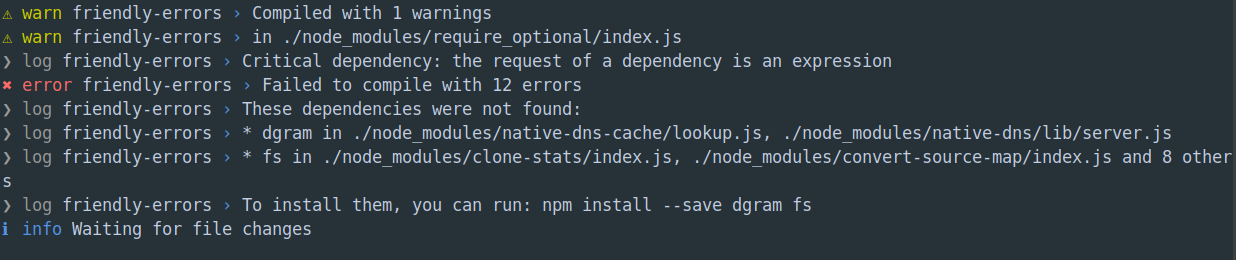
What is actually happening?
I don't know, because as I know fs is a standard node.js library.
Additional comments?
I had an idea to fill my components with data from mongo db before it will be rendered by nuxt and send to browser as HTML.
So I want to use a function which connects to the database and fetch data in asnycData part of the component. However, after adding mongodb package to my project and after importing mongo in my prototype service, I got this compilation errors with lack of 'fs' and 'dgram'
 dimitor115
All 10 comments
Is this your production db URI?
https://github.com/dimitor115/e-got/blob/nuxt-bug-reproduction/server/mongoDB.js#L3
If so, I would immediately remove that repo and take all security precautions before trying to resolve this issue.
 robyedlin
on 6 Jan 2019
robyedlin
on 6 Jan 2019
@robyedlin no it's just my dev db, without any personal or sensitive data and literally empty.
dimitor115
on 6 Jan 2019
You're trying to use the MongoDB lib in a client context.
Try this idiom:
let yourMongoLib
if (process.server) {
  yourMongoLib = require('your-mongo-lib')
}
 galvez
on 6 Jan 2019
galvez
on 6 Jan 2019
@galvez Ok, so probably I misunderstand something. I thought that thanks to server-side rendering I will be able to connect to db a fetch some data just before the component is rendered and send to the client browser.
dimitor115
on 6 Jan 2019
@dimitor115 but that's precisely what it can do.
asyncData() {
  if (process.server) {
    // runs on server
    return {
      // data from server
    }
  }
}
Please read the docs at https://nuxtjs.org/api/
galvez
on 6 Jan 2019
@galvez thanks a lot! It solves my issue. So as you said, this is not a problem with dependencies but I tried to use mongo driver on the client side.
dimitor115
on 6 Jan 2019
Note that connecting to the database only works on the server-side. So in addition to asyncData(), you'll probably want to have a mounted() handler (or $route watcher) to detect when the route has been loaded on the client-side (without SSR). To recap: when the user accesses an endpoint on your site for the 1st time (we call this 1st render), process.server is true and you're able to do those things. But if an endpoint is reached via $router.push('/endpoint') on the client (or <NuxtLink />), there's no SSR for this request and you'll have to do a client API request for the missing DB data. Ideally, you'd setup your code so that both client and server context use the same API, and that server-side API talks to MongoDB. You can streamline this with the help of serverMiddleware.
galvez
on 6 Jan 2019
Yes, it's best practice to set up an API that both client and server can use, so that you get the maximum benefit out of Nuxt SSR. Then you can use axios, apollo, or whatever http tech your API uses on the Nuxt client and server.
robyedlin
on 6 Jan 2019
Thanks, Guys ! To conclude, this idea with fetching data before the component rendering is great when we have to guarantee quick time access, for users with slower internet connection for example. However, to be sure that our page is still up to date with db, we should fetch the data each time mounted() is launched. That's why both fetching should use the same api.
dimitor115
on 7 Jan 2019
Just to be clear, your proposed setup is not typical.
What you should probably do instead is this (https://nuxtjs.org/guide/async-data/#returning-a-promise):
export default {
  asyncData ({ params }) {
    return axios.get(`https://my-api/posts/${params.id}`)
    .then((res) => {
      return { title: res.data.title }
    })
  }
}
It will be called server-side once (on the first request to the Nuxt app) and client-side when navigating to further routes.
I wouldn't run db queries anywhere where you could confuse server for client. Instead, use an API.
This will run on every page load (not just the first load). Then you don't have to worry about process.server and process.client and asyncData vs mounted.
robyedlin
on 7 Jan 2019
Related issues
 pehbehbeh
·
3Comments
pehbehbeh
·
3Comments
 maicong
·
3Comments
maicong
·
3Comments
 vadimsg
·
3Comments
vadimsg
·
3Comments
 msudgh
·
3Comments
msudgh
·
3Comments
 surmon-china
·
3Comments
surmon-china
·
3Comments