Nuxt.js: [REGRESSION] [DOC] fatal error for lang="postcss" for style element
Version
Reproduction link
https://codesandbox.io/s/z291v3355l
Steps to reproduce
- Create a nuxt project with tailwind
- Add
lang="postcss"to a<style>tag - build/generate -> fatal error
What is expected ?
That the project builds
What is actually happening?
ERROR in ./pages/index.vue?vue&type=style&index=0&lang=postcss& (./node_modules/vue-loader/lib??vue-loader-options!./pages/index.vue?vue&type=style&index=0&lang=postcss&) 44:0
Module parse failed: Unexpected token (44:0)
You may need an appropriate loader to handle this file type.
|
|
> .container {
|   min-height: 100vh;
|   display: flex;
 @ ./pages/index.vue?vue&type=style&index=0&lang=postcss& 1:0-129 1:145-148 1:150-276 1:150-276
 @ ./pages/index.vue
 @ ./.nuxt/router.js
 @ ./.nuxt/index.js
 @ ./.nuxt/client.js
 @ multi ./.nuxt/client.js
Additional comments?
In nuxt 1.4 this worked as expected. In nuxt 2.1.0 it does not. However, in nuxt 2.1, setting the lang attribute may not be required in order to use PostCSS. I an still investigating.
My current dependencies are:
 "dependencies": {
    "@nuxtjs/sitemap": "^0.1.1",
    "@sanity/client": "^0.134",
    "nuxt": "^2.1.0"
  },
  "devDependencies": {
    "autoprefixer": "^9.1.5",
    "babel-eslint": "^10.0.1",
    "cross-env": "^5.2.0",
    "eslint": "^5.6.1",
    "eslint-loader": "^2.1.1",
    "eslint-plugin-vue": "^4.7.1",
    "glob-all": "^3.1.0",
    "jest": "^23.6.0",
    "postcss-color-function": "^4.0.1",
    "purgecss-webpack-plugin": "^1.3.1",
    "superagent": "^3.8.3",
    "tailwindcss": "^0.6.6"
  }
 dotnetCarpenter
All 13 comments
Removing lang="postcss" appears to generate the same result in nuxt 2.1 than in 1.4. This bug is a documentation bug.
dotnetCarpenter
on 5 Oct 2018
This bug is a documentation bug.
I take that back.
background-image: url("~/assets/img/efeu576.jpg"); is stripped from the output CSS in nxut 2.1
dotnetCarpenter
on 5 Oct 2018
I have tried to create reduced test case here: https://codesandbox.io/s/k9518vzw53
I removed lang="postcss" in order to get the project to compile.
But this is the first time I use codesandbox and I am not sure if my configuration is in order. But non the less, it highlights the missing background image issue.
See pages/index.vue.
dotnetCarpenter
on 5 Oct 2018
@dotnetCarpenter see release notes for nuxt 2.
Due to css-loader upgradation, use ~assets instead of ~/assets for alias in <url> CSS data type, e.g., background: url("~assets/banner.svg")
https://codesandbox.io/s/m44nlmo278
 aldarund
on 5 Oct 2018
aldarund
on 5 Oct 2018
@aldarund I did read the release notes but I somehow missed this. Thanks!
dotnetCarpenter
on 5 Oct 2018
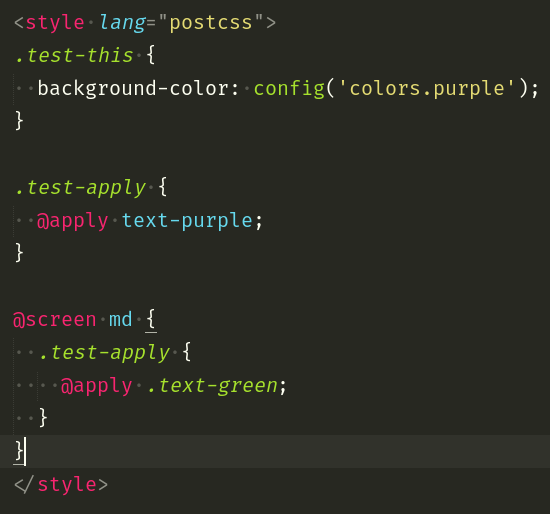
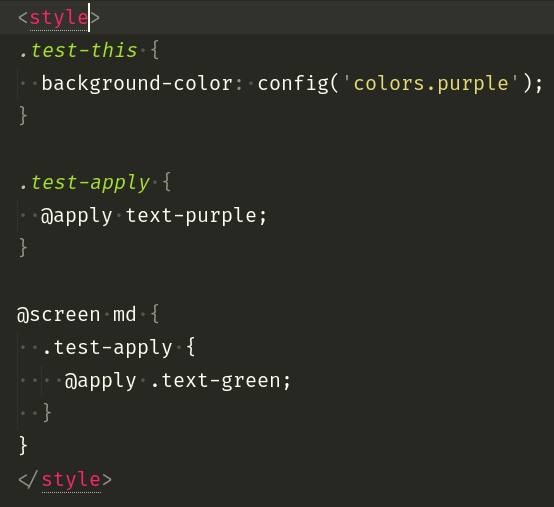
I really need to use lang="postcss" just for highlighting Tailwind. Without it so much pain!!
 thariddler
on 6 Oct 2018
thariddler
on 6 Oct 2018
Hi,
@dotnetCarpenter, @therddlr
I noticed the same bug and I found a temporary fix.
You can consult https://cmty.app/nuxt/nuxt.js/issues/c7861#comment-5bb76725fd6b5100143e8e7b for fix it.
Please let me know if this has helped you or if you need more explanation ;)
Regards.
 neoink
on 6 Oct 2018
neoink
on 6 Oct 2018
@neoink, your solution is not working at all.
Look at my files:
nuxt.config.js
module.exports = {
  /*
  ** Headers of the page
  */
  head: {
    title: 'vue-wordpress',
    meta: [
      { charset: 'utf-8' },
      { name: 'viewport', content: 'width=device-width, initial-scale=1' },
      { hid: 'description', name: 'description', content: 'Vue + Wordpress project' }
    ],
    link: [
      { rel: 'icon', type: 'image/x-icon', href: '/favicon.ico' }
    ]
  },
  /*
  ** Customize the progress bar color
  */
  loading: { color: '#3B8070' },
  /*
  ** Build configuration
  */
  build: {
    extractCSS: true,
    extend: (config) => {
      const svgRule = config.module.rules.find(rule => rule.test.test('.svg'));

      svgRule.test = /\.(png|jpe?g|gif)$/;

      config.module.rules.push({
        test: /\.svg$/,
        oneOf: [
          {
            resourceQuery: /inline/,
            loader: 'vue-svg-loader',
          },
          {
            loader: 'file-loader',
            query: {
              name: 'assets/[name].[hash:8].[ext]',
            },
          },
        ],
      });

      config.module.rules.push({
        test: /.postcss$/,
        use: [
          'vue-style-loader',
          {
            loader: 'css-loader',
            options: {
              modules: false
            },
          },
          {
            loader: 'postcss-loader',
            options: {
              plugins: (loader) => [
                require('postcss-preset-env')({
                  stage: 3,
                  features: {
                    'nesting-rules': true
                  }
                })
              ]
            }
          },
        ],
      });
    },
    postcss: [
      require('postcss-preset-env')({
        stage: 3,
        features: {
          'nesting-rules': true
        }
      }),
    ],
    /*
    ** Run ESLint on save
    */
    // extend (config, { isDev, isClient }) {
    //   if (isDev && isClient) {
    //     config.module.rules.push({
    //       enforce: 'pre',
    //       test: /\.(js|vue)$/,
    //       loader: 'eslint-loader',
    //       exclude: /(node_modules)/
    //     })
    //   }
    // }
  },
  modules: [
    '@nuxtjs/axios',
  ],
  css: [
    '~assets/fonts/Directo/directo.css'
  ]
}
someComponent.vue
<template>
    <span class="label-field">
        <label class="label label_block">{{ name }}</label>
        <slot></slot>
    </span>
</template>

<script>
export default {
    props: {
        name: String
    }
}
</script>

<style lang="postcss">
.label-field {
    display: inline-block;
}

.label {
    font-family: 'Directo', sans-serif;
    font-size: 12px;
    font-weight: bold;
    text-transform: uppercase;

    &_block {
        display: block;
        margin-bottom: 5px;
    }
}


</style>
Instead of compiling styles to .label and .label_block it compiles it to:
.label {
    font-family: 'Directo', sans-serif;
    font-size: 12px;
    font-weight: bold;
    text-transform: uppercase;
    &_block {: ;
    display: block;
    margin-bottom: 5px;
    }: ;
 Defite
on 7 Oct 2018
Defite
on 7 Oct 2018
@Defite
Personally, I use postcss-nested dependency instead of nesting-rules feature. My .postcssrc.js file below :
const cssVar = require('./client/assets/config/config_global.js');

module.exports = {
  plugins: [
    require('postcss-preset-env')({
      importFrom: cssVar,
      preserve: false,
      browsers: 'last 4 versions',
    }),
    require('postcss-nested')(),
    require('css-mqpacker')(),
  ],
};
@neoink yeah, thx. I've found that I misunderstood the meaning if nesting-rules. Now everything is fine.
Defite
on 8 Oct 2018
As the original issue is solved I'll close it. If you have similar problems or ideas, please open up a new issue for a better and trackability :relaxed:
To sum it up: You don't need to (and should not) use lang="postcss".
 manniL
on 13 Oct 2018
manniL
on 13 Oct 2018
Hi,
For those who want to support lang="postcss" in your vscode, I found a better solution that mine. My fix break the extractCSS feature.
https://qiita.com/karszawa/items/96a9156936fba129cff0
Regards.
neoink
on 23 Oct 2018
This thread has been automatically locked since there has not been any recent activity after it was closed. Please open a new issue for related bugs.
![lock[bot] picture](https://avatars1.githubusercontent.com/in/6672?v=4&s=40) lock[bot]
on 22 Nov 2018
lock[bot]
on 22 Nov 2018
Related issues
 maicong
·
3Comments
maicong
·
3Comments
 uptownhr
·
3Comments
uptownhr
·
3Comments
 lazycrazy
·
3Comments
lazycrazy
·
3Comments
 surmon-china
·
3Comments
surmon-china
·
3Comments
 vadimsg
·
3Comments
vadimsg
·
3Comments
Most helpful comment
As the original issue is solved I'll close it. If you have similar problems or ideas, please open up a new issue for a better and trackability :relaxed:
To sum it up: You don't need to (and should not) use
lang="postcss".