Nuxt.js: Console errors don't disappear after fixing
Version
Reproduction link
http://localhost:3000
Steps to reproduce
Follow the instructions in nuxt.js repo README.md:
1) yarn add nuxt
2) add scripts: {"nuxt": "nuxt"} to package.json
3) add file pages/index.vue with content
<script>
export default {
}
</script>
4) yarn run nuxt
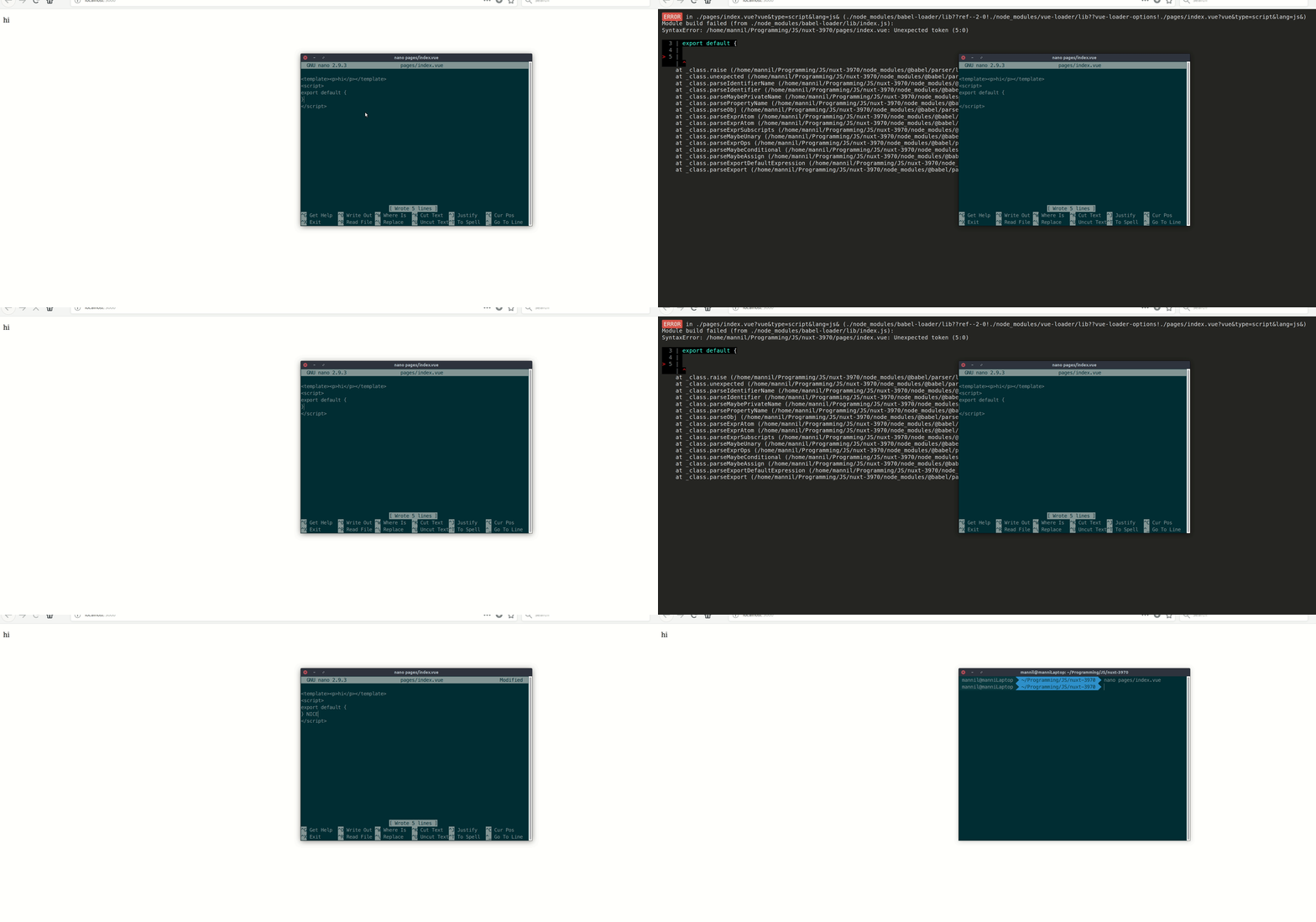
Then try to remove } in pages/index.vue. You will see error in terminal. After return } back, error in terminal not disappear and HMR will cease work.
What is expected ?
Nuxt should see that i fix error and show success inscription.
What is actually happening?
Error stay
 romikzo
All 21 comments
~Can not reproduce.~
 manniL
on 26 Sep 2018
manniL
on 26 Sep 2018
manniL
on 26 Sep 2018
Error in terminal disappear too?
romikzo
on 27 Sep 2018
Look at the console: https://glitch.com/edit/#!/join/bec57521-10a6-419d-9a08-3cc694b58de0
romikzo
on 27 Sep 2018
Ah, gotcha. The error will stay in console.
This is only a visual bug though as HMR will continue to work (as shown in the GIF)
manniL
on 27 Sep 2018
Same issue, reported here:
https://stackoverflow.com/questions/52715349/linter-eslint-keep-errors-after-fix-them-in-nuxt-app
It looks like you can keep working, but for newcomers users it's very confusing
 baumannzone
on 9 Oct 2018
baumannzone
on 9 Oct 2018
Yea, same issue happens to me also. It's really annoying, because in terminal you normally check if everything is compiled correctly.
 gapipro
on 10 Oct 2018
gapipro
on 10 Oct 2018
same issue, the last eslint error message not auto remove when I fixed for eslint.
 zlzdp
on 20 Oct 2018
zlzdp
on 20 Oct 2018
Thanks for your contribution to Nuxt.js!
This issue has been automatically marked as stale because it has not had recent activity. It will be closed if no further activity occurs.
If you would like this issue to remain open:
- Verify that you can still reproduce the issue in the latest version of nuxt-edge
- Comment the steps to reproduce it
Issues that are labeled as 🕐Pending will not be automatically marked as stale.
![stale[bot] picture](https://avatars3.githubusercontent.com/in/1724?v=4&s=40) stale[bot]
on 25 Nov 2018
stale[bot]
on 25 Nov 2018
There is no screen clearing anymore ;)
https://github.com/nuxt/webpackbar/releases
manniL
on 25 Nov 2018
@manniL Can you elaborate how that update affects this issue? I tried using Nuxt 2.32 in spa-mode and get "compiled successfully" regardless of any errors in my files. Do I need to adjust my config?
 evry-johber
on 25 Nov 2018
evry-johber
on 25 Nov 2018

Errors will be clearly shown but there is no screen clear anymore ;)
manniL
on 25 Nov 2018
@manniL I see, thanks for elaborating. This is my current result in spa-mode:

evry-johber
on 25 Nov 2018
@evry-johber That's strange :thinking: Could you open an issue for webpackbar here? Please include your editor and as much info as possible :relaxed:
manniL
on 25 Nov 2018
@manniL Sure, I'll see what I can do to create a minimal reproducible example
evry-johber
on 25 Nov 2018
@manniL Hmm, did a fresh npx create-nuxt-app, did the very same change as you did in universal mode, and still no error reported. I'm using Node 10.13 on Windows 10. Should be enough to add eslint in the create-nuxt-app wizard, right?
evry-johber
on 25 Nov 2018
@evry-johber That should even work without eslint as a component couldn't be found while building :thinking:
manniL
on 25 Nov 2018
@manniL It seems to work fine after a reboot :) Is there any way to capture more errors in the output window? For example, if I change components: { Logo } to components: { Logo123 }, it still compiles successfully, despite having eslint enabled.
evry-johber
on 25 Nov 2018
Sure. Make your eslint-config more strict ;)

I'd suggest our setup (https://github.com/nuxt/eslint-config)
Prod example: https://github.com/manniL/lichter.io/blob/master/.eslintrc.js
manniL
on 25 Nov 2018
@manniL Aaah, thank you!!
evry-johber
on 25 Nov 2018
This thread has been automatically locked since there has not been any recent activity after it was closed. Please open a new issue for related bugs.
![lock[bot] picture](https://avatars1.githubusercontent.com/in/6672?v=4&s=40) lock[bot]
on 26 Dec 2018
lock[bot]
on 26 Dec 2018
Related issues
 vadimsg
·
3Comments
vadimsg
·
3Comments
 shyamchandranmec
·
3Comments
vadimsg
·
3Comments
shyamchandranmec
·
3Comments
vadimsg
·
3Comments
 pehbehbeh
·
3Comments
pehbehbeh
·
3Comments
 mattdharmon
·
3Comments
mattdharmon
·
3Comments
Most helpful comment
Yea, same issue happens to me also. It's really annoying, because in terminal you normally check if everything is compiled correctly.