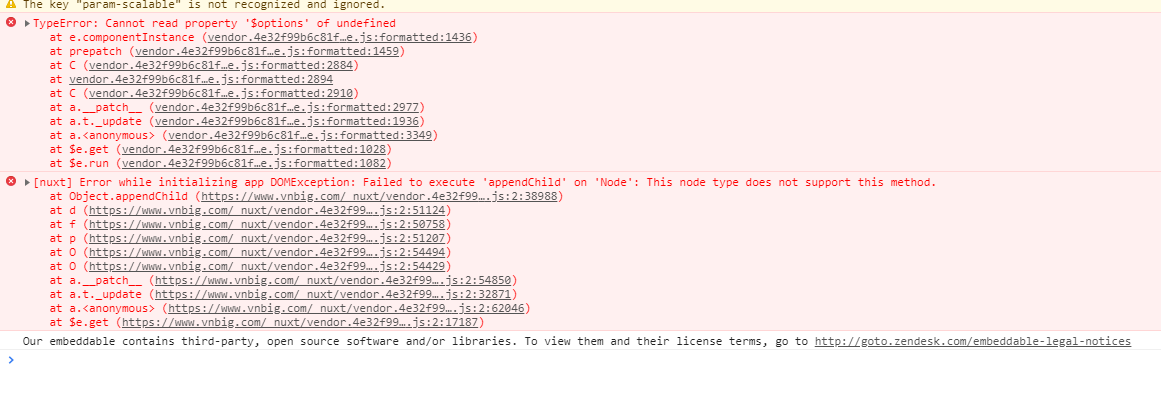
Nuxt.js: TypeError: Cannot read property '$options' of undefined
Version
v1.3.0
Reproduction link
Steps to reproduce
Page refreshed multiple times, code reported error
What is expected ?
Page refreshed multiple times, code reported error
What is actually happening?
expect the event to work

 tansj526
All 6 comments
Could you provide code or a reproduction repo please? :relaxed:
 manniL
on 15 Aug 2018
manniL
on 15 Aug 2018
Nuxt Version
1.4.2
Issue Description
Working on my first Vue project, I have just run into a similar issue.
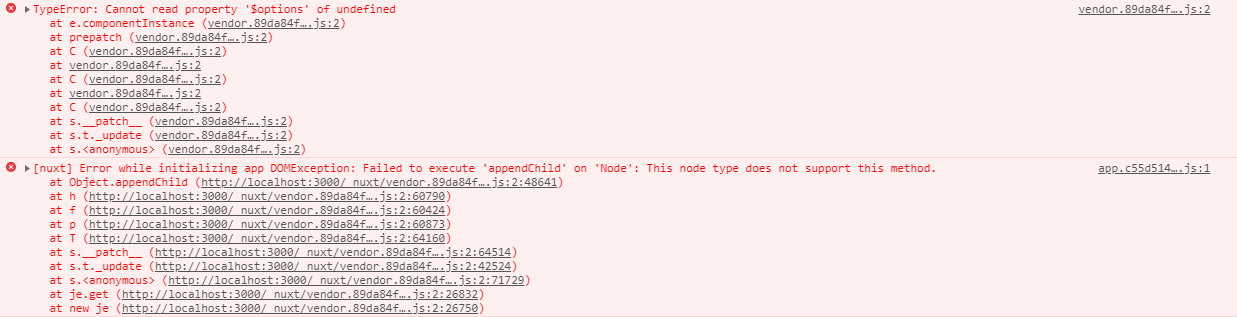
Oddly, the issue only appears when I use my static app generated with npm run generate. It works fine when I use npm run dev.
I investigated it and found the cause in my case. I will explain it in detail so @tansj526 has a chance to potentially track down their own issue.
Firstly, the problem appeared suddenly, so I did the obvious and reverted the changes of my latest commit. And indeed that fixed it. The changes were:
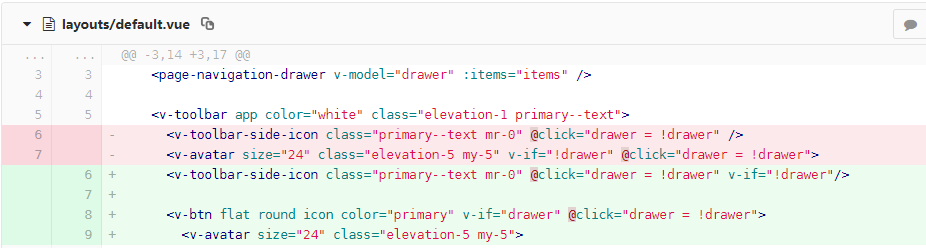
So everything pointed to the added v-if directive. Indeed, removing the second v-if directive on either component fixes it.
The special bit about the drawer variable is that it is initialised with a vuex value:
js
 data () {
    return {
      drawer: !!this.$store.state.drawer.visible
      ...
So I made it a non-vuex variable:
js
drawer: false
...and again it worked, with both v-ifs present, and with npm run generate.
More Details
Now, I set up a minimal example project, which worked at first.
Then I investigated the remaining bit of difference: vuex-persistedstate. I am actually persisting drawer.visible in LocalStorage so that after a page refresh the navigation drawer of my app remembers its state.
So I installed vuex-persistedstate into my minimal project based on the nuxt starter and added the drawer.visible key:
````js
// nuxt.config.js
plugins: [
{ src: '~/plugins/localStorage.js', ssr: false }
],
// /plugins/localStorage.js as referenced in nuxt.config.js
import createPersistedState from 'vuex-persistedstate'
export default ({store}) => {
createPersistedState({
key: 'vuex',
paths: [
'drawer.visible'
]
})(store)
}
````
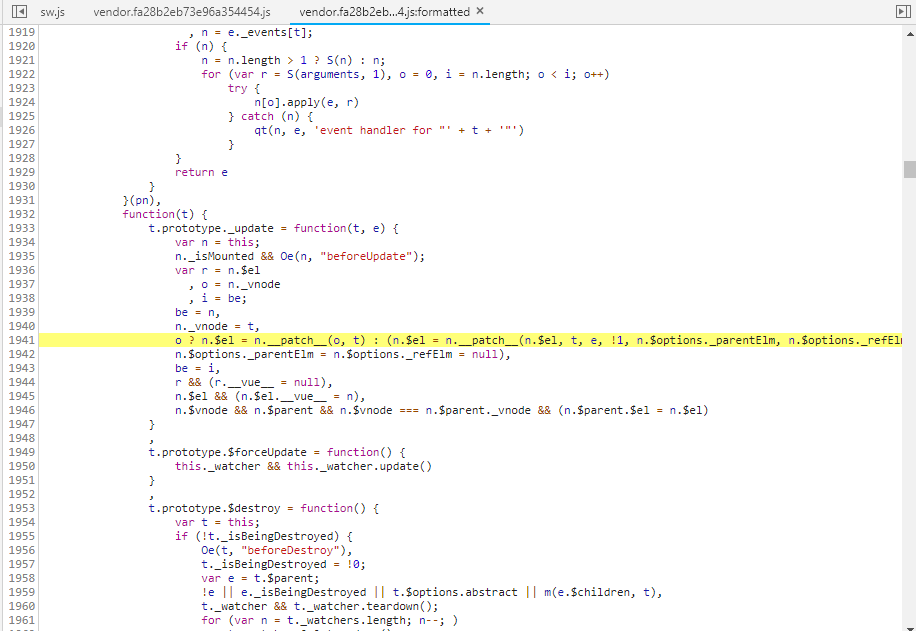
And that indeed produces the same root cause:

Now, when I change my nuxt.config.js from
js
plugins: [
    { src: '~/plugins/localStorage.js', ssr: false }
],
to
js
plugins: [
    // { src: '~/plugins/localStorage.js', ssr: false }
],
it all works again, even with npm run generate, and with both v-ifs present.
Again, please note that none of these oddities occur with npm run dev in my case.
So my questions to @tansj526 would be, does that ring any bells? Are you using vuex-persistedstate or some other plugin that could cause a similar effect? Are you using a generated static site?
In summary, the issue only appears in the following edge case:
- Using vuex-persistedstate (potentially same problem with other LocalStorage related plugins?)
- Using npm run generate
- A value must be present in LocalStorage for the respective variable (here: drawer.visible) used in v-if. [The app works fine as long as there is no value in LocalStorage yet. Once that happens and the page is refreshed, the problem appears.]
Albeit a bit long, I hope this will help track down the issue. I have set up a minimal repo for you to play with here:
Reproduction Link
https://github.com/steinwachs/bugreport-nuxt-vuex-persistedstate
Reproduction Steps
- clone the repo
- npm install
- npm run generate
- http-server -p 3000 dist
- Point browser to localhost:3000
- Open Dev Tools and watch the console
- Click the button
- Refresh the page
Now do the same without vuex-persistedstate (comment it out as described below)
 steinwachs
on 20 Aug 2018
steinwachs
on 20 Aug 2018
I was facing the same error after using nuxt generate (and Apollo). In my case a cookie used by Apollo (for log-in) seems to cause the problem.
- If I clear the cookies, the pages load without any problem.
- If I reload the page after logging in (i.e. setting a cookie), the problem appears again
 RegienBrouwer
on 6 Oct 2018
RegienBrouwer
on 6 Oct 2018
I have the same issue only on packaged application
I use :
- nuxt 2.2.0
- vuex-persistedstate : 2.5.4
Do you have a workaround ?
 nono0481
on 24 Oct 2018
nono0481
on 24 Oct 2018
Actually, there are 3 workarounds I know when using vuex-persistedstate and nuxt generate or nuxt start:
- Use
v-showinstead ofv-ifwhere you usevuex-persistedstatedata
Or - Use
<no-ssr>around the components usingvuex-persistedstatedata
Or - Use
vuex-persistedstateplugin like this (my PR for vuex-persistedstate: https://github.com/robinvdvleuten/vuex-persistedstate/pull/170)
export default ({ store }) => {
window.onNuxtReady(() => {
createPersistedState({
...
})(store)
})
}
 Atinux
on 12 Nov 2018
Atinux
on 12 Nov 2018
This thread has been automatically locked since there has not been any recent activity after it was closed. Please open a new issue for related bugs.
![lock[bot] picture](https://avatars1.githubusercontent.com/in/6672?v=4&s=40) lock[bot]
on 13 Dec 2018
lock[bot]
on 13 Dec 2018
Related issues
 surmon-china
·
3Comments
surmon-china
·
3Comments
 pehbehbeh
·
3Comments
pehbehbeh
·
3Comments
 lazycrazy
·
3Comments
lazycrazy
·
3Comments
 vadimsg
·
3Comments
vadimsg
·
3Comments
vadimsg
·
3Comments
vadimsg
·
3Comments
Most helpful comment
Nuxt Version
1.4.2
Issue Description
Working on my first Vue project, I have just run into a similar issue.
Oddly, the issue only appears when I use my static app generated with
npm run generate. It works fine when I usenpm run dev.I investigated it and found the cause in my case. I will explain it in detail so @tansj526 has a chance to potentially track down their own issue.
Firstly, the problem appeared suddenly, so I did the obvious and reverted the changes of my latest commit. And indeed that fixed it. The changes were:

So everything pointed to the added
v-ifdirective. Indeed, removing the secondv-ifdirective on either component fixes it.The special bit about the
drawervariable is that it is initialised with a vuex value:js data () { return { drawer: !!this.$store.state.drawer.visible ...So I made it a non-vuex variable:
js
drawer: false
...and again it worked, with both
v-ifs present, and withnpm run generate.More Details
Now, I set up a minimal example project, which worked at first.
Then I investigated the remaining bit of difference:
vuex-persistedstate. I am actually persistingdrawer.visiblein LocalStorage so that after a page refresh the navigation drawer of my app remembers its state.So I installed
vuex-persistedstateinto my minimal project based on the nuxt starter and added the drawer.visible key:````js
// nuxt.config.js
plugins: [
{ src: '~/plugins/localStorage.js', ssr: false }
],
// /plugins/localStorage.js as referenced in nuxt.config.js
import createPersistedState from 'vuex-persistedstate'
export default ({store}) => {

createPersistedState({
key: 'vuex',
paths: [
'drawer.visible'
]
})(store)
}
````
And that indeed produces the same root cause:
Now, when I change my
nuxt.config.jsfromjs plugins: [ { src: '~/plugins/localStorage.js', ssr: false } ],to
js
plugins: [
    // { src: '~/plugins/localStorage.js', ssr: false }
],
it all works again, even with
npm run generate, and with bothv-ifs present.Again, please note that none of these oddities occur with
npm run devin my case.So my questions to @tansj526 would be, does that ring any bells? Are you using
vuex-persistedstateor some other plugin that could cause a similar effect? Are you using a generated static site?In summary, the issue only appears in the following edge case:
Albeit a bit long, I hope this will help track down the issue. I have set up a minimal repo for you to play with here:
Reproduction Link
https://github.com/steinwachs/bugreport-nuxt-vuex-persistedstate
Reproduction Steps
Now do the same without vuex-persistedstate (comment it out as described below)