Nuxt.js: req.headers producing error - Cannot read property 'headers' of undefined
I am using vue-i18n in my project. the issue is when i am loading the page. below codes are able to fetch cookie data but again it producing nuxt error.
I tried putting try..catch, (process.server) but no one worked. Because if this, now axios is not working.

code which i am using -
in plugin/i18n.js
import Vue from 'vue';
import VueI18n from 'vue-i18n';
Vue.use(VueI18n);

export default ({ app, store, req }) => {
    console.log('plugins')
    var cookies = req.headers.cookie
    var KeyNameLocale =  "locale="
    var decodedCookie = decodeURIComponent(cookies)
    console.log('cookie')
    console.log(decodedCookie)

  // Set i18n instance on app
  // This way we can use it in middleware and pages asyncData/fetch
  app.i18n = new VueI18n({
    locale: store.state.locale,
    fallbackLocale: 'en',
    messages: {
      'en': require('~/locales/en.json'),
      'fr': require('~/locales/fr.json')
    }
  });
  app.i18n.path = (link) => {
    if (app.i18n.locale === app.i18n.fallbackLocale) {
      return `/${link}`;
    }
    return `/${app.i18n.locale}/${link}`;
  }
}
in middleware/i18n.js
export default function ({ isHMR, app, store, route, params, error, redirect }) {
    store.commit('SET_LANG', 'fr')
}
 sudhir600
All 12 comments
@clarkdo any suggestion
sudhir600
on 27 Apr 2018
@sudhir600 Please create issue via template introduction and provide repo to reproduce the issue.
 clarkdo
on 27 Apr 2018
clarkdo
on 27 Apr 2018
@clarkdo sorry for the inconvenience, but i didn't get this line "create issue via template introduction"
However, I have created a repo to reproduce the issue.
https://github.com/sudhir600/nuxt_i18n
sudhir600
on 27 Apr 2018
Ok, I will take a look.
BTW, issue template:
IMPORTANT: Please use the following link to create a new issue:
https://nuxtjs.cmty.io/issues/new
If your issue was not created using the app above, it will be closed immediately.
clarkdo
on 27 Apr 2018
Ok.
Thanks @clarkdo Will follow above link from next time.
sudhir600
on 27 Apr 2018
@sudhir600
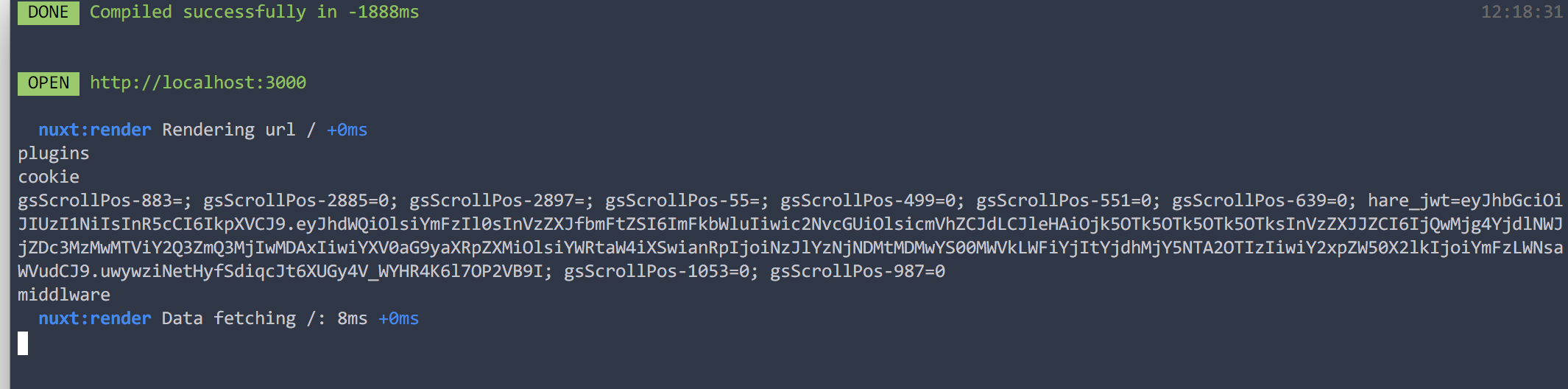
It works fine for me, console as below:
clarkdo
on 27 Apr 2018
Hi, @clarkdo
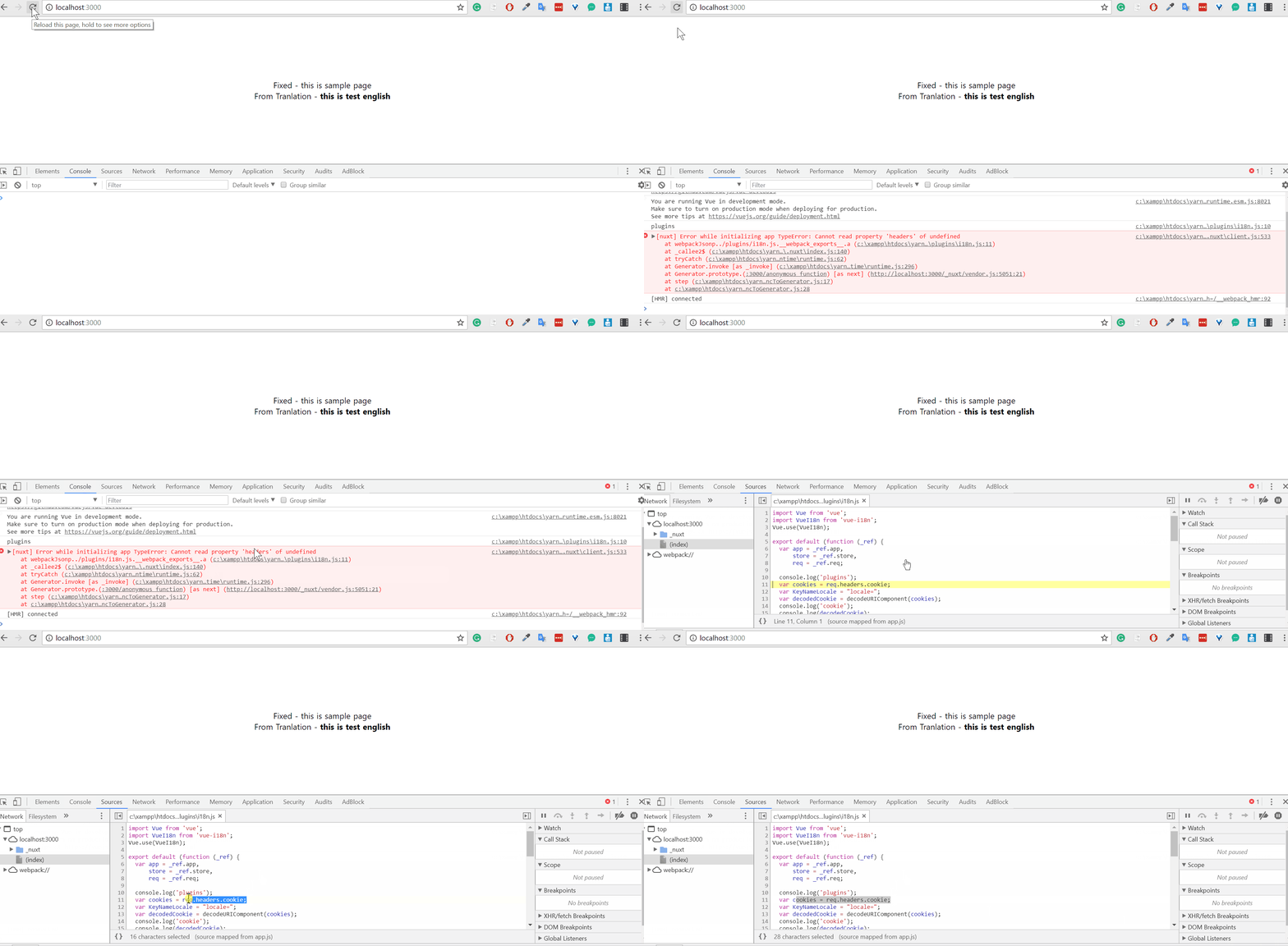
Its so strange that i am still getting same issue. even try in another pc but same issue. here is the screen recording-
update - which version of node/npm you are using...
I am using 6.0.0 / v9.11.1 (npm -v / node -v) but still getting that issue.
sudhir600
on 27 Apr 2018
@sudhir600
My previous comment was using mac and node 9.x, then I tried windows, node 9.11.0 and yarn, it also works for me.

clarkdo
on 27 Apr 2018
About the browser error, you should add process.server to avoid using req which is not existed in client side.
  if (process.server) {
    var cookies = req.headers.cookie
    var KeyNameLocale =  "locale="
    var decodedCookie = decodeURIComponent(cookies)
    console.log('cookie')
    console.log(decodedCookie)
  }
thanks @clardo
(process.server)resolve this issue.
Prevesly i was not sure about how plugin and middleware excute. by doing this i identity that both file run 1st on server and then client too. So when i18n excute on client side req.headers goes undefined.
Thanks alot clarkdo
Guys, If any one facing the same issue, fixes is here (plugin/i18n, middleware/i18n and store/index).
sudhir600
on 28 Apr 2018
@sudhir600 It's nice that everything is working now.
Cloud you mark @clarkdo 's message as the solution please? (It helps clean up the site)
And thanks for the repo :D
:slightly_smiling_face:
 Extarys
on 28 Apr 2018
Extarys
on 28 Apr 2018
This thread has been automatically locked since there has not been any recent activity after it was closed. Please open a new issue for related bugs.
![lock[bot] picture](https://avatars1.githubusercontent.com/in/6672?v=4&s=40) lock[bot]
on 2 Nov 2018
lock[bot]
on 2 Nov 2018
Related issues
 gary149
·
3Comments
gary149
·
3Comments
 danieloprado
·
3Comments
danieloprado
·
3Comments
 vadimsg
·
3Comments
vadimsg
·
3Comments
 mattdharmon
·
3Comments
mattdharmon
·
3Comments
 lazycrazy
·
3Comments
lazycrazy
·
3Comments
Most helpful comment
thanks @clardo
(process.server)resolve this issue.Prevesly i was not sure about how plugin and middleware excute. by doing this i identity that both file run 1st on server and then client too. So when
i18nexcute on client side req.headersgoes undefined.Thanks alot clarkdo
Guys, If any one facing the same issue, fixes is here (plugin/i18n, middleware/i18n and store/index).
https://github.com/sudhir600/nuxt_i18n