Nuxt.js: [edge] <style lang="postcss"> cannot be parsed
Version
Reproduction link
https://github.com/OrcaXS/nuxt-test
Steps to reproduce
npm install -g vue-cli
vue init nuxt-community/starter-template nuxt-test
yarn add nuxt@npm:nuxt-edge
Add lang="postcss" to ./pages/index.vue
yarn build
What is expected ?
No error is thrown
What is actually happening?
ERROR in ./pages/index.vue?vue&type=style&index=0&lang=postcss (./node_modules/vue-loader/lib/loaders/stylePostLoader.js!./node_modules/vue-loader/lib??vue-loader-options!./pages/index.vue?vue&type=style&index=0&lang=postcss)
Module parse failed: Unexpected token (2:0)
You may need an appropriate loader to handle this file type.
|
| .container {
|   min-height: 100vh;
|   display: flex;
 @ ./pages/index.vue?vue&type=style&index=0&lang=postcss 1:0-186 1:202-205 1:207-390 1:207-390
 @ ./pages/index.vue
 @ ./.nuxt/router.js
 @ ./.nuxt/index.js
 @ ./.nuxt/client.js
 OrcaXS
All 15 comments
I think postcss is not a lang! It will be automatically applied to all styles. So you can safely remove lang="postcss" part.
 pi0
on 17 Apr 2018
pi0
on 17 Apr 2018
According to https://vue-loader.vuejs.org/en/features/postcss.html,
Sometimes the user may want to use lang="postcss" only for syntax highlighting purposes.
My syntax highlighting setup only works when lang="postcss" is added.
And it worked well in nuxt 1.4.0.
OrcaXS
on 17 Apr 2018
@OrcaXS I understand. Same happens for type="text/css" too. But the docs are for vue-loader 14. nuxt-edge uses vue-loader@15. If it is a regression we should open an Issue and possibly fix it there :)
pi0
on 17 Apr 2018
According to vue-loader@next documentation:
vue-loaderno longer auto applies PostCSS transforms. To use PostCSS, configurepostcss-loaderthe same way you would for normal CSS files.
 clarkdo
on 17 Apr 2018
clarkdo
on 17 Apr 2018
Therefore you can just use lang=css, because nuxt has enabled postcss-loader in css by default.
Or add a rule for postcss by using extend:
    module: {
      rules: [
        {
          test: /\.postcss$/,
          use: [
            'vue-style-loader',
            'css-loader',
            {
              loader: 'postcss-loader'
            }
          ]
        }
      ]
    }
After adding those rules to nuxt.config.js it seems to be working now.
Thank you for your quick responses!
OrcaXS
on 17 Apr 2018
can anyone show me the exact syntax for adding postcss-loader at nuxt.config.js, I just can't figure it out.
here's what I tried
 build: {
    extend(config, {  loaders }) {
      loaders.module.rules.push({
        test: /\.postcss$/,
        use: [
          'vue-style-loader',
          'css-loader',
          {
            loader: 'postcss-loader'
          }
        ]
      })
    }
  },
 jericopulvera
on 29 Sep 2018
jericopulvera
on 29 Sep 2018
@jericopulvera
```
build: {
extend(config, ctx) {
config.module.rules.push({
test: /.(postcss)$/,
use: [
'vue-style-loader',
'css-loader',
{
loader: 'postcss-loader'
}
]
})
}
}
 ayvanov
on 3 Oct 2018
ayvanov
on 3 Oct 2018
Not working, I see:
Error: No PostCSS Config found in:
 Defite
on 7 Oct 2018
Defite
on 7 Oct 2018
I am having the same issue and I can't seem to solve it,
I found a solution for the 'no config' error here: https://github.com/akveo/ngx-admin/issues/604#issuecomment-271974780
I have no errors, but my style is not processed by the postcss-loader
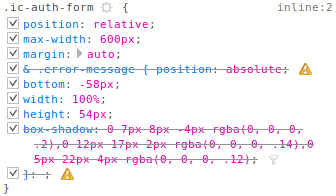
nuxt.config.js
module.exports = {
  // ...

  /*
  ** Build configuration
  */
  build: {
    /*
    ** You can extend webpack config here
    */
    extend(config, ctx) {
      // ...

      config.module.rules.push({
        test: /\.postcss$/,
        use: [
          'vue-style-loader',
          'css-loader',
          {
            loader: 'postcss-loader'
          }
        ]
      })
    }
  },

  // ...
}
AuthForm.vue
<style lang="postcss" scope>
.ic-auth-form {
  position: relative;
  max-width: 600px;
  margin: auto;

  & .error-message {
    position: absolute;
    bottom: -58px;
    width: 100%;
    height: 54px;
    box-shadow: 0 7px 8px -4px rgba(0, 0, 0, .2),0 12px 17px 2px rgba(0, 0, 0, .14),0 5px 22px 4px rgba(0, 0, 0, .12);
  }
}
</style>
I tried adding the package postcss-loader but that made no difference since it is also installed by nuxt
I am using nuxt@^2.0.0
 benjamindedonder
on 31 Oct 2018
benjamindedonder
on 31 Oct 2018
Solution: https://codesandbox.io/s/5kr8nrlz5l
Nesting operator needs stage 0 of preset-env or a plugin.
 manniL
on 5 Nov 2018
manniL
on 5 Nov 2018
@manniL well, I messed up features, all I needed is in this plugin:
import postcssNested from 'postcss-nested';
...
{
            loader: 'postcss-loader',
            options: {
              ident: 'postcss',
              plugins: (loader) => [
                postcssPresetEnv({
                  browsers: 'last 2 versions',
                  /* use stage 3 features + css nesting rules */
                  stage: 3,
                  features: {
                    'nesting-rules': true
                  }
                }),
                postcssNested()
              ]
            }
          }
...
Then everything works as I expect.
Defite
on 7 Nov 2018
@Defite This is a bit cumbersome, isn't it? 🙉
I'd use the build.postcss object for that (docs)
manniL
on 7 Nov 2018
@manniL your solutions look better than mine, I'll fix it in my project, thank you)
Defite
on 8 Nov 2018
This thread has been automatically locked since there has not been any recent activity after it was closed. Please open a new issue for related bugs.
![lock[bot] picture](https://avatars1.githubusercontent.com/in/6672?v=4&s=40) lock[bot]
on 8 Dec 2018
lock[bot]
on 8 Dec 2018
Related issues
 uptownhr
·
3Comments
uptownhr
·
3Comments
 vadimsg
·
3Comments
vadimsg
·
3Comments
 shyamchandranmec
·
3Comments
shyamchandranmec
·
3Comments
 msudgh
·
3Comments
msudgh
·
3Comments
 pehbehbeh
·
3Comments
pehbehbeh
·
3Comments
Most helpful comment
Therefore you can just use
lang=css, because nuxt has enabled postcss-loader in css by default.Or add a rule for postcss by using
extend: