Nuxt.js: NuxtServerInit may be have a major problem
Have a code
nuxtServerInit({ commit }){
    commit('setNumber', Math.random());
}
If there are two people at the same time online
Suppose they get 0.1 and 0.2 on the server
But they get the same value on the browser
When they use {{ number }}
They will show the same value
That is to compare the later one
 Wei12345
All 25 comments
I tested it, they happened
when nuxtServerInit + middleware + fetch wait
nuxtServerInit and middleware will be wrong data
I guess this is they share a store
// user1 loading
commit('setNumber', 0.1);
// user2 loading
commit('setNumber', 0.2);
//user 1 loading end and get 0.2
//user 2 loading end and get 0.2
But I do not know why fetch no problem
This error only appears in nuxtServerInit and middleware
If the above is true, that means example Auth Routes is a problem
Or above is my bad
Wei12345
on 8 Jan 2018
Interesting. What happens if instead of Math.random() you try Date.now() ?
 microcipcip
on 8 Jan 2018
microcipcip
on 8 Jan 2018
@microcipcip The same thing happens as described above
user1 get 1515430557563 on server
user2 get 1515430557657 on server
user1 and user2 get 1515430557657 on client ( browser )
This error happens when I use it async/await fetch
Because it wait(My guess)
If used only fetch ( not use promise, I don't try it )
Don't use async/await
It will be the correct data
But it should be usable async/await fetch
And get the correct data
Wei12345
on 8 Jan 2018
I can't recreate your issue. My store/index.js is as follows:
const waitForMe = () => {
  return new Promise((resolve, reject) => {
    setTimeout(() => resolve('Resolved'), 2000)
  })
}

export const state = () => ({
  authUser: null
})

export const mutations = {
  SET_USER: function (state, user) {
    state.authUser = user
  }
}

export const actions = {
  nuxtServerInit: async ({commit}, {app, req, redirect}) => {
    await waitForMe()
    const number = Math.random()
    console.log(number)
    commit('SET_USER', number)
  }
}
@microcipcip
A single nuxtServerInit should be no problem
You can try adding the following in index.vue
async fetch(){
    await waitForMe()
},
mounted(){
    alert(this.number); // or console.log(this.number) or {{ number }} in template
},
computed(){
    ...mapGetters(['number'])
}
Then let two people connect at the same time ( wait two seconds should be within two seconds )
Maybe can reproduce my problem
You will get two different data on the server side
You will get two identical data on the client side ( browser )
Wei12345
on 9 Jan 2018
@microcipcip
I found a way to reproduce more easily
Your code
nuxtServerInit: async ({commit}, {app, req, redirect}) => {
    await waitForMe()
    const number = Math.random()
    console.log(number)
    commit('SET_USER', number)
}
Await after the commit
commit('SET_USER', number);
await waitForMe();
Then let two people connect at the same time ( wait two seconds should be within two seconds )
Maybe can reproduce my problem
You will get two different data on the server side
You will gett wo identical data on the client side ( browser )
Wei12345
on 9 Jan 2018
+1 facing this issue
 iarickvigasi
on 9 Feb 2018
iarickvigasi
on 9 Feb 2018
We are also facing the same issue. Server side the data is correct. But on client side, identical data is showing up for different users. Request you to please fix this at the earliest.
 msahajwani
on 11 Feb 2018
msahajwani
on 11 Feb 2018
Probably @Atinux can have a closer look to this bug.
microcipcip
on 11 Feb 2018
+1 same issue here
 henriquefurlan
on 16 Feb 2018
henriquefurlan
on 16 Feb 2018
Will investigate and fix it quickly
 Atinux
on 16 Feb 2018
Atinux
on 16 Feb 2018
@Wei12345
If the following codes are right way to reproduce the issue ?
const waitForMe = () => {
  return new Promise((resolve, reject) => {
    setTimeout(() => resolve('Resolved'), 10000) // wait 10 seconds
  })
}

export const state = () => ({
  authUser: null
})

export const mutations = {
  SET_USER: function (state, user) {
    state.authUser = user
  }
}

export const actions = {
  nuxtServerInit: async ({commit}, {app, req, redirect}) => {
    const number = Math.random()
    commit('SET_USER', number)
    console.log(number)
    await waitForMe()
  }
}
I used the current dev branch and cannot reproduce it, client side states are like below:
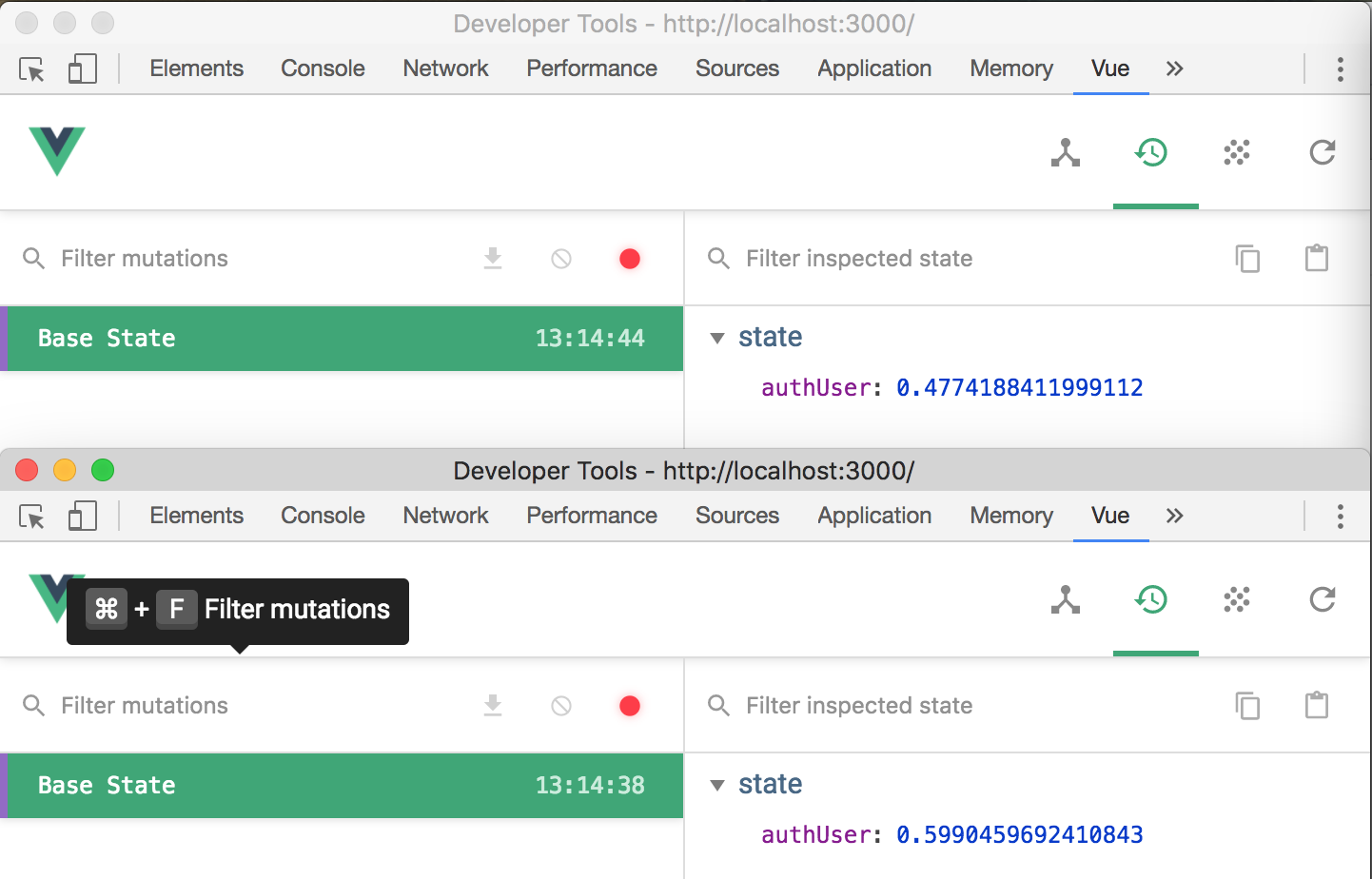
Did I misunderstand the reproduce steps ? Please feel free to point it out 😄
 clarkdo
on 16 Feb 2018
clarkdo
on 16 Feb 2018
@clarkdo
The code steps are no problem
You have to print the data on the client side
mounted(){
    alert(this.authUser); // or console.log(this.authUser) or {{ authUser}} in template
}
Then let two people connect at the same time ( wait ten seconds should be within ten seconds )
Maybe can reproduce my problem
You will get two different data on the server side
You will gett wo identical data on the client side ( browser )
Please confirm to see if you can reproduce this problem
Wei12345
on 20 Feb 2018
Agree with @Wei12345 . This is exactly whats happening. For us, a user logged in from one location, and another user just visited the site within a few seconds from another location, and it was shown as logged in as the first user!!!
msahajwani
on 20 Feb 2018
I could not reproduce it Could you guys create a small repo on Github (or Glitch)?
Atinux
on 20 Feb 2018
@Atinux
I can not reproduce it in glitch
However, the local machine still have this problem
I guess the reason is because vuex store is shared on local server but not shared on glitch
The code
nuxtServerInit({commit}, {query}){
 if(query.test){
    commit('SET_USER', 'test')
}
on local server
Visit locahost:3000 // authUser is null
Visit locahost:3000/?test=test // authUser is test
Visit locahost:3000 // authUser is test
on glitch
Visit glitch // authUser is null
Visit glitch/?test=test // authUser is test
Visit glitch // authUser is null
This bug on local server console
The following two simulates two users for the window
One is normal window and the other is traceless window
nuxtServerInit 2018-02-21T05:59:52.114Z // user1   server side
0.29319009964039133
nuxtServerInit 2018-02-21T05:59:53.008Z // user2 get different data    server side
0.9915702232298238
fetch 2018-02-21T05:59:59.420Z // user1 get 0.9915702232298238    server side
0.9915702232298238
fetch 2018-02-21T05:59:59.451Z // user2    server side
0.9915702232298238
mounted Wed Feb 21 2018 14:00:00 GMT+0800 (CST) // user1    client side
0.9915702232298238
mounted Wed Feb 21 2018 14:00:01 GMT+0800 (CST) // user2    client side
0.9915702232298238
This bug on glitch console
The following two simulates two users for the window
One is normal window and the other is traceless window
nuxtServerInit 2018-02-21T06:03:53.869Z // user1    server side
0.5868061494931875
nuxtServerInit 2018-02-21T06:03:56.523Z // user2    server side
0.04613850368121164
fetch 2018-02-21T06:03:56.869Z // user 1    server side
0.5868061494931875
fetch 2018-02-21T06:03:59.525Z // user 2    server side
0.04613850368121164
mounted Wed Feb 21 2018 14:04:01 GMT+0800 (CST) // user 1    client side
0.5868061494931875
mounted Wed Feb 21 2018 14:04:03 GMT+0800 (CST) // user 2    client side
0.04613850368121164
Are these helpful to you?
Wei12345
on 21 Feb 2018
I uploaded a GIF which included my steps, but didn't reproduce this issue, did I follow correct way ? If anything incorrect, please let me know.

clarkdo
on 22 Feb 2018
@clarkdo
Oh sorry
I reproduce this problem at glitch
You will get this problem if you do the same thing
Is this my mistake?
Do not const state in store/index.js is no problem
Wei12345
on 22 Feb 2018
@Wei12345
The issue in you glitch should be caused by sharing state in store/index.js, you can move state into createStore for avoiding store.state being a shared object.
import Vuex from 'vuex'

import getters from './getters'
import actions from './actions'
import mutations from './mutations'

const createStore = () => {
  const state = {
    authUser: null
  }
  return new Vuex.Store({
    state,
    getters,
    actions,
    mutations
  })
}

export default createStore
@clarkdo We are using the following code in our application and we have faced similar problem. Can you please take a look and confirm if the following will be prone to this problem?
import Vuex from 'vuex'
import state from './state'
import mutations from './mutations'
import actions from './actions/'
import getters from './getters'

const store = () => {
  const vuexStore = new Vuex.Store({
    state,
    mutations,
    actions,
    getters
  })

  // @TODO: Development
  if (process.browser) {
    window.store = vuexStore
  }
  return vuexStore
}

export default store
@msahajwani
Does your ./state export a object ? If so, you can change it to a function, such as:
// state.js
export default () => ({
    authUser: null
})

//store.js
import Vuex from 'vuex'
import createState from './state'
import mutations from './mutations'
import actions from './actions/'
import getters from './getters'

const store = () => {
  const vuexStore = new Vuex.Store({
    createState(),
    mutations,
    actions,
    getters
  })

  // @TODO: Development
  if (process.browser) {
    window.store = vuexStore
  }
  return vuexStore
}

export default store
@clarkdo Thank you. I will try this solution and let you know if I still face the problem.
msahajwani
on 26 Feb 2018
Actually, it has to export a function to work and avoid a security issue (this is why when using Nuxt Store modules, we force the users to set state as a function)
Atinux
on 26 Feb 2018
Thank you all
This is my fault
Wei12345
on 27 Feb 2018
This thread has been automatically locked since there has not been any recent activity after it was closed. Please open a new issue for related bugs.
![lock[bot] picture](https://avatars1.githubusercontent.com/in/6672?v=4&s=40) lock[bot]
on 2 Nov 2018
lock[bot]
on 2 Nov 2018
Related issues
 vadimsg
·
3Comments
vadimsg
·
3Comments
 uptownhr
·
3Comments
uptownhr
·
3Comments
 jaredreich
·
3Comments
jaredreich
·
3Comments
 msudgh
·
3Comments
msudgh
·
3Comments
 pehbehbeh
·
3Comments
pehbehbeh
·
3Comments
Most helpful comment
We are also facing the same issue. Server side the data is correct. But on client side, identical data is showing up for different users. Request you to please fix this at the earliest.