Nuxt.js: Serve Web Components made with VueJS using Nuxt
I'm using vue-custom-element that helps to make a vuejs component build into a single js file where I can embed it on any website.
The scripts may look like this:
<html>
  <head>
    <script src="link/to/jquery/angular/react/vue/or/something"></script>
  </head>
  <body>
    ...
    <my-component></my-component>
    <script src="app.js"></script>
    ...
  </body>
</html>
It works using vue-custom-element. Is there any way to make it work with Nuxt? Because that component has to fetch some data from the server in order to render it. So if I can make it SSR using Nuxt that would be great! Or any other suggestions?
What I'm building is a chat widget using vuejs. That chat widget can be embedded on any website
 gijo-varghese
All 5 comments
+1
 XavierLeTohic
on 21 May 2018
XavierLeTohic
on 21 May 2018
from looking at the vue-custom-element docs, I feel it is not straight forward to work in SSR. It would have been trivial if vue-custom-element also exported an npm package.
 uptownhr
on 21 May 2018
uptownhr
on 21 May 2018
After hours of research I can now render Web Components even if SSR is enabled by using @skatejs/ssr/register.
It extract tags/text/style from your Web Components on server-side, it will not render the shadow DOM.
Example
Install dependencies
npm install @skatejs/ssr babel-plugin-transform-custom-element-classes raw-loader postcss-loader --save-dev
Using css you don't have to install css-loader
~/components/mobile-only.js
import style from '!raw-loader!postcss-loader!./mobile-only.css';

class MobileOnly extends HTMLElement {
  constructor() {
    super();
    this.root = this.attachShadow({ mode: 'open' });
    this.root.innerHTML = `
      <style>
        ${style}
      </style>
      <slot></slot>
    `;
  }
}

customElements.define('mobile-only', MobileOnly);
~/plugins/webcomponents.js
import Vue from 'vue'

// Render web components server-side
if(!process.browser) {
  // Avoid HTMLElement is not defined on server-side
  global.HTMLElement = () => {}
  // Avoid customElements is not defined on server-side
  global.customElements = { define: () => {} }
  // Require skatejs/ssr/register only on server side
  require('@skatejs/ssr/register')
}

// Vue must ignore custom components that aren't Vue Components
Vue.config.ignoredElements = [
  'mobile-only',
]
Note that Vue.config.ignoredElements is optional but a good practice.
You can also add regex to the array to match multiple tags such as /^m-/ that match all custom elements starting by m-
~/nuxt.config.js
{
// [...]
build: {
    babel: {
      presets: ['vue-app'],
      plugins: [
        "transform-custom-element-classes",
        "transform-es2015-classes",
      ]
    },
},
plugins: ['~/plugins/webcomponents.js'],
// [...]
}
~/pages/index.vue
<template>
  <div>
    <mobile-only>This should be visible only on mobile</mobile-only>
  </div>
</template>

<script>
import '../components/mobile-only'

export default {
  name: 'Index'
}
</script>
Issue
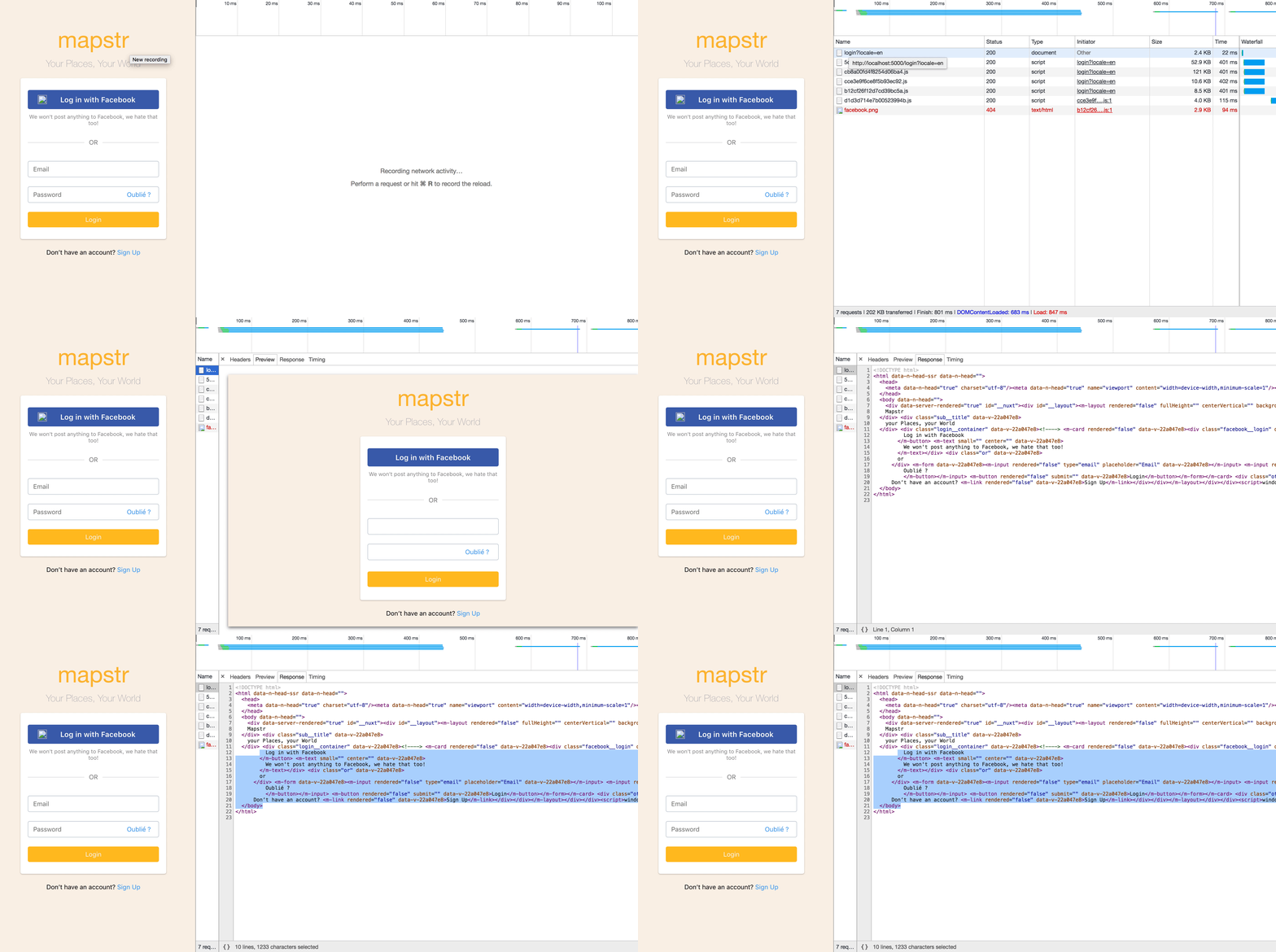
As you can see below on the gif only HTML tags and text are displayed. Then the client renders the web components with style and shadow-dom.
I added an attribute "rendered" to false by default, applying the default style of my web components. Then I set this attribute to true via "connectedCallback".
You can check the result in the following GIF.
Please 🙏
If you find a better solution please share it with us. Thanks !
XavierLeTohic
on 21 May 2018
This issue has been automatically marked as stale because it has not had recent activity. It will be closed if no further activity occurs.
![stale[bot] picture](https://avatars3.githubusercontent.com/in/1724?v=4&s=40) stale[bot]
on 31 Oct 2018
stale[bot]
on 31 Oct 2018
This thread has been automatically locked since there has not been any recent activity after it was closed. Please open a new issue for related bugs.
![lock[bot] picture](https://avatars1.githubusercontent.com/in/6672?v=4&s=40) lock[bot]
on 7 Dec 2018
lock[bot]
on 7 Dec 2018
Related issues
 nassimbenkirane
·
3Comments
nassimbenkirane
·
3Comments
 danieloprado
·
3Comments
danieloprado
·
3Comments
 o-alexandrov
·
3Comments
o-alexandrov
·
3Comments
 shyamchandranmec
·
3Comments
shyamchandranmec
·
3Comments
 jaredreich
·
3Comments
jaredreich
·
3Comments
Most helpful comment
After hours of research I can now render Web Components even if SSR is enabled by using
@skatejs/ssr/register.It extract tags/text/style from your Web Components on server-side, it will not render the shadow DOM.
Example
Install dependencies
Using css you don't have to install
css-loader~/components/mobile-only.js
~/plugins/webcomponents.js
Note that
Vue.config.ignoredElementsis optional but a good practice.You can also add regex to the array to match multiple tags such as
/^m-/that match all custom elements starting bym-~/nuxt.config.js
~/pages/index.vue
Issue
As you can see below on the gif only HTML tags and text are displayed. Then the client renders the web components with style and shadow-dom.
I added an attribute "rendered" to false by default, applying the default style of my web components. Then I set this attribute to true via "connectedCallback".
You can check the result in the following GIF.
Please 🙏
If you find a better solution please share it with us. Thanks !