Nuxt.js: Help Needed : Loading order incorrect with prefetch and preload, delayed boot time
Hey there.
While i'm globally satisfied with Nuxt performance, I'm always trying to achieve a quicker first display for the user.
I noticed quite a delay when coming with a slow network connexion, so I tried to analyse the asset loading using google chrome. here is my discoveries :
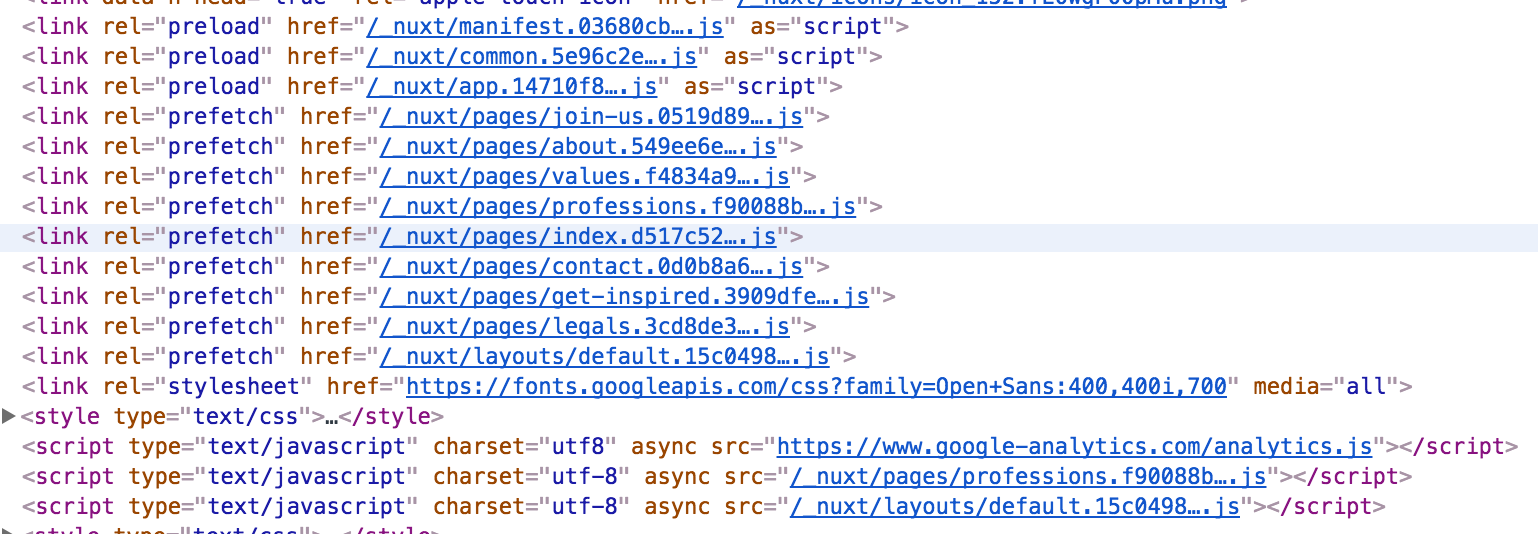
and the Associated DOM
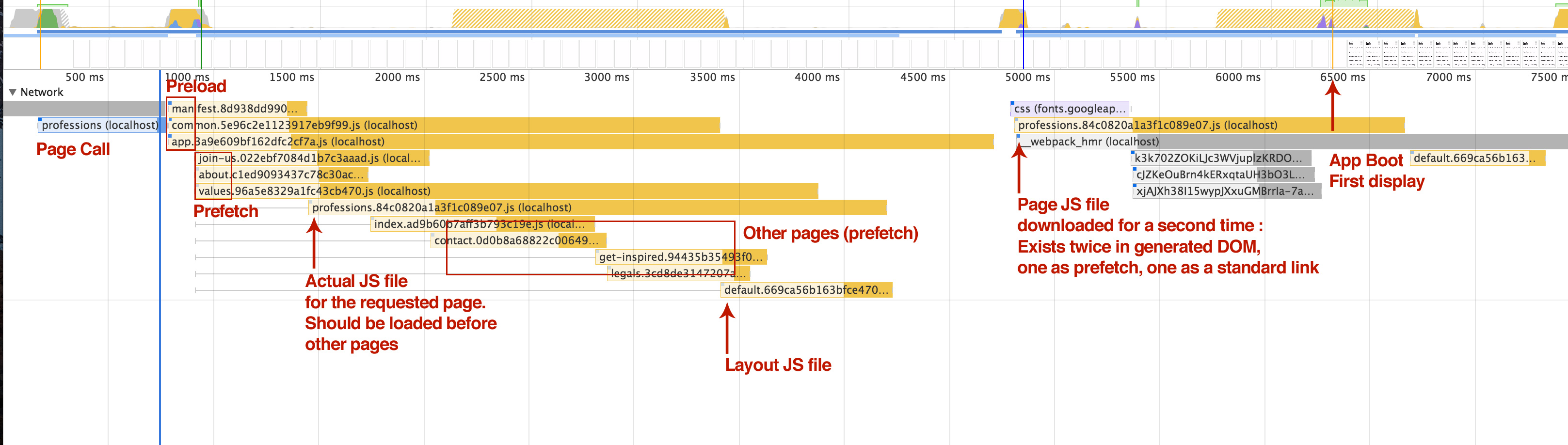
This is the loading waterfall called just after a request made to a "profession" page, served through SSR.
You can see the loading order has a few faults :
- Vendor, app and manifest are loading first ans simultaneously, thanks to the preload instruction. That's a good thing
- Then comes all the pages with the prefetch instruction. The three first being loaded are not the files corresponding the the page I'm displaying. That a first issue.
- Then the "current JS page file", and it's associated layout are downloaded a second time, I guess it's because they are marked twice in the DOM, one with the prefetch instruction, one with no instruction.
- Boot time is delayed after I got the CSS and asociated font, not sure why since I'm using WebFontLoader in order not to wait for the font.
Several things there.
- First is the incorrect loading order, and the resources downloaded twice. This may be part of the Vue SSR Bundler.
- Second is the boot time. I can't find why my app isn't displayed earlier. Point of SSR is not to wait for assets to be loaded before displaying the page. I guess this is on my side, but I can't see anything delaying the rendering.
If anyone encountered the same kind of issue, I'd be happy to have some hints on what to do to improve both loading order, and first display timing.
Thanks
 Norbz
Norbz
All 17 comments
Tried with resourceHints set to false. Waterfall is OK without the prefetch :
- Core
- Then requested page
and of course, no other page loaded.
With the same network throttled speed, first display is under 500ms, while previous test was a little over 6.5sec. This is a great improvment for slower connections.
We should really keep the prefetch feature, but the current page and layout should be injected as preload, and the app should not wait for every asset to be loaded before starting.
Norbz
on 21 Sep 2017
Hi @Norbz
Normally this has been fixed in rc11 to set the current page into preload with the layout as well.
Could you try to remove your node_modules, install your dependencies and make sure to use nuxt: 1.0.0-rc11 and try again please?
PS: Mention me so I can keep track of this issue
 Atinux
on 22 Sep 2017
Atinux
on 22 Sep 2017
@Atinux Hey there, thanks for your answer.
According to my yarn.lock file, I'm definitively using the RC11 version, but I went and deleted the whole thing to reinstall my dependencies. No change there. I should mention that I'm using Nuxt as an express middleware.
So, bottom line, the preload / prefetch order problem is still there.
However, and I feel a bit silly there, I found the problem with the delayed first display.
To prevent blocking the rendering, I am using WebFontLoader in a plugin to load asynchronously my webfont. The issue here is that it is compiled in the app, and the webfont are loaded pretty late in the waterfall.
I could manage to compile this script on my own side, and include it with vue-meta, but it doesn't feel quite right in the dev stack. I will look into building a nuxt module to separately compile the webfontloader file and include it in the head as an async script, kind of the same way the Workbox module works.
Last but not least, I could probably share some part of the code with you but we need to discuss in PM for that :)
Norbz
on 22 Sep 2017
@Atinux I don't know if you received it, I sent you a mail a few days ago. You can contact me back if you need access to the project source code.
See you
Norbz
on 29 Sep 2017
@Atinux Just un update to remind you I'm available to help you work on this one.
See you
Norbz
on 19 Oct 2017
Hi @Norbz
Sorry about the delay, with the next upcoming release, we are using the last version of Vue, vue-server-renderer and vue-router which may update this behaviour.
When release I would love some help to debug this issue if it still not resolved.
Atinux
on 19 Oct 2017
In the meantime, you can help me by cloning nuxt.js @Norbz, putting you on the refacto-app branch, npm run build and then link nuxt to your project :)
See https://github.com/nuxt/nuxt.js/blob/dev/.contributing.md
Atinux
on 19 Oct 2017
 Atinux
on 2 Nov 2017
Atinux
on 2 Nov 2017
Hi @Atinux
Sorry for going AWOL, I had family issues the last few weeks.
I cloned nuxt, but I can't find the refacto-app branch. Did you deleted it ?
I still have the issue about the loading order although we activated HTTP/2 in production so the impact is much less significant on supported browser.
I also still feel Nuxt could beneficiate a solution to have scripts compiled then loaded before or in parallel with the app, for the webfontloade for instance, or any service worker that you would manually program.
Please tell me where I can find the refactoring you mentioned so I can run some tests and get back to you.
Norbz
on 7 Nov 2017
No prob at all @Norbz, it's open source so no pressure :)
You can directly use the dev branch now.
I include @pi0 on the loop since he implemented HTTP/2
Atinux
on 7 Nov 2017
Oh OK.
Using the dev branch, I'm having issues when using the linked nuxt. My plugins aren't imported correctly somehow.
 warning  in ./.nuxt/index.js
140:25-32 "export 'default' (imported as 'globals') was not found in 'globals'
(for every plugins)
Right now I'm not seing any change, but as I have errors due to the plugins not being found, the test is quite irrelevant.
I'll try to find a simpler project and upgrade nuxt on it to run the tests
Norbz
on 7 Nov 2017
Actually the plugins error has been fixed an hour ago by Pooya, you can
link again Nuxt and try again :)
2017-11-07 14:28 GMT+01:00 Nicolas Chesné notifications@github.com:
Oh OK.
Using the dev branch, I'm having issues when using the linked nuxt. My
plugins aren't imported correctly somehow.warning in ./.nuxt/index.js 140:25-32 "export 'default' (imported as
'globals') was not found in 'globals'
(for every plugins)Right now I'm not seing any change, but as I have errors due to the
plugins not being found, the test is quite irrelevant.I'll try to find a simpler project and upgrade nuxt on it to run the tests
—
You are receiving this because you were mentioned.
Reply to this email directly, view it on GitHub
https://github.com/nuxt/nuxt.js/issues/1702#issuecomment-342481739, or mute
the thread
https://github.com/notifications/unsubscribe-auth/AA3OFFhcTzn_vhrlq9NEt0WmKXZpEqvNks5s0FrlgaJpZM4PfPl5
.
Atinux
on 7 Nov 2017
Ok, make sense, didn't understand why the npm link wouldn't work.
I can't see any difference :
- App, common, and manifest are "preload"
- All pages are "Prefetch"
- Current page and layout are in script tags below
So all pages are still loaded at once, before the actual scripts tag. At least that's what I see in Chrome.
Can you link to a page that is working correctly so I can compare ? I may have issues on my side tbh.
I'm using Nuxt as a middleware, and not directly.
One unrelated thing : in this version, the common.[hash].js is named app and that makes the code harder to read ;)
I have to stop for now, but I'll investigate more tomorrow.
Norbz
on 7 Nov 2017
One unrelated thing : in this version, the common.[hash].js is named app and that makes the code harder to read ;)
@Norbz this is just in dev mode for faster reloads. A separate vendor.js file should be generated on production builds as before. Do you mean reading generated js code?
 pi0
on 7 Nov 2017
pi0
on 7 Nov 2017
I meant "reading" the network tab, not the compiled JS files. The filename went from "common" to "app". So I have two different files that are named "app" : the actual app, and the vendors.
Norbz
on 8 Nov 2017
Because this issue seems to be inactive for quite some time, I'll close it now. If you feel like it deserves some attention because it's not fixed, feel free to ping me and I'll reopen it.
 manniL
on 9 Aug 2018
manniL
on 9 Aug 2018
This thread has been automatically locked since there has not been any recent activity after it was closed. Please open a new issue for related bugs.
![lock[bot] picture](https://avatars1.githubusercontent.com/in/6672?v=4&s=40) lock[bot]
on 1 Nov 2018
lock[bot]
on 1 Nov 2018
Related issues
 gary149
·
3Comments
gary149
·
3Comments
 vadimsg
·
3Comments
vadimsg
·
3Comments
 bimohxh
·
3Comments
vadimsg
·
3Comments
bimohxh
·
3Comments
vadimsg
·
3Comments
 nassimbenkirane
·
3Comments
nassimbenkirane
·
3Comments
Most helpful comment
@Atinux Hey there, thanks for your answer.
According to my yarn.lock file, I'm definitively using the RC11 version, but I went and deleted the whole thing to reinstall my dependencies. No change there. I should mention that I'm using Nuxt as an express middleware.
So, bottom line, the preload / prefetch order problem is still there.
However, and I feel a bit silly there, I found the problem with the delayed first display.
To prevent blocking the rendering, I am using WebFontLoader in a plugin to load asynchronously my webfont. The issue here is that it is compiled in the app, and the webfont are loaded pretty late in the waterfall.
I could manage to compile this script on my own side, and include it with vue-meta, but it doesn't feel quite right in the dev stack. I will look into building a nuxt module to separately compile the webfontloader file and include it in the head as an async script, kind of the same way the Workbox module works.
Last but not least, I could probably share some part of the code with you but we need to discuss in PM for that :)