Nunit-console: SocketException thrown during console run
@HaomingFu commented on Fri Jul 07 2017
I'm using NUnit3.5 console runner. I use nunit console to run my unit tests. There is no deterministic repro but it fails very often with error code -100.
nunit3-console.exe UnitTest.Client.dll --where "cat==MyTests" --output=RBSUnitTest_General_OutputFile.txt --result=RBSUnitTest_General_ResultFile.xml
I see this in the nunit console cmd output:
Server stack trace:
   at System.Net.Sockets.Socket.Receive(Byte[] buffer, Int32 offset, Int32 size, SocketFlags socketFlags)
   at System.Runtime.Remoting.Channels.SocketStream.Read(Byte[] buffer, Int32 offset, Int32 size)
   at System.Runtime.Remoting.Channels.SocketHandler.ReadFromSocket(Byte[] buffer, Int32 offset, Int32 count)
   at System.Runtime.Remoting.Channels.SocketHandler.Read(Byte[] buffer, Int32 offset, Int32 count)
   at System.Runtime.Remoting.Channels.Tcp.TcpFixedLengthReadingStream.Read(Byte[] buffer, Int32 offset, Int32 count)
   at System.IO.BinaryReader.ReadBytes(Int32 count)
   at System.Runtime.Serialization.Formatters.Binary.SerializationHeaderRecord.Read(__BinaryParser input)
   at System.Runtime.Serialization.Formatters.Binary.__BinaryParser.ReadSerializationHeaderRecord()
   at System.Runtime.Serialization.Formatters.Binary.__BinaryParser.Run()
   at System.Runtime.Serialization.Formatters.Binary.ObjectReader.Deserialize(HeaderHandler handler, __BinaryParser serParser, Boolean fCheck, Boolean isCrossAppDomain, IMethodCallMessage methodCallMessage)
   at System.Runtime.Serialization.Formatters.Binary.BinaryFormatter.Deserialize(Stream serializationStream, HeaderHandler handler, Boolean fCheck, Boolean isCrossAppDomain, IMethodCallMessage methodCallMessage)
   at System.Runtime.Remoting.Channels.CoreChannel.DeserializeBinaryResponseMessage(Stream inputStream, IMethodCallMessage reqMsg, Boolean bStrictBinding)
   at System.Runtime.Remoting.Channels.BinaryClientFormatterSink.SyncProcessMessage(IMessage msg)

Exception rethrown at [0]:
   at System.Runtime.Remoting.Proxies.RealProxy.HandleReturnMessage(IMessage reqMsg, IMessage retMsg)
   at System.Runtime.Remoting.Proxies.RealProxy.PrivateInvoke(MessageData& msgData, Int32 type)
   at NUnit.Engine.ITestAgent.Stop()
   at NUnit.Engine.Runners.ProcessRunner.Dispose(Boolean disposing)
   at NUnit.Engine.Runners.AbstractTestRunner.Dispose()
   at NUnit.Engine.Runners.MasterTestRunner.Dispose(Boolean disposing)
   at NUnit.Engine.Runners.MasterTestRunner.Dispose()
   at NUnit.ConsoleRunner.ConsoleRunner.RunTests(TestPackage package, TestFilter filter)
   at NUnit.ConsoleRunner.Program.Main(String[] args)
Any help would be appreciated.
@ChrisMaddock commented on Fri Jul 07 2017
I'd expect this is the same issue as this, which will be fixed in NUnit Console 3.7.
https://github.com/nunit/nunit-console/issues/225
Try the console from the latest build of master at the link below - and see if that solves the problems you're seeing?
https://ci.appveyor.com/project/CharliePoole/nunit-console/build/3.7.0-dev-03691/artifacts
@ChrisMaddock commented on Fri Jul 07 2017
I'm also going to move this issue over to the NUnit Console repo.
 ChrisMaddock
All 105 comments
The stack trace is identical so I think this is fixed, but please let us know how it goes with 3.7.
 jnm2
on 8 Jul 2017
jnm2
on 8 Jul 2017
I have been using nunit cnosole executable since
- I need to automate running my tests on a daily basis, and
- I have problems using the nunit nuget package.
I only found nuget packages on the website https://ci.appveyor.com/project/CharliePoole/nunit-console/build/3.7.0-dev-03691/artifacts.
Where can I download the nunit console executable so that I can test it?
 HaomingFu
on 10 Jul 2017
HaomingFu
on 10 Jul 2017
@HaomingFu You download https://ci.appveyor.com/api/buildjobs/4upeyj45myl2kbsm/artifacts/package%2FNUnit.ConsoleRunner.3.7.0-dev-03691.nupkg and unzip the nupkg and look in the tools folder.
jnm2
on 10 Jul 2017
@jnm2 Isn't that console fix merged? Assuming it is, user can take the latest build from MyGet.
 CharliePoole
on 10 Jul 2017
CharliePoole
on 10 Jul 2017
@CharliePoole Sure. I don't see any link to MyGet.
jnm2
on 10 Jul 2017
Are we talking https://www.myget.org/F/nunit/api/v2/package/NUnit.Console/3.7.0-dev-03704?
The package names don't match NuGet then?
jnm2
on 10 Jul 2017
@jnm2 Thanks. Now I have access to the nunit console executable 3.7. I will kick off a test shortly and it may take time to finish. Will update the thread when the test is done.
HaomingFu
on 10 Jul 2017
They do, but NUnit.Console is a meta-package. It brings in NUnit.ConsoleRunner and five extensions. Our MyGet feed provides a sort of running beta release as development proceeds. We should have a link to it, I agree, although it should not be so prominent that users who don't really need a dev release start using it.
I think this goes back to my wanting the web site to be product focused. There's an awful lot to say about each product, which would be easier if the second-level pages were all about individual products like the Console Runner.
CharliePoole
on 10 Jul 2017
I have finished running my unit tests using nunit console 3.7. Unfortunately error -100 is still hit and I see exactly the same callstack on error. The unit tests are divided into 28 categories. Each time I run my unit tests, for sure some category will hit error -100. However it is unpredictable which category will hit this error.
In addition to the callstack, I also see this message in the nunit console output:
System.Net.Sockets.SocketException (0x80004005): An existing connection was forcibly closed by the remote host
HaomingFu
on 11 Jul 2017
@HaomingFu That's good to know, thanks. Could you try one more thing I think has a chance of success? Can you tell us what happens when you run #251's build https://ci.appveyor.com/api/buildjobs/3ajik15763diqnbd/artifacts/package%2FNUnit.ConsoleRunner.3.7.0-ci-03730-pr-251.nupkg?
jnm2
on 11 Jul 2017
The new Nunit console runner looks good since my nunit tests didn't hit error -100 any more!
HaomingFu
on 12 Jul 2017
@rprouse We have to get #251 in 3.7 now.
jnm2
on 12 Jul 2017
@jnm2 Sounds good. I will mark this as fixed by #251 too and merge. I will be doing the release tonight.
 rprouse
on 13 Jul 2017
rprouse
on 13 Jul 2017
I am afraid we have to reopen this case since error -100 was hit again. I still saw exactly the same stack trace.
HaomingFu
on 13 Jul 2017
@HaomingFu Thanks for letting us know. I will revisit this tonight.
Since I have not been successful in getting the SocketException on my machine, I might have to resort to really verbose logging and have you try things.
Another thought: I wonder if I need to wrap IClientChannelSink the same as the server sink?
https://github.com/nunit/nunit-console/pull/223/commits/33e75f2c2ef3f3cfa4df0993540a82c9559ad153#diff-47f68aa1d792b3d290cd51f3b01306dcR69
jnm2
on 13 Jul 2017
@rprouse For better or worse, #251 is in. I'd rather work off that than revert. I don't know if I will make any headway tonight so you probably shouldn't wait the release very long since it certainly improved the SocketException situation for many. I'll keep you updated if I make a discovery.
jnm2
on 13 Jul 2017
@jnm2 thanks for the update. Keep me in the loop. It takes awhile to pull the changes together, go through the issues, build and test, so you will have some time. If you feel like you are making progress, just ping me. Once the initial setup and admin stuff is done for the build, pulling in a PR and redoing the build isn't hard.
rprouse
on 13 Jul 2017
I'm still trying to repro. If I can't repro, then the feedback loop is going to be very long while we wait for external help collecting logs and we'll miss the 3.7 deadline anyway.
jnm2
on 14 Jul 2017
My working machine generates SocketExceptions using ConsoleRunners 3.6.1 like there's no tomorrow, but I can't get even a single failure building from master.
jnm2
on 14 Jul 2017
Unless you want a very last-minute speculative fix wrapping IClientChannelSink the same as the server sink, which I need to understand better:
33e75f2#diff-47f68aa1d792b3d290cd51f3b01306dcR69
jnm2
on 14 Jul 2017
I can't get [email protected] to build.
jnm2
on 14 Jul 2017
Wrapped IClientChannelSink methods never get called, but wrapping it does introduce a thirty second delay somehow even though it eventually succeeds. That direction is looking cold.
jnm2
on 14 Jul 2017
Ha, may have found a chink in the original solution. Did not realize that TcpChannel is making its TcpServerTransportSink wrap my ObservableServerChannelSinkProvider rather than the other way around. So I think we have a much smaller window of opportunity, but the same race condition. Let me see what solutions there are.
jnm2
on 14 Jul 2017
So our message counter increments and decrements inside this line:
http://referencesource.microsoft.com/#System.Runtime.Remoting/channels/tcp/tcpserverchannel.cs,584
And right after that it starts actually sending the response over the TCP connection:
http://referencesource.microsoft.com/#System.Runtime.Remoting/channels/tcp/tcpserverchannel.cs,613
During which our main thread shuts down because the message count is zero.
jnm2
on 14 Jul 2017
It's not even theoretically possible to wrap the other way around; TcpChannel was not designed to be wrapped:
http://referencesource.microsoft.com/#System.Runtime.Remoting/channels/tcp/tcpserverchannel.cs,658
It goes straight from the socket to the ServiceRequest method which is not interceptable by us:
http://referencesource.microsoft.com/#System.Runtime.Remoting/channels/tcp/tcpserverchannel.cs,452
jnm2
on 14 Jul 2017
It is not safe to decrement until the socket is closed. So far I don't know of any way to know when it is closed. http://referencesource.microsoft.com/#System.Runtime.Remoting/channels/tcp/tcpserverchannel.cs,393
jnm2
on 14 Jul 2017
@rprouse When can we stop using remoting? :D
jnm2
on 14 Jul 2017
Oo, think I found our way in. The TcpServerSocketHandler holding the Socket and SocketStream which we need to watch is pushed to the sink stack:
http://referencesource.microsoft.com/#System.Runtime.Remoting/channels/tcp/tcpserverchannel.cs,552
And passed to our ObservableServerChannelSink which is in _nextSync:
http://referencesource.microsoft.com/#System.Runtime.Remoting/channels/tcp/tcpserverchannel.cs,584
Will require reflection though.
jnm2
on 14 Jul 2017
@jnm2 release is out, so don't kill yourself. If we need to, I can release a hotfix after the current release settles down and we see how it goes.
As for remoting, it is gone as soon as one of us replaces it 😄
rprouse
on 14 Jul 2017
Okay, it never closes the socket. It just waits for the next remoting request. So I'm wrong; we don't have to wait for the socket to close. We probably only have to wait for the data to be written.
http://referencesource.microsoft.com/#System.Runtime.Remoting/channels/tcp/tcpserverchannel.cs,639
http://referencesource.microsoft.com/#System.Runtime.Remoting/channels/tcp/tcpstreams.cs,0372c865c0e99273
jnm2
on 14 Jul 2017
Whatever we return for responseStream will never be closed until it's written to the SocketStream:
http://referencesource.microsoft.com/#System.Runtime.Remoting/channels/tcp/tcpserverchannel.cs,584
http://referencesource.microsoft.com/#System.Runtime.Remoting/channels/tcp/tcpstreams.cs,365
http://referencesource.microsoft.com/#System.Runtime.Remoting/channels/tcp/tcpserverchannel.cs,420
That will be safe unless the .NET Framework changes to start buffering, because then closing responseStream won't tell us if the whole response has been written out to the socket. But for now, and until we replace remoting, I'm going to put my money here. No reflection needed. :+1:
jnm2
on 14 Jul 2017
@jnm2 Thanks for working so hard on fixing this, but FYI the fix is not urgent on my side, so don't kill yourself. BTW, is there any reading for me so that I can grap a rough idea about the cause of this issue? Is there a workaround?
HaomingFu
on 14 Jul 2017
@HaomingFu I don't think there's a workaround. The problem is that nunit3-console.exe finishes the tests and tells nunit-agent.exe to shut down, and nunit-agent.exe shuts down too soon, before it's finished responding to the Stop remoting call. There's no workaround that I'm aware of that you can do because it's not directly related to anything your tests are doing. #223 goes more in depth, but it needs to be updated with the info in this thread.
jnm2
on 14 Jul 2017
This may well be our fix: https://github.com/nunit/nunit-console/commits/socketexception_2
As soon as AppVeyor has built the ConsoleRunner package for this branch, I'll ask you to stress test it a few times and let us know if you see anything.
jnm2
on 14 Jul 2017
The unsatisfying part is that every conclusion I've come to is pure theory based on reading .NET Framework source code. There doesn't seem to be a way for me to test any of this theory. I *think* I'm correct, but I thought I was correct in #223 and I missed stuff. So you are invaluable, @HaomingFu. 😄
jnm2
on 14 Jul 2017
@HaomingFu Would you very kindly let us know the outcome of running your tests against https://ci.appveyor.com/api/buildjobs/ovhbgefoo1m92jnj/artifacts/package%2FNUnit.ConsoleRunner.3.7.0-ci-03745-socketexcep.nupkg a couple times? Thanks!
jnm2
on 14 Jul 2017
I will run my tests a couple times, and the first test has already been kicked off. You should get my feedback by tomorrow PST.
HaomingFu
on 14 Jul 2017
Update: error -100 still happens with identical trace stack..
HaomingFu
on 14 Jul 2017
Thanks @HaomingFu.
I wonder if I just put in an extra delay if that would work.
jnm2
on 14 Jul 2017
Alright, I'm going to give you some variables to play with.
jnm2
on 15 Jul 2017
@HaomingFu and @demonix if you are interested, would you try running this build and giving the console the extra command line arguments --remoting-wait-after-stop --remoting-shutdown-delay=5000?
jnm2
on 15 Jul 2017
I have tried the 3.8.0, but am getting no tests executing
C:\Projects\ena>"C:\Nunit3.8\tools\nunit3-console.exe" --labels=All --out=TestResult.txt "--result=TestResult.xml" c:\projects\ena\UAT\IntegrationTests\bin\debug\IntegrationTests.dll --test=uat
NUnit Console Runner 3.8.0
Copyright (c) 2017 Charlie Poole, Rob Prouse
Runtime Environment
OS Version: Microsoft Windows NT 10.0.14393.0
CLR Version: 4.0.30319.42000
Test Files
c:\projects\ena\UAT\IntegrationTests\bin\debug\IntegrationTests.dll
Test Filters
Test: uat
Run Settings
DisposeRunners: True
WorkDirectory: C:\Projects\ena
ImageRuntimeVersion: 4.0.30319
ImageTargetFrameworkName: .NETFramework,Version=v4.6.1
ImageRequiresX86: False
ImageRequiresDefaultAppDomainAssemblyResolver: False
NumberOfTestWorkers: 8
Test Run Summary
Overall result: Passed
Test Count: 0, Passed: 0, Failed: 0, Warnings: 0, Inconclusive: 0, Skipped: 0
Start time: 2017-07-17 15:53:18Z
End time: 2017-07-17 15:53:20Z
Duration: 2.711 seconds
Results (nunit3) saved as TestResult.xml
C:\Projects\ena>
 brantkev
on 17 Jul 2017
brantkev
on 17 Jul 2017
FWIW this is biting us pretty frequently (many failed test runs per day) with the 3.7.0 ConsoleRunner. We have hundreds of builds combined with a set-up where we run a ConsoleRunner instance per test assembly, because we've only just migrated to NUnit3 so wrote our own tooling to do parallel assembly runs with NUnit2. This is probably quite a good stress test of things. :feelsgood:
I can carve off a bit of time tomorrow to look at the socket code around here and be a second pair of eyes on it if that's useful, @jnm2.
 herebebeasties
on 17 Jul 2017
herebebeasties
on 17 Jul 2017
It is tremendously useful. It will speed us along to have as many people testing https://github.com/nunit/nunit-console/issues/255#issuecomment-315502568 as possible.
The other thing that would be tremendously useful is if each of you would consider deleting half the tests and retesting, and half and half again until we have a sense of where the repro/norepro line is.
jnm2
on 17 Jul 2017
@jnm2 I am having infra issue issues so not able to run tests with your new binaries for now. Will do the test when things go right.
HaomingFu
on 18 Jul 2017
Hi @jnm2
We've updated to new version on last Wednesday and it hasn't crashed since that.
Unfortunately, we havn't merged this change to every branch (but I've asked our developers to do this whenever possible), so I don't have correct stats. But before updating we saw "exit code -100" 2-3 times a day.
 demonix
on 24 Jul 2017
demonix
on 24 Jul 2017
So right now the only people we know of where console 3.7.0 fails is @HaomingFu and @herebebeasties?
jnm2
on 24 Jul 2017
I am failing as well.
brantkev
on 24 Jul 2017
Right, sorry I missed you! When you say you've tried 3.8.0, was it https://ci.appveyor.com/api/buildjobs/sl6ui4ek8wg8teno/artifacts/package%2FNUnit.ConsoleRunner.3.8.0-ci-03749-socketexcep.nupkg? That's the one I'm hoping people use trying --remoting-wait-after-stop --remoting-shutdown-delay=5000 to see if we can alleviate the race condition.
At the end of the day, due to the lack of control remoting gives us, https://github.com/nunit/nunit-console/issues/266 is our best bet. @nunit/engine-team Since at least three people can't use the console runner, would you respond to https://github.com/nunit/nunit-console/issues/266?
jnm2
on 24 Jul 2017
Update (7/24): the infra issue is still not yet resolved..
HaomingFu
on 24 Jul 2017
I think I may have found something on this. Can someone confirm?
Steps to reproduce
- Install the MSI version of NUnit Console
- Create a sample NUnit test project
- Reference the NuGet nunit console runner
- Compile the test project
- Attempt to run the unit tests using the console runner in the packages directory
Doing this, I get the fails with error code -100,
- Uninstall the MSI of the nunit console
- Attempt to run the tests again,
Tests run fine and pass
rprouse
on 4 Aug 2017
The console runner is using the newest version of the engine found, not necessarily the one installed via nuget. I'm not clear why the msi install would have a newer version however.
Question is... do we actually want it to work this way?
CharliePoole
on 5 Aug 2017
You can see this happen by debugging the search for an engine in Program.cs.
CharliePoole
on 5 Aug 2017
@rprouse @jnm2 This seems like a fairly critical problem. We should decide how we want it to work. We originally decided that each runner would decide whether it wanted to use a local engine or the best engine available. NUnit3 Console uses the best available so it is apparently grabbing the msi install.
I don't know why it thinks the msi is newer when both are installed to the same version. Somebody needs to step through it to find out. We also have to review our initial decision about use of alternative engines. I'm thinking it can't be hard coded (as we now do) in each runner. There probably needs to be a file of some kind that can be changed so that each runner __install__ can be configured differently.
CharliePoole
on 12 Aug 2017
@CharliePoole I agree that this is critical. The installed version may not be newer, but it may come first in the search path?
I think this is also related to #6. As a temporary fix for that we were planning on only using the local engine but that code is false currently. AFAIK, other runners also chose to only use the private engine.
NuGet is also our primary distribution method. Looking back at 3.6.1 because it has been out longer, the MSI was downloaded 7,702 times compared to 264,010 download of the NuGet package. MSI accounts for less than 3% of usage. My feeling is that if someone installs a specific version of a NuGet package in their solution, we should only be using that, not walking out and pulling out other versions. It is not what users expect or likely want.
If we were to replace the hard coded decision for the runners and replace it with a file, where would that file live, in one global spot or dropped in with the runner? Either way, I don't like giving users the ability to override the decision made by the original runner developer.
To be honest, even though I wrote the original implementation, I am starting to dislike the idea of allowing users to load alternate engines.
- It makes it really hard to debug issues
- It potentially overrides the intentions or wishes of runner developers
- I don't think anyone ever asked for the ability, we just thought it was a good idea
- I think it messes with addin discovery, especially with NuGet
- Different developers on a team can see different behavior depending on their setup
- It adds complexity and increases our testing footprint. I think issues like this show that only integration tests can catch problems like this issue and #6.
rprouse
on 14 Aug 2017
Whatever we do, I'd like to understand what happens here. The code logic is that it that we start out with the local engine and only use any other engine (from the msi) if the version is newer. If we are somehow messing up the version info, I think we should fix that anyway.
I agree that this has not worked out as we hoped. I originally envisioned the user getting new features simply by replacing the engine. That's not such a big deal for us, but it would be for third-party runners. However, AFAIK the third-party runners all require a local engine.
I see two ways to go, aside from figuring out what's up with our versioning:
- Change the console runner to always use a local engine
- Change the semantics of the engine API itself.
CharliePoole
on 14 Aug 2017
Adding notes to reproduce in the debugger since it took me awhile to reproduce. This only happens if the installed version is newer than the version you are running. The agent in the install directory starts and loads the engine, but then the call to Agent.Start() fails. I am investigating that, meanwhile the steps to reproduce in the debugger are,
- Install the NUnit Console MSI
- Compile the NUnitConsole solution in debug
- Copy the debug binaries into the install directory
- Change the version in EngineVersion.cs to an older version
- Set nunit.engine.tests as the startup project
- Set the project to debug using an external program and point to nunit-console\bin\Debug\nunit3-console.exe with command line argument
--debug-agent --wait nunit.engine.tests.dll - Compile and start without debuging
Ctrl+F5so that you can attach to the agent - You will attach to the agent in the install directory
rprouse
on 18 Aug 2017
The error is in RemoteTestAgent.Start() on the _agency.Register(this); line. As far as I can tell, the remoting channel is setup correctly and the remote proxy for _agency was setup correctly, but a RemotingException is thrown.
Outer exception is a RemotingException with the message "The argument type 'System.MarshalByRefObject' cannot be converted into parameter type 'NUnit.Engine.ITestAgent'."
The inner exception is an InvalidCastException with the message "Object must implement IConvertible.".
I have no idea why any of this is different when loaded from the install directory but launched from the bin\debug directory.
rprouse
on 18 Aug 2017
I've walked through the engine loading code FindNewestEngine when running with privateCopy=false and it is loading the correct assemblies base on our design. It loads whichever are newer, the current directory, or the install directory. When equal, the current private copy is used. When newer, the agent that runs is the one in the install directory and according to the debug output window, all of the other assemblies (engine) that load are also the ones in the install directory. Everything looks like it is running and loading correctly, but the remoting is not working.
My initial reaction was that maybe the remoted classes were different versions between the console and the agent, but I also checked the engine load and related assemblies in the console and they are all the newer versions in the install directory.
I can confirm that setting privateCopy to true fixes the problem. I don't know when it got broken (if we ever tested it properly and thoroughly), but loading a newer engine from another directory is definately broken. Easiest fix is to only allow privateCopy. Personally, I would go for that since the idea never caught on.
Before I do that, I am going to leave this for a few days to see if anyone else has ideas.
rprouse
on 18 Aug 2017
Sounds sensible to me. All for removing unnecessary complexity. 🙂
ChrisMaddock
on 18 Aug 2017
Whew, same here.
jnm2
on 20 Aug 2017
I didn't close this with #283 but I would be curious if that PR solves this issue for anyone reporting.
rprouse
on 22 Aug 2017
Because we experienced the same issue on the teamcity with nunit 3 console runner 3.6.1 we tried to use the prerelease 3.8 with the command line parameters --remoting-wait-after-stop --remoting-shutdown-delay=5000. Unfortunately no changes. We still getting exit code -100 with the same stack trace as already posted.
 OliverMarte
on 23 Aug 2017
OliverMarte
on 23 Aug 2017
@rprouse Are those options actually planned for the next release? I definitely missed them if so.
CharliePoole
on 23 Aug 2017
@CharliePoole These options just live on a branch @jnm2 set up - for diagnosis. I don't believe it was ever planned to be merged.
ChrisMaddock
on 23 Aug 2017
@ChrisMaddock Thanks for the explanation.
CharliePoole
on 23 Aug 2017
@ChrisMaddock Thanks, exactly.
@OliverMarte You'll need to use the dev build I linked at https://github.com/nunit/nunit-console/issues/255#issuecomment-317457833. We don't intend for them to ever be merged and released, but rather if they solve people's problems, we'll consider hardcoding values internally without surfacing any options.
Although like I've said, at this point, I'm putting priority on #266 which will entirely remove remoting and put us in real control of the socket. We'll have an ideal safe shutdown solution.
jnm2
on 25 Aug 2017
Hi there, I too am experiencing the same issue on our TeamCity builds with NUnit 3 console runner version 3.6.1, I also tried to use your Dev releases as mentioned in this thread with the command line parameters --remoting-wait-after-stop --remoting-shutdown-delay=5000 but with no success. I am still getting exit code -100 as below.
[15:32:27][Step 2/2]
[15:32:27][Step 2/2] Errors, Failures and Warnings
[15:32:27][Step 2/2]
[15:32:27][Step 2/2] 1) Error : C:\BuildAgent\temp\buildTmp\7P2huJjnELwNLc2fGw7UZABZ81gGOi8W.nunit
[15:32:27][Step 2/2] An exception occurred in the driver while loading tests.
[15:32:27][Step 2/2]
[15:32:27][Step 2/2] Server stack trace:
[15:32:27][Step 2/2] at NUnit.Engine.Runners.DirectTestRunner.LoadDriver(IFrameworkDriver driver, String testFile, TestPackage subPackage)
[15:32:27][Step 2/2] at NUnit.Engine.Runners.DirectTestRunner.LoadPackage()
[15:32:27][Step 2/2] at NUnit.Engine.Runners.DirectTestRunner.EnsurePackageIsLoaded()
[15:32:27][Step 2/2] at NUnit.Engine.Runners.DirectTestRunner.RunTests(ITestEventListener listener, TestFilter filter)
[15:32:27][Step 2/2] at NUnit.Engine.Runners.AggregatingTestRunner.RunTestsSequentially(ITestEventListener listener, TestFilter filter, List`1 results, Boolean disposeRunners)
[15:32:27][Step 2/2] at NUnit.Engine.Runners.AggregatingTestRunner.RunTests(ITestEventListener listener, TestFilter filter)
[15:32:27][Step 2/2] at System.Runtime.Remoting.Messaging.StackBuilderSink._PrivateProcessMessage(IntPtr md, Object[] args, Object server, Object[]& outArgs)
[15:32:27][Step 2/2] at System.Runtime.Remoting.Messaging.StackBuilderSink.SyncProcessMessage(IMessage msg)
[15:32:27][Step 2/2]
[15:32:27][Step 2/2] at System.Runtime.Remoting.Proxies.RealProxy.PrivateInvoke(MessageData& msgData, Int32 type)
[15:32:27][Step 2/2] at NUnit.Engine.ITestEngineRunner.Run(ITestEventListener listener, TestFilter filter)
[15:32:27][Step 2/2] at NUnit.Engine.Runners.ProcessRunner.RunTests(ITestEventListener listener, TestFilter filter)
[15:32:27][Step 2/2]
[15:32:27][Step 2/2] Test Run Summary
[15:32:27][Step 2/2] Overall result: Failed
[15:32:27][Step 2/2] Test Count: 0, Passed: 0, Failed: 0, Warnings: 0, Inconclusive: 0, Skipped: 0
[15:32:27][Step 2/2] Start time: 2017-09-14 14:19:54Z
[15:32:27][Step 2/2] End time: 2017-09-14 14:32:26Z
[15:32:27][Step 2/2] Duration: 752.636 seconds
[15:32:27][Step 2/2]
[15:32:27][Step 2/2] Results (nunit3) saved as C:\BuildAgent\temp\buildTmp\7P2huJjnELwNLc2fGw7UZABZ81gGOi8W.nunit.xml
[15:32:27][Step 2/2] Process exited with code -100
Originally (when using 3.6.1), the exception was "Exception encountered unloading AppDomain"
 Eric-Pang
on 14 Sep 2017
Eric-Pang
on 14 Sep 2017
@Eric-Pang Thank you. That is a whole new call stack.
jnm2
on 15 Sep 2017
Here's the log when using NUnit 3.6.1
[12:49:27][Step 7/8]
[12:49:27][Step 7/8] Errors, Failures and Warnings
[12:49:27][Step 7/8]
[12:49:27][Step 7/8] 1) Error : C:\BuildAgent\temp\buildTmp\44aT9DppeWDft5UR7XS5h30eugFzJeeu.nunit
[12:49:27][Step 7/8] Exception encountered unloading AppDomain
[12:49:27][Step 7/8]
[12:49:27][Step 7/8] Server stack trace:
[12:49:27][Step 7/8] at NUnit.Engine.Services.DomainManager.DomainUnloader.Unload()
[12:49:27][Step 7/8] at NUnit.Engine.Runners.TestDomainRunner.UnloadPackage()
[12:49:27][Step 7/8] at NUnit.Engine.Runners.AbstractTestRunner.Dispose(Boolean disposing)
[12:49:27][Step 7/8] at NUnit.Engine.Runners.AbstractTestRunner.Dispose()
[12:49:27][Step 7/8] at NUnit.Engine.Runners.AggregatingTestRunner.RunTests(ITestEventListener listener, TestFilter filter)
[12:49:27][Step 7/8] at System.Runtime.Remoting.Messaging.StackBuilderSink._PrivateProcessMessage(IntPtr md, Object[] args, Object server, Object[]& outArgs)
[12:49:27][Step 7/8] at System.Runtime.Remoting.Messaging.StackBuilderSink.SyncProcessMessage(IMessage msg)
[12:49:27][Step 7/8]
[12:49:27][Step 7/8] at System.Runtime.Remoting.Proxies.RealProxy.PrivateInvoke(MessageData& msgData, Int32 type)
[12:49:27][Step 7/8] at NUnit.Engine.ITestEngineRunner.Run(ITestEventListener listener, TestFilter filter)
[12:49:27][Step 7/8] at NUnit.Engine.Runners.ProcessRunner.RunTests(ITestEventListener listener, TestFilter filter)
[12:49:27][Step 7/8]
[12:49:27][Step 7/8] Test Run Summary
[12:49:27][Step 7/8] Overall result: Failed
[12:49:27][Step 7/8] Test Count: 0, Passed: 0, Failed: 0, Warnings: 0, Inconclusive: 0, Skipped: 0
[12:49:27][Step 7/8] Start time: 2017-09-15 11:47:49Z
[12:49:27][Step 7/8] End time: 2017-09-15 11:49:16Z
[12:49:27][Step 7/8] Duration: 87.210 seconds
[12:49:27][Step 7/8]
[12:49:27][Step 7/8] Results (nunit3) saved as C:\BuildAgent\temp\buildTmp\44aT9DppeWDft5UR7XS5h30eugFzJeeu.nunit.xml
[12:49:27][Step 7/8]
[12:49:27][Step 7/8] Exception encountered unloading AppDomain
[12:49:27][Step 7/8] Agent Process was terminated successfully after error.
[12:49:27][Step 7/8] Process exited with code -100
Eric-Pang
on 15 Sep 2017
Is this related?
Running a single supposedly 6-7 minute running test with ConsoleRunner from a bat script.
NUnit v3.8.1 with ConsoleRunner 3.7.0
Server stack trace:
ved System.Net.Sockets.Socket.Receive(Byte[] buffer, Int32 offset, Int32 size, SocketFlags socketFlags)
ved System.Runtime.Remoting.Channels.SocketStream.Read(Byte[] buffer, Int32 offset, Int32 size)
ved System.Runtime.Remoting.Channels.SocketHandler.ReadFromSocket(Byte[] buffer, Int32 offset, Int32 count)
ved System.Runtime.Remoting.Channels.SocketHandler.Read(Byte[] buffer, Int32 offset, Int32 count)
ved System.Runtime.Remoting.Channels.SocketHandler.ReadAndMatchFourBytes(Byte[] buffer)
ved System.Runtime.Remoting.Channels.Tcp.TcpSocketHandler.ReadAndMatchPreamble()
ved System.Runtime.Remoting.Channels.Tcp.TcpSocketHandler.ReadVersionAndOperation(UInt16& operation)
ved System.Runtime.Remoting.Channels.Tcp.TcpClientSocketHandler.ReadHeaders()
ved System.Runtime.Remoting.Channels.Tcp.TcpClientTransportSink.ProcessMessage(IMessage msg, ITransportHeaders requestHeaders, Stream requestStream, ITransportHeaders& responseHeaders, Stream& responseStream)
ved System.Runtime.Remoting.Channels.BinaryClientFormatterSink.SyncProcessMessage(IMessage msg)
Exception rethrown at [0]:
ved System.Runtime.Remoting.Proxies.RealProxy.HandleReturnMessage(IMessage reqMsg, IMessage retMsg)
ved System.Runtime.Remoting.Proxies.RealProxy.PrivateInvoke(MessageData& msgData, Int32 type)
ved NUnit.Engine.ITestEngineRunner.Run(ITestEventListener listener, TestFilter filter)
ved NUnit.Engine.Runners.ProcessRunner.RunTests(ITestEventListener listener, TestFilter filter)
Test Run Summary
Overall result: Failed
Test Count: 0, Passed: 0, Failed: 0, Warnings: 0, Inconclusive: 0, Skipped: 0
Start time: 2017-09-28 14:50:47Z
End time: 2017-09-28 14:52:33Z
Duration: 105.773 seconds
-- _Rough translation from danish:_
Connection refused as the destination computer actively denied it 127.0.0.1:55845
Failed to stop the remote agent. Connection could not be established as the destination computer actively denied it 127.00.1:55845
 ecly
on 28 Sep 2017
ecly
on 28 Sep 2017
My above comment turned out to be a problem with our code and can be disregarded.
ecly
on 29 Sep 2017
Hi guys, I migrated a framework recently to Core 2.0 (It was .NET Framework 4.7 before) and started having the same issue. My log is very similar to @Eric-Pang, but I will post it anyways.
Is there any workaround when working with TeamCity?
`JetBrains dotCover Console Runner 2017.2.2. Build 109.0.20171006.131113
Copyright (c) 2009-2017 JetBrains s.r.o. All rights reserved.
[JetBrains dotCover] Coverage session started [14/10/2017 16:32:24]
Runtime Environment
OS Version: Microsoft Windows NT 10.0.14393.0
CLR Version: 4.0.30319.42000
Test Files
C:\TeamCity\buildAgent\temp\buildTmp\l0mSxVwBT3Jz82qUWqjfRn2cXxMCiacy.nunit
Errors, Failures and Warnings
1) Error : C:\TeamCity\buildAgent\temp\buildTmp\l0mSxVwBT3Jz82qUWqjfRn2cXxMCiacy.nunit
An exception occurred in the driver while loading tests.
Server stack trace:
at NUnit.Engine.Runners.DirectTestRunner.LoadDriver(IFrameworkDriver driver, String testFile, TestPackage subPackage)
at NUnit.Engine.Runners.DirectTestRunner.LoadPackage()
at NUnit.Engine.Runners.TestDomainRunner.LoadPackage()
at NUnit.Engine.Runners.DirectTestRunner.EnsurePackageIsLoaded()
at NUnit.Engine.Runners.DirectTestRunner.RunTests(ITestEventListener listener, TestFilter filter)
at NUnit.Engine.Runners.AbstractTestRunner.Run(ITestEventListener listener, TestFilter filter)
at NUnit.Engine.Agents.RemoteTestAgent.Run(ITestEventListener listener, TestFilter filter)
at System.Runtime.Remoting.Messaging.StackBuilderSink._PrivateProcessMessage(IntPtr md, Object[] args, Object server, Object[]& outArgs)
at System.Runtime.Remoting.Messaging.StackBuilderSink.PrivateProcessMessage(RuntimeMethodHandle md, Object[] args, Object server, Object[]& outArgs)
at System.Runtime.Remoting.Messaging.StackBuilderSink.SyncProcessMessage(IMessage msg)
Exception rethrown at [0]:
at System.Runtime.Remoting.Proxies.RealProxy.HandleReturnMessage(IMessage reqMsg, IMessage retMsg)
at System.Runtime.Remoting.Proxies.RealProxy.PrivateInvoke(MessageData& msgData, Int32 type)
at NUnit.Engine.ITestEngineRunner.Run(ITestEventListener listener, TestFilter filter)
at NUnit.Engine.Runners.ProcessRunner.RunTests(ITestEventListener listener, TestFilter filter)
Test Run Summary
Overall result: Failed
Test Count: 0, Passed: 0, Failed: 0, Warnings: 0, Inconclusive: 0, Skipped: 0
Start time: 2017-10-14 19:32:26Z
End time: 2017-10-14 19:32:28Z
Duration: 1.678 seconds`
 marceloatg
on 14 Oct 2017
marceloatg
on 14 Oct 2017
Hi Team,
We are trying to Upgrade our Projects from Nunit 2.6.3 to 3.6.1
We are facing an issue with "Exception encountered unloading AppDomain" then it is terminating with "Agent Process was terminated successfully after error" .
We are using Teamcity for automated test run.
Few blogs here says that the issue might be due to 'long running test cases' or 'any unhandle exceptions during test running'.
Not sure how to identify them as we are not facing the issues on local Dev machines.
Could anyone of please advise me how to overcome this.
1.Is their any workaround to solve this?
2.Is their any suggestion -that this issue could be solved by making any changes to project?
3.Is their any commands that can be used while running test cases through TeamCity which will suppress/solves the issue without failing the build.
4.Can we know in which version of Nunit this issue will get solved.
Any advise on this would be greatly helpful for to proceed with upgradation of Nunit to our Projects.
[14:28:13][Step 8/9] Errors, Failures and Warnings
[14:28:13][Step 8/9]
[14:28:13][Step 8/9] 1) Error : C:\BuildAgent\temp\buildTmp\2fd5jXcXtHuxVQRYgOilFKdUX6jHeD53.nunit
[14:28:13][Step 8/9] Exception encountered unloading AppDomain
[14:28:13][Step 8/9]
[14:28:13][Step 8/9] Server stack trace:
[14:28:13][Step 8/9] at NUnit.Engine.Services.DomainManager.DomainUnloader.Unload()
[14:28:13][Step 8/9] at NUnit.Engine.Services.DomainManager.Unload(AppDomain domain)
[14:28:13][Step 8/9] at NUnit.Engine.Runners.TestDomainRunner.UnloadPackage()
[14:28:13][Step 8/9] at NUnit.Engine.Runners.AbstractTestRunner.Unload()
[14:28:13][Step 8/9] at NUnit.Engine.Runners.AbstractTestRunner.Dispose(Boolean disposing)
[14:28:13][Step 8/9] at NUnit.Engine.Runners.AbstractTestRunner.Dispose()
[14:28:13][Step 8/9] at NUnit.Engine.Runners.AggregatingTestRunner.RunTests(ITestEventListener listener, TestFilter filter)
[14:28:13][Step 8/9] at NUnit.Engine.Runners.AbstractTestRunner.Run(ITestEventListener listener, TestFilter filter)
[14:28:13][Step 8/9] at NUnit.Engine.Agents.RemoteTestAgent.Run(ITestEventListener listener, TestFilter filter)
[14:28:13][Step 8/9] at System.Runtime.Remoting.Messaging.StackBuilderSink._PrivateProcessMessage(IntPtr md, Object[] args, Object server, Object[]& outArgs)
[14:28:13][Step 8/9] at System.Runtime.Remoting.Messaging.StackBuilderSink.PrivateProcessMessage(RuntimeMethodHandle md, Object[] args, Object server, Object[]& outArgs)
[14:28:13][Step 8/9] at System.Runtime.Remoting.Messaging.StackBuilderSink.SyncProcessMessage(IMessage msg)
[14:28:13][Step 8/9]
[14:28:13][Step 8/9] at System.Runtime.Remoting.Proxies.RealProxy.PrivateInvoke(MessageData& msgData, Int32 type)
[14:28:13][Step 8/9] at NUnit.Engine.ITestEngineRunner.Run(ITestEventListener listener, TestFilter filter)
[14:28:13][Step 8/9] at NUnit.Engine.Runners.ProcessRunner.RunTests(ITestEventListener listener, TestFilter filter)
[14:28:13][Step 8/9]
[14:28:13][Step 8/9] Test Run Summary
[14:28:13][Step 8/9] Overall result: Failed
[14:28:13][Step 8/9] Test Count: 0, Passed: 0, Failed: 0, Warnings: 0, Inconclusive: 0, Skipped: 0
[14:28:13][Step 8/9] Start time: 2017-10-13 13:25:11Z
[14:28:13][Step 8/9] End time: 2017-10-13 13:28:00Z
[14:28:13][Step 8/9] Duration: 169.729 seconds
[14:28:13][Step 8/9]
[14:28:13][Step 8/9] Results (nunit3) saved as C:\BuildAgent\temp\buildTmp\2fd5jXcXtHuxVQRYgOilFKdUX6jHeD53.nunit.xml
[14:28:13][Step 8/9]
[14:28:13][Step 8/9] Exception encountered unloading AppDomain
[14:28:13][Step 8/9] Agent Process was terminated successfully after error.
[14:28:14][Step 8/9] [JetBrains dotCover] Analyzed application exited with code '-100'
[14:28:17][Step 8/9] Process exited with code -100
Thanks & Regards,
Rajkumar Uppala.
 Rajkumar-Uppala
on 27 Oct 2017
Rajkumar-Uppala
on 27 Oct 2017
@marceloatg I've resolved this issue in my TeamCity build by specifying full path folders where tests can be found.
I.e. instead of .Tests.dll for searching tests
I specified {ProjectName}.Tests/bin/Release/.Tests.dll
This resolved issue
 michael-kokorin
on 27 Oct 2017
michael-kokorin
on 27 Oct 2017
@michael-kokorin we are specifying the below pattern to fetch the tests against the 'Run tests from' in the build step
Run tests from: %system.TestOutputPath%\ ** *.Test.dll
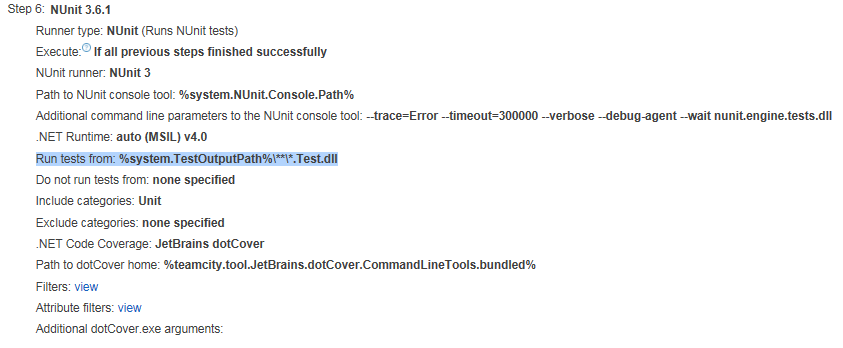
which is something similar to the pattern which you have advised. but still we are facing this issue.
Could you please provide more clear information about the exercise you did to address this issue?
Thanks & Regards,
Rajkumar Uppala
Rajkumar-Uppala
on 27 Oct 2017
@Rajkumar-Uppala
Based on your stack trace, you have a different issue - yours is here: https://github.com/nunit/nunit-console/issues/191
How are you running the tests locally, where you can't reproduce? I suggest you try fetching the .nunit project file generated by TeamCity, and see if you can reproduce the issue using that, and try on the same machine as TeamCity is running.
ChrisMaddock
on 27 Oct 2017
@Rajkumar-Uppala Yes, @ChrisMaddock is right. You have a bit different error. I resolved issue that @marceloatg described.
I specified the following value for "Run tests from" field:
**\Bin\Release*.UITests.dll
Any other values (including paths with ** inside path) are not working for me.
michael-kokorin
on 27 Oct 2017
We had a lot of theses random -100 errors with our CI using nunit-console 3.7 (2/3 times a day).
After a week of using the patch provided by @jnm2 with the two arguments (--remoting-wait-after-stop --remoting-shutdown-delay=5000), I can confirm the mitigation seems to work for us. We never encountered a -100 socket close exception since.
 thegrima
on 20 Dec 2017
thegrima
on 20 Dec 2017
Interesting! Thanks for the data. Perhaps we should consider moving some of that functionality into master with defaults. (@nunit/engine-team?)
jnm2
on 20 Dec 2017
I haven't looked at the patch yet. Can the delay only be applied when needed, i.e. not to every test run? Regardless, it sounds promising!
There's a lot of different stack traces in this issue - some which will have been taken care of by #321. (@marceloatg @Eric-Pang - I believe yours fall into this category.)
I think it could be good to a) get the fix for that known problem in @jnm2 and then b) close this issue, and open new ones for any new errors, separated by stack trace. One issue for 'Error -100' is kinda messy - that's our 'something unknown went wrong' code - we've already fixed a few problems off the back of this issue, and people are still finding problems.
ChrisMaddock
on 20 Dec 2017
@ChrisMaddock The delay only happens if you specify --remoting-wait-after-stop and then it waits for the number of milliseconds specified by --remoting-shutdown-delay=. We could unify the two parameters and add it as a workaround, maybe.
jnm2
on 20 Dec 2017
I'm not totally keen on this being an option flag - I'd rather have it in the build, or not. The flag feels a bit like a --dont-be-broken option. 😄
My preferences:
- Fix the timing issue with no additional delay. (Sounds like you've exhausted that path, Joseph - although I wonder if a new communication architecture would tick this box. That's a much bigger job.)
- Have the delay for everyone.
- Have a flag to add the delay.
@thegrima - Are you able to provide one/some of the exact stack traces you saw? We've seen that socket exceptions have been thrown for a number of different reasons. Also a bit of information about what you're actually running - do you have multiple assemblies, are you passing in a VS solution, and .nunit file? TeamCity? 😄
ChrisMaddock
on 20 Dec 2017
@ChrisMaddock I have the same preferences, though I'm no longer convinced that the new architecture will have the bugfixing ROI that I first hoped.
jnm2
on 20 Dec 2017
I'm hopeful it will fix the race condition shutdown issue that you diagnosed and we know exists - and we can then handle other bug reports separately. 😄
ChrisMaddock
on 20 Dec 2017
@ChrisMaddock : Sure. We're using our TeamCity server with 2 build agent to build a complete VS solution. Solution have multiple test assemblies. .nunit file is generated by TeamCity.
Don't known if it's relevant, but it happen very often that our build system is building the same solution in parallel using the two agents (in different directory of course).
Typical command line in logs is
[10:41:37][Step 5/19] Starting: "C:\Program Files (x86)\NUnit.org\nunit-console\nunit3-console.exe" C:\BuildAgent\temp\buildTmp\U4rDkJny6srG4NUZro4KGUKaxIJoNq7T.nunit --result=C:\BuildAgent\temp\buildTmp\U4rDkJny6srG4NUZro4KGUKaxIJoNq7T.nunit.xml --noheader --x86 --framework=net-4.0
For the stacktrace, you'll find some in this file.
nunit-console-error.log
I could provide complete build logs from TeamCity but they're over 5mb per log and i don't know if it's relevant.
Hope it helps
thegrima
on 21 Dec 2017
Likely very relevant information, thanks. 😄
Could you try something out for us? This is a bit of a stab in the dark, but I'm intrigued to find out.
Could you try adding the --process=Multiple flag? There's currently a bug with .nunit files that forces each assembly to run in sequence (https://github.com/nunit/nunit-console/issues/116). Default behaviour _should_ be that the assemblies run in parallel. I wouldn't _expect_ this to be related - but we've seen other issues result from our TestRunner classes not being used as expected (e.g. the AppDomain problems) - and I'm wondering if this could be a similar problem...
ChrisMaddock
on 21 Dec 2017
(This would need to be without @jnm2's --remoting options - which we know fix's the problem by adding in additional delay. 🙂)
ChrisMaddock
on 21 Dec 2017
I suggest this, as, am I understanding correctly, you currently only see this problem on TeamCity? When running via an .nunit file?
Of course, there's many other ways your TC machine could be different - but it seems to be a common thread.
ChrisMaddock
on 21 Dec 2017
Yes, the problems only occurs in TC. We never encountered it when running all the tests from VS.
I could try your suggestion, but since this is our production release environment, i will not be able to do so before the first week of January. I'll post results when available.
thegrima
on 21 Dec 2017
No problem. 👍
Another option for diagnosis - you could retrieve the .nunit file from TeamCity, and try running the same command line locally. That would help to work out if it's a problem specific to the machine TC is running on, or the .nunit file set-up that TC is using.
ChrisMaddock
on 21 Dec 2017
We see this from non-.nunit invocations on other CI systems (Bamboo). We're on Windows.
herebebeasties
on 21 Dec 2017
@herebebeasties - same questions as above! 😄
Are you able to provide one/some of the exact stack traces you saw? We've seen that socket exceptions have been thrown for a number of different reasons. Also a bit of information about what you're actually running - do you have multiple assemblies, are you passing in a VS solution, and .nunit file? TeamCity? 😄
ChrisMaddock
on 21 Dec 2017
Single assembly, no VS solution, no NUnit, no TeamCity, but concurrent builds/runs under Bamboo.
I'll find you a stack trace tomorrow.
herebebeasties
on 21 Dec 2017
Is there an update on the explicit wait being merged into master for a new release? I don't mind applying the fix, however that branch will soon become outdated.
 PhilipGullick
on 23 Jan 2018
PhilipGullick
on 23 Jan 2018
@PhilipGullick do you mean the command line option --remoting-wait-after-stop? It was intended to diagnose the issue and provide possible workarounds, but does not work for everyone. Have you tried our recent builds of master? Does that fix your problems?
rprouse
on 24 Jan 2018
@rprouse I have applied the fix and for me it does not fix the issue completely:
If I have --inprocess set, it fails with Unhandled Exception: NUnit.Engine.NUnitEngineException: Exception encountered unloading AppDomain
If I have no -inprocess set, it fails with https://github.com/nunit/nunit-console/issues/117
So from recommendations on #117 I set --agents=2 and the suffer from the AppDomain issue again.
I'm currently investigating the last ran test to identify if there are any tasks running erroneously when the test has finished.
I will also pull down the latest master branch to see if that fixes the issue.
PhilipGullick
on 24 Jan 2018
@PhilipGullick - This should be fixed in master, although it will now return a -5 return code. If not, it would be good to understand more details about your scenario.
ChrisMaddock
on 24 Jan 2018
Awesome, thanks guys - will try it now and let you know the result
PhilipGullick
on 24 Jan 2018
Hmm, still affected by #117 . I will limit the agents now to see if AppDomain is still working
PhilipGullick
on 24 Jan 2018
@PhilipGullick - sorry, it's only the AppDomain issue I'd expect to be fixed in master. I haven't looked into #117.
ChrisMaddock
on 24 Jan 2018
@ChrisMaddock No worries, running with --inprocess set now. Will let you know what happens.
PhilipGullick
on 24 Jan 2018
@ChrisMaddock, with --inprocess set I have not had any issues with AppDomain when using master.
PhilipGullick
on 25 Jan 2018
Great - thanks for the update! 👍🏻
ChrisMaddock
on 25 Jan 2018
All,
We believe this issue will have been fixed by @BlythMeister's temporary fix in #370.
Until the next console release, please try the master build, version 3.9.0-dev-03932 or later. You can find this on out MyGet Feed.
If you still experience this issue with the above build of master...
Run your tests with the
--inprocessflag - see if this exposes a more useful exception or error message.Add the
--trace=Debugflag to your command line. When you next see the exception, examine the logs for any clues.
Please then open a new issue. The SocketException is often caused by an nunit-agent crash, which can occur in a number of different scenarios. We believe many of these have been fixed in NUnit.Console 3.8, and the fix in #372 - however, they may still be edge cases we have yet to tackle. Please report these if you come across any!
ChrisMaddock
on 15 Feb 2018
Related issues
ChrisMaddock
·
3Comments
ChrisMaddock
·
6Comments
 kevinheyvaert
·
3Comments
kevinheyvaert
·
3Comments
 michaelrobayoGasTag
·
5Comments
CharliePoole
·
6Comments
michaelrobayoGasTag
·
5Comments
CharliePoole
·
6Comments
Most helpful comment
Sounds sensible to me. All for removing unnecessary complexity. 🙂