Nuitka: Fix for newest PyQt5 and standalone mode
I tried to compile simple project with Qt5
nuitka --standalone --plugin-enable=qt-plugins --windows-icon="c:\convertor\icon.ico" "c:\convertor\convertor.py"
And after compilling it return to cmd:
Traceback (most recent call last):
  File "c:\convertor\convertor.dist\convertor.py", line 2, in <module>
  File "c:\convertor\convertor.dist\PyQt5\__init__.py", line 41, in <module PyQt5>
  File "c:\convertor\convertor.dist\PyQt5\__init__.py", line 33, in find_qt
ImportError: unable to find Qt5Core.dll on PATH
qt5core.dll is in one folder with compilled .exe. If i add qt5core.dll to some of folder in path (for example in windows or python folder, but not for windpows/system32 although it in path too) - it works fine. Why it happend, and how to make it standalone?
programm text:
https://pastebin.com/GsyHvTMk

 ATRedline
All 32 comments
I just compiled & executed this successfully (using hinted compilation - but that shouldn't be vital):
D:\Jorj\Desktop\Develop\nuitka>python nuitka-hints.py qt-test2.py
NUITKA is compiling 'qt-test2.py' with these options:
 --standalone
 --remove-output
 --experimental=use_pefile
 --recurse-none
 --disable-dll-dependency-cache

Nuitka:INFO:User plugin 'hinted-mods.py' is being loaded.
Nuitka:INFO:'hinted-mods.py' is adding the following options:
Nuitka:INFO:--enable-plugin=qt-plugins=sensible
Nuitka:INFO:--recurse-to for 5 imported modules.
Nuitka:INFO:
Nuitka:INFO:drop types
Nuitka:INFO:drop site
Nuitka:INFO:Injecting plug-in based post load code for module 'PyQt5.QtCore':
Nuitka:INFO:    Setting Qt library path to distribution folder. Need to avoid loading target
Nuitka:INFO:    system Qt plug-ins, which may be from another Qt version.
Nuitka:INFO:drop sip
Nuitka:WARNING:Not recursing to unused 'enum'.
Nuitka:WARNING:Not recursing to unused 'functools'.
Nuitka:INFO:Copying Qt plug-ins 'iconengines,imageformats,mediaservice,platforms,printsupport' to 'qt-test2.dist\PyQt5\qt-plugins'.
Nuitka:INFO:Copying OpenSSL DLLs to 'qt-test2.dist'
Nuitka:INFO:Compile time 107 seconds.

D:\Jorj\Desktop\Develop\nuitka>
How does your compilation log compare to mine?
 JorjMcKie
on 2 Jul 2019
JorjMcKie
on 2 Jul 2019
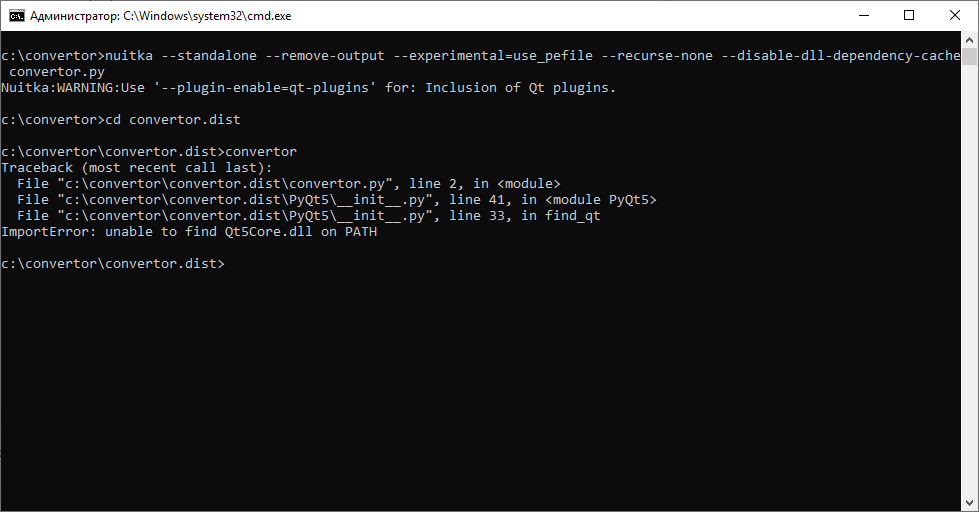
JorjMcKie, with your option-keys log looks like this:
ATRedline
on 2 Jul 2019
you forgot to --enable-plugin=qt-plugins - this is also the warning you are getting.
And:
- you either use hinted compilation alltogether, or
- you must not use
--recurse-none
The basic principle of hinted compilation is (1) create a log of all imports during a test execution, and (2) use that logfile to exclude every (= recurse-none) import except the ones actually executed in the test run (ie. found in the logfile).
JorjMcKie
on 2 Jul 2019
JorjMcKie, the same result

ATRedline
on 2 Jul 2019
Can you paste the code of that find_qt function, this seems to be pure Python code, and giving the message. Lets see if it can be right about this. I am pretty sure I never have it in PATH and it works, uncompiled, and compiled. Maybe the code has a glitch that explains the differences.
 kayhayen
on 2 Jul 2019
kayhayen
on 2 Jul 2019
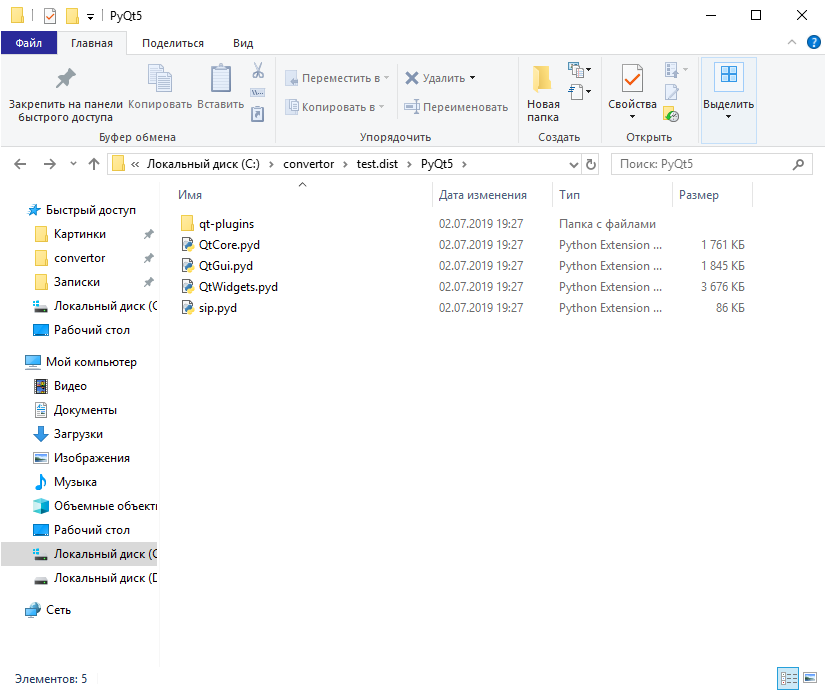
kayhayen, i'm sorry, i'm newbie and dont understand where i can find it? In .dist\PyQt5 no __init__.py file.
And its not from my code too
ATRedline
on 2 Jul 2019
@ATRedline - I have the suspicion that kyrillic letters have something to do with the issue. Can you please provide a directory listing of your Python installation, respectively PyQt installation?
And also a listing of __init__.py inside the Python/lib/site-packages/PyQt5 directory?
JorjMcKie
on 3 Jul 2019
@JorjMcKie yet again the issue template was not filled out, how sure are we this is recent Nuitka, because there used to be problems with unicode paths.
I really would tend to want to close these levels of issues without further investigation. But I am also blaming the issue template, maybe we need to make it more clear, that we do not support otherwise, I know you have been more lenient than I am. Ideally the issue template would be impossible to submit without filling out. :/
kayhayen
on 3 Jul 2019
JorjMcKie, where is no kyrillic letters in pytonpath and other components

listing of __init__.py:
https://pastebin.com/PQrExa2P
ATRedline
on 3 Jul 2019
Aah - we finally have the source code of find_qt!
For @kayhayen: the following is bound to fail when compiled under Nuitka.
def find_qt():
    import os

    path = os.environ['PATH']

    dll_dir = os.path.dirname(__file__) + '\\Qt\\bin'
    if os.path.isfile(dll_dir + '\\Qt5Core.dll'):
        path = dll_dir + ';' + path
        os.environ['PATH'] = path
    else:
        for dll_dir in path.split(';'):
            if os.path.isfile(dll_dir + '\\Qt5Core.dll'):
                break
        else:
            raise ImportError("unable to find Qt5Core.dll on PATH")

    try:
        os.add_dll_directory(dll_dir)
    except AttributeError:
        pass


find_qt()
del find_qt
I doubt that you are providing us the complete source of PyQt5/__init__.py, however, @ATRedline.
In my version
python -m pip show pyqt5
Name: PyQt5
Version: 5.12.2
PyQt5/__init__.py looks like this:
import os as _os

_path = _os.path.dirname(__file__) + '\\Qt\\bin;' + _os.environ['PATH']
_os.environ['PATH'] = _path
@ATRedline - you probably should update your Qt version.
JorjMcKie
on 3 Jul 2019
Another option might be to just remove find_qt in qt-plugins, @kayhayen ?
JorjMcKie
on 3 Jul 2019
JorjMcKie, i have newest version of PyQt installed from pip. I have also newest python version, and last stable Nuitka. I installed all of this just yesterday
Thanks you! Before i read you i tried to modified that __init__ file by myself this way:
https://pastebin.com/9ij07wLk
(just added current dir in dll search process)
and it works too! I just didnt know where to find the source of issue. Thanks!
ATRedline
on 3 Jul 2019
And also, my version of PyQt - 5.12.3

I doubt that you are providing us the complete source of
PyQt5/__init__.py
it was complete version of my init without comments (in the hat)
ATRedline
on 3 Jul 2019
@ATRedline - I see. I refreshed my PyQt5 installation, and indeed: __init__.py now looks like yours :-(
Amazingly bad coding style by those Riverbank people, I must say.
@kayhayen - I think this emphasizes my recent last post: we should prevent execution of line find_qt() ... last line before del find_qt
JorjMcKie
on 3 Jul 2019
@kayhayen I volunteer doing this in the plugin, or do you have a better idea?
JorjMcKie
on 3 Jul 2019
@JorjMcKie fantastic I wasn't aware of os.add_dll_directory being a thing, and well, not calling find_qt() seems good enough, unfortunately not that easy to prevent, I think you may have to patch the source code on the fly, at least I wasn't immediately aware of another way.
kayhayen
on 3 Jul 2019
I am still a bit surprised, the code doesn't use os.pathsep and hard codes the : which is only ever correct on Windows.
kayhayen
on 3 Jul 2019
Ok, os.add_dll_directory is a Python 3.8 thing, hence it is new.
kayhayen
on 3 Jul 2019
But wait, I just compiled your script again @ATRedline with the new Qt version, and it worked without any modification!
This is my Nuitka version:
python -m nuitka --version
0.6.5rc2
Python: 3.7.3 (v3.7.3:ef4ec6ed12, Mar 25 2019, 22:22:05) [MSC v.1916 64 bit (AMD64)]
Executable: C:\Users\Jorj\AppData\Local\Programs\Python\Python37\python.exe
OS: Windows
Arch: x86_64
Please try upgrading to the Nuitka development version and undo your modification of PyQt5 __init__.py to make sure we are on the same page ...
JorjMcKie
on 3 Jul 2019
@kayhayen - yes temp source modification was my thinking, too.
But miraculously it works on my machine without that!
JorjMcKie
on 3 Jul 2019
JorjMcKie, i tried Nuitka dev version yesterday too. Result the same. Maybe you have this file qt5core.dll in some of PATH folders, and thats why it works for you (and as i sad in first message - it working strang - for example System32 is in path too, but if i put qt5core.dll to it - the propgramm will not work (without init-modification) ).
ATRedline
on 3 Jul 2019
And another one strange thing:
to make PyQt5 work on PyCharm and Python - i was forced to mannualy put the way for its "platforms" folder to the path:
QT_QPA_PLATFORM_PLUGIN_PATH = C:\Program Files (x86)\Python37-32\Lib\site-packages\PyQt5\Qt\plugins\platforms
in other way it just didnt finded the platforms folder and windows.dll. The path for platforms folder, as error show was ' '.
Maybe it's connected somehow...
ATRedline
on 3 Jul 2019
I am still a bit surprised, the code doesn't use
os.pathsepand hard codes the:which is only ever correct on Windows.
Just looked into the Linux version of PyQt5: the __init__.py there is _empty_ ... that's why they afford themselves the usual sloppiness, obviously.
JorjMcKie
on 3 Jul 2019
JorjMcKie, i tried Nuitka dev version yesterday too. Result the same. Maybe you have this file qt5core.dll in some of PATH folders, and thats why it works for you (and as i sad in first message - it working strang - for example System32 is in path too, but if i put qt5core.dll to it - the propgramm will not work (without init-modification) ).
I had been thinking the same and set the path to empty in the dist folder before testing your script. It still worked.
Anyway - I will try an on-the-fly modification of __init__.py source in the qt-plugins script. Once done, I will send you that version and ask you to test it, @ATRedline.
JorjMcKie
on 3 Jul 2019
@JorjMcKie amazing grace, why would anybody make the source different on a per platform basis, that is crazy.
One solution could be to
a) Adhere to their layout of the binaries, and put the Qt DLLs where they expect it.
b) Put an empty file there (for Windows obviously only)
c) Remove the source code on the fly
d) Create a pre-load module code that adds the _nuitka_binary_dir in PATH, and a post-load module, that removes it again.
All these solutions have something going fore themselves. I think b is ugly, but could work. I think a involves a lot of changes, so we can specify multiple folder to add to the DLL search path. That touches the C layer a bit.
What they (PyQt) really ought to do is to query the DLL load path, and check that. Because Nuitka added the dist folder to it, and that's where it matters. The PATH is only one part of that.
What is your take, do you think we can work on a and get that to work? Because d is really easy, and will work just fine, and maybe is often the solution for this kind of issue should it repeat elsewhere.
kayhayen
on 3 Jul 2019
@kayhayen - just dumping thoughts for the moment:
- the Linux shared libraries are in the root path of PyQt5
- on Windows they are in
PyQt5\Qt\bin - the
find_qtfunction looks forqt5core.dllin that directory under the obvious assumption that all its other DLLs will also be there. - all this is true only for this PyQt5 version 5.12.3 - not for the earlier ones (which we must also support)
- in the
numpyplugin I encountered half a dozen of different folder layouts, for numpy itself, then scipy, matplotlib and others. The shared library sets for eg. scipy and numpy have a non-empty overlap, but are also not contained within each other. Here, following the original folder layout resulted in duplicated DLLs in different sub-folders ofdist. After strictly using thedistroot for all shared libraries solved that problem.
So (modulo logical errors) to me it appears best to make the dist root the recipient for shared libraries where ever / when ever possible.
If you follow this reasoning, then either c) or d) apply. Probably d).
JorjMcKie
on 3 Jul 2019
Removing source code on the fly is a bit ugly, you ought to make sure, you don't change the number if new lines btw, or else call stacks can become confusing. And it's fragile to their source changes. Setting PATH and resetting later is something that ought to not harm when it is not needed, more robust.
BTW: I think, the pre and post load codes, we ought to make it so, that they are not compiled via C, but always as bytecode by default. They are rarely ever performance relevant. But that's for another day.
kayhayen
on 4 Jul 2019
@kayhayen - you are right. In the meantime, I have made a plugin version that prepends the dist dir to os.environ["PATH"]. No-brainer.
Question: why should I ever again remove that entry?
@ATRedline - here is a revised qt-plugins for you to test. Sorry for the delay. Unzip it and manually copy it to this folder of your Python / Nuitka installation:
...\site-packages\nuitka\plugins\standard
Don't forget to remove your modification of the PyQt5 __init__.py file before testing.
PySidePyQtPlugin.zip
JorjMcKie
on 5 Jul 2019
@JorjMcKie, i tried it, and it works fine. Thanks
ATRedline
on 6 Jul 2019
good, thanks for the feedback.
I will include the change on a branch from where @kayhayen will select changes for next versions.
JorjMcKie
on 7 Jul 2019
Released as 0.6.5
kayhayen
on 27 Jul 2019
I was using nuitka 6.9.1, python 3.8.2-32 and PyQt 5.15.0 and encountered a similar issue 'find_qt.py'. However it raised the following type error:
'TypeError: expected str, bytes or os.PathLike object, not NoneType'
nuitka, and PyQt5 installed with PIP. running in a virtual environment
Compiling through nuitka-utilities and fully hinted compilation
I was able to work around this by backdating pyqt5 to 5.12.3, the version debugged above.
Please let me know if this should be opened as a seperate issue
 wfuller-invn
on 3 Oct 2020
wfuller-invn
on 3 Oct 2020
Related issues
 abl
·
5Comments
abl
·
5Comments
 anki-code
·
5Comments
anki-code
·
5Comments
 sorinaTR
·
8Comments
sorinaTR
·
8Comments
 jamesstidard
·
12Comments
jamesstidard
·
12Comments
 solanu
·
12Comments
solanu
·
12Comments
Most helpful comment
I was using nuitka 6.9.1, python 3.8.2-32 and PyQt 5.15.0 and encountered a similar issue 'find_qt.py'. However it raised the following type error:
'TypeError: expected str, bytes or os.PathLike object, not NoneType'
nuitka, and PyQt5 installed with PIP. running in a virtual environment
Compiling through nuitka-utilities and fully hinted compilation
I was able to work around this by backdating pyqt5 to 5.12.3, the version debugged above.
Please let me know if this should be opened as a seperate issue