Nuitka: Cannot get cryptodome module to work
Hello Kay,
I am trying to compile a program that uses pycryptodome module as standalone, and of course running into issues.
I've tried with latest nuitka stable and latest rc so far, and tried to find some topics before opening the issue.
- Nuitka version, full Python version and Platform (Windows, OSX, Linux ...)
0.6.2rc1
Python: 3.7.1 (v3.7.1:260ec2c36a, Oct 20 2018, 14:05:16) [MSC v.1915 32 bit (Intel)]
Executable: C:\Python37-32\python.exe
OS: Windows
Arch: x86
Using MingW64 8.1.0 with posix/dwarf
How did you install Nuitka and Python (pip, anaconda, deb, rpm, from source,
what is a virtualenv ...), this is very important usually.
Installed latest nuitka as site package with http://nuitka.net/releases/Nuitka-6.0.210.win32.py37.msi
By the way, there seems to be a naming problem with those 6.0.210 develop packages which naming make them look elder than the 6.1.10 stable packages.If possible please supply a Short, Self Contained, Correct, Example
Example test.py file:
from Crypto.Cipher import AES
from Crypto.Random import get_random_bytes

print(str(get_random_bytes(1337)))
Compiled with
python -m nuitka --exe --follow-imports --recurse-to=Crypto --standalone c:\PythonApps\test\test.py
Compilation produces no errors.
- If this is a regression (used to work in an earlier version of Nuitka),
Didn't find anything about this.
Anything I may have missed ?
Best regards.
 deajan
All 46 comments
I have attempted to reproduce this on Linux with both Python2 and Python3.7 and it works. For the later I did pip install pycrypto. Is pycryptodome something different?
You also didn't say what run time error you were getting, crash or traceback?
 kayhayen
on 9 Jan 2019
kayhayen
on 9 Jan 2019
Indeed, I totally forgot the traceback :)
Here it is:
C:\PythonApps\Builds\test.dist>test
Traceback (most recent call last):
  File "C:\PythonApps\Builds\test.dist\test.py", line 1, in <module>
  File "<frozen importlib._bootstrap>", line 983, in _find_and_load
  File "<frozen importlib._bootstrap>", line 967, in _find_and_load_unlocked
  File "<frozen importlib._bootstrap>", line 668, in _load_unlocked
  File "<frozen importlib._bootstrap>", line 638, in _load_backward_compatible
  File "C:\PythonApps\Builds\test.dist\Crypto\Cipher\__init__.py", line 27, in <module Crypto.Cipher>
  File "<frozen importlib._bootstrap>", line 983, in _find_and_load
  File "<frozen importlib._bootstrap>", line 967, in _find_and_load_unlocked
  File "<frozen importlib._bootstrap>", line 668, in _load_unlocked
  File "<frozen importlib._bootstrap>", line 638, in _load_backward_compatible
  File "C:\PythonApps\Builds\test.dist\Crypto\Cipher\_mode_ecb.py", line 35, in <module Crypto.Cipher._mode_ecb>
  File "C:\PythonApps\Builds\test.dist\Crypto\Util\_raw_api.py", line 299, in load_pycryptodome_raw_lib
OSError: Cannot load native module 'Crypto.Cipher._raw_ecb': Trying '_raw_ecb.cp37-win32.pyd': [WinError 126] Le module spécifié est introuvable, Trying '_raw_ecb.pyd': [WinError 126] Le module spécifié est introuvable
Yes, pycryptodome is a fork of the older pycypto, which does not work out of the box on recent Python for Windows.
Installing pycrypto via pip on Windows Python 3.7 asks me to install MSVC:
pycrypto error: Microsoft Visual C++ 14.0 is required. Get it with "Microsoft Visual C++ Build Tools": http://landinghub.visualstudio.com/visual-cpp-build-tools
Back to my issue.
Earlier, I tried to copy the _raw_ecp.cp37-win32.pyd file directly to the test.dist folder, without success.
Then, today, I litteraly copied the windows library files '_*.pyd' from site-packages/Cyptodome, including the folder hierarchy to test.dist, and, hey... It Works !
So for anyone stumbling accross this issue between pycrypto, pycryptodome or pycryptodomex with Nuitka, here's the solution (for windows):
robocopy c:\Python37-32\Lib\site-packages\Cryptodome c:\PythonApps\Builds\test.dist\Cryptodome _*.pyd /S
This will copy the cryptodome folder structure with all precompiled modules for the current architecture directly into the dist folder generated by Nuitka.
Of course, you'll have to change paths according to your python install and dist folder :)
If the problem exists on Linux, the above command can be translated to:
rsync -a --include '*/' --include '*.py' --exclude '*' /usr/lib/python3.7/site-packages/Cryptodome / /home/nuitkabuilds/test.dist/Cryptodome/
Cheers Kay,
And thank you for your hard work on Nuitka.
I have several rather large python programs with multiple imports (ctypes, win32event, win32process, win32com, wmi, tkinter, PysimpleGUI, pycryptodome...) and got everything working pretty well with nuitka 0.6.2-rc2.
Btw, little OT, I'm thinking of a small wiki that could be hosted directly on your github project (or anywhere else), where small solutions like this could find their place.
I know of this one, I know about the manual pythoncom37.dll copy for the wmi package, and @JorjMcKie has the tkinter one.
I could also add documentation for proper Windows UAC elevation code that works with nuitka and preserves command line arguments.
deajan
on 9 Jan 2019
Hello!
I have the same problem with PyCryptodome package on Windows 10, Microsoft VS 2017, Python 3.6. 32 bit installation.
My python script compilation as --standalone goes good, but Crypto dir was not placed to destination Nuitka directory and compiled program fails to start WITHOUT any warnings of incorrect situation (but I use --windows-disable-console option -may be due to this fact I have no warnings).
I cured this problem by:
1) Have made distributive directory of my project using PyInstaller (or Cx_Freeze)
2) Took from my project's PyInstaller distributive directory subdirectory Crypto and copied it into dist directory, made by Nuitka
After theese steps all worked fine with my compiled as --standalone project.
by the way:
adding '--include-package=Crypto' to
'python -m nuitka --standalone --recurse-all --plugin-enable=qt-plugins...... '
doesn't help...
 shoemak
on 12 Jan 2019
shoemak
on 12 Jan 2019
@shoemak What files / folder structure does your distributive directory contain ? Could you make a gist and post it ? I'm interested to know file differences between my and your solution.
deajan
on 12 Jan 2019
Oh, sorry! Forgot the main things..
Windows 10, Microsoft VS 2017, Python 3.6. 32 bit installation.
Sorry, right now I cannot show my nuitka dist directory - I am not at home.
I will show it later.
shoemak
on 12 Jan 2019
@shoemak What files / folder structure does your distributive directory contain ? Could you make a gist and post it ? I'm interested to know file differences between my and your solution.
Hello!
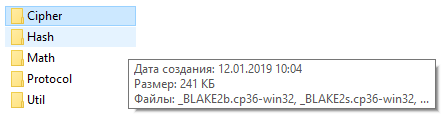
Here are two images showing dist folder of my program (without Crypto dir) and contents of the Crypto directory, I need to copy to my dist folder. (I copy the full "Crypto" dir)

shoemak
on 12 Jan 2019
Okay, be aware that coyping only the _*.pyd files and their folder structure from crypto is sufficient :)
deajan
on 14 Jan 2019
Closing this issue since it's resolved via the above robocopy / rsync command.
deajan
on 1 Feb 2019
Nah, don't close it, such steps should be performed by Nuitka standard plugins.
kayhayen
on 1 Feb 2019
Okay :)
deajan
on 1 Feb 2019
Can you give me the path to the standard plugins that should handle this so I can write something for both pycryptodome and pycryptodomex ?
deajan
on 6 Feb 2019
So, implicit imports are done here @deajan
It is expected to yield the list of names, and an indicator if it's an error, if those cannot be found (put those to True now), and that will make sure Nuitka knows them, and e.g. looks at their DLL dependencies. I definitely want Nuitka to not just blindly copy them as a whole folder, I want to know them, so e.g. I can report them later.
If there is then still data files, there is this for it:
This is a list of discrete files, that you provide there. If you think it should be a directory scan, let me know, then I would propose something different. Should these be DLLs that are not dependencies that the pefile can find, then we would have to also do something different. I also want those to come in via extra DLLs plugin API.
kayhayen
on 6 Feb 2019
Note to myself:
pycryptodome requires all files .pyd from sites-libraries\Cryptodome to program.dist\Crpyto
pycryptodome requires all files .pyd from sites-libraries\Cryptodome to program.dist\Crpytodome
deajan
on 13 Feb 2019
@deajan did you had time to move forward? I just hit the same error and can have a look if you want to.
 BoboTiG
on 19 Mar 2019
BoboTiG
on 19 Mar 2019
@BoboTiG Since @deajan currently lacks the time, I would be willing to step in, but one point I never quite got about the issue was what to pip install, because I think this is not quite the standard crypto package, is it? Worst case an output of pip freeze from the proper interpreter would do me good there.
kayhayen
on 19 Mar 2019
You are right, this is not the standard crypto module but pycryptodomex==3.7.3 (as pip freeze outputs, see their GitHub). There is no question here, it is intended to use this particular module :)
If you want another test case:
from Cryptodome.Cipher import AES
from Cryptodome.Random import get_random_bytes


plaintext = "Administrator".encode("utf-8")
secret = "12345678-acbd-1234-cdef-12345678".encode("utf-8")

iv = get_random_bytes(AES.block_size)
encobj = AES.new(secret, AES.MODE_CFB, iv)
print(iv + encobj.encrypt(plaintext))
Ok, will look into it later today, with the information already provided by @deajan this ought to be doable for me.
kayhayen
on 19 Mar 2019
@kayhayen did you make progress? :)
BoboTiG
on 21 Mar 2019
@BoboTiG I was so side tracked yesterday, it's not funny. But I will get to it. :)
kayhayen
on 21 Mar 2019
I had succes running both pycryptodome and pycryptomodex, the only difference being the source folder from where to copy the pyd files, see my comment from a month ago.
@boboTIG any error messages ?
deajan
on 21 Mar 2019
@Kayhayen, sorry, I get like all Nuitka git notifications, so mine are lost in the mass.
Any clue how to limit notifications to mine only so I can respond quicker ?
deajan
on 21 Mar 2019
@deajan of course, this is what I get when running the code given here:
▶ ./test.dist/test
Traceback (most recent call last):
  File "/home/tiger-222/projects/nuxeo-drive/test.dist/test.py", line 1, in <module>
  File "<frozen importlib._bootstrap>", line 971, in _find_and_load
  File "<frozen importlib._bootstrap>", line 955, in _find_and_load_unlocked
  File "<frozen importlib._bootstrap>", line 656, in _load_unlocked
  File "<frozen importlib._bootstrap>", line 626, in _load_backward_compatible
  File "/home/tiger-222/projects/nuxeo-drive/test.dist/Cryptodome/Cipher/__init__.py", line 27, in <module Cryptodome.Cipher>
  File "<frozen importlib._bootstrap>", line 971, in _find_and_load
  File "<frozen importlib._bootstrap>", line 955, in _find_and_load_unlocked
  File "<frozen importlib._bootstrap>", line 656, in _load_unlocked
  File "<frozen importlib._bootstrap>", line 626, in _load_backward_compatible
  File "/home/tiger-222/projects/nuxeo-drive/test.dist/Cryptodome/Cipher/_mode_ecb.py", line 35, in <module Cryptodome.Cipher._mode_ecb>
  File "/home/tiger-222/projects/nuxeo-drive/test.dist/Cryptodome/Util/_raw_api.py", line 299, in load_pycryptodome_raw_lib
OSError: Cannot load native module 'Cryptodome.Cipher._raw_ecb': Trying '_raw_ecb.cpython-36m-x86_64-linux-gnu.so': cannot load library '/home/tiger-222/projects/nuxeo-drive/test.dist/Cryptodome/Util/../Cipher/_raw_ecb.cpython-36m-x86_64-linux-gnu.so': /home/tiger-222/projects/nuxeo-drive/test.dist/Cryptodome/Util/../Cipher/_raw_ecb.cpython-36m-x86_64-linux-gnu.so: cannot open shared object file: No such file or directory.  Additionally, ctypes.util.find_library() did not manage to locate a library called '/home/tiger-222/projects/nuxeo-drive/test.dist/Cryptodome/Util/../Cipher/_raw_ecb.cpython-36m-x86_64-linux-gnu.so', Trying '_raw_ecb.abi3.so': cannot load library '/home/tiger-222/projects/nuxeo-drive/test.dist/Cryptodome/Util/../Cipher/_raw_ecb.abi3.so': /home/tiger-222/projects/nuxeo-drive/test.dist/Cryptodome/Util/../Cipher/_raw_ecb.abi3.so: cannot open shared object file: No such file or directory.  Additionally, ctypes.util.find_library() did not manage to locate a library called '/home/tiger-222/projects/nuxeo-drive/test.dist/Cryptodome/Util/../Cipher/_raw_ecb.abi3.so', Trying '_raw_ecb.so': cannot load library '/home/tiger-222/projects/nuxeo-drive/test.dist/Cryptodome/Util/../Cipher/_raw_ecb.so': /home/tiger-222/projects/nuxeo-drive/test.dist/Cryptodome/Util/../Cipher/_raw_ecb.so: cannot open shared object file: No such file or directory.  Additionally, ctypes.util.find_library() did not manage to locate a library called '/home/tiger-222/projects/nuxeo-drive/test.dist/Cryptodome/Util/../Cipher/_raw_ecb.so'
And there is no subfolder at all in test.dist.
BoboTiG
on 21 Mar 2019
Sorry @deajan for the spam, I understand that is not effective, I think this is the way to go:
https://github.com/settings/notifications
I think you can disable "watch" for repositories. Right now you can click "Unwatch", which I will not.
kayhayen
on 21 Mar 2019
@bototig have you tried my rsync command from https://github.com/Nuitka/Nuitka/issues/215#issuecomment-452748417 ?
deajan
on 21 Mar 2019
@kayhayen Thanks, as long as I get the notifications for my assigned issues that'll be perfect ;)
deajan
on 21 Mar 2019
So I managed to reproduce an issue on my side, Python2.7 and Linux. In my case, it seems that it's line 89 though, where this is:
    from cffi import FFI

    ffi = FFI()
    null_pointer = ffi.NULL
    uint8_t_type = ffi.typeof(ffi.new("const uint8_t*"))
So basic cffi is not working at all it seems. Your crash is later down the road.
kayhayen
on 22 Mar 2019
For 3.7, I also managed to reproduce the issue, this time the one actually reported. It seems as though there is a bunch of DLLs that match a naming pattern:
/home/hayen/.local/lib/python3.7/site-packages/Cryptodome/Cipher/_raw_blowfish.cpython-37m-x86_64-linux-gnu.so
/home/hayen/.local/lib/python3.7/site-packages/Cryptodome/Cipher/_raw_cfb.cpython-37m-x86_64-linux-gnu.so
/home/hayen/.local/lib/python3.7/site-packages/Cryptodome/Cipher/_raw_aes.cpython-37m-x86_64-linux-gnu.so
/home/hayen/.local/lib/python3.7/site-packages/Cryptodome/Cipher/_raw_cast.cpython-37m-x86_64-linux-gnu.so
/home/hayen/.local/lib/python3.7/site-packages/Cryptodome/Cipher/_raw_ocb.cpython-37m-x86_64-linux-gnu.so
/home/hayen/.local/lib/python3.7/site-packages/Cryptodome/Cipher/_raw_aesni.cpython-37m-x86_64-linux-gnu.so
/home/hayen/.local/lib/python3.7/site-packages/Cryptodome/Cipher/_raw_des.cpython-37m-x86_64-linux-gnu.so
/home/hayen/.local/lib/python3.7/site-packages/Cryptodome/Cipher/_raw_ecb.cpython-37m-x86_64-linux-gnu.so
/home/hayen/.local/lib/python3.7/site-packages/Cryptodome/Cipher/_raw_arc2.cpython-37m-x86_64-linux-gnu.so
/home/hayen/.local/lib/python3.7/site-packages/Cryptodome/Cipher/_raw_des3.cpython-37m-x86_64-linux-gnu.so
/home/hayen/.local/lib/python3.7/site-packages/Cryptodome/Cipher/_raw_cbc.cpython-37m-x86_64-linux-gnu.so
/home/hayen/.local/lib/python3.7/site-packages/Cryptodome/Cipher/_raw_ofb.cpython-37m-x86_64-linux-gnu.so
/home/hayen/.local/lib/python3.7/site-packages/Cryptodome/Cipher/_raw_ctr.cpython-37m-x86_64-linux-gnu.so
From me looking at them with objdump I am very convinced these are mere DLLs. Are they really .pyd files on Windows? That well could be, since its using the imp.C_EXTENSION suffices in CFFI, which is a bad idea methinks, but that's the way CFFI does it then.
I will try up with a clever imitation of the CFFI search code, and include those DLL as "extra DLLs".
One remaining question from here, is, not following this too closely, there is also another PyPI package without the "x". Is it a fork or a replacement? And do they collide in the used namespace? I guess, chances are it's a fork and a scan for present DLLs matching the name space used, would be good enough, but I have to run now. Hoping to sort this out later today.
kayhayen
on 22 Mar 2019
If anybody would look into the Python 2.7 issue, why that cffi code is not working at all, I would be glad. But one thing on my mind, nobody is using CFFI for anything, right? This is in my mind the first time I come across it now, and it's hard to believe. With all the cool promise of CFFI that would be bad. I was kind of hoping it ties well into Nuitka allowing for direct C call optimization as planned for ctypes.
kayhayen
on 22 Mar 2019
Both pycryptodome and pycryptodomex work with Nuitka, and yes, the .pyd file are actually precompiled DLLs.
You just need to copy pycryptodome pyd files to soft.dist/Crypto, and pycryptodomex pyd files to soft.dist/Cryptodome, using the robocoy / rsync command above.
deajan
on 23 Mar 2019
I have just pushed to the factory branch changes that will enable standalone for cryptodomex and Python3, just what @BoboTiG wants.
The ugly thing is this uses the method to locate Python extension modules, and not the one to find DLLs, as ".pyd" files won't match. This is a CFFI issue. I think I want to make it a better named helper function of some sorts, to include things.
I also found that the task of adding extra DLLs is a bit strange. You get to make the copy and report what you did, and then other things work on the DLL. But why do I have to shutit.copy myself, I think the plugin layer ought to do that.
I also added a method to the plugins to decide a module kind and name from a filename, just for CFFI here, and because it's otherwise a cyclic dependency for every user. Not sure how useful that is in the long run. And maybe, when searching concrete DLL, we can rather than listdir, just create the allowed filenames from what we know instead of matching.
So this is under heavy flux still. But try it out as described under:
http://nuitka.net/doc/factory.html
Before I make too many cleanups though, I want to cover Python2 as well, and normal cryptodome, which ought to be easy now, as @deajan says.
kayhayen
on 24 Mar 2019
Well, I didn't follow the plan, and instead cleaned it up. Using the normal implicit dependencies for what are not real extension modules, but it is going to work very well. No need to search for filenames and decide if they could be it. The importing scan does that already.
Also other cleanups that improve plugin mechanism to allow data files which are generated. The Util direcotry has to be kept, and a place holder files makes sure, that doesn't exist as a file, so I added creation functions for data files and moved the actual copying to the standalone module.
Still on factory branch, plus I tested on Windows, made no difference.
kayhayen
on 25 Mar 2019
Thanks @kayhayen, I will have time to test tomorrow.
BoboTiG
on 25 Mar 2019
The factory branch works like a charm with pycryptodomex on GNU/Linux and Windows :+1:
BoboTiG
on 26 Mar 2019
@deajan could you confirm this issue is resolved with Nuitka 0.6.3? For me, it is OK :)
BoboTiG
on 23 Apr 2019
@BoboTiG I think I only ever did anything for cryptodomex, and mean to still look at cryptodome when I find the time.
kayhayen
on 23 Apr 2019
@kayhayen Just tried to build with latest Nuitka 0.6.4rc3 with pycryptodome.
None of the .pyd files copied automagically.
Is there any --plugin or --import statement needed ?
I'm working on this again right now, willing to review / fix code (if you tell me where to find it :))
deajan
on 9 May 2019
Tried --include-module=Crypto (for pycryptodome) and --include-package=Crypto (for pycryptodome).
Both do not copy the necessary files.
If this hasn't been resolved, shall I write a plugin for it (like the tk one) ?
deajan
on 9 May 2019
@deajan Sorry, I only did pycryptodomex so far, and didn't follow up on this further.
kayhayen
on 10 May 2019
@kayhayen I've tried to search for 'Cryptodome,' 'pycrypto*' in your code using grep -ri. Didn't find anything.
Are we talking about a plugin you've done or some module or what else ?
The only difference I see so far between pycryptodome and pycryptodomex is the package name (Crypto and Cryptodome). Please point me to the piece of code that I can read to see whether I can do something.
deajan
on 10 May 2019
@deajan have a look at the commit that added pycryptodome support, you may find valuable information: 958d918.
BoboTiG
on 10 May 2019
After doing git pull; git checkout develop, I didn't redo git pull, hence I didn't find the changes.
Thanks. I'll see to add support for both packages.
deajan
on 10 May 2019
@deajan Thanks, that would be great. I was too distracted. Maybe you will need to make a difference though, in which case detecting one vs. the other might be an issue, since they use the same namespace. Changing the True to False for stuff only one thing has, and adding the other with False as well might get both to work at the same time too.
kayhayen
on 11 May 2019
Added support for both packages.
Most of the hard work was done by @kayhayen, I only managed to make code check for both package names.
deajan
on 13 May 2019
So with it merged, I think we can put this as "develop". I am readying a release now, this is in the next one of course.
kayhayen
on 13 May 2019
Released as 0.6.4
kayhayen
on 10 Jun 2019
I am using SHA224 and it seems not to be included in https://github.com/Nuitka/Nuitka/pull/384/files, would it be OK to add it?
My traceback:
Traceback (most recent call last):
  File "D:\Bismuth\dist\files\wallet.py", line 23, in <module>
  File "<frozen importlib._bootstrap>", line 983, in _find_and_load
  File "<frozen importlib._bootstrap>", line 967, in _find_and_load_unlocked
  File "<frozen importlib._bootstrap>", line 668, in _load_unlocked
  File "<frozen importlib._bootstrap>", line 638, in _load_backward_compatible
  File "D:\Bismuth\dist\files\Cryptodome\PublicKey\RSA.py", line 38, in <module Cryptodome.PublicKey.RSA>
  File "<frozen importlib._bootstrap>", line 983, in _find_and_load
  File "<frozen importlib._bootstrap>", line 967, in _find_and_load_unlocked
  File "<frozen importlib._bootstrap>", line 668, in _load_unlocked
  File "<frozen importlib._bootstrap>", line 638, in _load_backward_compatible
  File "D:\Bismuth\dist\files\Cryptodome\IO\PKCS8.py", line 44, in <module Cryptodome.IO.PKCS8>
  File "<frozen importlib._bootstrap>", line 983, in _find_and_load
  File "<frozen importlib._bootstrap>", line 967, in _find_and_load_unlocked
  File "<frozen importlib._bootstrap>", line 668, in _load_unlocked
  File "<frozen importlib._bootstrap>", line 638, in _load_backward_compatible
  File "D:\Bismuth\dist\files\Cryptodome\IO\_PBES.py", line 41, in <module Cryptodome.IO._PBES>
  File "<frozen importlib._bootstrap>", line 983, in _find_and_load
  File "<frozen importlib._bootstrap>", line 967, in _find_and_load_unlocked
  File "<frozen importlib._bootstrap>", line 668, in _load_unlocked
  File "<frozen importlib._bootstrap>", line 638, in _load_backward_compatible
  File "D:\Bismuth\dist\files\Cryptodome\Hash\SHA224.py", line 29, in <module Cryptodome.Hash.SHA224>
  File "D:\Bismuth\dist\files\Cryptodome\Util\_raw_api.py", line 300, in load_pycryptodome_raw_lib
OSError: Cannot load native module 'Cryptodome.Hash._SHA224': Trying '_SHA224.cp37-win_amd64.pyd': cannot load library 'D:\Bismuth\dist\files\Cryptodome\Util\..\Hash\_SHA224.cp37-win_amd64.pyd': error 0x7e.  Additionally, ctypes.util.find_library() did not manage to locate a library called 'D:\\Bismuth\\dist\\files\\Cryptodome\\Util\\..\\Hash\\_SHA224.cp37-win_amd64.pyd', Trying '_SHA224.pyd': cannot load library 'D:\Bismuth\dist\files\Cryptodome\Util\..\Hash\_SHA224.pyd': error 0x7e.  Additionally, ctypes.util.find_library() did not manage to locate a library called 'D:\\Bismuth\\dist\\files\\Cryptodome\\Util\\..\\Hash\\_SHA224.pyd'
My code:
python -m nuitka --follow-imports wallet.py --windows-icon=graphics\icon.ico --standalone --show-progress -j 8 --recurse-all --include-package=coincurve --include-package=cryptodome --plugin-enable=tk-inter
 hclivess
on 11 Jun 2019
hclivess
on 11 Jun 2019
Related issues
BoboTiG
·
12Comments
 gggggeorge
·
7Comments
gggggeorge
·
7Comments
 redstoneleo
·
4Comments
redstoneleo
·
4Comments
 abl
·
5Comments
abl
·
5Comments
 sorinaTR
·
8Comments
sorinaTR
·
8Comments