Nuitka: Star imports of built-in names are not working as expected
Today I wanted to try a very fast experiment, the idea was trying to create executables for all the existing matplotlib examples, here's what I did so far:
Having a virtualenv with these requirements (i've got more but just posting the basic ones to run many of the matplotlib examples):
matplotlib==2.2.2
pyparsing==2.2.0
python-dateutil==2.7.3
cycler==0.10.0
numpy==1.14.0+mklgit clone https://github.com/matplotlib/matplotliband make sure I was able to run all included examples, so far so good, all of them would run flawlessly (tested manually many dozens)Create nuitka modules by doing:
nuitka --output-dir=build --no-pyi-file --include-package=cycler --module --jobs=4 --show-scons D:\virtual_envs\py364_32\lib\site-packages\cycler.py
nuitka --output-dir=build --no-pyi-file --include-package=dateutil --module --jobs=4 --show-scons D:\virtual_envs\py364_32\lib\site-packages\dateutil
nuitka --output-dir=build --no-pyi-file --include-package=matplotlib --module --jobs=4 --show-scons D:\virtual_envs\py364_32\lib\site-packages\matplotlib
nuitka --output-dir=build --no-pyi-file --include-package=numpy --module --jobs=4 --show-scons D:\virtual_envs\py364_32\lib\site-packages\numpy
nuitka --output-dir=build --no-pyi-file --include-package=pyparsing --module --jobs=4 --show-scons D:\virtual_envs\py364_32\lib\site-packages\pyparsing.pyFinally, copying manually the required implicit dlls/data to use numpy&matplotlib.
I've created a beautiful package to give more relevant information, you can download from here
Once you've extracted that nice package containing all dependencies the idea was I'd just set PYTHONPATH pointing out to that folder (absolute path) and everything would run flawlessly... Well, unfortunately the plan fail and it didn't work ;-)
Anyway, here's the current traceback I've got stuck with:
(py364_32) D:\sources\others\sources_compilers\nuitka_tests\matplotlib\examples\color>echo %PYTHONPATH%
D:\sources\others\sources_compilers\nuitka_tests\bin

(py364_32) D:\sources\others\sources_compilers\nuitka_tests\matplotlib\examples\color>python color_by_yvalue.py
D:\sources\others\sources_compilers\nuitka_tests\bin\matplotlib\__init__.py:1004: UserWarning: could not find rc file; returning defaults
<module 'numpy' from 'D:\\sources\\others\\sources_compilers\\nuitka_tests\\bin\\numpy.pyd'>
Traceback (most recent call last):
  File "color_by_yvalue.py", line 25, in <module>
    ax.plot(t, smiddle, t, slower, t, supper)
  File "D:\sources\others\sources_compilers\nuitka_tests\bin\matplotlib\__init__.py", line 1855, in inner
  File "D:\sources\others\sources_compilers\nuitka_tests\bin\matplotlib\axes\_axes.py", line 1531, in plot
  File "D:\sources\others\sources_compilers\nuitka_tests\bin\matplotlib\axes\_base.py", line 2516, in autoscale_view
  File "D:\sources\others\sources_compilers\nuitka_tests\bin\matplotlib\axes\_base.py", line 2500, in handle_single_axis
  File "D:\sources\others\sources_compilers\nuitka_tests\bin\numpy\core\numeric.py", line 2334, in isclose
TypeError: 'numpy.bool_' object is not iterable
Can you think of any reason why I'm getting this error when trying to use the modules generated by nuitka? Do you see any nuitka command missing any relevant arguments on my previous steps?
This plan was great, proving that I'd be able to build all matplotlib very fast and having them running on other boxes without python installed would be quite amazing (at least in my books)
Regards,
B
Ps. nuitka(develop) + 3.6.x + win7 + vs2015
 brupelo
All 19 comments
That looks like a ICE (Incorrect Code Execution) error, the worst ones to have. Can you check the original source for the traceback, what can of source that is, seems Nuitka is mishandling something there.
 kayhayen
on 18 Sep 2018
kayhayen
on 18 Sep 2018
ICE... never heard about that term. So let me see If I've understood correctly, does that mean isn't my fault as a user that missed some extra argument when converting numpy to a module but it's because nuitka is generating buggy c code?
In any case, when you say check the original source for the traceback, you mean the original python code or the c code? Anyway, please let me know the best way to tackle this one so we'll be able to come up with some mcve to reproduce this one much easily.
Said otherwise, which strategy do you use to deal with the so called ICEs over there?
brupelo
on 18 Sep 2018
Hello Bruno,
ICE is a class of compiler bugs, and yes, very unlikely your fault.
In any case, when you say check the original source for the traceback, you
mean the original python code or the c code? Anyway, please let me know the
best way to tackle this one so we'll be able to come up with some mcve to
reproduce this one much easily.I mean the Python code. I looked at my variant of numpy, but the line
numbers are bound to not match. The function itself looked innocent and
iterates little, no idea from the code.
Generating a minimal reproducer or self contained example would be most
welcome. Most of what you said you did probably has nothing to do with the
error, and the slimmer the example, the easier I can reproduce the error.
Of course I won't do 10 compilations and stuff, when all it takes is
probably that one small program compiled with --recurse-to=numpy which is
what you should attempt.
I concur that executing tests is a very good idea to uncover bugs. Please
reduce this one and find the next thereafter. Once isolated, I surely will
fix such things swiftly and with priority.
Yours,
Kay
kayhayen
on 18 Sep 2018
Kay,
Cristal clear, makes total sense, excuse me if this time I've just provided this kind of hard to reproduce bug report, these ones are a new kind for me so I still need to come up with better ways to provide you exactly the relevant information so you'll know exactly how to tackle them.
Said otherwise, I'll eventually learn the best way to make better bug reports out of ICEs. Learning how to come with mcves is definitely a really powerful skill. In fact, asking/answering on StackOverflow has teached me quite a lot about this extremely valuable asset which is how to become a more effective tester... but of course, still a long way to become on expert on that area ;)
Yours,
B
Ps. I'll try to find the time this week to come up with a proper mcve, this one is really interesting and making out standalone executables (in a fast way) out of the whole matplotlib test-suite won't prove nuitka is production-ready code yet but it'll definitely prove that's already worth considering on really interesting cases. For instance, I love when products show on their sites "Success cases", they're really good marketing to attract people to join... in fact, I recall few months ago I'd listened in some video you'd told using Nuitka to build mercurial... that's what I call a "Success case" in this context.
brupelo
on 18 Sep 2018
@kayhayen I think I've found it, wow! this one looks like a really nasty one, hopefully you were already aware of it and got some ideas to fix it.
In order to understand what this ICE is all about I propose you to try this on a python interactive session:
>>> all
<built-in function all>
>>> all(True)
Traceback (most recent call last):
  File "<stdin>", line 1, in <module>
TypeError: 'bool' object is not iterable
>>> all([])
True
>>> from numpy.core.numeric import *
>>> all
<compiled_function all at 0x03247300>
>>> all(True)
True
>>> all([])
True
>>>
So yeah, there you got it... Assuming all pypi packages would be good python citizens without overwritting builtins was naive... as you can see that won't always be the case. It's because these type of nasty bad practices because I don't use the overbloated so popular numpy library anymore on my personal projects and I just use my custom c++ mathy library with proper namespacing wrapped with the good old but quite critized swig ... :/
Anyway... hopefully you'll be able to come up with a good solution for this one... Kay, I believe in you!
Good luck :')
Bruno
Ps. It feels like solving this one would be quite awesome!
brupelo
on 18 Sep 2018
Hello Bruno,
this is very close and great of you.
However your assumption that Nuitka is too naive with built-ins is not strictly true, in fact it strives to catch code like that, and even has a test for that. I just believe it doesn't take star imports as writes. that not only could change every global, but also add some. That is a bug in the variable tracing this exposes.
So I think it believe that it could believe that "all" cannot be a global variable. which is untrue. And then treats it as a built-in reference.
In an ideal world, we would know which names __all__ of a module will be, i.e. what names that import is going to expose, and limits what * imports give you We would know that from checking the source code. In a yet better world, the ".pyi" file that is created along side as your ".pyd" file would not loose that important information, and get loaded by Nuitka and put there too.
Then star imports like these become more like regular imports are will be fully and correctly predictable, but that is only dreaming right now, although I see myself doing that soonish.
Now, having discovered this leak, I am a bit concerned to disable this globally. But I have to confess that I am a sinner, the code that does this looks like this:
        if variable.isModuleVariable() and \
           variable.hasDefiniteWrites() is False:
....
            elif variable_name in Builtins.builtin_names and \
                 variable_name != "pow":
                from .BuiltinRefNodes import makeExpressionBuiltinRef

                new_node = makeExpressionBuiltinRef(
                    builtin_name = variable_name,
                    source_ref   = self.getSourceReference()
                )
I am not sure if you get it from the code extract... So module variable with no writes, that fits a built-in name, but it is not "pow", then it turns into a built-in reference. I recall I added this very early when I first came across "from math import *" which is standard library overwriting a built-in name right there.
Of course bad in many ways, one of which is that "pow" is now never optimized into a built-in, as will be "all" if done the same. What instead should be done is to consider potential writes from star imports that are not resolved to add something to the traces that inhibits these all.
And as for numpy being bad with namespace, is it the one doing the star import? Those are really bad, and should not be done. And if you are not using numpy, you are doing it wrong. Period. The brightest minds have created really great stuff there. Nobody has a chance to compete with them on his/her own, I believe it's a huge mistake to roll your own. Using a builtin name for a function is not really that bad, if you access it through a namespace all the time.
Yours,
Kay
kayhayen
on 18 Sep 2018
Ok, I think my previous report wasn't very good and maybe even I was assuming/ommitting some explanations so let me try again to be sure my research will reach properly to you, let's forget about the import *.
I think at certain point when I run my matplotlib test numpy will override some python builtin functions here, and I think (this is an assumption) nuitka isn't able to distinguish between the numpy all compiled method and the builtin all python method. I guess a good mcve could be something like this:
from numpy import bool_
from numpy.core.numeric import all
all(bool_(True))
The goal should be in that case of course nuitka being able to use the numpy compiled all method instead the python builtin one.
In any case, let me reread your previous message in case I'm still missing something... hopefully at this point you'll have understood what the bug is all about.
brupelo
on 18 Sep 2018
And if you are not using numpy, you are doing it wrong. Period. The brightest minds have created really great stuff there. Nobody has a chance to compete with them on his/her own, I believe it's a huge mistake to roll your own.
Hehe, fair enough, do you recall I told I love reinventing the wheel all the time? Thing is, usually on my personal projects I love using python for GUI development (frontends) and c++ as a player (backend). These GUIs usually will export stuff completely decoupled from python (using c++ player), so that's basically one of the reasons I don't use numpy. If the project was fully using python I guess I'd need to reconsider using numpy fully (now I know the brightest minds have put effort on it is worth considering ;) ) , but meh... I can't help it, I love reinventing the wheel, guess I'm a naughty boy and can't help it :'D
brupelo
on 18 Sep 2018
Ok, here's my last test just to be extra sure I'm providing the right information to you, open numpy\core\numeric.py and check this code:
def isclose(a, b, rtol=1.e-5, atol=1.e-8, equal_nan=False):
    """
    Returns a boolean array where two arrays are element-wise equal within a
    tolerance.

    The tolerance values are positive, typically very small numbers.  The
    relative difference (`rtol` * abs(`b`)) and the absolute difference
    `atol` are added together to compare against the absolute difference
    between `a` and `b`.

    Parameters
    ----------
    a, b : array_like
        Input arrays to compare.
    rtol : float
        The relative tolerance parameter (see Notes).
    atol : float
        The absolute tolerance parameter (see Notes).
    equal_nan : bool
        Whether to compare NaN's as equal.  If True, NaN's in `a` will be
        considered equal to NaN's in `b` in the output array.

    Returns
    -------
    y : array_like
        Returns a boolean array of where `a` and `b` are equal within the
        given tolerance. If both `a` and `b` are scalars, returns a single
        boolean value.

    See Also
    --------
    allclose

    Notes
    -----
    .. versionadded:: 1.7.0

    For finite values, isclose uses the following equation to test whether
    two floating point values are equivalent.

     absolute(`a` - `b`) <= (`atol` + `rtol` * absolute(`b`))

    The above equation is not symmetric in `a` and `b`, so that
    `isclose(a, b)` might be different from `isclose(b, a)` in
    some rare cases.

    Examples
    --------
    >>> np.isclose([1e10,1e-7], [1.00001e10,1e-8])
    array([True, False])
    >>> np.isclose([1e10,1e-8], [1.00001e10,1e-9])
    array([True, True])
    >>> np.isclose([1e10,1e-8], [1.0001e10,1e-9])
    array([False, True])
    >>> np.isclose([1.0, np.nan], [1.0, np.nan])
    array([True, False])
    >>> np.isclose([1.0, np.nan], [1.0, np.nan], equal_nan=True)
    array([True, True])
    """
    def within_tol(x, y, atol, rtol):
        with errstate(invalid='ignore'):
            return less_equal(abs(x-y), atol + rtol * abs(y))

    x = asanyarray(a)
    y = asanyarray(b)

    # Make sure y is an inexact type to avoid bad behavior on abs(MIN_INT).
    # This will cause casting of x later. Also, make sure to allow subclasses
    # (e.g., for numpy.ma).
    dt = multiarray.result_type(y, 1.)
    y = array(y, dtype=dt, copy=False, subok=True)

    xfin = isfinite(x)
    yfin = isfinite(y)
    print('x'*80)
    print(xfin, yfin, all)
    print(all(xfin), all(yfin))
    print('o'*80)
    print()

    if all(xfin) and all(yfin):
        return within_tol(x, y, atol, rtol)
    else:
        finite = xfin & yfin
        cond = zeros_like(finite, subok=True)
        # Because we're using boolean indexing, x & y must be the same shape.
        # Ideally, we'd just do x, y = broadcast_arrays(x, y). It's in
        # lib.stride_tricks, though, so we can't import it here.
        x = x * ones_like(cond)
        y = y * ones_like(cond)
        # Avoid subtraction with infinite/nan values...
        cond[finite] = within_tol(x[finite], y[finite], atol, rtol)
        # Check for equality of infinite values...
        cond[~finite] = (x[~finite] == y[~finite])
        if equal_nan:
            # Make NaN == NaN
            both_nan = isnan(x) & isnan(y)

            # Needed to treat masked arrays correctly. = True would not work.
            cond[both_nan] = both_nan[both_nan]

        return cond[()]  # Flatten 0d arrays to scalars
As you can see I've added some prints in the middle of the function so we can see what all will be used in either nuitka case or vanilla python. When using the compiled extension module with nuitka, you'll get this:
(py364_32) D:\sources\others\sources_compilers\nuitka_tests\matplotlib\examples\color>python color_by_yvalue.py
<module 'numpy' from 'D:\\sources\\others\\sources_compilers\\nuitka_tests\\bin\\numpy.pyd'>
--------------------------------------------------------------------------------
0.0 []
xxxxxxxxxxxxxxxxxxxxxxxxxxxxxxxxxxxxxxxxxxxxxxxxxxxxxxxxxxxxxxxxxxxxxxxxxxxxxxxx
True [] <built-in function all>
Traceback (most recent call last):
  File "color_by_yvalue.py", line 25, in <module>
    ax.plot(t, smiddle, t, slower, t, supper)
  File "D:\sources\others\sources_compilers\nuitka_tests\bin\matplotlib\__init__.py", line 1856, in inner
  File "D:\sources\others\sources_compilers\nuitka_tests\bin\matplotlib\axes\_axes.py", line 1531, in plot
  File "D:\sources\others\sources_compilers\nuitka_tests\bin\matplotlib\axes\_base.py", line 2521, in autoscale_view
  File "D:\sources\others\sources_compilers\nuitka_tests\bin\matplotlib\axes\_base.py", line 2502, in handle_single_axis
  File "D:\sources\others\sources_compilers\nuitka_tests\bin\numpy\core\numeric.py", line 2336, in isclose
TypeError: 'numpy.bool_' object is not iterable
while if i use normal numpy we'll get:
(py364_32) D:\sources\others\sources_compilers\nuitka_tests\matplotlib\examples\color>python color_by_yvalue.py
<module 'numpy' from 'D:\\virtual_envs\\py364_32\\lib\\site-packages\\numpy\\__init__.py'>
--------------------------------------------------------------------------------
0.0 []
xxxxxxxxxxxxxxxxxxxxxxxxxxxxxxxxxxxxxxxxxxxxxxxxxxxxxxxxxxxxxxxxxxxxxxxxxxxxxxxx
True [] <function all at 0x02EFF978>
True True
oooooooooooooooooooooooooooooooooooooooooooooooooooooooooooooooooooooooooooooooo

[]
xxxxxxxxxxxxxxxxxxxxxxxxxxxxxxxxxxxxxxxxxxxxxxxxxxxxxxxxxxxxxxxxxxxxxxxxxxxxxxxx
True [] <function all at 0x02EFF978>
True True
oooooooooooooooooooooooooooooooooooooooooooooooooooooooooooooooooooooooooooooooo
You can see the differences quite clear, using the numpy extension module we're seeing <built-in function all> messages and with vanilla numpy we're seeing <function all at 0x02EFF978>
Anyway, please confirm me with yes/no if after this thread I've been able to communicate what the bug is. If answer is no I'll continue trying... ;)
brupelo
on 18 Sep 2018
Nah, it's perfect, Bruno, I got it.
In fact I came here to describe what I think needs to be done, for this to be fixed.
So with module name scope, that escapes all the time. The assumption is that however not everybody is patching its namespace to add names that previously didn't exist, but match built-ins. Therefore, it is not using "variable_trace.mustNotHaveValue()" on a global variable's trace to determine if the built-in fallback is going to be used, as that will rarely say yes on a global. Control flow escapes a lot.
I think the issue is two fold. So Nuitka trusted a built-in name, and used it. Then something, never mind we could know it was very much possible and to some extend likely by a star import, overwrote it.
I think, Nuitka definitely should have to assert at least that these kinds of values are not written to. For the builtins module, it is doing that kind of thing at write time. Now I need to consider if doing the same would be good or possible for compiled modules. You can pass its dictionary easily, and then writing will always be invisible. So for safety I think, using code ought to assert that a built-in wasn't set in the module dictionary yet, then --debug will abort the program with a report. That will make such issues immediately apparent.
A custom compiled module attribute access function feels like a good idea for performance, although it's unclear how to outsmart a dictionary despite known keys. I have shied away from this rightfully so far. Also it's supposed to be compile time optimization anyway. Adding checks there for variables added to the dictionary would however be bearable in terms of performance. Adding new names is only happening once per name. I will keep that in mind.
Then of course, there is also the issue of now that it will be detected, how to avoid it. I could go similar as with what is done with classes. If you use a built-in name, or any name in a class, it asks the mapping or dict if it has the item, then branches in an expression into the fallback, that is the outside scope, or the locals dict contents. This then, for dictionaries at least is optimized away in most cases for Python2 classes, mappings are not yet predicted in their type, so Python3 is duplicating code there.
That would be the absolute safe way, and need no fallback. It would also lead to larger code and the check would be done at run time, unless "mustHaveValue()" can fire for some reason. This kind of node, could also choose to demote itself to a one that checks only, giving us the debug solution from above. For some names, True, False, where new Python made it a syntax error to modify, there can be exceptions made to not take an extra hoop. People who write "True = 1" and we then do not put that into global namespace from a star import of that, well, nothing bad is coming out of that anyway, and in the module, it works nicely anyway.
For len() and friends, this extra check is very unwelcome. Here we have to trace the star imports as kind of a separate thing that happens to a namespace, and make sure we know, if they are there, and only optimize those conditional globals checks to non-asserts when we know they are not harmed by star imports. Then we can warn about how the star import requires Nuitka to be skeptical of built-in names it very much would love to optimize, although clearly, len() will still be faster. Right now CPython checks the module dict, and then the built-in dict, whereas Nuitka then will normally check neither, and with star import, only the former.
Compatibility trumps everything, but compromises are to be made here. Catching exec code modifying module scope built-in names e.g. is not worth the effort. Star imports, while generally looked down on, people do this in test code, like the one you originally had.
So, I have to think where to put the information that a star import occurred on the module level. I need to make sure, class dictionaries and function locals are not affected as well, I think in Python2 you can do star imports there too. The locals dict tracing I think handles this, but I am not entirely sure so far.
Maybe a "globals dict" tracing is ultimately the proper space to have this. It would also allow to fully inline modules eventually be separating its namespace from a need for there to ever be an object, but that is future talk, but still a good point that it fits into future plans.
Then I could use that, to change the "pow" code we have and exclude all but what is referred to elsewhere as "quick_names" in the code, and be done with this. A net result will be that "pow" is also optimized, and your "all" case should work now.
If I am not mistaken, I believe your minimal reproducer will actually work, because importing "all" will be seen as a definite write, and caught be current code. Replacing it with "*" in the import is what causes the trouble.
Then future work is of course to make star imports where there is an "__all__" and I have not checked, but I wouldn't be surprised if there was one in that module, something statically analysed (it's at the end of the module anyway) and used. That of course is whole program optimization then, as an outside module affects the current module compilation, and so far not done all that much. And the .pyi file to get a shadow of all compiled functions declared, plus who knows, maybe even their "__doc__" and the "__all__" including all the names. For globals that are not functions, it should be done.
The later is structurally very important work. I think star imports generally are unimportant for performance, but for compile time of Nuitka, where compiled extension modules are used, I would love so much to know for a fact, which compiled functions there are going to be, and to be able to quickly call them. That is totally on the agenda of Nuitka.
Right now, I think addressing the bug at hand is very important indeed. I will look into adding the globals dict tracing, it cannot be so hard. It is definitely 0.6.1 work though. I am right now tidying up for the 0.6.0 release to come this weekend. I think however, this ought to be a priority after that, as compatibility is even more important than performance.
kayhayen
on 19 Sep 2018
@kayhayen Awesomel! I assume the whole explanation from your previous thread are mainly some notes that will help you to remember how to address this important one eventually.
In any case, once you commit a fix for this one in factory/develop just ping me here and I will gladly test it out. So I'll check out the matplotlib example will work and I'll be able to continue testing the rest of the matplotlib test suite till I find the next bug to report you.
By following this cycle of me testing/bug_reporting, you fixing, me testing/bug_reporting, you fixing... I hope we will be able to have the whole matplotlib test suite up & running very soon, when that happens a little but important milestone will have been achieved, I consider these type "usability" little milestones important success cases to be proud about as they can be used to make others become more interested to join the community.
Cos don't get me wrong, when writing a software such as a parser/compiler I see a good point to drive development based on minimal tests like you do, it feels like that's faster thing to do in order to iterate faster and the compiler supporting the whole language but it's when you start using the compiler on real scenarios when people becomes more and more interested ;)
Yours,
Bruno
brupelo
on 19 Sep 2018
Fully spot on @brupelo and it's another thing that gives it importance, that I know it will allow you to continue running these tests and take on the effort to isolate findings.
kayhayen
on 19 Sep 2018
And this is basically only delayed, because getting out what is already there, has to have higher priority, but only that. I expect to release on weekend and start working on phase 1 of the solution I described. I changed the subject, to make it clear. Feel free to raise other issues once you proceed with the tests and create new issues. You will know because I will close it or put the factory label on, say it's in develop, etc. that is how I make things known.
kayhayen
on 19 Sep 2018
On factory there are changes that make this happen now. They feel relatively regressive, as e.g. some names like "locals()" must be resolved or else optimization will be done that leads to false results for say hidden "eval" calls in a scope.
Lets see how happy Buildbots get with that.
kayhayen
on 23 Sep 2018
So this appears to be good now. Still being delayed until 0.6.1, closing it now as it affects no real code likely and a pre-release with it will happen soon.
kayhayen
on 23 Sep 2018
Hiya! You didn't give me enough time neither to report back if all matplotlib tests would work now (original purpose of the thread) nor to confirm if the bug was gone :D, closing this one was pretty optimistic of you hehe... I recall you once told me "testing is for weakling...", right? :'D
Anyway, today I wanted to test this promising one with matplotlib but before even doing that I've found this commit has introduced a new bug, please take a look to bug_f403ee59ca.txt.
And yeah, just to clarify:
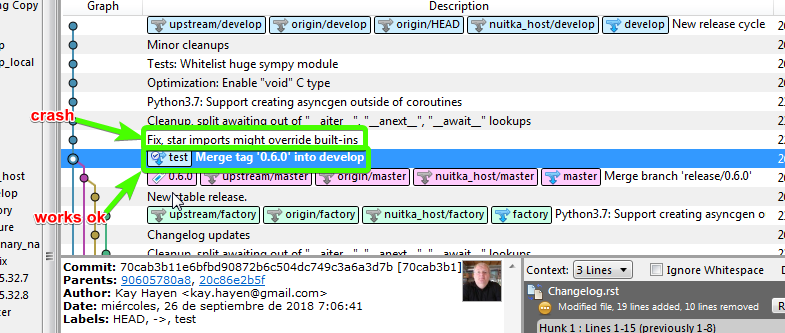
Please let me know if by looking at my previous bug report you know what could be the reason of this crash, if by looking at that traceback is too difficult, just let me know and I'll try to create a mcve for you.
Thanks in advance, I really wanted to test this new bug fix... it's very promising and my wish was just been able to say "Good job"... but you know? we testers are a pain in the butt ;)
brupelo
on 26 Sep 2018
Make it a new issue, definitely its another one. Not sure what could be going on there, maybe something is duplicated that shouldn't be. I would appreciate a reproducer, although bi-sect is welcome.
My expectation is that the new global dict names registry finds an existing bug that was previously not found. It was of course tested.
kayhayen
on 26 Sep 2018
Cool, I'll open a new issue with a little reproducer then.
It was of course tested.
Sure thing, just for the record... I was just kidding, I assume you'd already tested this one... ;D
brupelo
on 26 Sep 2018
Well, there is a reason that commit is not part of 0.6.0, but will only be in 0.6.1, and that is that I saw a risk in it.
And while I don't like it, develop is there to break things and repair when the slightly wider audience tests it in ways that do not happen here. A bunch of things were delayed for 0.6.1 and are enabled only now. Anyway, marking these discussions as off-topic.
kayhayen
on 26 Sep 2018
Related issues
 dzg
·
10Comments
dzg
·
10Comments
 himadriganguly
·
8Comments
himadriganguly
·
8Comments
 anki-code
·
5Comments
anki-code
·
5Comments
 abl
·
5Comments
abl
·
5Comments
 maaaaz
·
7Comments
maaaaz
·
7Comments