Nuitka: Not including tkinter for standalone exe
Cannot create standalone exe for scripts using tkinter.
- nuitka pip installation
- Compiler installed VS 2017
- output of nuitka generation:
Microsoft Windows [Version 10.0.16299.665]

Jorj@ARRAKIS C:\Users\Jorj\Desktop\test
$ python -m nuitka --portable test.py

Jorj@ARRAKIS C:\Users\Jorj\Desktop\test
$ python -m nuitka --version
0.5.33
Python: 3.7.0 (v3.7.0:1bf9cc5093, Jun 27 2018, 04:59:51) [MSC v.1914 64 bit (AMD64)]
Executable: C:\Users\Jorj\AppData\Local\Programs\Python\Python37\python.exe
OS: Windows
Arch: x86_64
- Script:
import tkinter
root = tkinter.Tk()
root.bbox()
root.bell()
Output when running test.exe:
Jorj@ARRAKIS C:\Users\Jorj\Desktop\test\test.dist
$ test.exe
Traceback (most recent call last):
 File "C:\Users\Jorj\Desktop\test\test.dist\test.py", line 2, in <module>
  File "C:\Users\Jorj\Desktop\test\test.dist\tkinter\__init__.py", line 2020, in __init__
_tkinter.TclError: Can't find a usable init.tcl in the following directories:
    {C:\Users\Jorj\AppData\Local\Programs\Python\Python37\tcl} C:/Users/Jorj/AppData/Local/Programs/Python/Python37/tcl8.6 C:/Users/Jorj/Desktop/test/lib/tcl8.6 C:/Users/Jorj/Desktop/test/lib/tcl8.6 C:/Users/Jorj/Desktop/lib/tcl8.6 C:/User
s/Jorj/Desktop/test/library C:/Users/Jorj/Desktop/library C:/Users/Jorj/Desktop/tcl8.6.8/library C:/Users/Jorj/tcl8.6.8/library


This probably means that Tcl wasn't installed properly.
Problem goes away when I (e.g.) copy the two directories C:\Users\Jorj\AppData\Local\Programs\Python\Python37\tcl\tcl8.6 and C:\Users\Jorj\AppData\Local\Programs\Python\Python37\tcl\tk8.6 side-by side in a common directory called lib on the same level as test.dist.
What am I missing / doing wrong?
 JorjMcKie
All 60 comments
You are missing the PR that adds the code to do it automatically. :-)
Can you try to add that to Nuitka? I think the data files plugin might be a good spot, depending on what is in those directories. Are there DLLs or .PYD files in there?
 kayhayen
on 15 Sep 2018
kayhayen
on 15 Sep 2018
Thanks for the quick answer, Kay.
I will try the data plugin then.
The directories are pure TCL source - no DLL, no PYD, not even Python source :-)
I always disliked including tkinter as the Python de-facto GUI standard - together with yet another scripting language. It is an architectural uncleanliness ...
JorjMcKie
on 15 Sep 2018
I am having a similar problem I installed using the .msi file on windows. I did the pip install of nuitka.
I'm able to make my .exe using:
python -m nuitka myprogram.py
I do not get any output from this command... no status, no errors.
I am left with a .exe
I get this error when running the EXE:
Traceback (most recent call last):
  File "c:\Python\PycharmProjects\GooeyGUI\Nuitka\pysimplegui.py", line 2, in <module>
    import tkinter as tk
  File "X:\Python\python3.6.4\Lib\tkinter\__init__.py", line 36, in <module>
    import _tkinter # If this fails your Python may not be configured for Tk
ImportError: DLL load failed: The specified procedure could not be found.
I read somewhere that copying tk86t.dll and tcl86t.dll will resolve this error, but it didn't. I put those files in the same folder with my .py file.
I am unable to follow this Issue's discussion however. I don't know anything about setup files nor know what a PR is. I thought I was fairly versed in Python.
I'm SO excited about the potential to distribute my GUI code as an EXE. These EXE Files will look and act exactly like a "normal windows program" since they have a GUI on them.
Any help is greatly appreciated.
An update.... I just tried with the --portable option like jorj did.
This time my machine rebooted during the build (after several minutes... I think my system overheated).
When I rebooted, I was left this time with a different set of folders. There is a .dist folder that this time has the .EXE file.
When I ran it, I got a different tkinter error:
Traceback (most recent call last):
  File "c:\Python\PycharmProjects\GooeyGUI\Nuitka\pysimplegui.dist\pysimplegui.py", line 2, in <module>
  File "c:\Python\PycharmProjects\GooeyGUI\Nuitka\pysimplegui.dist\tkinter\__init__.py", line 36, in <module>
ImportError: LoadLibraryEx 'c:\Python\PycharmProjects\GooeyGUI\Nuitka\pysimplegui.dist\_tkinter.pyd' failed
 MikeTheWatchGuy
on 16 Sep 2018
MikeTheWatchGuy
on 16 Sep 2018
@MikeTheWatchGuy Please try without rebooting in the middle of things, you might have an incomplete .dist folder.
@JorjMcKie given the nice reproducer I will try and create a plugin. Is is certain that for Tkinter to be run, code like tkinter.Tk() will be in the source? I will use that as a warning trigger from the plugin, much like done with multi-processing. Please allow for some time though.
kayhayen
on 16 Sep 2018
Thanks for looking into this anyway!
For the time being, I have built a script that envelops nuitka - so there is no urgency (for me).
To answer your question:
Yes, at some point inside the imported package PySimpleGUI, an object tkinter.Tk() will be created.
But I think it would perfectly be adequate to request that an explicit plugin name is given - e.g. "tk-plugin" in analogy to the qt-plugin.
What needs to happen then is the creation of a folder named lib at the same level as the .dist folder of the compiled script. This lib folder must contain the two sub folders os.path.join(sys.exec_prefix,"tcl", "tk8.6") and os.path.join(sys.exec_prefix,"tcl", "tcl8.6") (valid at least for Windows Py 3.4 thru 3.7, both bitnesses).
I am in the process of researching
- how this can be achieved using the nuitka plugin feature
- how volatile this information is, WRT to Python versions and, of course, platforms. What I already know: the 2 directories are named
tcl8.5andtk8.5in Python 2.7 ...
As a reference, this is the script that I am working with currently:
make-exe.zip
In it, I am assuming that compilation results go to a sub folder of the script's one (called compiled). Also - for several more to-be-compiled scripts - I am xcopying the .dist content over to a folder with the fixed name bin. If I am not too wrong, nothing bad can happen copying all .dist content over each other in that same folder bin.
The advantage being: it can then be distributed as a folder of installation binaries covering more than just one single EXE.
JorjMcKie
on 16 Sep 2018
Thanks for specifying that, very nice. And yes, you are free to rename the ".dist" folder to anything of your liking.
Multi-binary distribution has not really been explored by me, but in my thinking, copying them all into one should just do.
kayhayen
on 16 Sep 2018
:-)
I have been testing this for half a dozen scripts now: whatever their .dist folders are, I am "xcopying" that content over to the bin folder with xcopy /E/S/Y ....
So far it is working just fine.
JorjMcKie
on 16 Sep 2018
Multi-binary distribution has not really been explored by me, but in my thinking, copying them all into one should just do.
One possible way to allow multi-binary distribution would be using nuitka to compiling/freezing pip freeze packages at once before compiling any executables. So for instance, app1->{package1, package2, package3}, app2->{package1, package2}. By compiling/factoring out package1/package2 you're saving nuitka to compile heavy packages more than once for those apps.
 brupelo
on 16 Sep 2018
brupelo
on 16 Sep 2018
Good point. In distutils world, if you have a package, then an extension module with it will be created in the wheel. Currently for entry points, it is not having something that compiles them. Also from my experience, pip installing a wheel ignores the entry points you provide and creates new ones anyway.
That however is only usable for cases, where there is a target Python installation to begin with. But installing these wheels to a virtualenv, an then making standalone compilation of all the entry points, seems workable. However, I would much rather first have distutils integration work flawlessly before basing anything else on it.
Clearly this will be coming. I am ignoring multi-entry point standalone right now. But it probably makes sense to even add it as a use case in the user manual, because the manual procedure works and can be used right now.
kayhayen
on 16 Sep 2018
@JorjMcKie Has made a script that does a bunch of the copying, etc. It worked GREAT for me!
I'm SO excited because my project could really do some cool things if it's packaged into a .EXE. PySimpleGUI makes it very easy to create a nice looking custom GUI. Coupled with Nuitka means my programs launch straight into a GUI, just as you would expect a .EXE file on windows to do.
Thank you guys SO much.... it's exciting to see the stuff work and work well. I was playing the demo pong game and it performed beautifully.
MikeTheWatchGuy
on 17 Sep 2018
Update:
This issue does not exist on all platforms: on Ubuntu everything works just fine when using the same parameters.
I have no OSX, so I don't know what is happening there.
JorjMcKie
on 23 Sep 2018
@JorjMcKie indeed, I think that is Debian trying to avoid using an inline copy of TCL, but instead use what is on the system, which is very likely OK. I didn't reproduce it when I first tried on Linux. As for MacOS, I also lack a system to try, the plugin could try and convince users to report though.
kayhayen
on 23 Sep 2018
These seem relevant too:
os.environ['TCL_LIBRARY'] = 'system/tcl/tcl8.6'
os.environ['TK_LIBRARY'] = 'system/tcl/tk8.6'
Probably that gives us leaway where to put the TCL files. It also prevents using defaults compiled in the CPython to be used.
Yours,
Kay
kayhayen
on 3 Oct 2018
@JorjMcKie Did you manage to make a standalone build of a PySimpleGUI project with Nuitka in the end ?
 deajan
on 13 Nov 2018
deajan
on 13 Nov 2018
@deajan - yes, did it on Windows.
It wasn't a big deal after all. I am still using the following script (make-exe.py) for creating / accumulating my EXEs. The setup is as follows:
- copy the to-be-build programs in a fixed directory and execute make-exe.py
- it will build the EXE and copy the binaries in a fixed subdirectory named
compiled, which in turn has 2 subdirectoriesbinandlib. bincontains the EXE and several dozen more.dlland.pydbinaries.libcontains Tkinter / TCL stuff, which the EXE needs for running successfully.- the
compileddirectery, together with its subdirs can then be distributed around. Its EXE file(s) are executable on any Windows system. - several EXE builds accumulate over time into that same
compileddirectory - they do not negatively interfere with each other - on the contary: they are making use of the same runtime binaries mre or less.
JorjMcKie
on 13 Nov 2018
Nuitka building standalone PySimpleGUI executables also works on Linux (tested in a Ubuntu VM). Just did not bother creating a similar script for that environment ...
JorjMcKie
on 13 Nov 2018
Any clue if PySimpleGUIQt will compile? ;-)
I suppose the better question to ask if is anyone has compiled PySide2 yet.
MikeTheWatchGuy
on 13 Nov 2018
@MikeTheWatchGuy - interesting question. I will try that in the next few days.
JorjMcKie
on 13 Nov 2018
@JorjMcKie The script works indeed, thanks.
But a simple test program with PySimpleGUI takes 48MB for both bin and lib directories, whereas PyInstaller creates a single executable of 7.8MB.
Have you found any solution to skim the weight of the Nuitka compiled stuff ?
deajan
on 10 Dec 2018
@deajan As far as I recall, there are a handful of basic differences between both approaches (and maybe Kay feels motivated to comment on this as well):
- the PyInstaller file is a self-extracting ZIP which at execution time expands itself into a temp folder from which the packaged-in Python interpreter starts and which in turn executes your
script.pyc.
- So the size of this expanded temp folder should actually be compared to be fair (or alternatively the compressed folder of nuitka-generated stuff - which is about 20 MB when no specialties like wxPython, PyQt, etc. are needed).
- the TK/TCL directory (lib) alone is 4.5 MB, but 650 KB compressed.
- the afore-mentioned approach of PyInstaller does not meet everyone's taste ... I personally dislike it.
- PyInstaller also has a one-folder approach, which leads to considerable folder sizes as well.
- nuitka in contrast leads to a binary-only distribution. The script code is compiled and is not excuted via interpretation.
- by its very nature, compiled code is not easy to reverse-engineer if this is a concern. Very much in contrast to the
script.pyc. - the same dist folder can be re-used for many script-EXEs. For every additional script-EXE it will only grow by ca. 3.4 MB, if you compress it via UPX (double size or more otherwise). UPX worked in all my cases so far.
- You can also UPX-compress the rest of the binaries (except for the
vcruntimeXXX.dll!). This brings down the complete folder size to those ballpark 25 MB. - A few more MB can be squeezed out if you use a 32bit Python version to feed nuitka with. This may be advisable anyway if you want your program be executable on 32bit and 64bit machines.
- if you want some smart installation approach, you can automatically generate *.lnk files on the user's DESKTOP for every EXE you have compiled into the dist folder. I am using AutoIT for this. Elegant stuff like this type is hard to achieve with PyInstaller.
- by its very nature, compiled code is not easy to reverse-engineer if this is a concern. Very much in contrast to the
JorjMcKie
on 10 Dec 2018
I just tried a perhaps more relevant comparison:
Taking a non-trivial script and generating it with (1) cxfreeze and (2) nuitka gave the following results (cxfreeze is comparable to pyinstaller).
I then compressed both the resulting dist folders with UPX -9. These where the results (MB):
- cxfreeze creation size 82.7, after compression 35.5
- nuitka creation 92.8, after compression 33.6
This seems to indicate an at least comparable size when it comes to more complex scripts than "Hello, world!".
JorjMcKie
on 11 Dec 2018
I know the difference between an interpreter + pyc packer and a full blown python to C parser and compiler :)
I'd feel more confident being able to distribute my python programs without the necessity of being interpreted, but here's my point.
I took a threaded GUI program I need to distribute and prepared it with both PyInstaller and Nuitka, and here are the results:
- PyInstaller 3.4 using
python -OO -m PyInstaller --onefile --noconsole imf_thread.pyand UPXing all files except VCRUNTIME140.dll made 10,5MB, which could be compressed down with LZMA to a single file of 5,3MB - Nuitka 0.60.6 using make-exe.py script produced 48MB, UPexd down to 18,2MB, which still could be compressed down with LZMA to a single file of 13,0MB
Nuitka takes more than 240% of the size of a PyInstaller dist.
A quick analysis shows that there are a lot of files in the Nuitka bin directory that I'm pretty sure my program is not needing.
For instance, I use the following imports in my pyhon program
from threading import Thread
from concurrent.futures import Future
from time import time, sleep
import PySimpleGUI as sg
but endup with files like d3d12.dll or sqlite3.dll which I'm pretty sure aren't relevant for me.
I have successfully removed 6,9MB of unused dll files from the bin directory, without my program not being executed (okay, I might have some DLLs already in system32, but I'm still convinced that I don't need Direct3D support for my simple Tcl/Tk gui app).
Removing unused dlls brings the following result:
- Nuitka 0.60.6 using make-exe.py script, manual skimmed down and UPXed version is 11,3MB, which can be compressed down to a single LZMA file of 6,7MB
Now we're talking about 25% percent size, which IMHO is very nice considering the performance improvements Nuitka brings along.
So the question is, how may I reduce what Nuitka is building me ?
I am sure I can have numerous --nofollow statements, but the should be a "standard" list already existing, that will prevent all those fancy dlls to be added ?
deajan
on 11 Dec 2018
I see. Please forgive if my remarks were too close to "elementary school". No offense intended.
Your very valid baseline question is however one for Kay. As yet, I haven't cared to search for criteria in nuitka's decision machinery, when to include things and when not.
That those criteria must be different from what is used in packages like cxfreeze, seems quite obvious: in the example I tested (a wxPython script with no tkinter use), cxfreeze did not include any trace of sqlite / Tk / Tcl, whereas nuitka did include the DLLs. I imagine, that currently a strategy à la "better safe than sorry" is used.
JorjMcKie
on 11 Dec 2018
Hello there,
I think it is larger because Nuitka includes all of standard library in
bytecode form or as extension modules, which then can pull in a bunch of
DLLs.
My rationale for that is that there always could be code like this:
import os
os.listdir("some_dir")
__import__(some_plugin_name)
So do I only include the os module in this case, and even there, only
what os.listdir is, and what if then whatever gets loaded as un-compiled
code from the import, does then uses standard library beyond that. What if
it uses the sqlite3 module and finds it not working?
So this far, Nuitka errors on the side of completeness. But I am open to
pull requests, where people make a plugin that prevents it from including
stuff typically not used, and even from including all standard library
modules by default, but only ones apparently used.
Also what can happen, is that people have test as a directory installed
in standard library, something Nuitka will ignore already, and a few things
like turtle that absolutely make no sense.
But for me, Nuitka is foremost about maximizing run time speed, not
distribution size. But if you are willing to hack it, you surely can make
Nuitka deliver everything as bytecode and become very minimal. Already some
namespaces (search unworthy in Nuitka) are never compiled. Just don't
expect me to do it. But again, I am open to pull requests that make these
things accessible.
Yours,
Kay
kayhayen
on 11 Dec 2018
I am going to include this script next, last thing before 0.6.1 release, just to clean this up. Is the make-exe.py still your best, @JorjMcKie or do you have anything better.
kayhayen
on 11 Dec 2018
@kayhayen - it's my best so far, though I am not completely happy with it:
- I would like to frontend it with a GUI for entering parameters: TK/TCL yes/no, path names for binary targets, ...
- For accumulating the dist output folder in one central
binfolder, I need to check that the just generateddistbinaries which have same-named counterparts in the accumulated bin folder also are truly identical - otherwise something has undergone a change in the meantime which may render some of the accumulated EXE files invalid.
But I can as well submit a PR once I have something better. So please go ahead if you like.
JorjMcKie
on 11 Dec 2018
@JorjMcKie No offense taken :)
Btw, since UPX gives good results on Nuitka compiled code, you might consider including a --upx-dir parameter to the script that would, if found, call upx for every file found in dist_path, except VCRUNTIME.DLL and PYTHON.DLL which should never be UPXed.
Also, could copy_cmd ="xcopy ..." be replaced with shutil.copytree in order to become portable ?
@kayhayen Thanks for your answer, explains a lot.
It's probably too far from my todays Python knowledge to make a good PR for nuitka, but yet I'm curious.
Read a bit code from nuitka/freezer/Standalone.py, wondering where to find the piece of code that includes the standard lib ?
Thank you.
deajan
on 11 Dec 2018
@deajan - good points. As I mentioned to @kayhayen - I plan to do some reworks on the script anyway. Among those changes indeed are replacing xcopy by a more sophisticated bit which only does this copy if binary compatibility is ensured (well, at least not obviously broken ...).
JorjMcKie
on 12 Dec 2018
And does anyone have a headless Tcl/TK example I could use in my Buildbot testing, where I have no display? One that shows Tcl is accessible and alive, and ideally the path it runs from?
kayhayen
on 13 Dec 2018
@kayhayen, @deajan - here is my new "best" version of that standalone EXE creator script:
make-exe.zip
It does this:
- displays a (Tkinter) GUI for entering all the information. It is based on PySimpleGUI and looks like this:
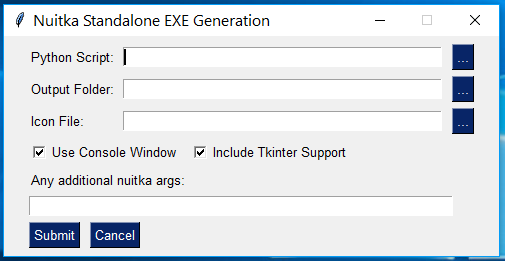
optional output folder serves as collecting multiple nuitka compilation output in one
binsub-folder of this. It is mandatory if Tkinter support is requested (default). In that case another sub-folderlibof it is created. If no output folder is specified, no special processing takes place and the compilation output can be found inscript.distin the folder wherescript.pylives.if "Output Folder" is provided, compilation output
script.distis created as a sub-folder of it. After successful compile, all new binaries in it are copied over tobin. Any duplicates (i.e. same names also existing inbin) will be verified to have identical content (but not copied of course).if all works fine, sub-folder
script.distof the output folder is deleted.
Further remarks:
- File copying is done in Python (shutil) - no longer Windows xcopy.
- UPX compression is not (yet) implemented. My reasons are:
- UPX must be executed in every sub-folder of
script.dist, taking care of excluding certain binaries (e.g.vcruntimeXXX.dll, which may exist multiple times) - check for binary compatibility must be done only after compression
- so it seems to me that compression makes most sense immediately before actually distributing the (merged) binaries. One should also evaluate the option to just compress the distributed folder as a whole, e.g. using the very effective LZMA (e.g. 7zip) method, potentially combining with self-extraction and elegant installation options. Besides, contents of Tkinter support sub-folder
libis source and cannot be UPX-compressed - it is also quite large (4 MB) and compresses very well with LZMA.
- UPX must be executed in every sub-folder of
- I am still thinking about an (independent) UPX based script, which recursively compresses nuitka output (like
script.distandbin).
JorjMcKie
on 13 Dec 2018
@kayhayen - something like this?
tk-test.zip
invokes tkinter and displays some success message about the physical screen size
JorjMcKie
on 13 Dec 2018
runs on Python 2 and 3
JorjMcKie
on 13 Dec 2018
Another update to my make-exe.py ... forgot something
make-exe.zip
JorjMcKie
on 13 Dec 2018
@JorjMcKie
@kayhayen - something like this?
tk-test.zipinvokes tkinter and displays some success message about the physical screen size
Works on my Python 3.7, just asking myself if there should be a exit code handling so the buildbot can get a proper failure reason.
Here's what I propose https://gist.github.com/deajan/7fa32d33ab70b34545154bc8476a1342
deajan
on 13 Dec 2018
@deajan - as announced, I have done some more work on the UPX compression potential.
Here is a script which takes a nuitka script.dist folder (as well as a "bin" folder into which which multiple nuitka compilations have been merged) and UPX-compresses its content recursively (i.e. including sub-folders) in-place.
The key success factor for this script to work and producing a compressed, but still usable folder is the list of binaries which must not be compressed -- see the script.
It seems that compression ratio is about 60% or more.
I would argue that the overall folder size is important primarily for distribution (i.e. to other computers) and is no matter of concern in the current computer where all the generation takes place.
If this is true, then best/smallest distribution size is achieved by not UPX-ing the binaries, but instead taking the excellent 7zip package to create a self-extracting (LZMA-compressed!) archive.
Anyway - here is the UPX-compressor:
upx-packer.zip
and a somewhat improved make-exe.py script:
make-exe.zip
JorjMcKie
on 15 Dec 2018
Please find current versions of the above-mentioned scripts upx-packer.py and make-exe.py here.
JorjMcKie
on 16 Dec 2018
@kayhayen - from my point of view, this issue can be closed ...
JorjMcKie
on 16 Dec 2018
@JorjMcKie Tested your make-exe.py script successfully. Also tested upx-packer, made a quick PR to check for upx binary :)
Indeed the main issue can be closed IMO, just hoping someday we'll be able to have a single executable including Tk, but hey... it's already nice yet.
deajan
on 17 Dec 2018
@deajan
Actually off topic - this comment is only concerning binary folder size.
I did a little research with the new Nuitka v0.6.1rc9 - might be interesting for you.
JorjMcKie
on 28 Dec 2018
@JorjMcKie To be fair, Nuitka had a fair similar footprint to PyInstaller once all optional modules were removed.
As for your last comparaison, I think it's about recursing all optional modules or not, hence depending on what kind of modules you import, PyInstaller will be bigger than Nuitka or the contrary.
deajan
on 29 Dec 2018
@deajan I understand and I agree. However, I used both without giving them any guidance on what eventually to neglect ... therefore both followed their standard algorithm. In so far I believe the comparison scenario was fair.
One reason for the big size(s) in my test case is the fact, that my two scripts use the imaging library PIL / Pillow, which contains references to big packages: PyQt, and -- even worse -- numpy (with MKL, in my installation).
Myself, I am not using numpy here, so, in another test round, I told Nuitka to not recurse down to this package via --recurse-not-to=numpy (which is now easy to do with my revised exe-maker.py script). This leads to a another size reduction of the merged Nuitka folder: from 151 MB (which is the number in the above comparison), down to non-compressed 116.5 MB - a 35 MB saving. When UPX-ing this, the packed folder size is 47.0 MB.
What would I have to tell PyInstaller to ignore numpy?
JorjMcKie
on 30 Dec 2018
@JorjMcKie Well i'm not a hardcore PyInstaller user, so I honestly don't know.
The is a main reason I'd prefer to use Nuitka over PyInstaller:
PyInstaller executables are seen as viruses by 11/61 antivirus programs on virustotal
Nuitka distributions aren't.
Now I just have to get all my programs to compile with Nuitka, where obviously your tkinter trick is welcome.
I still have problems with some PySimpleGUI functions (event_enable=True) which don't play well once they're Nuitked (sorry for the pun).
deajan
on 8 Jan 2019
@deajan - I found it out in the meantime. One has to generate a .spec file of the script first and then edit it (or fight your way thorugh the various cli commands). Several SPEC files can be merged together to create a common distribution for more than one script etc.
Once excluding numpy, PyInstaller again becomes small.
I am also continuing standalone generations and testing them. Certainly being interested in your experience.
But maybe we shouldn't bloat Kay's issue discussions with this. It definitely has left the original topic!
Any idea where we can continue? I do have issues with standlone real numpy programs. I am just not sure what the problem is. So, if you can report success in that area, I would certainly be interested to know.
JorjMcKie
on 8 Jan 2019
@deajan - you can always directly use my e-mail, to be found on the PyMuPDF repo page.
JorjMcKie
on 8 Jan 2019
@JorjMcKie We can discuss at your exe-maker github repo, but again, I'm not a python expert :)
deajan
on 9 Jan 2019
Hello Kay,
So this far, Nuitka errors on the side of completeness. But I am open to
pull requests, where people make a plugin that prevents it from including
stuff typically not used, and even from including all standard library
modules by default, but only ones apparently used.
I've looked at the output files generated by depends.exe, which seem to check all existing dlls in %PATH%, and generates 18MB depends files on my system per pyd/exe file, which takes ages to do (roughly 20 minutes only for depends runs).
Also, depends seems to add a lot of unnecessary dlls along the way.
i've done some work in order to get rid of depends.exe in favor of MingW64 implementation of objdump (still looking for a windows native ldd.exe, but the MingW64 version of objdump.exe works and is portable).
So far, I managed to modify standalone.py in order to use objdump and I got to compile my biggest project with success.
If you're comfortable with the idea of using objdump, I can improve my PoC and make a PR.
Maybe as an experimental feature with a '--use-objdump' argument, or a plugin ?
Do you have any guidelines to make good Nuitka contributions ?
deajan
on 17 Jan 2019
@deajan I once created this: https://github.com/Nuitka/Nuitka/blob/master/CONTRIBUTING.md
Sounds good to me. I am not at all attached to having to use objdump. For experimental code, I have this option --experimental which you then can check with isExperimental() in Python. That way it's easy to check both in comparison, something I would do in this case until we are satisfied.
But yeah, would love it. Maybe though I am using depends.exe wrong, but it surely is not easy.
kayhayen
on 17 Jan 2019
@deajan maybe I am missing a point, but how about using dumbin.exe (Visual Studio) on Windows? Sample output (redirectable to file, tons of other options available)
dumpbin.exe /DEPENDENTS C:\Users\Jorj\AppData\Local\Programs\Python\Python37\python37.dll

Dump of file C:\Users\Jorj\AppData\Local\Programs\Python\Python37\python37.dll

File Type: DLL

  Image has the following dependencies:

    VERSION.dll
    SHLWAPI.dll
    WS2_32.dll
    KERNEL32.dll
    ADVAPI32.dll
    VCRUNTIME140.dll
    api-ms-win-crt-runtime-l1-1-0.dll
    api-ms-win-crt-math-l1-1-0.dll
    api-ms-win-crt-locale-l1-1-0.dll
    api-ms-win-crt-string-l1-1-0.dll
    api-ms-win-crt-stdio-l1-1-0.dll
    api-ms-win-crt-convert-l1-1-0.dll
    api-ms-win-crt-time-l1-1-0.dll
    api-ms-win-crt-environment-l1-1-0.dll
    api-ms-win-crt-process-l1-1-0.dll
    api-ms-win-crt-heap-l1-1-0.dll
    api-ms-win-crt-conio-l1-1-0.dll
    api-ms-win-crt-filesystem-l1-1-0.dll
<...>
@JorjMcKie Indeed, I'm just concerned about using opensource which may be freely redistributed, hence trying to avoir Microsoft tools here.
I think the results are the same:
objdump -p c:\Python37-32\python37.dll | findstr "DLL Name:"
        DLL Name: VERSION.dll
        DLL Name: SHLWAPI.dll
        DLL Name: WS2_32.dll
        DLL Name: KERNEL32.dll
        DLL Name: ADVAPI32.dll
        DLL Name: VCRUNTIME140.dll
        DLL Name: api-ms-win-crt-runtime-l1-1-0.dll
        DLL Name: api-ms-win-crt-math-l1-1-0.dll
        DLL Name: api-ms-win-crt-locale-l1-1-0.dll
        DLL Name: api-ms-win-crt-string-l1-1-0.dll
        DLL Name: api-ms-win-crt-stdio-l1-1-0.dll
        DLL Name: api-ms-win-crt-convert-l1-1-0.dll
        DLL Name: api-ms-win-crt-time-l1-1-0.dll
        DLL Name: api-ms-win-crt-environment-l1-1-0.dll
        DLL Name: api-ms-win-crt-process-l1-1-0.dll
        DLL Name: api-ms-win-crt-heap-l1-1-0.dll
        DLL Name: api-ms-win-crt-conio-l1-1-0.dll
        DLL Name: api-ms-win-crt-filesystem-l1-1-0.dll
Yet better, I found a pythonic way to do so
import pefile
import sys

def get_dependency(filename):
    deps = []
    pe = pefile.PE(filename)
    for imp in pe.DIRECTORY_ENTRY_IMPORT:
        deps.append(imp.dll.decode())
    return deps

deps = get_dependency(sys.argv[1])
for dep in deps:
    print(dep)
Which produces the same result, without needing subprocess.
Going to tweak Standalone.py to use this so we won't have any more ...dependencies (pun intended).
deajan
on 17 Jan 2019
Getting close to something usable. I wrote the dependency detection using pefile, and also added an optional recursive check on the dependent dll and pyd files to catch additionnal dependencies.
This resolves missing pythoncom37.dll for instance.
After trying, a simple hello_world project goes from 40,8MB to 19,5MB :) Once upexed, we go under the 10MB barrier, even to 6.7MB upxed and lzma2 processed.
Tried on bigger projects, works okay so far.
Can be used with --experimental=useInternalDependencyWalker and furthermore --experimental=recursiveInternalDependencies in order to catch more missing dependencies.
Overall first compile time is hugely improved since depends.exe walks through all DLLs in %PATH% variable.
Code is available in PR #218, may be tried by taking nuitka/freezer/Standalone.py from PR.
deajan
on 18 Jan 2019
I have compiled half a dozen programs now with --experimental=useInternalDependencyWalker. Found not any problem so far ... great!
Continuing ...
JorjMcKie
on 19 Jan 2019
You did my any chance remove nuitka cache before in appdataroaming ? just to be sure new found dependencies are used.
deajan
on 19 Jan 2019
Ah no, but I'll do that now.
JorjMcKie
on 19 Jan 2019
@kayhayen In an effort to get this issue closed once for all, I have finally managed to develop a user plugin for automatically supporting tkinter. Features:
- automatically copy the TCL/TK folders as sub-folders into the script's
distfolder. - automatically redirect tkinter requests to these folders
Obviously, this plugin only works (and is relevant?) for Windows standalone compiles. As far as I know today, the plugin is even not required on other platforms. If you know better, I would be happy to extend it.
The plugin is compatible with, but independent from @deajan 's work around the new dependency walker.
I will submit a PR once I have reviewed the requirements you have in that respect.
JorjMcKie
on 24 Jan 2019
any objections to closing this one?
JorjMcKie
on 1 Feb 2019
@JorjMcKie I used to have a policy to close issues when they are part of a release. I am not sure how good that is, but it avoids the confusion to find a closed issue that fails to work with stable release. I am using the factory tag to track when it got fixes on that branch, and I think we now might have to use develop and make it mean has fixes on that branch too.
I am also using those to write the Changelog.rst entries for stuff and going through things and mass closing at release time.
I am aiming at releasing during this week. For release and this issue, I am missing a change that we discussed, where tkinter and maybe another required call of it, is searched in __main__ source code on Windows. That would make the detector viable. I think right now it's more or less disabled, which is OK, but a pity, since this plugin is more or less necessary. Much like what the multiprocessing plugin does.
kayhayen
on 3 Feb 2019
I came here because the current version of Nuitka (0.6.7) still does have the issue with tkinter (I am using PySimpleGUI), and the make-exe fixes that problem. Since the problem still very much exists (and even if it didn't), it might be a good idea to mention the existence and de facto necessity of NUITKA-Utilities in the main repo or on nuitka.net as that would save people a lot of time troubleshooting. If I hadn't come here and actually read through this, I wouldn't have known about the whole host of useful tools.
 Silun
on 15 Feb 2020
Silun
on 15 Feb 2020
@Silun - are you using --standlone --enable-plugin=tk-inter?
JorjMcKie
on 15 Feb 2020
I did not use that in the beginning because I found no reference to that option at all. I saw that --enable-plugin exists, but not that tk-inter is an option. So that's what I meant by saying the make-exe fixes that problem, because it adds that option and there seemed to be no obvious way for me to know I'd have to set that specific flag, especially not with the hyphen in there. Now that I found Nuitka utilities I'm good though, which is why I'm suggesting to make those more prominently visible.
Silun
on 20 Feb 2020
Related issues
 gggggeorge
·
7Comments
gggggeorge
·
7Comments
 maaaaz
·
7Comments
maaaaz
·
7Comments
 anki-code
·
5Comments
anki-code
·
5Comments
 Goczilla
·
4Comments
Goczilla
·
4Comments
 jamesstidard
·
12Comments
jamesstidard
·
12Comments