Nugetgallery: Add instructions to install .NET Tools as local
The current NuGet Gallery UI for .NET Tools shows instructions on how to install them as global tools, but doesn't have instructions for installing as a local tool.

Proposed UI
I suggest adding a new tab for instructions on how to install it as a local tool, including creating the tool manifest, as that's currently required.
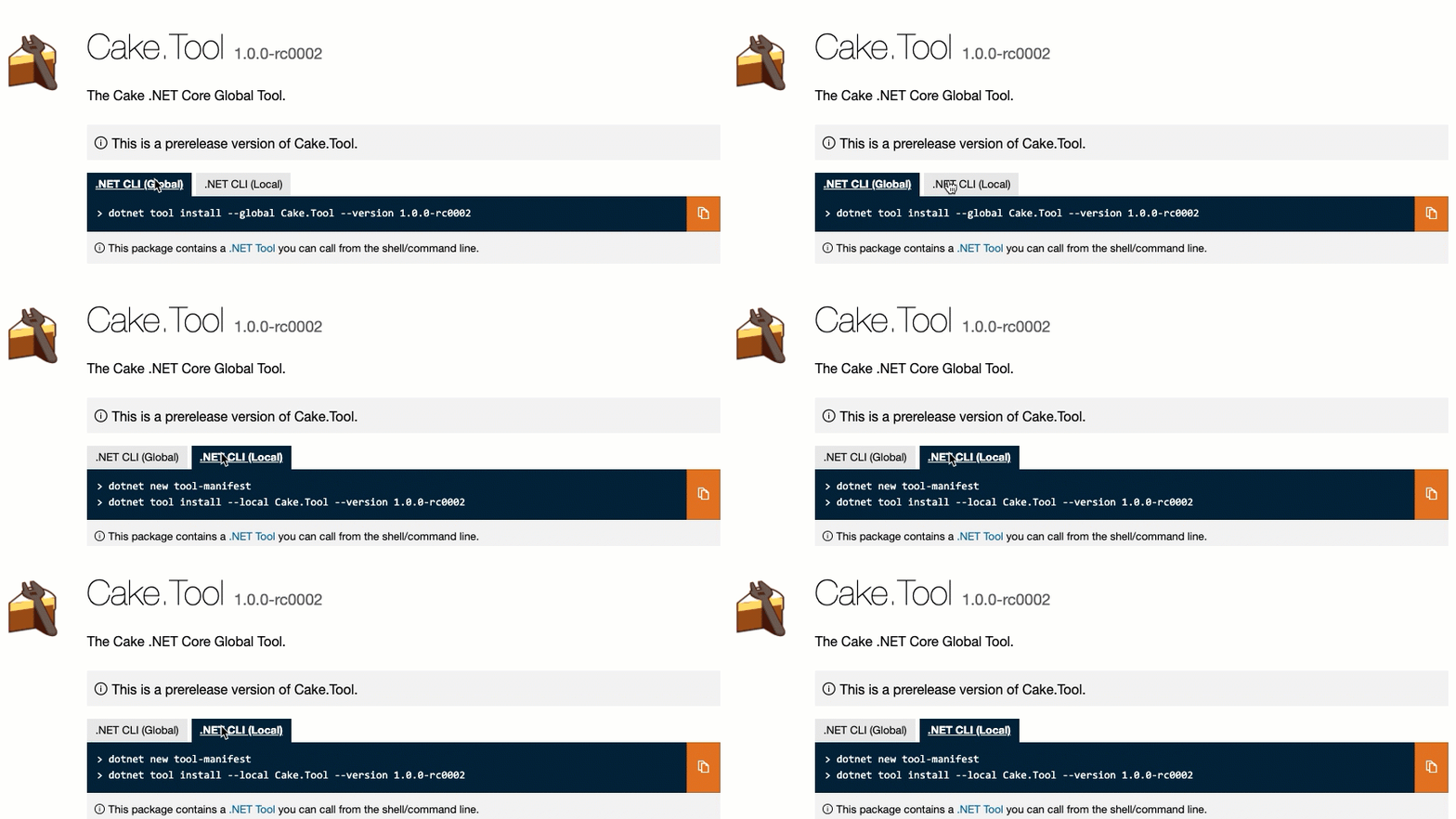
- Rename the existing ".NET CLI" tab to ".NET CLI (Global)"
- Update the info text at the bottom to
This package contains a .NET Tool you can call from the shell/command line. - Add new tab ".NET CLI (Local)" with the following instructions:
> dotnet new tool-manifest
> dotnet tool install --local <ToolName> --version <ToolVersion>
 augustoproiete
All 12 comments
@augustoproiete , love your proposal! Would you be willing to work with us to on getting a polished UX spec and contributing a PR?
//cc @jcjiang
 skofman1
on 22 Jan 2021
skofman1
on 22 Jan 2021
@skofman1 Absolutely. Let me know next steps.
augustoproiete
on 22 Jan 2021
@nkolev92 - do you know who on the .NET CLI side would have an opinion here?
 joelverhagen
on 26 Jan 2021
joelverhagen
on 26 Jan 2021
/cc: @KathleenDollard @wli3
 anangaur
on 26 Jan 2021
anangaur
on 26 Jan 2021
@augustoproiete, let's wait for feedback from folks that own the .NET CLI tool experience. Once we get some consensus, I'd love to review a PR you make 😄.
joelverhagen
on 26 Jan 2021
@KathleenDollard may have more opinion on this. Stating dotnet new tool-manifest all the time might be an issue. If there is an existing tool manifest in user's desired directory or directory above, it is not required.
 wli3
on 26 Jan 2021
wli3
on 26 Jan 2021
@wli3 Related/for reference, I also suggested that dotnet tool install could create the manifest automatically for the user (if one does not exist) which I think is a better experience: https://github.com/dotnet/sdk/issues/15254
augustoproiete
on 26 Jan 2021
@wli3 Do we ignore further calls to dotnet new tool-manifest?
If not, should we?
If so, I like this addition. It will be the right place for people to start understanding the difference between global and local tools (they are considering installing one at that time) and they might think "oh, what's a tool-manifest".
We can then work with docs to be sure the logical SEO from this point takes them to more on the difference between local and global tools
 KathleenDollard
on 10 Feb 2021
KathleenDollard
on 10 Feb 2021
Sorry I missed the thread. The problem I am afraid is not something on the same directly.
If someone write a tool manifest in the C: by accident. There will be a set of tools shows up everywhere.
Another case is, if the user run the tool in a subdirectory of the project(while intent to use it in the repo level). The person will get confused when the tool does not show up in other directories.
The current design at least would force the user to pause and understand the concept of the tool manifest hierarchic aspect. And I also don't think the action of running dotnet new tool-manifest would be very frequent. It should only be set up by the repo owner.
I think there will be people hate it or like it on both sides.
wli3
on 17 Feb 2021
For this specific PR. We could change to something like below. Since the user need to type it out. While I am more concerned on https://github.com/dotnet/sdk/issues/15254
dotnet new tool-manifest # if you are setting up this repo
dotnet tool install --local--version
wli3
on 17 Feb 2021
@augustoproiete - let's proceed with a PR whenever you're ready! Please use the wording that @wli3 suggested here:
https://github.com/NuGet/NuGetGallery/issues/8373#issuecomment-780299556
To be transparent, there's a little bit of a concern that the command is not always "copy-pastable" but we'll keep an eye on customer feedback when we ship this and react accordingly. I think your issue https://github.com/dotnet/sdk/issues/15254 sum up the situation well. If dotnet/sdk adds a switch in the future, we can tweak the NuGet.org UI at that time 👍.
joelverhagen
on 19 Feb 2021
@joelverhagen Perfect! I'll get started with PR in the next few days.
augustoproiete
on 20 Feb 2021
Related issues
anangaur
·
5Comments
 jawn
·
4Comments
jawn
·
4Comments
 heng-liu
·
5Comments
heng-liu
·
5Comments
 dannyvv
·
4Comments
dannyvv
·
4Comments
 j3parker
·
4Comments
j3parker
·
4Comments
Most helpful comment
@augustoproiete, let's wait for feedback from folks that own the .NET CLI tool experience. Once we get some consensus, I'd love to review a PR you make 😄.