Nugetgallery: Display exact match search result at the top and with clear label
Current Workaround
Searching on NuGet.org and package manager UI in VS
Usepackageid:{package ID}. For example,packageid:Westwind.AspnetCore.Markdown.Install using package manager console (PMC) in VS *

Install using the dotnet.exe CLI *

* _assumes you know the exact package ID_
Proposal
Thanks @zkat for the hint in the demo day a while back.
We have deprioritized exact match in some cases but we could bring it back with some UI tweaks like npm:

We would need to think through this analogous UI on nuget.org and on VS client. Might need a protocol enhancement.
 joelverhagen
All 13 comments
crates.io
I particularly like the way crates.io does it, because they make it clear something is top-of-the-list because it's an -exact match-, not because it ranked better. It's common to want that exact match, after all.

rubygems.org
rubygems.org does this too, but I'm less of a fan of displaying it twice:

 zkat
on 19 Aug 2019
zkat
on 19 Aug 2019
I like this idea! I prefer the label (npm style)
 304NotModified
on 27 Aug 2019
304NotModified
on 27 Aug 2019
You really need to prioritize this 'feature' because without it's incredibly hard to find a package that has any part of the name that's common (like Web or AspNet anything).
If you do a search both on Web and in the Nuget Manager and put in an exact package name, or even a partial name that includes a common term (like AspNet anything) you're going to get thousands of results and never see your's.
Here's an example:
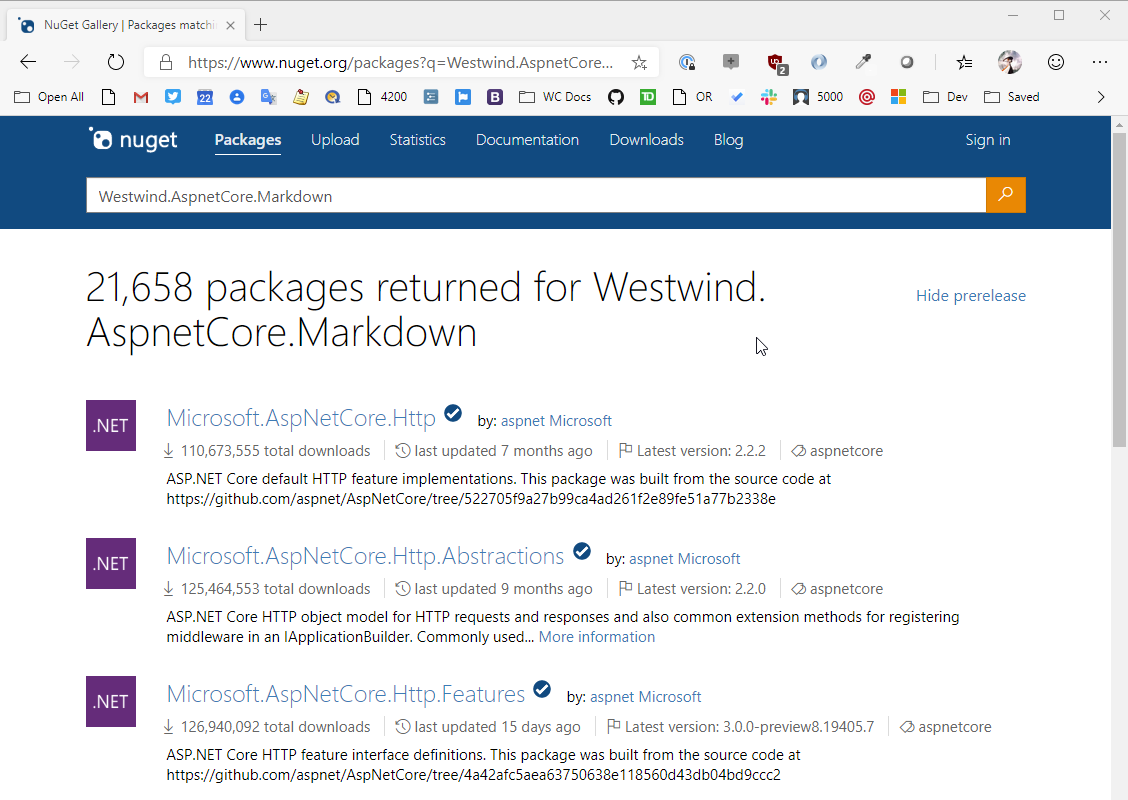
Using the current search algorithm logic I can't realistically find my package via Search even though it exists - unless I want to sift through 20k packages.
Whatever the old behavior was, it might not have been easier to discover random packages, but it sure worked for finding if you know what you're looking for, which is the primary reason most people use a package manager.
From a UI perspective it shouldn't be too difficult to switch between search modes with a dropdown for sort options.
Please fix this because it's made it extremely difficult to even use with certain packages.
 RickStrahl
on 28 Aug 2019
RickStrahl
on 28 Aug 2019
Totally agree on the exact match usecase. Many folks do learn about packages on blog posts, documentation, samples etc., copy the package id and then search for it on Visual Studio PM UI to install it in their project(s). As stated above, this usecase is broken especially for package ids with common names.
However, I am not too sure about the modes.
 anangaur
on 28 Aug 2019
anangaur
on 28 Aug 2019
For the Westwind.AspnetCore.Markdown case, this should be improved by a relevancy fix we are going to be A/B testing in the next few weeks. Basically we are boosting when all dot-splitted tokens match.
Agreed that an exact match special case in the API and UI is the best solution though, as proposed above.
I have mentioned a work-around in the original issue above. You can use packageid:{package ID} to do an exact match today. It's a little unwieldy and not the perfect solution, but hopefully it can mitigate some of the frustration until we make ranking or UI fixes.
Whatever the old behavior was, it might not have been easier to discover random packages, but it sure worked for finding if you know what you're looking for, which is the primary reason most people use a package manager.
Based on telemetry we see a lot of people searching for generic "categories" or tags. For example, excel or pdf, websockets, or rest. We are working on improving this area too.
joelverhagen
on 28 Aug 2019
Here is another example that would be helped by this work item: https://github.com/NuGet/NuGetGallery/issues/7518
 loic-sharma
on 7 Sep 2019
loic-sharma
on 7 Sep 2019
Not listing exact matches first is completely counter-intuitive.
You really need to prioritize this 'feature' because without it's incredibly hard to find a package that has any part of the name that's common (like Web or AspNet anything).
Or the 500-pound gorilla of popularity-ranking-spam, "Microsoft".
Yesterday I had to search for Microsoft.AspNetCore.Components.Authorization which currently produces 58,680 hits, and the exact match doesn't show up until page 7 on NuGet.org ... no idea where it shows up in the VS GUI, I didn't have that kind of patience.
 mv10-work
on 11 Sep 2019
mv10-work
on 11 Sep 2019
I've shipped the first step in this work to our primary region (secondary region and China will be all out within 3 days). This means searches on nuget.org and in Visual Studio in non-China should have this first fix.
When a search query has an exact match _and_ the package ID contains symbols (dot ., underscore _, hyphen -) then that package is at the top.
Regarding package IDs without symbols, we chose not to put that one always at the top yet because:
- A lot of our top queries have low download count exact match "false positives". Without clear UI saying "this is at the top because exact match only" our telemetry and user feedback indicates that we shouldn't do this one yet.
- We don't have our A/B testing infrastructure for search changes ready yet so we wanted to avoid changes that we are less confident about.
- All of the exact match issues reported since we shipped new search were concerning package IDs with dots. In other words, this small fix covers the reported pain points.
To be clear, exact match means that the search query exactly matches a package ID. If the query is "system text json", System.Text.Json isn't _necessarily_ at the top but, in this case, it is for other scoring reasons. If there are two package IDs in the search query or a prefix of a package ID the improvement I made does not apply. Other relevancy changes are planned to improve these non-exact match cases but they are less urgent.
As always, we warmly welcome input on how we are doing. For the exact match case, please feel free to chime in here. For other search relevancy issues, please respond to https://github.com/NuGet/NuGetGallery/issues/4124.
This issue tracks the UI work and putting all exact matches at the top so I will leave it open until we do that. Note the UI is a little challenging because we are thinking about all of the other "markers" or "badges" that may be on a search result so we want to make a UI change that gels well.
joelverhagen
on 16 Sep 2019
Sorry I don't have time to read about the problem you are trying to fix, but I wanted to let you know that I find current search results confusing and quite hard to understand. Totally unrelated packages appear higher in the result without any obvious reason. Documented in Screenshot_2019-09-19 NuGet Gallery Packages matching Pkcs11Interop.
 jariq
on 19 Sep 2019
jariq
on 19 Sep 2019
I can confirm our 2 most problematic packages Amazon.AspNetCore.Identity.Cognito and Amazon.AspNetCore.DataProtection.SSM are showing up at the top of this list now.
 normj
on 19 Sep 2019
normj
on 19 Sep 2019
@karann-msft judging solely by your reaction to my previous comment I'm guessing I wasn't communicating the problem clear enough. Let me try again.
When I searched for Pkcs11Interop before this change, I got Pkcs11Interop package as the 1st and related package Pkcs11Interop.X509Store as 2nd or at most as 3rd.
When I search for Pkcs11Interop now I got Pkcs11Interop package as the 1st (no change here) but related package Pkcs11Interop.X509Store is 9th and there are many unrelated packages between the 1st and 9th place.
So in my point of view this change may have fixed exact match but it messed up the rest of the result.
jariq
on 19 Sep 2019
PS. There is a comparison page (old/new search results) here: https://www.nuget.org/experiments/search-sxs
304NotModified
on 19 Sep 2019
Hey @jariq, the search service splits inputs like Pkcs11Interop into tokens like Pkcs, 11, and Interop. All of the "unrelated" results you mention match Pkcs or Interop, so this behavior is expected. What's happening here is that we're favoring downloads a little too much for this specific query. This is tricky to balance, but we have a few improvements in the works that should help this particular query. Stay tuned!
loic-sharma
on 20 Sep 2019
Related issues
 gep13
·
4Comments
gep13
·
4Comments
 dannyvv
·
4Comments
anangaur
·
4Comments
dannyvv
·
4Comments
anangaur
·
4Comments
 coleman-c
·
5Comments
anangaur
·
5Comments
coleman-c
·
5Comments
anangaur
·
5Comments
Most helpful comment
You really need to prioritize this 'feature' because without it's incredibly hard to find a package that has any part of the name that's common (like Web or AspNet anything).
If you do a search both on Web and in the Nuget Manager and put in an exact package name, or even a partial name that includes a common term (like AspNet anything) you're going to get thousands of results and never see your's.
Here's an example:
Using the current search algorithm logic I can't realistically find my package via Search even though it exists - unless I want to sift through 20k packages.
Whatever the old behavior was, it might not have been easier to discover random packages, but it sure worked for finding if you know what you're looking for, which is the primary reason most people use a package manager.
From a UI perspective it shouldn't be too difficult to switch between search modes with a dropdown for sort options.
Please fix this because it's made it extremely difficult to even use with certain packages.