Nugetgallery: Nuget Server issue post migration to Win 2016
@mcjacek commented on Thu Jan 10 2019
I have migrated nuget repository from Win 2008 to Win 2016. Alias to that server: http://xyz.mycompany.com/NugetFeed
Apart of windows, IIS is different as well, on the new server it is IIS 10.
After migration, nuget works pretty well, except one function. I can browse packages via web (http://xyz.mycompany.com/NugetFeed) or via Visual Studio etc. Visual Studio can see packages created manually.
The only problem is with the nuget push.
>nuget push FEDivaNET.dll*.nupkg -Source http://xyz.mycompany.com/NugetFeed/ D568CD48-1609-40C9-9A5D-7ADC808129E5
Pushing FEDivaNET.dll.3.41.73.nupkg to 'http://xyz.mycompany.com/NugetFeed/'...
PUT http://xyz.mycompany.com/NugetFeed/
NotFound http://xyz.mycompany.com/NugetFeed/ 128ms
Response status code does not indicate success: 404 (Not Found).
System.Net.Http.HttpRequestException: Response status code does not indicate success: 404 (Not Found).
   at System.Net.Http.HttpResponseMessage.EnsureSuccessStatusCode()
   at NuGet.Protocol.Core.Types.PackageUpdateResource.<>c.<PushPackageToServer>b__23_0(HttpResponseMessage response)
   at NuGet.Protocol.HttpSource.<ProcessResponseAsync>d__181.MoveNext()
--- End of stack trace from previous location where exception was thrown ---
   at System.Runtime.ExceptionServices.ExceptionDispatchInfo.Throw()
   at System.Runtime.CompilerServices.TaskAwaiter.HandleNonSuccessAndDebuggerNotification(Task task)
   at NuGet.Protocol.Core.Types.PackageUpdateResource.<PushPackageToServer>d__23.MoveNext()
--- End of stack trace from previous location where exception was thrown ---
   at System.Runtime.ExceptionServices.ExceptionDispatchInfo.Throw()
   at System.Runtime.CompilerServices.TaskAwaiter.HandleNonSuccessAndDebuggerNotification(Task task)
   at NuGet.Protocol.Core.Types.PackageUpdateResource.<PushPackageCore>d__20.MoveNext()
--- End of stack trace from previous location where exception was thrown ---
   at System.Runtime.ExceptionServices.ExceptionDispatchInfo.Throw()
   at System.Runtime.CompilerServices.TaskAwaiter.HandleNonSuccessAndDebuggerNotification(Task task)
   at NuGet.Protocol.Core.Types.PackageUpdateResource.<PushPackage>d__19.MoveNext()
--- End of stack trace from previous location where exception was thrown ---
   at System.Runtime.ExceptionServices.ExceptionDispatchInfo.Throw()
   at System.Runtime.CompilerServices.TaskAwaiter.HandleNonSuccessAndDebuggerNotification(Task task)
   at NuGet.Protocol.Core.Types.PackageUpdateResource.<Push>d__14.MoveNext()
--- End of stack trace from previous location where exception was thrown ---
   at System.Runtime.ExceptionServices.ExceptionDispatchInfo.Throw()
   at System.Runtime.CompilerServices.TaskAwaiter.HandleNonSuccessAndDebuggerNotification(Task task)
   at NuGet.Commands.PushRunner.<Run>d__0.MoveNext()
--- End of stack trace from previous location where exception was thrown ---
   at System.Runtime.ExceptionServices.ExceptionDispatchInfo.Throw()
   at System.Runtime.CompilerServices.TaskAwaiter.HandleNonSuccessAndDebuggerNotification(Task task)
   at NuGet.CommandLine.PushCommand.<ExecuteCommandAsync>d__32.MoveNext()
It is not a problem with the URL. When you try to modify URL then you will get different error
It is not a problem with permissions to D:\MyServer\NugetPackages on server, as I have set full permissions to that folder. I have also moved packages folder to different locations (ie. some other external network drive), but I am having same issue.
I tried compiling 2 different Nuget.Server versions: 2.14.0 and 3.1.2 ...Same exception.
Inside IIS, I am pretty sure I have set same settings as on the old server. Also I have INTEGRATED pipeline mode, so everything is good. I also tried setting authentication via technical users etc.
Not sure where is the issue, I think I checked every single setting. I tried with APIKEY, and without APIKEY. I modified every single setting in the Web.config, no luck…..
 zivkan
All 13 comments
It looks like the route configuration does not happen in your web app. This may happen if NuGetODataConfig.Start is not called on app startup, which in turn might be if there is no PreApplicationStartMethod assembly metadata pointing to that method.
The latter can be checked with ILSpy: load the entry point DLL of you web app (I'd recommend to pull it from the directory set up as app root in IIS, rather then from build output, so you are looking at the same file IIS is looking at) into it and check the assembly metadata. It should look like this:
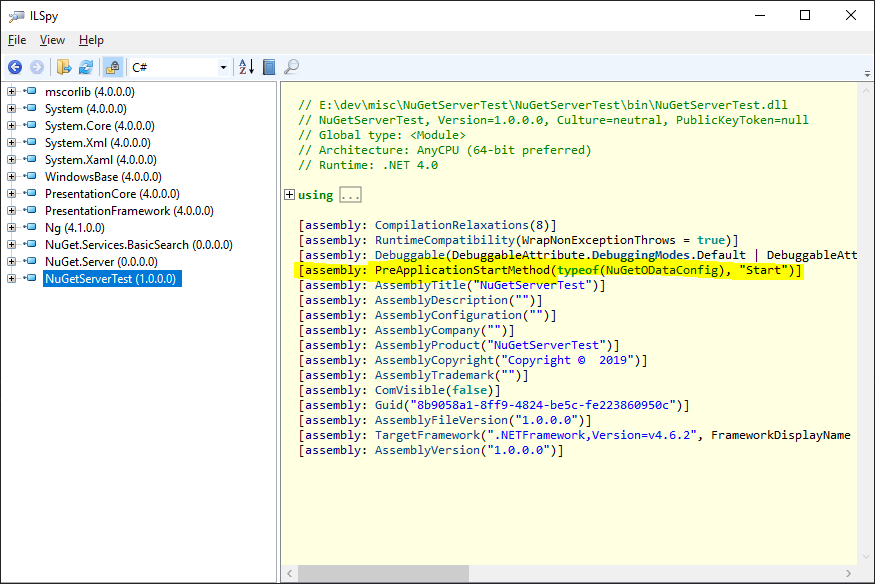
If you specifically opted out of setting that assembly metadata, then you need to make sure that NuGetV2WebApiEnabler.UseNuGetV2WebApiFeed is called in your code somewhere during the startup.
 agr
on 12 Jan 2019
agr
on 12 Jan 2019
Hi,
Thank you very much for an answer (I was on leave, hence late reply).
It looks like I have assembly metadata pointing to NuGetODataConfig.
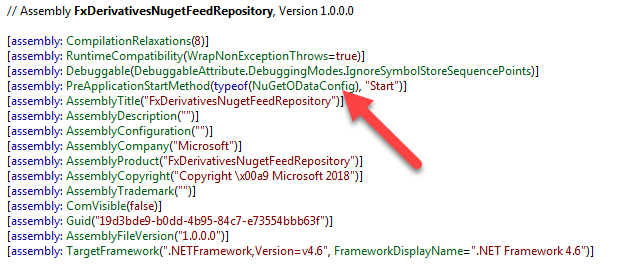
This is my NuGetODataConfig:
[assembly: WebActivatorEx.PreApplicationStartMethod(typeof(FxDerivativesNugetFeedRepository.App_Start.NuGetODataConfig), "Start")]
namespace FxDerivativesNugetFeedRepository.App_Start
{
public static class NuGetODataConfig
{
    public static void Start()
    {
        ServiceResolver.SetServiceResolver(new DefaultServiceResolver());
        var config = GlobalConfiguration.Configuration;
        NuGetV2WebApiEnabler.UseNuGetV2WebApiFeed(config, "NuGetDefault", "nuget", "PackagesOData");
        config.Services.Replace(typeof(IExceptionLogger), new TraceExceptionLogger());
        config.Routes.MapHttpRoute(
            name: "NuGetDefault_ClearCache",
            routeTemplate: "nuget/clear-cache",
            defaults: new { controller = "PackagesOData", action = "ClearCache" },
            constraints: new { httpMethod = new HttpMethodConstraint(HttpMethod.Get) }
        );
    }
}
Any other suggestions ?
 mcjacek
on 22 Jan 2019
mcjacek
on 22 Jan 2019
Could you please describe how you deploy your app to IIS (do you publish to IIS or a folder from VS? do you just copy certain files into certain location?) and how your IIS is set up (do you have a web site set with an application under it or something different?)?
agr
on 23 Jan 2019
Hi,
I have a website with an application under in IIS:
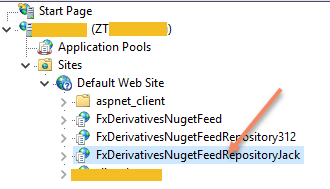
Binaries are copied manually to local drive, and I am sure that "FXDerivativesNugetRepositoryJack" is pointing to the correct location, as there is a context menu option and it redirect correctly to path where binaries are copied.
Also, when I browse website I get following (which is expected):
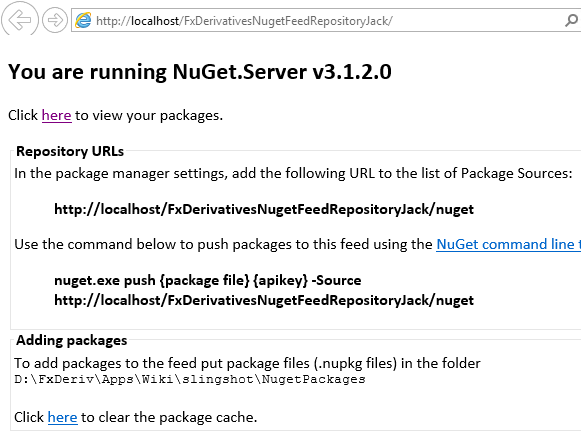
When I hit "Click here to view packages", then it displays packages.
Also, as stated before I can connect to that nuget repository for example from my Visual Studio and it works OK.
My Visual Studio also can see newly added packages that I manually copied to: D:\FxDeriv\Apps\Wiki\slingshot\NugetPackages
It is still just the matter of "nuget push" command.
mcjacek
on 23 Jan 2019
Where do you take the files that you copy? Do you just copy the (potentially partial) contents of the project directory or do you do something else (say, publish to folder from VS and then copy the contents of that folder)?
agr
on 23 Jan 2019
I copied files in 2 ways:
1) As I was migrating from Win 2018 to Win 2016, I simply copied all files from old server to the new one
2) As approach (1) did not work, then I rebuild NugetServer in my local Visual Studio (also with trying multiple nuget server versions) and copied all files from VS output bin to Win 2016. So I copied all required files.
mcjacek
on 24 Jan 2019
Did anything change between systems for external observer? Like the host name or the path.
Does push work when you push from the same server (i.e., pushing to localhost)?
Does push work if you run the web app from Visual Studio on your computer?
Does http://hostname/FxDerivativesNugetFeedRepositoryJack/nuget endpoint respond to GET requests (from browser or iwr http://hostname/FxDerivativesNugetFeedRepositoryJack/nuget in powershell)?
Did you try to create new web app from scratch to check if that would work?
I had set up a WS2016 VM and trying to reproduce your issue, I was unsuccessful so far.
Do you have anything "funny" in your web.config? I used the default one and only added the apiKey there: Web.config.zip
And to double check:
- You push to
http://hostname/FxDerivativesNugetFeedRepositoryJack/nugetand not tohttp://hostname/FxDerivativesNugetFeedRepositoryJack, right? - the
Packagessubdirectory under your application directory allows writing for the user which is used to run the AppPool (or<your ws2016 machinename>\IIS_IUSRSgroup), correct (that would fail with a different error, though)? - you are not trying to push to your old server;
agr
on 24 Jan 2019
Did anything change between systems for external observer? Like the host name or the path.
Does push work when you push from the same server (i.e., pushing to localhost)?
No, nothing changed from the perspective of external observer. However it does not matter as I tried pushing files from localhost as well, and it fails with the same exception.
Does push work if you run the web app from Visual Studio on your computer?
Yes, it works OK on my local PC when I lounch NugetServer from VS
Does http://hostname/FxDerivativesNugetFeedRepositoryJack/nuget endpoint respond to GET requests (from browser or iwr http://hostname/FxDerivativesNugetFeedRepositoryJack/nuget in powershell)?
Yes, it responds to the GET request.
Did you try to create new web app from scratch to check if that would work?
Yes, few times. Also with different nuget server versions.
Also, I put logging to 'NuGetODataConfig.Start(): HostingEnvironment.MapPath("~/NuGet.Server.log")' but it does not log anything when I push. It logs all other actions I perform.
Do you have anything "funny" in your web.config? I used the default one and only added the apiKey there: Web.config.zip
I have nothing funny in my Web.config. I treid yours with "something" as a KEY, but no luck.... same issue.
You push to http://hostname/FxDerivativesNugetFeedRepositoryJack/nuget and not to http://hostname/FxDerivativesNugetFeedRepositoryJack, right?
I tried both...
the Packages subdirectory under your application directory allows writing for the user which is used to run the AppPool (or
\IIS_IUSRS group), correct (that would fail with a different error, though)?
Correct, I do have
you are not trying to push to your old server
As aforementioned, I tried from localhost, so it should not matter.
I can turn on other logging ? I go crazy about this issue....
mcjacek
on 29 Jan 2019
Do you by any chance have a nuget subdirectory under your app?
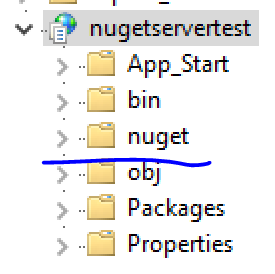
Also, please try pushing the package with the following powershell script and send back its output:
$headers = @{'X-NuGet-ApiKey'='something'};
$packageBytes = [System.IO.File]::ReadAllBytes('C:\Users\angrigor\Downloads\newtonsoft.json.10.0.3.nupkg');
$pushUri = "http://angrigor-ws2016/nugetservertest/nuget";
try {
    $r = Invoke-WebRequest -Uri $pushUri -Method Put -Body $packageBytes -Headers $headers
    Write-Output "$($r.RawContent)"
}
catch
{
    $r = $_.Exception.Response

    Write-Output "Response status: $($r.StatusCode) $($r.StatusDescription)";
    foreach ( $header in $r.Headers )
    {
        Write-Output "$($header): $($r.Headers[$header])";
    }

    $reader = new-object System.IO.StreamReader $r.GetResponseStream();
    $reader.ReadToEnd();
    $reader.Dispose();
};
You'll need to replace values with your apikey, full path to a package and a push url in first three lines.
agr
on 31 Jan 2019
Do you by any chance have a nuget subdirectory under your app?
No, I do not have "nuget" subfolder.
This is response I get:
Response status: NotFound Not Found
Connection: close
Content-Length: 4810
Cache-Control: private
Content-Type: text/html; charset=utf-8
Date: Mon, 04 Feb 2019 12:49:01 GMT
Server:
X-Powered-By:
I double checked that IIS is up & running, I can browse my website via IE, I can see packages via IE, I can see packages via VS....
mcjacek
on 4 Feb 2019
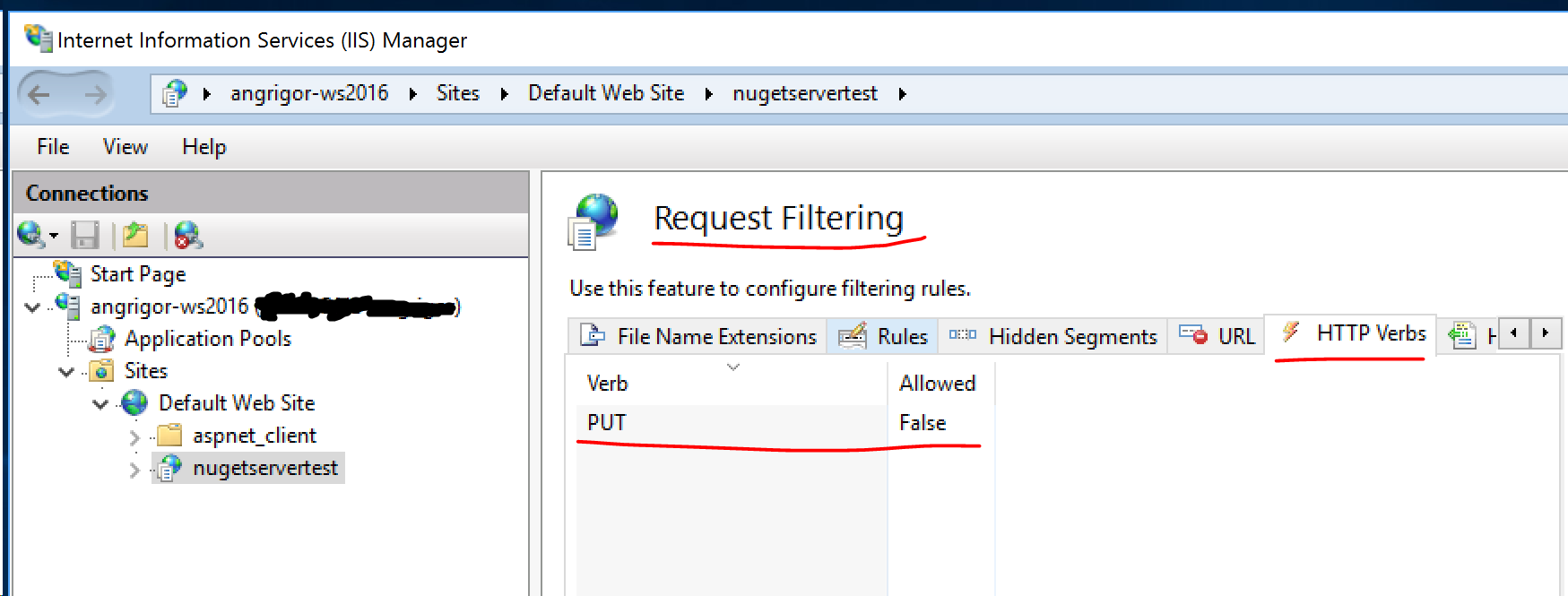
The response looks like it's an IIS response, i.e. request does not even reach the application code. Do you have PUT requests filtered on any level (need to check all 3: application level, site level and server level settings)?
agr
on 5 Feb 2019
Excellent- issue is resolved.
Your suggestion was accurate, when application in ISS 10 is created, by default PUT verb is not allowed.
Thank you very much for your help !
mcjacek
on 5 Feb 2019
Glad to hear that it is finally resolved!
agr
on 5 Feb 2019
Related issues
 heng-liu
·
5Comments
heng-liu
·
5Comments
 304NotModified
·
3Comments
304NotModified
·
3Comments
 anangaur
·
5Comments
304NotModified
·
3Comments
anangaur
·
5Comments
304NotModified
·
3Comments
 skofman1
·
3Comments
skofman1
·
3Comments