Nugetgallery: Nuget 404 on custom nuget server
I have created a nuget server on my dev server but everytime I try to push the package from my local machine using the following command it errors out with 404 not found.
nuget.exe push MyProject.1.0.0.nupkg nugetkey -Source http://devserver.com/CustomNuget/nuget
I am running NuGet.Server v3.0.2.0
Have tried everything from giving permissions, running under app pool account, increasing max request length, giving folder permissons etc.
Also if I deploy it to my local and do push as below then there is no issue and works fine:
nuget.exe push MyProject.1.0.0.nupkg nugetkey -Source http://localhost/CustomNuget/nuget
Updated
Another thing is:
When I browse to my nuget server at http://devserver.com/CustomNuget/ I get the following:
In the package manager settings, add the following URL to the list of Package Sources:
http://devserver.com/CustomNuget/nuget
Use the command below to push packages to this feed using the NuGet command line tool (nuget.exe).
nuget.exe push {package file} {apikey} -Source http://devserver.com/CustomNuget/nuget
But when I try browsing to
http://devserver.com/CustomNuget/nuget I get 404 error in my browser
And then if I try to use
nuget.exe push MyProject.1.0.0.nupkg nugetkey -Source http://localhost/CustomNuget/
(removing nuget at the end)
I get 405 method not allowed error
 kj1981
All 19 comments
I use a publish source of http://<server>/<virtual dir>/api/v2/package. Then for the NuGet.config: <add key="<source name>" value="http://<server>/<virtual dir>/api/v2" protocolVersion="2" />
 cfmayer
on 25 Jan 2018
cfmayer
on 25 Jan 2018
I added under app settings as below in my devserver nuget config file
<add key="NugetKey" value="http://devserver.iso.com/CustomNuget/api/v2" protocolVersion="2" />
Now when I try to browse my web server it gives me error:
Description: An error occurred during the processing of a configuration file required to service this request. Please review the specific error details below and modify your configuration file appropriately.
Parser Error Message: Unrecognized attribute 'protocolVersion'. Note that attribute names are case-sensitive.
kj1981
on 25 Jan 2018
Did you add that to the web.config? If so, remove it. It belongs in the NuGet.config so your projects know where to find the packages you've uploaded to the custom NuGet site.
cfmayer
on 25 Jan 2018
I have done the changes as you suggested and I get the same error.
Pushing MyProject.1.0.0.nupkg to 'http://devserver.com/CustomNuget/nuget'...
PUT http://devserver.com/CustomNuget/nuget
NotFound http://devserver.iso.com/CustomNuget/nuget/ 112ms
Response status code does not indicate success: 404 (Not Found).
Also I had updated my original post with some extra findings can you pls check that also.
kj1981
on 26 Jan 2018
@kj1981 Is the apiKey set up
 Nokecy
on 13 Mar 2018
Nokecy
on 13 Mar 2018
Same problem here, it works on iis express, but not when published to IIS :


 valeriob
on 7 Jun 2018
valeriob
on 7 Jun 2018
I'm seeing this error too.
It's strange: we have some builders that do it, but some that don't. I'm trying to figure out what the difference is.
 gbirchmeier
on 11 Jun 2018
gbirchmeier
on 11 Jun 2018
Yep, if i publish the web app it does 404 on http://localhost:8080/nuget/Packages
If then i copy the *.dll from the NuGet.Serverbin to the same running folder, it works...
valeriob
on 12 Jun 2018
I have a hypothesis, thanks to this StackOverflow answer.
Hypothesis: I suspect that my web server is configured to disallow uploads greater than a certain file size. I'm not sure what the http response to Nuget actually is, but Nuget wrongly reports back to the user that it's a 404.
Supporting evidence: We have many builders that release Nuget packages to our server. Only one fails to upload, and it's the biggest one. It's quite a bit larger than the rest, which fits the hypothesis perfectly.
I strongly believe that this is the root cause. Due to certain colleagues being on vacation at the moment, I cannot alter the server today, so it will be some time before I can confirm this hypothesis. But I hope to do so as soon as possible.
gbirchmeier
on 12 Jun 2018
Thanks @gbirchmeier !
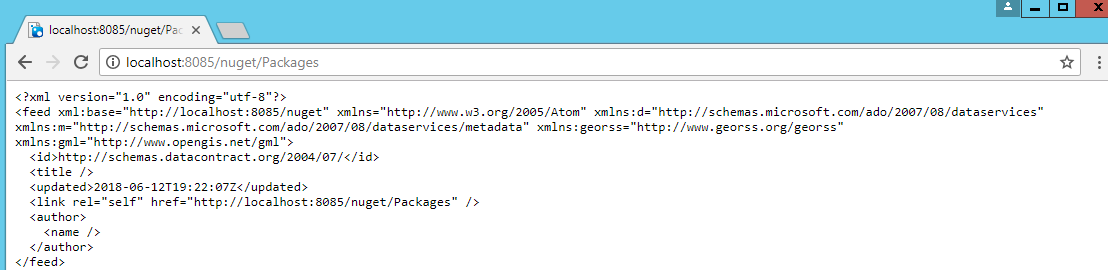
Btw it fails also on a simple get on http://localhost:8080/nuget/Packages
valeriob
on 12 Jun 2018
A GET failure would make sense if that URL only allows POST or PUT requests. Given that this situation is about uploading packages to that URL (not retrieving them), I think that's probably the case.
gbirchmeier
on 12 Jun 2018
I don't think so, that endpoint always worked, and it works if i compile the dll and copy them on top of the publish output :
valeriob
on 12 Jun 2018
Is there a current solution?
I run also into this error after updating NuGet.Server to 3.1.2. The root url of my NugetServer works, but the url path to http://localhost:58330/nuget/Packages fails with an 404 error.
 rogatec
on 24 Jul 2018
rogatec
on 24 Jul 2018
@rogatec you have to update the publish bin folder with the dll from the bin folder.
valeriob
on 24 Jul 2018
Actually what fixed my problem was, that I by mistake created the nuget.server project as a vb.net application. I fixed it to C#, afterwards everything worked fine (no copy/paste of dlls).
rogatec
on 24 Jul 2018
Why closed ? i do not see a commit that fixes the publishing issue :(
valeriob
on 24 Aug 2018
As far as I can tell, it's a server config issue, and not a NuGet issue. Right? There's nothing to fix in NuGet.
gbirchmeier
on 24 Aug 2018
If anyone sees this issue. I fixed my problem by making sure a file in the "/Packages" folder has "Copy to Output Directory" = "Copy if newer". This makes sure the "/Packages" folder is created on the remote site. Otherwise, you will end up with a missing folder, causing a 404 error.
NOTE: I just marked "Readme.txt" to get outputted during the build/publish.
 MadCoder253
on 29 Oct 2019
MadCoder253
on 29 Oct 2019
I also struggled with this issue for a few hours trying all the suggestions. I also tried copying the DLLs like above but it didn't work... until I copied the Debug DLLs and it did. Figuring there was probably a compiler condition I searched and found App_StartNuGetODataConfig.cs
// The consuming project executes this logic with its own copy of this class. This is done with a .pp file that is
// added and transformed upon package install.
#if DEBUG
[assembly: WebActivatorEx.PreApplicationStartMethod(typeof(NuGet.Server.App_Start.NuGetODataConfig), "Start")]
#endif
Removing the if solved it for me and I could deploy the publish output. Hope that helps someone else looking for a solution!
 manuelxmarquez
on 12 Mar 2020
manuelxmarquez
on 12 Mar 2020
Related issues
 heng-liu
·
5Comments
heng-liu
·
5Comments
 Sergio0694
·
3Comments
Sergio0694
·
3Comments
 anangaur
·
5Comments
anangaur
·
5Comments
 xied75
·
5Comments
xied75
·
5Comments
 skofman1
·
3Comments
skofman1
·
3Comments
Most helpful comment
I have done the changes as you suggested and I get the same error.
Pushing MyProject.1.0.0.nupkg to 'http://devserver.com/CustomNuget/nuget'...
PUT http://devserver.com/CustomNuget/nuget
NotFound http://devserver.iso.com/CustomNuget/nuget/ 112ms
Response status code does not indicate success: 404 (Not Found).
Also I had updated my original post with some extra findings can you pls check that also.