Nugetgallery: Latest Version on Manage Packages does not show SemVer 2.0.0 packages
Latest Version on Manage Packages does not show SemVer 2.0.0 packages in some scenarios.
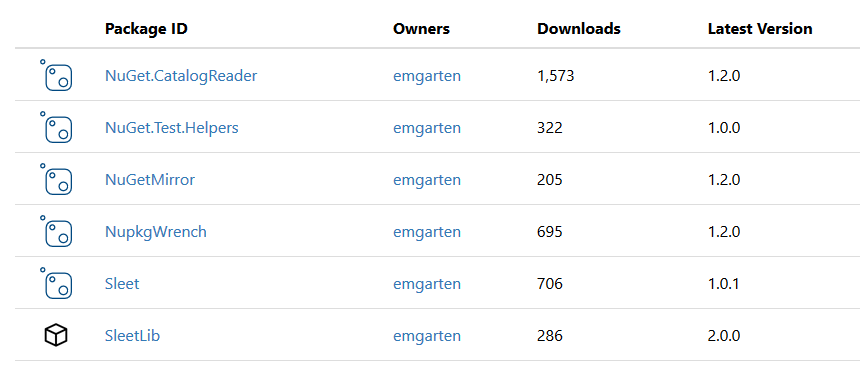
In the below example all packages have SemVer 2.0.0 stable versions. Only SleetLib shows the correct version, Sleet for example should be 2.0.0.
 emgarten
All 15 comments
The build metadata of a Semver 2.0.0 package should be shown too. We have places in NuGet Gallery where this info is not shown. For example, In package edit flow, the metadata part is not shown: https://github.com/NuGet/NuGetGallery/issues/4756
 anangaur
on 1 Oct 2017
anangaur
on 1 Oct 2017
@anangaur Given the build metadata part of the version can be really long, are you sure you want to show that information in these narrow columns? Or do you have a preferred way of truncating this information?
 xavierdecoster
on 2 Oct 2017
xavierdecoster
on 2 Oct 2017
We should just truncate with ellipsis to contain it within the column width.
anangaur
on 2 Oct 2017
@xavierdecoster the PR looks like it adds metadata, but the latest version itself is still incorrect.
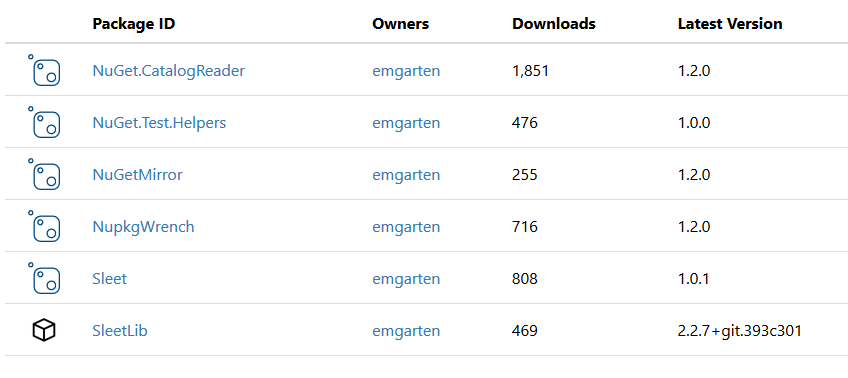
In the screen shot below only SleetLib has the correct version, everything else is showing the latest non-SemVer 2.0.0 version:
emgarten
on 27 Oct 2017
SleetLib is the only package that has zero stable non-SemVer 2.0.0 versions. It just has a single non-SemVer 2.0.0 pre-release version and the rest are SemVer 2.0.0. Apart from that Sleet and SleetLib have the same versions since they are released together, so it is strange that one is working and the other isn't here.
emgarten
on 27 Oct 2017
@emgarten is this still an issue? (asking, because maybe a package reflow may have fixed it)
I think the culprit is in the work-around for the IsLatest concurrency issue here: https://github.com/NuGet/NuGetGallery/blame/49833afe3e7ee36dd0de3cc5f9262b27e0241f35/src/NuGetGallery/Services/PackageService.cs#L243
@chenriksson when changing the order of the packages in the ReturnsFirstIfMultiplePackagesSetToLatest test case covering this scenario, the test breaks, and actual behavior no longer seems to match expected. Also, I'd expect to return latest package version flagged as latest, not first in the list flagged as latest.
xavierdecoster
on 31 Oct 2017
I'll check again
emgarten
on 31 Oct 2017
@xavierdecoster So maybe we should use LastOrDefault, or just go back to SingleOrDefault so that it's more obvious that a reflow is necessary...
 chenriksson
on 31 Oct 2017
chenriksson
on 31 Oct 2017
No change, I still see older versions of the packages. It looks the same as the screenshot above.
emgarten
on 31 Oct 2017
@anangaur @emgarten @skofman1 functional question: what is the intended behavior for the latest version column?
Should it show the absolute latest version (no matter whether listed, pre-release, or semver2)?
Or should it follow a decision try such as suggested by the following code comment I found in the sources:
// Like DisplayPackage we should prefer to show you information from the latest stable version,
// but show you the latest version (potentially latest UNLISTED version) otherwise.
In that case, the decision tree would look like:
a. show latest stable semver2 version if available; otherwise go to b.
b. show latest stable non-semver2 version if available; otherwise go to c.
c. show latest pre-release semver2 version if available; otherwise go to d.
d. show latest pre-release non-semver2 version if available; otherwise go to e.
e. (edge case, reflow required) order by version descending, show .First()
Checking the code for this functionality, it could be rewritten to be more concise and easier to understand, but would like to assert the above behavior first.
xavierdecoster
on 23 Jan 2018
This is author's view. I feel this just just show the absolute latest version that was uploaded or the absolute latest version available (exclude that is not listed). I feel it should be the later.
i.e. Show the absolute latest listed version. This would help author understand what is the latest 'available' version.
P.S: I had trouble parsing the 5 point logic listed above. Not sure if those 5 points meant the same ;)
anangaur
on 23 Jan 2018
We also need to fallback to include unlisted versions (e.g. when you only have a single, unlisted version, you still want to see it). And when browsing to the package details page without version, you end up on the "recommended latest version", which prefers latest stable over latest prerelease, which is what's also included in the above logic.
xavierdecoster
on 23 Jan 2018
Let me rewrite that logic a bit, reduced into 3 points :)
a. show latest stable version or latest stable semver2 version (whichever is highest version), if available; otherwise go to b.
b. show latest pre-release version or latest pre-release semver2 version (whichever is highest version), if available; otherwise go to c.
c. (edge case caused by possible concurrency issue, reflow required) order by version descending, show .First()
xavierdecoster
on 23 Jan 2018
Note: before semver2, that was the old behavior: show latest stable, otherwise latest pre-release (if no stable releases for the package), otherwise whichever is highest version
xavierdecoster
on 23 Jan 2018
LGTM :)
anangaur
on 23 Jan 2018
Related issues
anangaur
·
5Comments
 skofman1
·
4Comments
skofman1
·
4Comments
 SteveWilkes
·
3Comments
anangaur
·
5Comments
SteveWilkes
·
3Comments
anangaur
·
5Comments
 xied75
·
5Comments
xied75
·
5Comments