Nugetgallery: Empty PackageDependency ID causes NuGet Hell
Good evening,
Others and I have been having one hell of a problem with this Baseline NuGet package authored by @jeremydmiller.
Problems with his Baseline NuGet package have been cropping up here, here, and here.
Steps to reproduce
- Create an empty folder.
- Download the latest
nuget.exe - Run
nuget install baseline
Output:
R:\>nuget.exe install baseline
Feeds used:
  https://api.nuget.org/v3/index.json

  GET https://api.nuget.org/v3/registration2-gz/baseline/index.json
  OK https://api.nuget.org/v3/registration2-gz/baseline/index.json 444ms
An error occurred while retrieving package metadata for 'baseline' from source 'nuget.org'.
  id
Obviously, Baseline exists on NuGet.org. However, at the end of the error message, the last 2 characters of the output are id. An ominous clue.
So, upon closer examination of Baseline's NuGet "metadata" (https://api.nuget.org/v3/registration2-gz/baseline/index.json) yields a possible problem with Baseline's metadata:
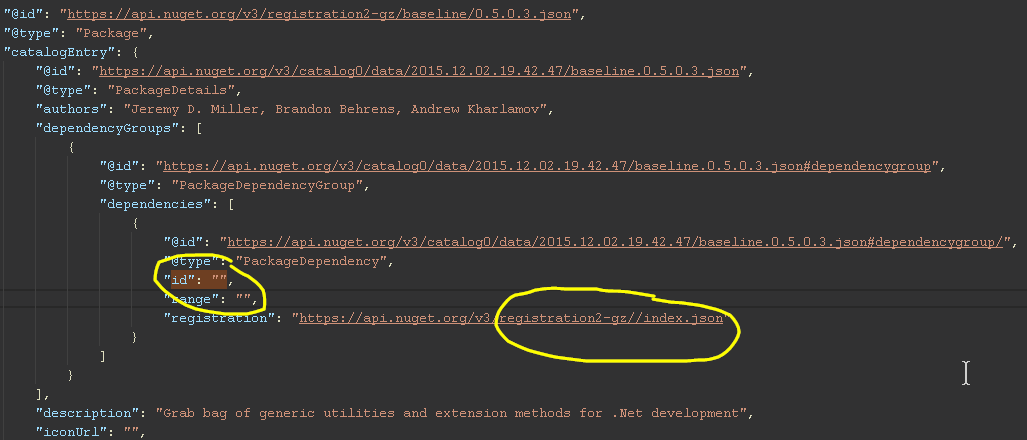
Notice the PackageDependency "id": "" is empty and the registration URL is invalid. This blank "id" and invalid registration exist for versions:
0.5.0.30.5.0.40.5.0.60.5.0.7
Ideally, this would be something the author of the package could resolve; however, since the package has already been published I don't think there's any way for @jeremydmiller to modify the existing package versions to remedy the issue; which, I think, now leaves it in hands of the NuGet team to resolve.
This leaves us in an awkward situation with a couple of ways out:
- @jeremydmiller republishes his NuGet package under a different name (
Baseline2) and have his people re-reference everything. - Forcefully purge the offending versions from NuGet.org.
- NuGet team handles the possibility of empty package
ids gracefully in all its client tools. - NuGet team rebuilds (or filter)
Baseline's "metadata" (and other packages) server-side to exclude empty packageids that would prevent client tools from crashing/failing.

Additional diagnostic information used when debugging nuget.exe with mdbg.exe to track down the problem:
R:\>mdbg nuget.exe install baseline
MDbg (Managed debugger) v0.0.0.0 started.
Copyright (C) Microsoft Corporation. All rights reserved.

For information about commands type "help";
to exit program type "quit".

run nuget.exe install baseline
STOP: Breakpoint Hit
IP: 0 @ NuGet.CommandLine.Program.Main - MAPPING_EXACT
[p#:0, t#:0] mdbg> ca ex System.ArgumentException
[p#:0, t#:0] mdbg> go
Feeds used:
  https://api.nuget.org/v3/index.json

  GET https://api.nuget.org/v3/registration2-gz/baseline/index.json
  OK https://api.nuget.org/v3/registration2-gz/baseline/index.json 793ms
STOP: Exception thrown
Exception=System.ArgumentException
        m_paramName=<null>
        s_EDILock=<null>
        _className=<null>
        _exceptionMethod=<null>
        _exceptionMethodString=<null>
        _message="id"
        _data=<null>
        _innerException=<null>
        _helpURL=<null>
        _stackTrace=array [48]
        _watsonBuckets=<null>
        _stackTraceString=<null>
        _remoteStackTraceString=<null>
        _remoteStackIndex=0
        _dynamicMethods=<null>
        _HResult=-2147024809
        _source=<null>
        _xptrs=0
        _xcode=-532462766
        _ipForWatsonBuckets=8790008599826
        _safeSerializationManager=System.Runtime.Serialization.SafeSerializationManager
IP: 27 @ NuGet.Packaging.Core.PackageDependency..ctor - MAPPING_APPROXIMATE
[p#:0, t#:8] mdbg> p
this=NuGet.Packaging.Core.PackageDependency
id=""
versionRange=NuGet.Versioning.VersionRange
include=<null>
exclude=<null>
[p#:1, t#:8] mdbg> printe
Exception thrown:
System.ArgumentException
 at function:
  NuGet.Packaging.Core.PackageDependency..ctor
 Message:
 "id"
[p#:0, t#:8] mdbg> where
Thread [#:8]
*0. NuGet.Packaging.Core.PackageDependency..ctor (source line information unavailable)
 1. NuGet.Packaging.Core.PackageDependency..ctor (source line information unavailable)
 2. NuGet.Protocol.ResolverMetadataClient.ProcessPackageVersion (source line information unavailable)
 3. NuGet.Protocol.ResolverMetadataClient+<GetDependencies>d__0.MoveNext (source line information unavailable)
 4. System.Runtime.CompilerServices.AsyncMethodBuilderCore+MoveNextRunner.InvokeMoveNext (source line information unavailable)
 5. System.Threading.ExecutionContext.RunInternal (source line information unavailable)
 6. System.Threading.ExecutionContext.Run (source line information unavailable)
 7. System.Runtime.CompilerServices.AsyncMethodBuilderCore+MoveNextRunner.Run (source line information unavailable)
 8. System.Threading.Tasks.AwaitTaskContinuation.RunOrScheduleAction (source line information unavailable)
 9. System.Threading.Tasks.Task.FinishContinuations (source line information unavailable)
 10. System.Threading.Tasks.Task.FinishStageThree (source line information unavailable)
 11. System.Threading.Tasks.Task`1<System.Collections.Generic.IEnumerable`1<Newtonsoft.Json.Linq.JObject>>.TrySetResult (source line information unavailable)
 12. System.Runtime.CompilerServices.AsyncTaskMethodBuilder`1<System.Collections.Generic.IEnumerable`1<Newtonsoft.Json.Linq.JObject>>.SetResult (source line information unavailable)
 13. NuGet.Protocol.Utils+<LoadRanges>d__1.MoveNext (source line information unavailable)
 14. System.Runtime.CompilerServices.AsyncMethodBuilderCore+MoveNextRunner.InvokeMoveNext (source line information unavailable)
 15. System.Threading.ExecutionContext.RunInternal (source line information unavailable)
 16. System.Threading.ExecutionContext.Run (source line information unavailable)
 17. System.Runtime.CompilerServices.AsyncMethodBuilderCore+MoveNextRunner.Run (source line information unavailable)
 18. System.Threading.Tasks.AwaitTaskContinuation.RunOrScheduleAction (source line information unavailable)
 19. System.Threading.Tasks.Task.FinishContinuations (source line information unavailable)
 20. System.Threading.Tasks.Task.FinishStageThree (source line information unavailable)
 21. System.Threading.Tasks.Task`1<Newtonsoft.Json.Linq.JObject>.TrySetResult (source line information unavailable)
 22. System.Runtime.CompilerServices.AsyncTaskMethodBuilder`1<Newtonsoft.Json.Linq.JObject>.SetResult (source line information unavailable)
 23. NuGet.Protocol.HttpSource+<GetJObjectAsync>d__15.MoveNext (source line information unavailable)
 24. System.Runtime.CompilerServices.AsyncMethodBuilderCore+MoveNextRunner.InvokeMoveNext (source line information unavailable)
 25. System.Threading.ExecutionContext.RunInternal (source line information unavailable)
 26. System.Threading.ExecutionContext.Run (source line information unavailable)
 27. System.Runtime.CompilerServices.AsyncMethodBuilderCore+MoveNextRunner.Run (source line information unavailable)
 28. System.Threading.Tasks.AwaitTaskContinuation.RunOrScheduleAction (source line information unavailable)
 29. System.Threading.Tasks.Task.FinishContinuations (source line information unavailable)
 30. System.Threading.Tasks.Task.FinishStageThree (source line information unavailable)
 31. System.Threading.Tasks.Task`1<Newtonsoft.Json.Linq.JObject>.TrySetResult (source line information unavailable)
 32. System.Runtime.CompilerServices.AsyncTaskMethodBuilder`1<Newtonsoft.Json.Linq.JObject>.SetResult (source line information unavailable)
[p#:0, t#:8] mdbg> go
STOP: MdbgError

Exception Type:       KeyNotFoundException
Exception Message:    The given key was not present in the dictionary.
Exception StackTrace:
   at System.Collections.Generic.Dictionary`2.get_Item(TKey key)
   at Microsoft.Samples.Debugging.MdbgEngine.ManagedThreadManager.UnRegister(CorThread t)
   at Microsoft.Samples.Debugging.MdbgEngine.ManagedRuntime.ExitThreadEventHandler(Object sender, CorThreadEventArgs e)
   at Microsoft.Samples.Debugging.MdbgEngine.ManagedEvents.DispatchEventInternal(Int32 eventId, Object sender, CorEventArgs args)
   at Microsoft.Samples.Debugging.MdbgEngine.ManagedLiveStopGoController.HandleEvent(ManagedCallbackType eventId, CorEventArgs args)

[p#:0, t#:no active thread] mdbg> An error occurred while retrieving package metadata for 'baseline' from source 'nuget.org'.
  id
And the culprit:
https://github.com/NuGet/NuGet.Client/blob/dev/src/NuGet.Core/NuGet.Packaging.Core/PackageDependency.cs#L58-L61
        public PackageDependency(
            string id,
            VersionRange versionRange,
            IReadOnlyList<string> include,
            IReadOnlyList<string> exclude)
        {
            if (string.IsNullOrEmpty(id))
            {
                throw new ArgumentException(nameof(id));
            }

            Id = id;
            _versionRange = versionRange ?? VersionRange.All;
            Include = include ?? EmptyList;
            Exclude = exclude ?? EmptyList;
        }
Thanks for listening,
Brian
:hourglass_flowing_sand: :mag: "But I still haven't found what I'm for..."
 bchavez
All 15 comments
Great analysis, @bchavez 👏. I think you hit the nail on the head with your proposed solutions. I'll make sure the right people see this issue. That being said, I think the fix should be made in both the server and the client. The client change is important as it gives the benefit of resiliency to malformed data on other server implementations. The server change is important since old clients (3.x and 4.x) will keep breaking on this package.
The server change should exclude dependencies with missing IDs in the registration blobs. Note that the gallery already does this! There must be an inconsistency with the code parsing the .nuspec the dependencies.
The errant .nuspec is:
?xml version="1.0" encoding="utf-8" standalone="yes"?>
<package xmlns="http://schemas.microsoft.com/packaging/2011/10/nuspec.xsd">
  <metadata>
    <id>Baseline</id>
    <version>0.5.0.3</version>
    <title>Baseline</title>
    <authors>Jeremy D. Miller, Brandon Behrens, Andrew Kharlamov</authors>
    <owners>Jeremy D. Miller, Chad Myers, Joshua Arnold, Joshua Flanagan</owners>
    <licenseUrl>https://github.com/JasperFX/Baseline/blob/master/LICENSE.txt</licenseUrl>
    <projectUrl>https://github.com/JasperFX/Baseline</projectUrl>
    <description>Grab bag of generic utilities and extension methods for .Net development</description>
    <dependencies>
      <dependency id="" version="" />
    </dependencies>
  </metadata>
</package>
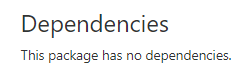
The gallery (https://www.nuget.org/packages/Baseline/0.5.0.3) shows this:
/cc @rrelyea for client changes.
/cc @skofman1 for server changes.
 joelverhagen
on 2 Aug 2017
joelverhagen
on 2 Aug 2017
/cc @scottbommarito, does your validation job detect this sort issue? The V2 shows this package as not having any dependencies at all:
https://www.nuget.org/api/v2/Packages(Id='Baseline',Version='0.5.0.3')
joelverhagen
on 2 Aug 2017
It does not detect this issue, but I could probably easily add this to the set of validations that are run.
 scottbommarito
on 2 Aug 2017
scottbommarito
on 2 Aug 2017
Related client issue: https://github.com/NuGet/Home/issues/5711
joelverhagen
on 4 Aug 2017
We verified that packages with empty dependencies can no longer be pushed to the Gallery. We decided not to add any special logic to V3 to filter out the broken packages.
Authors of packages that were already pushed are encouraged to unlist the impacted versions, and to push a new version that has correct dependencies. In certain cases we will consider deleting the affected packages from nuget.org - this will be reviewed on a case-by-case basis.
 skofman1
on 18 Oct 2017
skofman1
on 18 Oct 2017
Is there a list of requirements that NuGet.org current enforces for packages (such as this one?).
If not, can we create such a list...(and likely grow it!)
 rrelyea
on 18 Oct 2017
rrelyea
on 18 Oct 2017
sigh. :disappointed:
@skofman1 The Baseline NuGet package versions that have been affected by this issue have been unlisted by the author as you asked. The problem still persists. The workaround did not work. :x:
Please keep this issue open until someone actually fixes the problem. :hammer_and_wrench:
Thank you
bchavez
on 19 Oct 2017
I'll be investigating a proper fix here (server side only). Thanks for bringing this to our attention, @bchavez!
joelverhagen
on 19 Oct 2017
I tried to understand the scope and prevalence of the issue here, so I scanned the entire NuGet catalog, some 94,500 unique package IDs, last night hitting the problematic API endpoint:
https://api.nuget.org/v3/registration2-gz/__PACKAGE_ID__/index.json
- I throttled the requests back to about 4 threads sustaining (in aggregate) about 150KB/sec of API traffic. Hopefully, I did not cause too much trouble doing this.
- Around 2,523 packages had various HTTP errors (so I couldn't check them). Another small batch had illegal characters in their PackageId path; so I culled those out too.
Overall, roughly 91,500 around packages (96.8% of all packages) were checked for an empty "dependency id". I'm somewhat confident that Baseline is the only NuGet package in the NuGet universe that has this issue (versions: 0.5.0.3, 0.5.0.4, 0.5.0.6, 0.5.0.7) . No other packages of the ones I have checked seem to have this issue. Might be worth double checking this since the NuGet team probably has better tools at their disposal.
I hope this helps extra information helps in making any decisions. Again, thanks for everyone's effort in getting this issue resolved.
:heart:
PS, the magic Newtonsoft.Json JObject JSONPath string I used to check for the error:
obj.SelectTokens("$..dependencies[?(@id == '')].id").Any();
Might be worth double checking this since the NuGet team probably has better tools at their disposal.
Double checked. You're right.
joelverhagen
on 20 Oct 2017
A fix has been checked in for this issue. We have verified the fix in our preliminary test environment ("dev"). I will close this issue once a) we have deployed the fix to production and b) I have reflowed the effected packages so the situation entirely remedied.
/cc @bchavez @edouardp
joelverhagen
on 23 Oct 2017
Thank you so much @joelverhagen. My gosh, it feels like a huge weight has been lifted from my chest. This bug has been such pain to deal with. I look forward to the fix soon. Is there a specific date when the fix is moved into production?
Again, thank you to everyone for the effort and resolve! :1st_place_medal:
bchavez
on 23 Oct 2017
Is there a specific date when the fix is moved into production?
We typically release every three weeks, so November 15 at the latest. However, I'll talk to the team about potentially releasing sooner 🤞.
joelverhagen
on 23 Oct 2017
Baseline should be fixed now. Let us know if you run into any other issues.
joelverhagen
on 25 Oct 2017
IT WORKS!!! THANK YOUUUUUUUUUUUU!!!!!! :heart:



............ 
bchavez
on 25 Oct 2017
Related issues
 heng-liu
·
5Comments
heng-liu
·
5Comments
 yishaigalatzer
·
4Comments
scottbommarito
·
5Comments
yishaigalatzer
·
4Comments
scottbommarito
·
5Comments
 Sergio0694
·
3Comments
Sergio0694
·
3Comments
 anangaur
·
5Comments
anangaur
·
5Comments
Most helpful comment
We typically release every three weeks, so November 15 at the latest. However, I'll talk to the team about potentially releasing sooner 🤞.