Nswag: SwaggerUi3: Execute button not working if parameter is IFormFile
Hello,
when using an IFormFile parameter on an operation as a parameter (FileUpload) the "Execute" button in swagger UI3 is not working. I can see no error on the browser console. The Filepicker is working as expected but clicking on Execute makes no operation.
I am using AspCore 2.2., NSwag 12.3.1, OpenApi 3.0.
Controller:
[Route("test")]
[ApiController]
public class TestController : ControllerBase
{
    [HttpPost, Route("upload")]
    public IActionResult Upload([SwaggerFile]IFormFile file)
    {
        return Ok();
    }
}
Openapi spec
 "/test/upload": {
      "post": {
        "tags": [
          "Test"
        ],
        "operationId": "Test_Upload",
        "parameters": [
          {
            "type": "file",
            "name": "file",
            "in": "formData",
            "schema": {
              "type": "string",
              "format": "binary",
              "nullable": true
            },
            "nullable": true
          }
        ],
        "responses": {
          "200": {
            "description": "",
            "content": {
              "application/octet-stream": {
                "schema": {
                  "type": "string",
                  "format": "binary"
                }
              }
            }
          }
        }
      }
    }
  },
Any ideas?
Thank you and best regards,
Peter
 ptr1120
All 12 comments
I'm having the same issue
 dbartumeu
on 8 Jul 2019
dbartumeu
on 8 Jul 2019
Maybe a swagger ui 3 problem? Is the spec correct?
 RicoSuter
on 9 Jul 2019
RicoSuter
on 9 Jul 2019
No the problem is the specification changed.
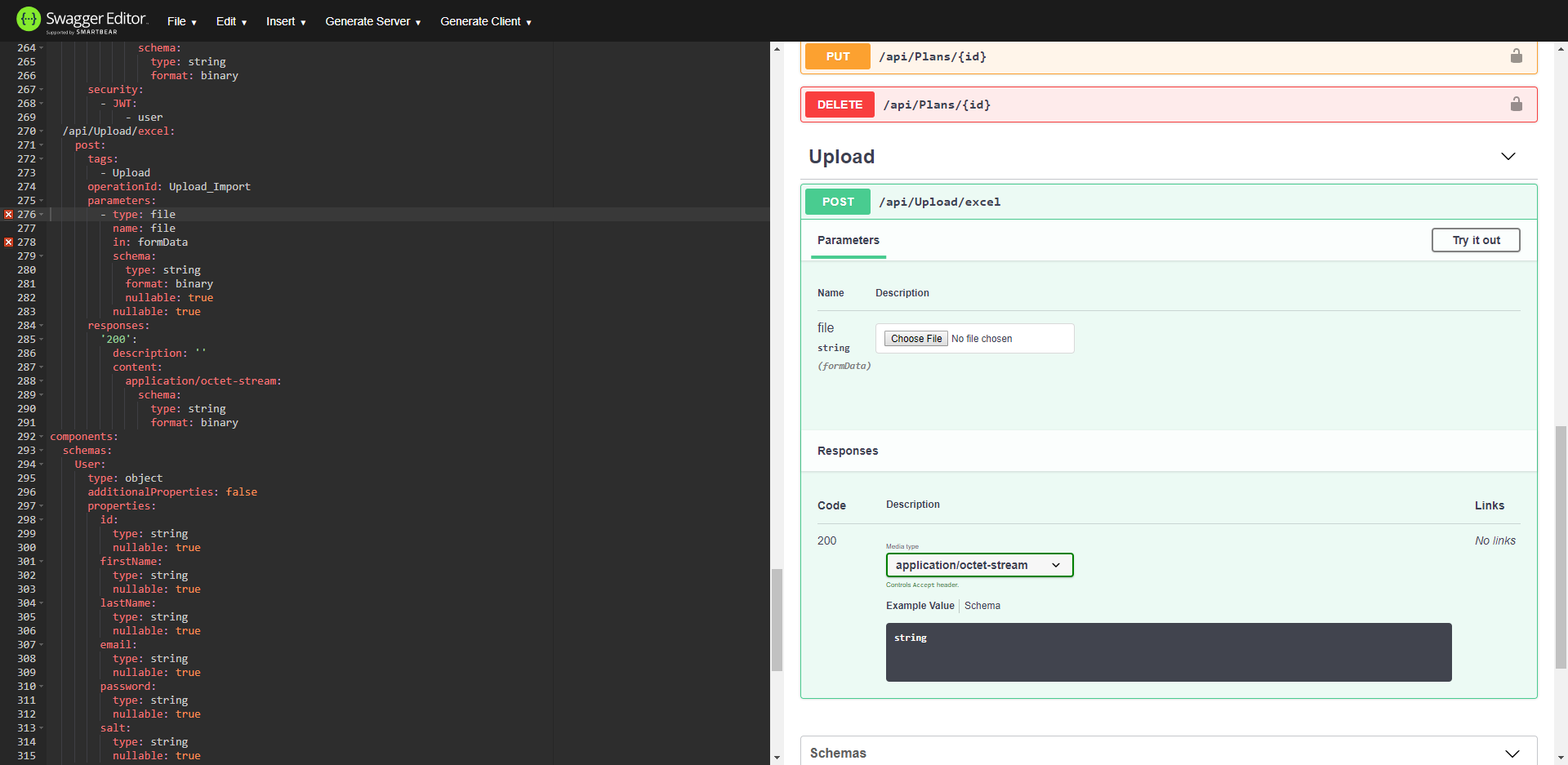
In OpenApi 2 this is the definition of a file upload:
/api/Upload/excel:
post:
tags:
- Upload
operationId: Upload_Import
parameters:
- type: file
name: file
in: formData
schema:
type: string
format: binary
nullable: true
nullable: true
responses:
'200':
description: ''
content:
application/octet-stream:
schema:
type: string
format: binary
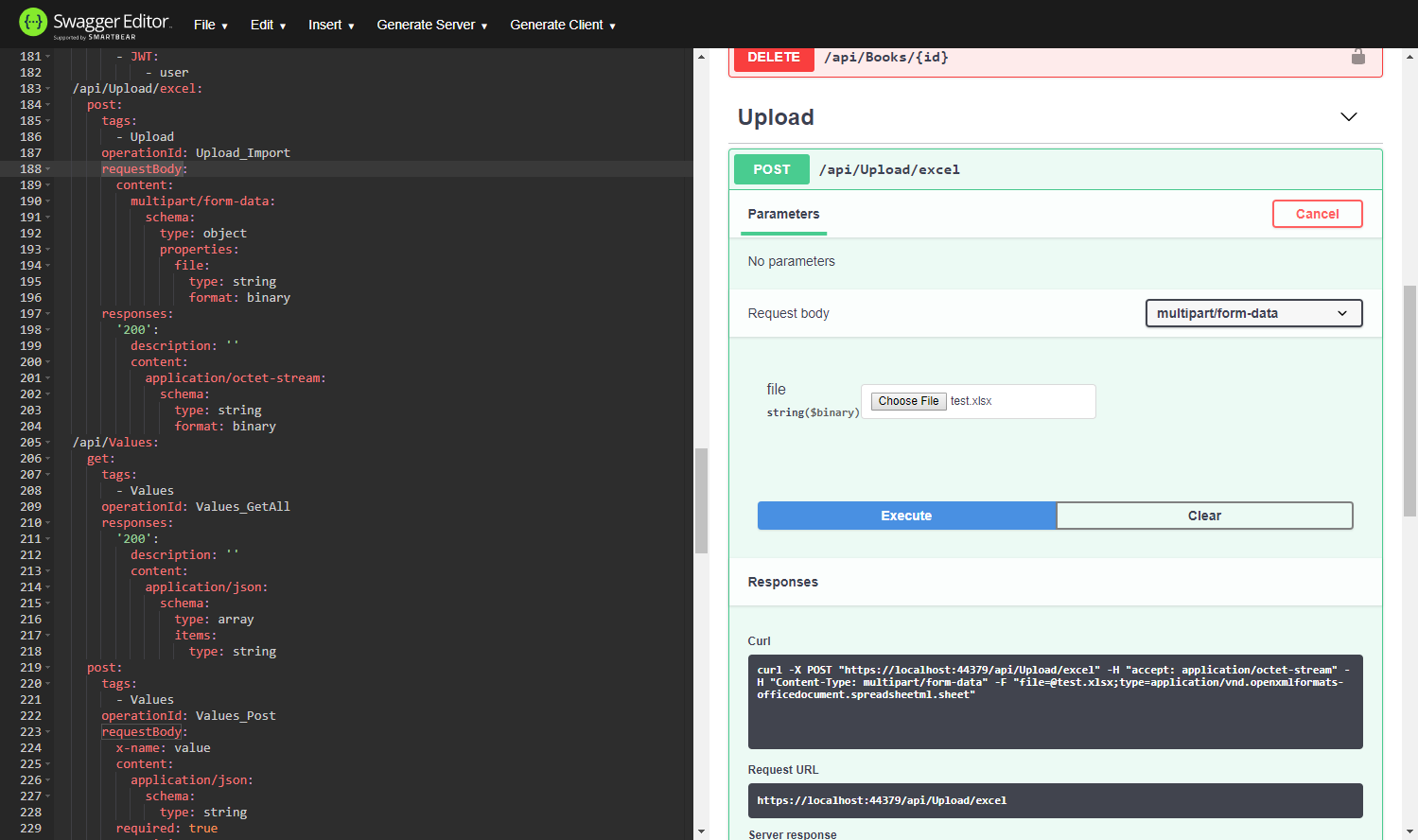
but this is the definition in OpenApi 3:
/api/Upload/excel:
post:
tags:
- Upload
operationId: Upload_Import
requestBody:
content:
multipart/form-data:
schema:
type: object
properties:
file:
type: string
format: binary
responses:
'200':
description: ''
content:
application/octet-stream:
schema:
type: string
format: binary
This is what is being genereted right now:
And this is what needs to be generated
dbartumeu
on 11 Jul 2019
Is there any news on this issue? I've just encountered it after upgrading to NSwag v13, so I'd appreciate any workarounds😊
 GeorgDangl
on 13 Aug 2019
GeorgDangl
on 13 Aug 2019
The UI can be fixed with the following post process:
foreach (var operation in x.Operations)
{
var fileParameters = operation.Operation.Parameters.Where(p => p.Type == NJsonSchema.JsonObjectType.File).ToList();
if (fileParameters.Any())
{
operation.Operation.RequestBody = new OpenApiRequestBody();
var requestBodyContent = new OpenApiMediaType();
requestBodyContent.Schema = new NJsonSchema.JsonSchema();
requestBodyContent.Schema.Type = NJsonSchema.JsonObjectType.Object;
foreach (var fileParameter in fileParameters)
{
requestBodyContent.Schema.Properties.Add(fileParameter.Name, new NJsonSchema.JsonSchemaProperty
{
Type = NJsonSchema.JsonObjectType.String,
Format = "binary",
Description = fileParameter.Description
});
operation.Operation.Parameters.Remove(fileParameter);
}
operation.Operation.RequestBody.Content.Add("multipart/form-data", requestBodyContent);
}
}
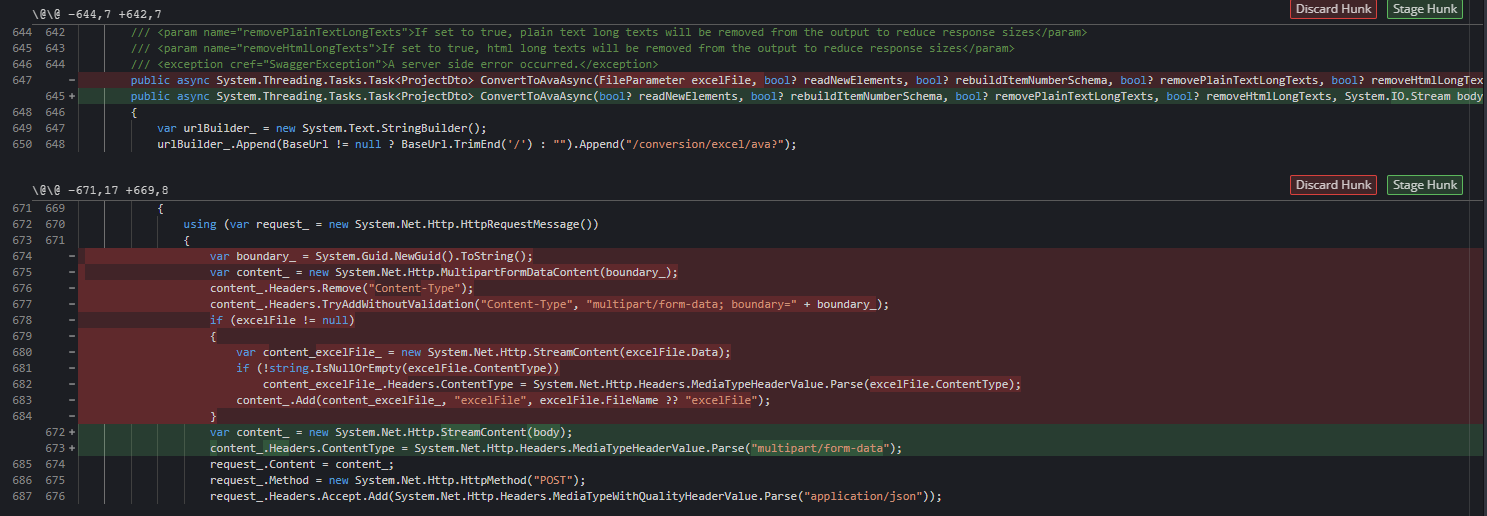
However, this fails when C# code is generated. First, it replaces the named FileParameter with a Stream body argument. Also, the generated client doesn't send the content-type boundary, so it can not be parsed as an IFormFile in the backend.
@RicoSuter, do you have any ideas?
GeorgDangl
on 14 Aug 2019
@GeorgDangl did you switch from Swagger 2.0 to OpenAPI 3.0?
RicoSuter
on 21 Aug 2019
Yeah, I did initially. But for now, I switched back again to Swagger 2.0.
I can confirm the findings of @dbartumeu, file parameters can only be described in the request body in OpenAPI 3.0, no longer as parameters with type file.
Applying the post process transformation I described above solved the problem, but the C# generator then produced code that did not include the request boundary in the multipart body.
So all in all, I decided to switch back to Swagger 2.0. I've found it to be much more stable with other generators as well and I don't yet have the requirement to support OpenAPI 3.0. I've got an app that produces clients for C#, TypeScript, JavaScript, Java, PHP and Python and everything seems to work fine with Swagger 2.0 for now.
GeorgDangl
on 21 Aug 2019
Can confirm, pretty annoying. Workaround for me is indeed using .UseSwaggerDocument() instead of .UseOpenApiDocument() .
edit: really can't use the workaround, as OAuth2 starts failing when I use Swagger2.0
Edit2: the workaround with custom post processor works
 SamJongenelen
on 16 Apr 2020
SamJongenelen
on 16 Apr 2020
Seems like the new release 13.6.0 has broken something. I was able to get the file upload working with the workaround posted above by @GeorgDangl but after upgrading from 13.5.0 to 13.6.0 it no longer works. I decided to stay with the olde version for now.
Having said that I admit that I have no idea whether the file upload also works with code generated from the specification (of either version). There is another issue around this (https://github.com/RicoSuter/NSwag/issues/2673) and I feel it has not been resolved yet. It would be nice to get a proper solution on this soon - are there any plans on that @RicoSuter ?
 srudin
on 3 Jun 2020
srudin
on 3 Jun 2020
For version 13.6 I found a new workaround. Using the [FromForm] attribute the generated spec just needs a small adjustment in post process.
public class FormDataModel {
   public IFormFile UploadFile {get; set; }
}

[HttpPost]
public IActionResult Upload([FromForm]FormDataModel form) {
   // Do something
}
The generated spec will be
/Upload
  post:
    operationId: Upload
    requestBody:
      content:
        multipart/form-data:
          schema:
            properties:
              UploadFile:
                type: string
                format: binary
The only thing missing is type: object directly underneath schema.
I don't know why the previous mentioned workaround doesn't work anymore, as it seems to also set the schema type to NJsonSchema.JsonObjectType.Object. But using below code at post process in combination with [FromForm] does produce a correct spec.
foreach (var operation in x.Operations)
{
    var content = operation.Operation.RequestBody?.Content;
    if (content != null && content.TryGetValue("multipart/form-data", out var schema) {
        schema.Schema.Type = NJsonSchema.JsonObjectType.Object;
    }
}
And this should produce:
/Upload
  post:
    operationId: Upload
    requestBody:
      content:
        multipart/form-data:
          schema:
            type: object        <- This was missing
            properties:
              UploadFile:
                type: string
                format: binary
 LennartKoot
on 12 Jun 2020
LennartKoot
on 12 Jun 2020
Same issue for me with a simple [Fromform] object and binding variables to property. The workaround of @LennartKoot worked for me.
 emmanuelmathot
on 14 Dec 2020
emmanuelmathot
on 14 Dec 2020
Related issues
 Zshazz
·
4Comments
Zshazz
·
4Comments
 p0wertiger
·
3Comments
p0wertiger
·
3Comments
 BlackGad
·
4Comments
BlackGad
·
4Comments
 alanedwardes
·
3Comments
alanedwardes
·
3Comments
 blackbaud-GavinNicol
·
3Comments
blackbaud-GavinNicol
·
3Comments
Most helpful comment
For version 13.6 I found a new workaround. Using the
[FromForm]attribute the generated spec just needs a small adjustment in post process.The generated spec will be
The only thing missing is
type: objectdirectly underneathschema.I don't know why the previous mentioned workaround doesn't work anymore, as it seems to also set the schema type to
NJsonSchema.JsonObjectType.Object. But using below code at post process in combination with[FromForm]does produce a correct spec.And this should produce: