Nswag: Nswag studio: assembly specified YamlDotNet.Signed not found
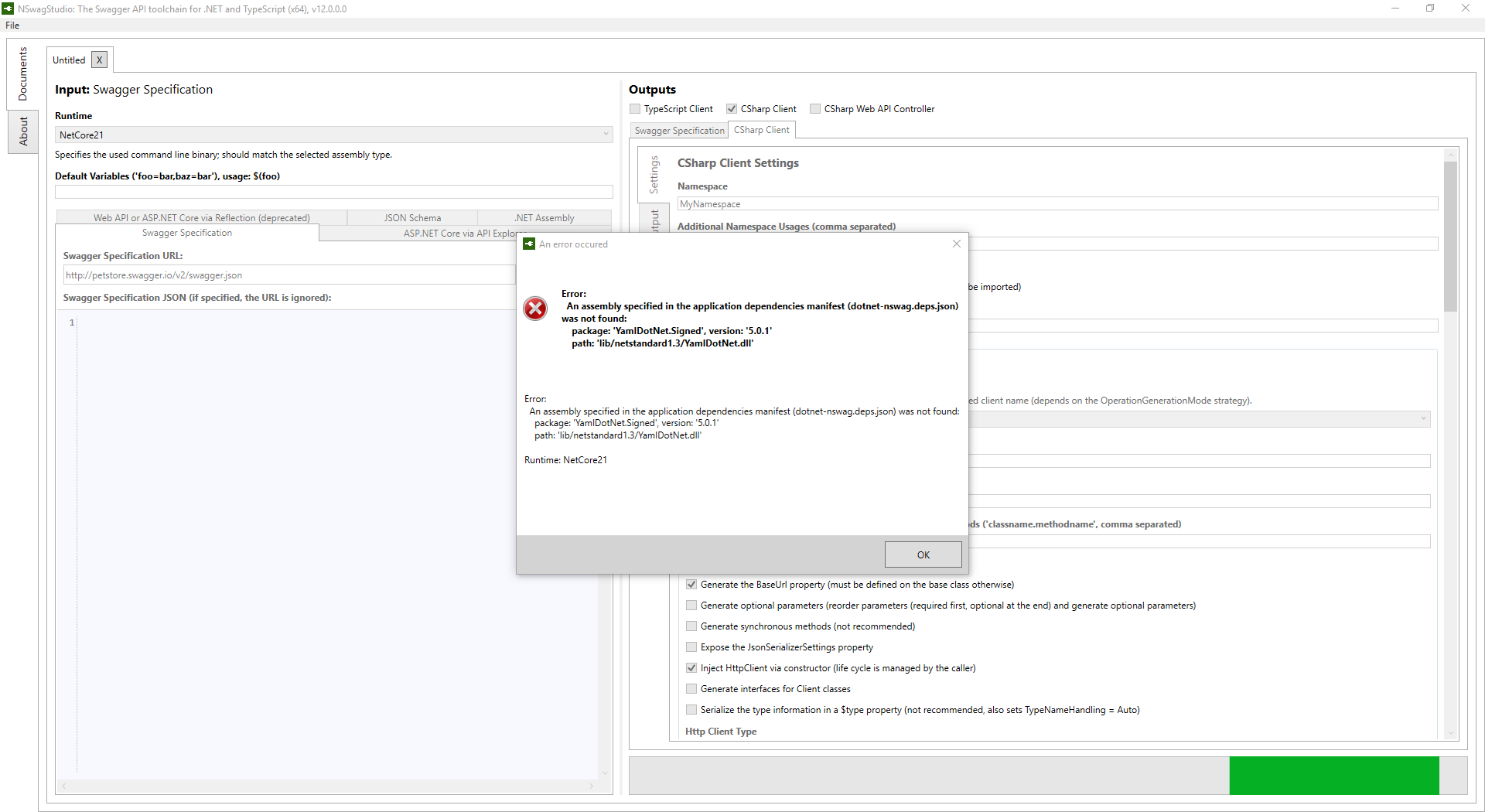
Trying to use the ASP.NET Core via API Explorer functionality in NSwagStudio v12.0 and I get the following exception:

I can get the TypeScript to generate when using the Swagger Specification option. Not sure why I cannot use the API Explorer option.
In ConfigureServices I have added AddSwaggerDocument() after AddMvc() as well as set the compatibility version.
In Configure I have this after UseMvc:
    // Add OpenAPI/Swagger middlewares
            app.UseSwagger(); // Serves the registered OpenAPI/Swagger documents by default on `/swagger/{documentName}/swagger.json`
            app.UseSwaggerUi3(); // Serves the Swagger UI 3 web ui to view the OpenAPI/Swagger documents by default on `/swagger`
 dylanvdmerwe
All 26 comments
Try to compile your app with
dotnet build /p:CopyLocalLockFileAssemblies=true
 RicoSuter
on 18 Nov 2018
RicoSuter
on 18 Nov 2018
Otherwise this looks like a publish bug, maybe i need to release a bug fix
RicoSuter
on 18 Nov 2018
I just tried with:
<CopyLocalLockFileAssemblies>true</CopyLocalLockFileAssemblies>
But I still get the same weird YamlDotNet.Signed error. I don't have a reference to this assembly/package in any of my projects.
dylanvdmerwe
on 18 Nov 2018
Yes, nswag has a dep to this package. It seems that is missing in the installer...
RicoSuter
on 18 Nov 2018
I’m offline and cant check right now, but you could try to save the nswag.json config file and run it with the nswag npm package
RicoSuter
on 18 Nov 2018
I just checked on my PC, after updating NSwagStudio the Yaml dll was indeed missing... Then I uninstalled and reinstalled NSwagStudio and now it looks good... It seems that there is a problem in the WIX installer upgrade...
RicoSuter
on 18 Nov 2018
Uninstall and reinstall fixed the missing dll issue.
dylanvdmerwe
on 18 Nov 2018
Can confirm that it is simply the missing dll after updating, i copied it from the .nuget folder into the NetCore21 folder and NSwagStudio resumed working.
 kevinandrewsde
on 20 Nov 2018
kevinandrewsde
on 20 Nov 2018
Very strange, there is no change on the installer project and i can't explain why there's now a file missing - but only after upgrade not normal install.
RicoSuter
on 20 Nov 2018
Had the same problem after updateing, uninstalling and reinstalling NSwagStudio did the trick
 stefan-schweiger
on 20 Nov 2018
stefan-schweiger
on 20 Nov 2018
Same issue after upgrade, remove/re-install fixed it.
 IvanJosipovic
on 21 Nov 2018
IvanJosipovic
on 21 Nov 2018
@IvanJosipovic thanks, I had the same issue and your solution worked for me!
 ranouf
on 21 Nov 2018
ranouf
on 21 Nov 2018
yep. that worked for me too! 👍
 SeriousM
on 30 Nov 2018
SeriousM
on 30 Nov 2018
Does this also happen with the new patch releases?
RicoSuter
on 30 Nov 2018
Just updated today and only a reinstall worked for me.
SeriousM
on 30 Nov 2018
Ok thanks for replying. I have no idea how to fix this without this “workaround”.
RicoSuter
on 30 Nov 2018
Updated today and had the same problem. Uninstall and install nswagstudio worked for me.
 Anderman
on 1 Dec 2018
Anderman
on 1 Dec 2018
The upgrade worked fine for me this time.
IvanJosipovic
on 1 Dec 2018
From v11 or v12?
RicoSuter
on 1 Dec 2018
From v11 or v12?
From 12.0.0.0 to 12.0.4.0
IvanJosipovic
on 1 Dec 2018
Yes, i expected/hoped that this works :-) thanks for reporting
RicoSuter
on 1 Dec 2018
For me it works in the studio, but not on the CLI...
I've checked the nswag bin directory and the YamlDotNet.Signed is actually there but it won't work, also not if I manually copy this dll into my applications bin folder.
Reinstalling the npm package didn't work either
(running on netcore22 btw)
 MadMonkey87
on 30 Jan 2019
MadMonkey87
on 30 Jan 2019
Same issue today -
Error:
An assembly specified in the application dependencies manifest (dotnet-nswag.deps.json) was not found:
package: 'YamlDotNet.Signed', version: '5.0.1'
path: 'lib/netstandard1.3/YamlDotNet.dll'
Moving from 11 to 12
 StevenSSparks
on 11 Feb 2019
StevenSSparks
on 11 Feb 2019
Uninstalling and reinstalling nswagstudio worked for me.
 coder8keyboard
on 12 Feb 2019
coder8keyboard
on 12 Feb 2019
Yes - The uninstall and reinstall worked for me. I have noticed some of the default UI settings are causing the functionality of the NSWAG studio to produce c# code that is different that previous versions.
StevenSSparks
on 13 Feb 2019
I have noticed some of the default UI settings are causing the functionality of the NSWAG studio to produce c# code that is different that previous versions.
There are some breaking changes - hence the v12 tag. But with some tweaks you should be able to produce compatible code..
RicoSuter
on 14 Feb 2019
Related issues
 danroth27
·
3Comments
danroth27
·
3Comments
 Zshazz
·
4Comments
Zshazz
·
4Comments
 Rui90
·
4Comments
Rui90
·
4Comments
 jjohs
·
3Comments
jjohs
·
3Comments
 p0wertiger
·
3Comments
p0wertiger
·
3Comments
Most helpful comment
Same issue after upgrade, remove/re-install fixed it.
