Nswag: Missing NSwag.AspNetCore.Launcher NuGet package for 11.13.0+
It looks like NSwag.AspNetCore.Launcher was not published to NuGet.org. This prevents use of NSwag.ConsoleCore 11.13.0 and 11.13.1.
 saxonww
All 17 comments
This is bad. I tried to also release NSwag.AspNetCore.Launcher as NuGet package, but it doesn't work (no NuGet package is created on build).
 RicoSuter
on 30 Jan 2018
RicoSuter
on 30 Jan 2018
@pranavkm Any ideas?
RicoSuter
on 6 Feb 2018
NSwag.ConsoleCore should bundle the contents of AspNetCore.Launcher (which it already does) and not have actual package reference to the the launcher. I'll see if I can send a quick fix for this.
 pranavkm
on 6 Feb 2018
pranavkm
on 7 Feb 2018
pranavkm
on 6 Feb 2018
pranavkm
on 7 Feb 2018
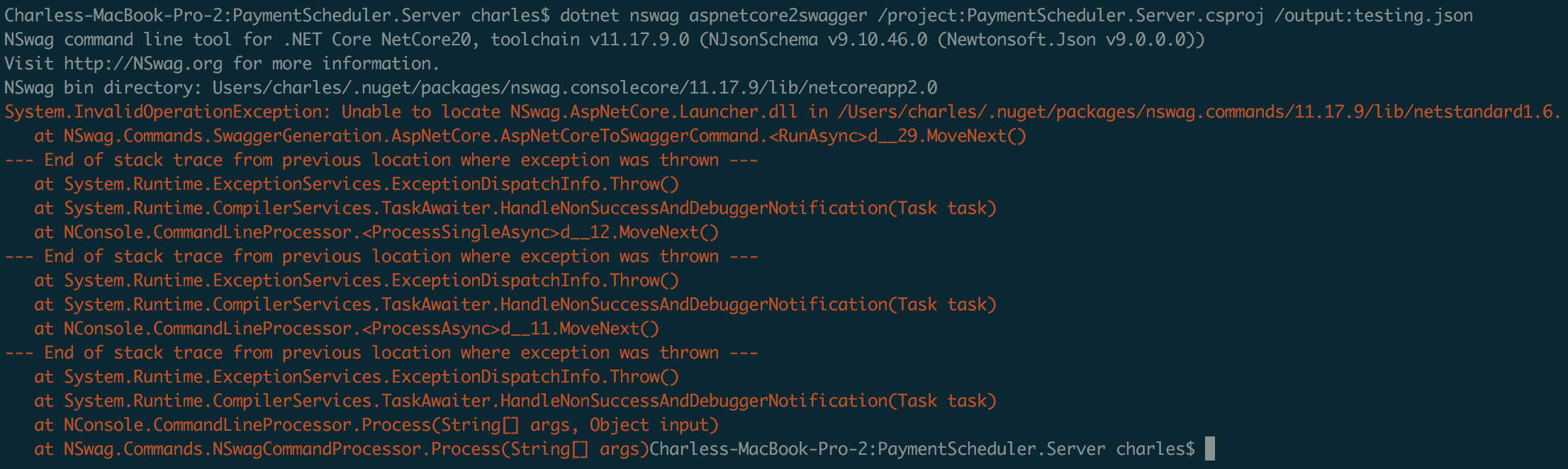
@RSuter & @pranavkm - I think this has regressed or manifested in a different way again... see attached screen shot.
Let me know if you want some more info.
 cvallance
on 22 May 2018
cvallance
on 22 May 2018
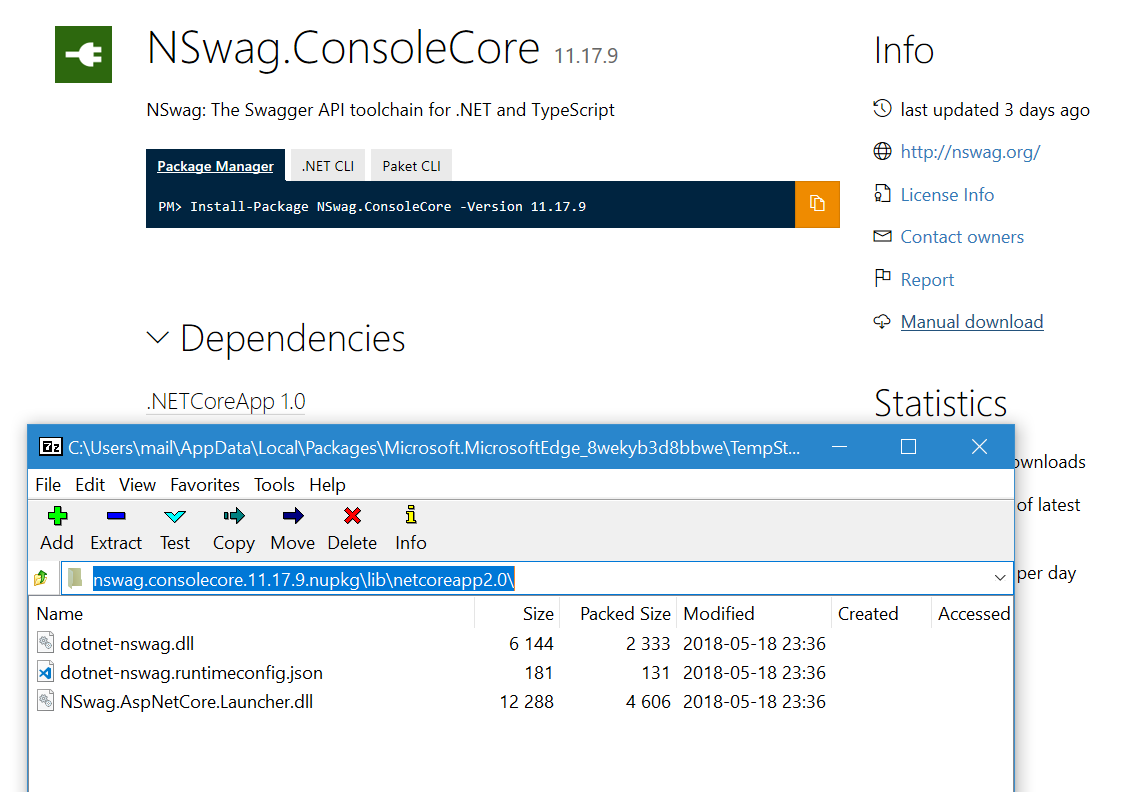
Strange, the package contains the NSwag.AspNetCore.Launcher.dll
RicoSuter
on 22 May 2018
Right now the command assumes you're running it from the published results of NSwag.ConsoleCore? It doesn't look like that is what's happening with @cvallance's scenario - looks more along the lines of a dotnet run on a project referencing NSwag.ConsoleCore package although clearly not from the command line output. @cvallance could you share your setup?
pranavkm
on 22 May 2018
So I'm on OSX. The project is a ASP.NET Core 2 application. The only reference to _NSwag_ is in the csproj file and it's a DotNetCliToolReference ... i.e. <DotNetCliToolReference Include="NSwag.ConsoleCore" Version="11.17.9" />.
I'm invoking it from bash using the command you can see in the screenshot - dotnet nswag aspnetcore2swagger /project:PaymentSchedulerServer.csproj /output:testing.json.
If I look inside /Users/charles/.nuget/packages/nswag.consolecore/11.17.9/lib/netcoreapp2.0 I can see the NSwag.AspNetCore.Launcher.dll file... but in the screen shot it says it can't find it in /Users/charles/.nuget/packages/nswag.commands/11.17.9/lib/netstandard1.6 ... which is true, I can't see the Launcher dll in that folder.
Any other info I can share?
cvallance
on 22 May 2018
@RSuter is that a scenario that's meant to work - referencing NSwag.ConsoleCore as a CLI tool? Tangentially related, the 2.1 CLI adds supports for globally installed tools (a la npm install -g). Perhaps that would be a better fit.
pranavkm
on 22 May 2018
@pranavkm The idea was that this works... but personally i never used - i always used the NSwag.MSBuild or NPM package... the big problem with the 2.1 CLI global tools is that it's global and not per project - so you can't choose the version (i.e. you get always the globally installed version). This is why i can't recommend this. Are tools per project no longer supported? Or what is the story there?
RicoSuter
on 22 May 2018
@cvallance @pranavkm any idea why it's searching in netstandard1.6? Maybe we just publish the dll also to this directory in the package and it just works (hacky)?
RicoSuter
on 22 May 2018
Are tools per project no longer supported?
Pretty sure they are still supported, it's what I'm using / doing. I can look into the MSBuild option.
It's looking in there because that's how NSwag.Commands is setup... no? https://www.nuget.org/packages/NSwag.Commands/11.17.9
cvallance
on 22 May 2018
any idea why it's searching in netstandard1.6
That's likely because of this line: https://github.com/RSuter/NSwag/blob/master/src/NSwag.Commands/Commands/SwaggerGeneration/AspNetCore/AspNetCoreToSwaggerCommand.cs#L73. It's using the command's path to locate the launcher dll. I'm trying to recall why I set it up this way but drawing a blank. Perhaps a safe-ish fix would be to additionally look for the dll in the BaseDirectory here: https://github.com/RSuter/NSwag/blob/master/src/NSwag.Commands/Commands/SwaggerGeneration/AspNetCore/AspNetCoreToSwaggerCommand.cs#L123-L127
```C#
var executorBinary = Path.Combine(toolDirectory, binaryName);
if (!File.Exists(executorBinary))
{
toolDirectory = AppContext.BaseDirectory;
executorBinary = Path.Combine(toolDirectory, binaryName);
}
if (!File.Exists(executorBinary))
{
throw new InvalidOperationException($"Unable to locate {binaryName} in {toolDirectory}.");
}
```
pranavkm
on 22 May 2018
What about this patch? :-)
Just add .NET Standard 1.6: https://github.com/RSuter/NSwag/pull/1339
RicoSuter
on 22 May 2018
@pranavkm why can't we directly use AppContext.BaseDirectory and AppDomain.CurrentDomain.BaseDirectory? Seems to be the correct location. Using the assembly of the command type is the simplest way as we only have a hold the current lib but not the app itself here (via type system)... And ATM it is assumed that all DLLs are in the same directory as the host (which is true but may change, i.e. with global tools)
RicoSuter
on 22 May 2018
why can't we directly use AppContext.BaseDirectory and AppDomain.CurrentDomain.BaseDirectory
Think that would be the correct fix here.
pranavkm
on 22 May 2018
This should do it, with fallback: https://github.com/RSuter/NSwag/pull/1340
RicoSuter
on 22 May 2018
Related issues
 saephraim
·
3Comments
saephraim
·
3Comments
 blackbaud-GavinNicol
·
3Comments
blackbaud-GavinNicol
·
3Comments
 slimjack
·
3Comments
slimjack
·
3Comments
 RawsomeGH
·
4Comments
RawsomeGH
·
4Comments
 danroth27
·
3Comments
danroth27
·
3Comments