NSwag.AspNetCore SwaggerUI: how to add JWT authorization headers?
Hello,
I'm successfully running my AspNetCore WebAPI project with JWT authorization and MS API versioning, but can't understand how to properly configure NSWag middleware to expose the "Authorization: Bearer" token, so to properly generate a c# client library using NSWag Studio.
I'm actually getting a timeout when opening my API project /swagger endpoint: it shows Swagger page, but then it stands waiting for it to show my api methods (fetching resource list). No errors appear on server, and the json can be loaded at its url. Can't even tell if this problem is related with the authorization header not being correctly generated.
My Configure method contains:
[...]
 app.UseJwtBearerAuthentication(new JwtBearerOptions
            {
                AutomaticAuthenticate = true,
                AutomaticChallenge = true,
                TokenValidationParameters = tokenValidationParameters,
                Events = new MyCustomJWTEventHandler()
            });

            // Swagger
            SwaggerUiSettings options = new SwaggerUiSettings();
            options.Description = "My API";
            options.Version = "1.0.0";
            options.Title = "My API";
            options.ValidateSpecification = true;

           // add Authorization header to Swagger UI
            options.OperationProcessors.Add(new OperationSecurityScopeProcessor("apiKey"));
            options.DocumentProcessors.Add(new SecurityDefinitionAppender("apiKey", new NSwag.SwaggerSecurityScheme()
            {
                Type = NSwag.SwaggerSecuritySchemeType.ApiKey,
                Name = "Authorization",
                In = NSwag.SwaggerSecurityApiKeyLocation.Header,
                Description = "Bearer token"
            }));

            app.UseSwaggerUi(typeof(Startup).GetTypeInfo().Assembly, options);

            app.UseMvc(routes =>
            {
                routes.MapRoute("default", "{controller}/{action}/{id?}");
            });
The produced json contains a security node for each method, but I'm not sure this is correct - and NSWag studio does not add code to handle the authorization header to the generated client library.
"security": [
          {
            "apiKey": []
          }
        ]
Can anybody help me taking the right direction? 😚
Thanks for any help,
al.
 trapias
All 44 comments
We should upgrade to the new version of swagger ui (v3?) and add more customization options.
 RicoSuter
on 10 Aug 2017
RicoSuter
on 10 Aug 2017
@RSuter that would be good 😊 I still have problems in seeing the swagger UI, even if I strip that part of code - any breaking changes recently?
I also would love you could add again the option to inject the HttpClient in NSwagStudio c# client generator: with previous version I used that to pass my bearer token to constructors, but now the option is gone and I'm not able to use generated library anymore - I have to modify generated code to inject HttpClient, so that I can pass the bearer token like this:
HttpClient c = new HttpClient();
string tok = this._httpc.HttpContext.Request.Cookies["Token"];
c.DefaultRequestHeaders.Authorization = new System.Net.Http.Headers.AuthenticationHeaderValue("Bearer", tok);
MyProject.ClientLibrary.UsersClient ac = new MyProject.ClientLibrary.UsersClient(c);
Am I missing some other way to pass the token?
Thank you,
Alberto.
trapias
on 11 Aug 2017
Just enable the setting InjectHttpClient in the C# code generator
RicoSuter
on 11 Aug 2017
@RSuter that's my problem, I cannot find the checkbox anymore in Studio version 8.3.6208.27063
trapias
on 11 Aug 2017
RicoSuter
on 11 Aug 2017
@RSuter OMG I was using an old version of Studio, sorry to bother!
About my UI page not being shown - browser hangs on "fetching" bringing CPU to 100%, yet APIs do work correctly - could it be that nested resources cause such a problem? It used to work for me, but looks like now that I added includes the UI stopped.
Thanks,
al.
trapias
on 11 Aug 2017
Try accessing the spec url directly and observe any exceptions
RicoSuter
on 25 Aug 2017
@RSuter I actually cannot see any errors nor in browser console nor on the server: it just keeps "fetching", CPU usage goes up (process "Google Chrome Helper" if using Chrome) but never can see something useful.
I'm trying to investigate myself, I read something about circular references that could break UI but I'm not sure that's the problem.
trapias
on 31 Aug 2017
Nswag comes with swagger ui 2.x, maybe the new version 3.x fixes that?
RicoSuter
on 31 Aug 2017
@RSuter don't know if this means something, but I now noticed that my swagger URL is generated as "v1" (url=/swagger/v1/swagger.json), while the JSON says it's Swagger version 2 spec
{
"x-generator": "NSwag v11.5.1.0 (NJsonSchema v9.4.10.0)",
"swagger": "2.0",
"info": {
"title": "My API",
"description": "My API description",
"version": "1.0.0"
},
[...]
I'll try to mount my json on a version 3 UI to see what happens, thanks for your patience ;)
trapias
on 31 Aug 2017
v1 is the version of your api (and is just a part of the url and can be changed). Swagger 2.0 specifies the format of the spec...
RicoSuter
on 31 Aug 2017
@RSuter yep thanks. I just downloaded latest Swagger UI (3.1.7), and it tells it cannot parse my JSON - I see it makes a request for the JSON, and then gives the error:
{"schemaValidationMessages":[{"level":"error","message":"Can't read from file http://cucciolo.local:5000/swagger/v1/swagger.json"}]}
Looks like something is wrong with the generated JSON, isn't it? How could I investigate the error?
trapias
on 31 Aug 2017
A CORS problem?
RicoSuter
on 31 Aug 2017
I do have a Cors setup, maybe I'm wrong?
In ConfigureServices I have:
services.AddCors(options =>
{
options.AddPolicy("CorsPolicy",
builder => builder.AllowAnyOrigin()
.AllowAnyMethod()
.WithExposedHeaders("Content-Length", "Access-Control-Allow-Origin", "TotalRecords", "Origin")
.AllowCredentials()
.AllowAnyHeader());
});
and then in Configure:
app.UseCors("CorsPolicy");
Currently running ASPNet Core 2.0, but it was the same with 1.1 'til a couple of days ago.
Am I missing something here? I can successfully test the APIs with a web application I'm developing too.
trapias
on 31 Aug 2017
Press F12 and check the "Network" tab (Chrome)
RicoSuter
on 31 Aug 2017
Ops, looks like you're right! Here's the error:
Fetch API cannot load http://cucciolo.local:5000/swagger/v1/swagger.json. No 'Access-Control-Allow-Origin' header is present on the requested resource. Origin 'null' is therefore not allowed access. If an opaque response serves your needs, set the request's mode to 'no-cors' to fetch the resource with CORS disabled.
I thought the "AllowAnyOrigin()" was enough, but it's not.... I also have the "Access-Control-Allow-Origin" exposed, apparently... I'm investigating this, thanks for your help!
trapias
on 31 Aug 2017
Yeah, this is a PITA. This works for me:
https://github.com/RSuter/NSwag/blob/master/src/NSwag.Sample.NetCoreAngular/Startup.cs#L43
RicoSuter
on 31 Aug 2017
Ok I managed to fix the CORS problem, add to move it before AddMvc :-|
But then also this new swagger UI does not parse my spec, and the browser doesn't show other errors.
Might be something in my API that pulls it into some infinite loop, I guess.
trapias
on 31 Aug 2017
Theres also redoc ;-)
RicoSuter
on 31 Aug 2017
Im upgrading to Swagger UI 3.x and adding ReDoc:
https://github.com/RSuter/NSwag/tree/redoc-and-new-swagger-ui
RicoSuter
on 7 Sep 2017
Just FYI: Swagger UI 3.x (UseSwaggerUi3()) and ReDoc (UseSwaggerReDoc()) can now be used with the latest release.
RicoSuter
on 29 Sep 2017
@RSuter thanks for the update: I'm constantly updating to latest release but still get the same problem - will try to look into this more deeply in the next days!
trapias
on 3 Oct 2017
Any success adding JWT tokens from SwaggerUI?
I can make it work in Angular 5 with the nwag generated JS client, but can't figure out how to successfully tweak the SwaggerUI through UseWaggerUI3 in the .Net Core server side settings.
To be more precise, SwaggerUI2 is able to add the apiKey token on the request retrieving swagger.json definition, but they are not added to the "try it out" functionality, i.e. in the curl commands.
My bad, I confused the name and the ApiKey type, this does work:
            app.UseSwaggerUi3(typeof(Startup).GetTypeInfo().Assembly, new SwaggerUi3Settings()
            {
                Title = "Some title",
                Version = "v1",
                Description = "Some description",
                DefaultEnumHandling = NJsonSchema.EnumHandling.Integer,
                AddMissingPathParameters = false,
                IsAspNetCore = true,

                OperationProcessors =
                {
                    new  OperationSecurityScopeProcessor("JWT token")
                },

                DocumentProcessors = {
                    new SecurityDefinitionAppender("JWT token", new SwaggerSecurityScheme
                    {
                        Type = SwaggerSecuritySchemeType.ApiKey,
                        Name = "Authorization",
                        Description = "Copy 'Bearer ' + valid JWT token into field",
                        In = SwaggerSecurityApiKeyLocation.Header

                    })
                }
            });
Pay attention to the reference between the "JWT token" name in OperationSecurityScopeProcessor and the name in SecurityDefinitionAppender.
 renepape
on 26 Feb 2018
renepape
on 26 Feb 2018
In order to save someone countless hours of confusion and self-doubt, app.UseSwaggerUi3() has to come before app.UseSwagger() for the custom header to work.
// this has in Startup.Configure() first
app.UseSwaggerUi3(typeof(Startup).GetTypeInfo().Assembly, swaggerSettings =>
{
    swaggerSettings.GeneratorSettings.OperationProcessors.Add(new OperationSecurityScopeProcessor("custom-auth"));

    swaggerSettings.GeneratorSettings.DocumentProcessors.Add(
        new SecurityDefinitionAppender("custom-auth", new SwaggerSecurityScheme
        {
            Type = SwaggerSecuritySchemeType.ApiKey,
            Name = "header-name",
            Description = "The language of the response",
            In = SwaggerSecurityApiKeyLocation.Header
        }));
});

// followed by this
app.UseSwagger(typeof(Startup).Assembly, swaggerSettings =>
{
    swaggerSettings.GeneratorSettings.DefaultEnumHandling = EnumHandling.String;
    swaggerSettings.PostProcess = document =>
    {
        document.Info.Version = "v1";
        document.Info.Title = "ToDo API";
        document.Info.Description = "A simple ASP.NET Core web API";
        document.Info.TermsOfService = "None";
        document.Info.Contact = new NSwag.SwaggerContact
        {
            Name = "Shayne Boyer",
            Email = string.Empty,
            Url = "https://twitter.com/spboyer"
        };
        document.Info.License = new NSwag.SwaggerLicense
        {
            Name = "Use under LICX",
            Url = "https://example.com/license"
        };
    };
});
 DamienLaw
on 20 May 2018
DamienLaw
on 20 May 2018
BTW: UseSwaggerUi3 already contains UseSwagger and thus UseSwagger is not needed (or you have to call it after the other method).
RicoSuter
on 20 May 2018
BTW: UseSwaggerUi3 already contains UseSwagger and thus UseSwagger is not needed (or you have to call it after the other method).
@RSuter I didn't know that. I'm new and was following the tutorial on Microsoft Doc. Thanks a lot.
DamienLaw
on 21 May 2018
Hi, @trapias,
Do you know by any chance how to add 'application/octet-stream'
to the Response content type dropdown in the SwaggerUI.
Thanks!
 AnaitBI
on 17 Oct 2018
AnaitBI
on 17 Oct 2018
@AnaitBI no sorry, let me know if you find the way!
trapias
on 17 Oct 2018
Hi, @trapias,
Do you know by any chance how to add 'application/octet-stream'
to the Response content type dropdown in the SwaggerUI.
Thanks!
Add a [Produces("application/octet-stream", "application/json")] attribute, you can add multiple types as shown here.
 wesleygrimes
on 20 Feb 2019
wesleygrimes
on 20 Feb 2019
Here's how you get JWT tokens working with v12.0.14 (.NET Core 2.2):
services.AddMvc();
services.AddSwaggerDocument(document =>
{
    // Add an authenticate button to Swagger for JWT tokens
    document.OperationProcessors.Add(new OperationSecurityScopeProcessor("JWT"));
    document.DocumentProcessors.Add(new SecurityDefinitionAppender("JWT", new SwaggerSecurityScheme
    {
        Type = SwaggerSecuritySchemeType.ApiKey,
        Name = "Authorization",
        In = SwaggerSecurityApiKeyLocation.Header,
        Description = "Type into the textbox: Bearer {your JWT token}. You can get a JWT token from /Authorization/Authenticate."
    }));

    // Post process the generated document
    document.PostProcess = d => d.Info.Title = "Hello world!";
});
 yetanotherchris
on 23 Feb 2019
yetanotherchris
on 23 Feb 2019
@yetanotherchris maybe it would make sense to update the wiki with your findings?
RicoSuter
on 25 Feb 2019
@RSuter I've updated https://github.com/RSuter/NSwag/wiki/AspNetCore-Middleware
yetanotherchris
on 26 Feb 2019
Here's how you get JWT tokens working with v12.0.14 (.NET Core 2.2):
services.AddMvc();
services.AddSwaggerDocument(document =>
{
    // Add an authenticate button to Swagger for JWT tokens
    document.OperationProcessors.Add(new OperationSecurityScopeProcessor("JWT"));
    document.DocumentProcessors.Add(new SecurityDefinitionAppender("JWT", new SwaggerSecurityScheme
    {
        Type = SwaggerSecuritySchemeType.ApiKey,
        Name = "Authorization",
        In = SwaggerSecurityApiKeyLocation.Header,
        Description = "Type into the textbox: Bearer {your JWT token}. You can get a JWT token from /Authorization/Authenticate."
    }));

    // Post process the generated document
    document.PostProcess = d => d.Info.Title = "Hello world!";
});
I just upgraded the NSwag.AspNetCore nuget package to v12.2.4 and now I get the following deprecation warning when using the above code:
'SecurityDefinitionAppender.SecurityDefinitionAppender(string, SwaggerSecurityScheme)' is obsolete: 'Use the constructor with scopeNames parameter instead.'
I see that there is now this constructor:
public SecurityDefinitionAppender(string name, IEnumerable<string> scopeNames, SwaggerSecurityScheme swaggerSecurityScheme);
but can you enlighten me as to what I should use for the scopeNames; particularly since I don't know why I should care about this param?
 ideoclickVanessa
on 27 Apr 2019
ideoclickVanessa
on 27 Apr 2019
Use Enumerable.Empty<string>()
RicoSuter
on 27 Apr 2019
See https://github.com/RicoSuter/NSwag/wiki/AspNetCore-Middleware#add-oauth2-authorization-openapi-3
RicoSuter
on 27 Apr 2019
See https://github.com/RicoSuter/NSwag/wiki/AspNetCore-Middleware#add-oauth2-authorization-openapi-3
I couldn't make the above work out of the box.
It seems like the sample has an ambiguity in naming the AddSecurity as "JWT" and the OperationSecurityScopeProcessor as "bearer".
If I changed both to i.e. "JWT token", it started to work.
This is my version:
`
services.AddSwaggerDocument(conf =>
{
conf.Title = "Some UI title";
conf.Description = "Some UI description during auth.";
            conf.OperationProcessors.Add(new OperationSecurityScopeProcessor("JWT token"));
            conf.AddSecurity("JWT token", Enumerable.Empty<string>(),
                new SwaggerSecurityScheme()
                {
                    Type = SwaggerSecuritySchemeType.ApiKey,
                    Name = nameof(Authorization),
                    In = SwaggerSecurityApiKeyLocation.Header,
                    Description = "Copy this into  the value field: \nBearer {my long token}"
                }
            );
        });
`
renepape
on 30 Apr 2019
I tried the solution posted above on my .NET Core 2.2 App using latest NSwag.AspNetCore (v13.0.4) package:
Startup.ConfigureServices():
services.AddMvc().SetCompatibilityVersion(CompatibilityVersion.Version_2_2);
services.AddOpenApiDocument(config =>
{
    config.DocumentName = "OpenApi3";
    config.OperationProcessors.Add(new OperationSecurityScopeProcessor("Bearer"));
    config.AddSecurity("Bearer", Enumerable.Empty<string>(),
        new OpenApiSecurityScheme()
        {
            Type = OpenApiSecuritySchemeType.ApiKey,
            Name = nameof(Authorization),
            In = OpenApiSecurityApiKeyLocation.Header,
            Description = "Copy this into the value field: Bearer {token}"
        }
    );
});
Startup.Configure():
...
app.UseMvc();
app.UseOpenApi();
app.UseSwaggerUi3();
app.UseAuthentication();
...
But when I run and check the generated OpenAPI file, the "security" field is empty:

What am I doing wrong here? Any help is appreciated!
@RicoSuter
 anas2204
on 8 Jul 2019
anas2204
on 8 Jul 2019
It looks very much like what I have up and running, however:
I use AddSwaggerDocument instead of AddOpenAPIDocument
I use the key "JWT Token" instead of "Bearer"
I don't set the DocumentName
renepape
on 9 Jul 2019
The Enumerable.Empty<string>() will create an empty "Bearer": []
But AddSecurity() will add "securitySchemes" with the given details..
RicoSuter
on 9 Jul 2019
@renepape, @RicoSuter
I removed the _DocumentName_ setting, it made no effect for the OpenAPI 3 document. But I added the _AddSwaggerDocument_ to see if it works for OpenAPI 2, here's my updated code:
Startup.ConfigureServices():
services.AddOpenApiDocument(config =>
{
    config.DocumentName = "OpenAPI 3";
    config.OperationProcessors.Add(new OperationSecurityScopeProcessor("JWT Token"));
    //config.OperationProcessors.Add(new AspNetCoreOperationSecurityScopeProcessor("JWT Token")); -> Replaced the line above with this with no difference
    config.AddSecurity("JWT Token", Enumerable.Empty<string>(),
        new OpenApiSecurityScheme()
        {
            Type = OpenApiSecuritySchemeType.ApiKey,
            Name = nameof(Authorization),
            In = OpenApiSecurityApiKeyLocation.Header,
            Description = "Copy this into the value field: Bearer {token}"
        }
    );
});

services.AddSwaggerDocument(config =>
{
    config.DocumentName = "OpenAPI 2";
    config.OperationProcessors.Add(new OperationSecurityScopeProcessor("JWT Token"));
    config.AddSecurity("JWT Token", Enumerable.Empty<string>(),
        new OpenApiSecurityScheme()
        {
            Type = OpenApiSecuritySchemeType.ApiKey,
            Name = nameof(Authorization),
            In = OpenApiSecurityApiKeyLocation.Header,
            Description = "Copy this into the value field: Bearer {token}"
        }
    );
});
My OpenAPI 3 Document is unchanged as:

However, this is how my OpenAPI 2 document is:
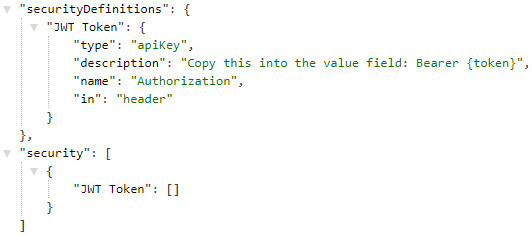
Am I doing anything incorrect for the OpenAPI 3 version?
Also, any leads on how to render this Authorization on each of my endpoints on the UI so I can pass a token through the "Try it out" feature on Swagger UI?
anas2204
on 9 Jul 2019
I hit this same bug in OAuth3 descriptors... how can we get it fixed?
 lewcianci
on 4 Aug 2019
RicoSuter
on 4 Aug 2019
lewcianci
on 4 Aug 2019
RicoSuter
on 4 Aug 2019
You can configure also it as follows:
settings.OperationProcessors.Add(new OperationSecurityScopeProcessor("auth"));
settings.DocumentProcessors.Add(new SecurityDefinitionAppender("auth", new OpenApiSecurityScheme
{
    Type = OpenApiSecuritySchemeType.Http,
    In = OpenApiSecurityApiKeyLocation.Header,
    Scheme = "bearer",
    BearerFormat = "jwt"
}));
it should show as follows

 amgdy
on 26 Jun 2020
amgdy
on 26 Jun 2020
Adding the following OperationProcessor to AddOpenApiDocument solved the issue for me.
config.OperationProcessors.Add(new AspNetCoreOperationSecurityScopeProcessor("JWT Token"));
Now Authorization header is being passed with the Try out request
 vladimirnani
on 21 Sep 2020
vladimirnani
on 21 Sep 2020
Related issues
 slimjack
·
3Comments
slimjack
·
3Comments
 p0wertiger
·
3Comments
p0wertiger
·
3Comments
 alanedwardes
·
3Comments
alanedwardes
·
3Comments
 cjfphilip
·
3Comments
cjfphilip
·
3Comments
 saephraim
·
3Comments
saephraim
·
3Comments
Most helpful comment
Any success adding JWT tokens from SwaggerUI?
I can make it work in Angular 5 with the nwag generated JS client, but can't figure out how to successfully tweak the SwaggerUI through UseWaggerUI3 in the .Net Core server side settings.
To be more precise, SwaggerUI2 is able to add the apiKey token on the request retrieving swagger.json definition, but they are not added to the "try it out" functionality, i.e. in the curl commands.
My bad, I confused the name and the ApiKey type, this does work:
Pay attention to the reference between the "JWT token" name in OperationSecurityScopeProcessor and the name in SecurityDefinitionAppender.