NSwag generate wrong code for FileContentResult type.
Hi Team,
I have Web.API core action method which returns FileContentResult, code example:
return new FileContentResult(fileViewModel.Content, fileViewModel.FileMetadataViewModel.MimeType)
{
      FileDownloadName = fileViewModel.FileMetadataViewModel.FileName
};
It generates code like:
var responseData_ = await response_.Content.ReadAsStringAsync().ConfigureAwait(false);
var result_ = default(FileContentResult);
try
{
   result_ = Newtonsoft.Json.JsonConvert.DeserializeObject<FileContentResult>(responseData_);
   return result_;
}
catch (System.Exception exception)
{
    throw new BusinessApiException("Could not deserialize the response body.", status_, result_.ToString(), headers_, exception);
}
Which cause SerializationException.
My manual fix looks like:
var result_ = new FileContentResult();

// Get file's byte array
byte[] responseData_ = await response_.Content.ReadAsByteArrayAsync().ConfigureAwait(false);

// Set FileContentResult properties manually
result_.ContentType = headers_["Content-Type"].FirstOrDefault();
result_.FileDownloadName = headers_["Content-Disposition"].FirstOrDefault();
result_.FileContents = responseData_;

try
{
    return result_;
}
catch (System.Exception exception)
{
    throw new BusinessApiException("Could not deserialize the response body.", status_, result_.ToString(), headers_, exception);
}
Could you please help me or/and suggest how to fix it. (Probably, I'm using wrong type or doing something wrong etc)
Thanks a lot in advance !!
 Boriszn
All 48 comments
What is the signature of the web api action method?
 RicoSuter
on 12 Jun 2017
RicoSuter
on 12 Jun 2017
Thanks for the answer.
Method with signature:
public async Task<IActionResult> Get(Guid fileId)
{
            if (fileId == Guid.Empty)
            {
                return new BadRequestResult();
            }

            var fileViewModel = await this.fileService.GetFile(fileId);

            if (fileViewModel == null)
            {
                return new NotFoundObjectResult($"File {fileId} doesn't exist.");
            }

            return new FileContentResult(fileViewModel.Content, fileViewModel.FileMetadataViewModel.MimeType)
            {
                FileDownloadName = fileViewModel.FileMetadataViewModel.FileName
            };
}
- Content field - byte[]
- FileName and MimeType - string
Boriszn
on 12 Jun 2017
Try
[SwaggerResponse(typeof(byte[]))]
public async Task<IActionResult> Get(Guid fileId)
{
...
Hi Rico,
Thanks a lot for the answer.
But it still throws an exception "JsonReaderException: Unexpected character encountered while parsing ..."
at this line:
result_ = Newtonsoft.Json.JsonConvert.DeserializeObject<byte[]>(responseData_);
The problem in generated method ReadAsStringAsync:
var responseData_ = await response_.Content.ReadAsStringAsync().ConfigureAwait(false);
Should be changed to ReadAsByteArrayAsync()
Thanks in advance,
Boriszn
on 14 Jun 2017
Can you post the generated swagger spec? The response schema.type must be file.
RicoSuter
on 14 Jun 2017
The response is handled as file when
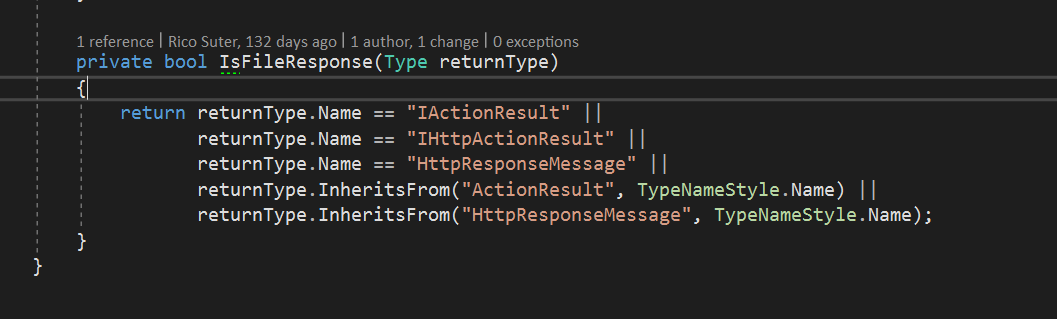
RicoSuter
on 14 Jun 2017
My sample operation from GeoController.cs:
    public HttpResponseMessage GetUploadedFile(int id, bool @override = false)
    {
        return new HttpResponseMessage(HttpStatusCode.OK)
        {
            Content = new ByteArrayContent(new byte[] { 1, 2, 3 })
        };
    }
Gives me the following client:
    /// <param name="cancellationToken">A cancellation token that can be used by other objects or threads to receive notice of cancellation.</param>
    /// <exception cref="SwaggerException">A server side error occurred.</exception>
    public async System.Threading.Tasks.Task<FileResponse> GetUploadedFileAsync(int id, bool? @override, System.Threading.CancellationToken cancellationToken)
    {
        if (id == null)
            throw new System.ArgumentNullException("id");

        if (@override == null)
            throw new System.ArgumentNullException("@override");

        var urlBuilder_ = new System.Text.StringBuilder();
        urlBuilder_.Append(BaseUrl).Append("/api/Geo/GetUploadedFile/{id}?");
        urlBuilder_.Replace("{id}", System.Uri.EscapeDataString(id.ToString()));
        urlBuilder_.Append("override=").Append(System.Uri.EscapeDataString(@override.Value.ToString())).Append("&");
        urlBuilder_.Length--;

        var client_ = new System.Net.Http.HttpClient();
        try
        {
            using (var request_ = new System.Net.Http.HttpRequestMessage())
            {
                request_.Method = new System.Net.Http.HttpMethod("GET");
                request_.Headers.Accept.Add(new System.Net.Http.Headers.MediaTypeWithQualityHeaderValue("application/json"));

                PrepareRequest(client_, request_, urlBuilder_);
                var url_ = urlBuilder_.ToString();
                request_.RequestUri = new System.Uri(url_, System.UriKind.RelativeOrAbsolute);
                PrepareRequest(client_, request_, url_);

                var response_ = await client_.SendAsync(request_, System.Net.Http.HttpCompletionOption.ResponseHeadersRead, cancellationToken).ConfigureAwait(false);
                try
                {
                    var headers_ = System.Linq.Enumerable.ToDictionary(response_.Headers, h_ => h_.Key, h_ => h_.Value);
                    foreach (var item_ in response_.Content.Headers)
                        headers_[item_.Key] = item_.Value;

                    ProcessResponse(client_, response_);

                    var status_ = ((int)response_.StatusCode).ToString();
                    if (status_ == "200" || status_ == "206")
                    {
                        var responseStream_ = await response_.Content.ReadAsStreamAsync().ConfigureAwait(false);
                        var fileResponse_ = new FileResponse(status_, headers_, responseStream_, client_, response_);
                        client_ = null; response_ = null; // response and client are disposed by FileResponse
                        return fileResponse_;
                    }
                    else
                    if (status_ != "200" && status_ != "204")
                    {
                        var responseData_ = await response_.Content.ReadAsStringAsync().ConfigureAwait(false);
                        throw new SwaggerException("The HTTP status code of the response was not expected (" + (int)response_.StatusCode + ").", status_, responseData_, headers_, null);
                    }

                    return default(FileResponse);
                }
                finally
                {
                    if (response_ != null)
                        response_.Dispose();
                }
            }
        }
        finally
        {
            if (client_ != null)
                client_.Dispose();
        }
    }

}
Thanks a lot, looks good.
But with byte array it genarates same code but in line where ReadAsStreamAsync()
it generates code line ReadAsStringAsync() (which throws an exception)
Anyway, I also need send some file metadata like MIME type and file name,
therefore I'm using type FleContentResult (and unfortunately NSwag generate code with ReadAsStringAsync() for type FleContentResult)
For receiving files there are 2 option in MVC API 5:
Is NSwag support this type(s) (Or will support in future) ?
Many Thanks,
Boriszn
on 16 Jun 2017
NSwag only scans the method signatures and its attributes. The implementation does not matter... If you use one of the listed types as return type (or in the SwaggerResponseAttribute) the spec is generated as file response and should not handle it as string.
RicoSuter
on 20 Jun 2017
Hi Rico. Thank you a lot, That is clear for me.
Just two questions:
- Is it possible to add FileContentResult type to this list of supported types ?
- How can send additional info/metadata with file (not only byte array) ?
Boriszn
on 26 Jun 2017
- We could add this type, but it would be the same as:
[SwaggerResponse(typeof(FileContentResult))]
public async Task<IActionResult> Get(Guid fileId)
{
Isnt this generating the file/stream handling code?
- What metadata are you sending? How would you read this metadata in the client? You can enable the WrapResponses setting (C# gen) so that you have access to all headers... Another option is to manually implement this operation by excluding it with ProtectedMethods and providing an own public method
RicoSuter
on 26 Jun 2017
Thanks,
- I have same code like in your example it generates client with ReadAsStringAsync() method.
Full client version what is generates on my side:
  /// <param name="cancellationToken">A cancellation token that can be used by other objects or threads to receive notice of cancellation.</param>
        /// <returns>Returns FileContentResult object which contains file-content as byte array, file name and MIME type</returns>
        /// <exception cref="BusinessApiException">A server side error occurred.</exception>
        public async System.Threading.Tasks.Task<FileContentResult> GetFileAsync(System.Guid fileId, System.Threading.CancellationToken cancellationToken)
        {
            if (fileId == null)
                throw new System.ArgumentNullException("fileId");

            var urlBuilder_ = new System.Text.StringBuilder();
            urlBuilder_.Append(BaseUrl).Append("/api/v1/files/{fileId}");
            urlBuilder_.Replace("{fileId}", System.Uri.EscapeDataString(fileId.ToString()));

            var client_ = _httpClient;
            try
            {
                using (var request_ = new System.Net.Http.HttpRequestMessage())
                {
                    request_.Method = new System.Net.Http.HttpMethod("GET");
                    request_.Headers.Accept.Add(new System.Net.Http.Headers.MediaTypeWithQualityHeaderValue("application/json"));

                    PrepareRequest(client_, request_, urlBuilder_);
                    var url_ = urlBuilder_.ToString();
                    request_.RequestUri = new System.Uri(url_, System.UriKind.RelativeOrAbsolute);
                    PrepareRequest(client_, request_, url_);

                    var response_ = await client_.SendAsync(request_, System.Net.Http.HttpCompletionOption.ResponseHeadersRead, cancellationToken).ConfigureAwait(false);
                    try
                    {
                        var headers_ = System.Linq.Enumerable.ToDictionary(response_.Headers, h_ => h_.Key, h_ => h_.Value);
                        foreach (var item_ in response_.Content.Headers)
                            headers_[item_.Key] = item_.Value;

                        ProcessResponse(client_, response_);

                        var status_ = ((int)response_.StatusCode).ToString();
                        if (status_ == "200")
                        {
                            var responseData_ = await response_.Content.ReadAsStringAsync().ConfigureAwait(false);
                            var result_ = default(FileContentResult);
                            try
                            {
                                result_ = Newtonsoft.Json.JsonConvert.DeserializeObject<FileContentResult>(responseData_);
                                return result_;
                            }
                            catch (System.Exception exception)
                            {
                                throw new BusinessApiException("Could not deserialize the response body.", status_, responseData_, headers_, exception);
                            }
                        }
                        else
                        if (status_ == "400")
                        {
                            var responseData_ = await response_.Content.ReadAsStringAsync().ConfigureAwait(false);
                            var result_ = default(string);
                            try
                            {
                                result_ = Newtonsoft.Json.JsonConvert.DeserializeObject<string>(responseData_);
                            }
                            catch (System.Exception exception)
                            {
                                throw new BusinessApiException("Could not deserialize the response body.", status_, responseData_, headers_, exception);
                            }
                            throw new BusinessApiException<string>("Returns when file is empty or file doesn\'t exist", status_, responseData_, headers_, result_, null);
                        }
                        else
                        if (status_ != "200" && status_ != "204")
                        {
                            var responseData_ = await response_.Content.ReadAsStringAsync().ConfigureAwait(false);
                            throw new BusinessApiException("The HTTP status code of the response was not expected (" + (int)response_.StatusCode + ").", status_, responseData_, headers_, null);
                        }

                        return default(FileContentResult);
                    }
                    finally
                    {
                        if (response_ != null)
                            response_.Dispose();
                    }
                }
            }
            finally
            {
            }
        }
- I would like to add MIME Type and FileName (example in the first comment ;) )
Boriszn
on 26 Jun 2017
Not sure if I fully grasp the problems OP is experiencing, but here's my take on it. [SwaggerResponse(typeof(byte[]))] is not correct, since it generates string for schema.type. Instead, simply using IHttpActionResult or any other type listed in IsFileResponse makes it work.
```c#
[SwaggerResponse(HttpStatusCode.OK, typeof(IHttpActionResult))]
public IHttpActionResult GetData(string id)
{
var deliveryData = Data.GetDeliveryData(id);
var responseMessage = new HttpResponseMessage(HttpStatusCode.OK)
{
    Content = new StreamContent(new MemoryStream(deliveryData.Data))
};
responseMessage.Content.Headers.ContentType = new MediaTypeHeaderValue("application/zip");
responseMessage.Content.Headers.ContentDisposition = new ContentDispositionHeaderValue("attachment")
{
    FileName = deliveryData.Name
};

return ResponseMessage(responseMessage);
}
```
I don't think you can simply add byte[] to IsFileResponse either, because (I assume) it's technically possible to have a a byte array represented by JSON? Anyway, the problem really is that Web API doesn't come with a built-in type for file responses that implements IHttpActionResult, you need to roll your own. If it did, everyone could use the same type and it could be added to IsFileResponse.
 stijnherreman
on 20 Oct 2017
stijnherreman
on 20 Oct 2017
Newtonsoft.Json serializes byte[] as base64 string and i assume that web api das the same for a byte[] response...
RicoSuter
on 20 Oct 2017
Hello,
I have the same issue here. I think that it has to be with the fact that the action is asynchronous, the specific type is not set and somehow the ProducesAttribute plus the ProducesResponseType is not correctly read by the generator of Swagger.
My code looks like the following:
        [HttpPost]
        [Produces(@"application/pdf")]
        [ProducesResponseType(typeof(byte[]), 200)]
        [ProducesResponseType(typeof(void), 400)]
        [ProducesResponseType(typeof(void), 401)]
        [Route(@"api/[controller]/Report")]
        public async Task<IActionResult> GenerateReport([FromBody]Request request)
        {
            // Magic that asynchronously retrieves a valid Stream instance with the binary data of a PDF report file...
            Stream stream = await this.pdfProvider.Createreport(...).ConfigureAwait(false);
            return this.File(stream, @"application/pdf", @"report.pdf");
        }
I have to hide some part of the code.
BTW... this is ASP.NET Core.
 rliberoff
on 26 Feb 2018
rliberoff
on 26 Feb 2018
instead of typeof(byte[]) use one of these types to specify a file response:
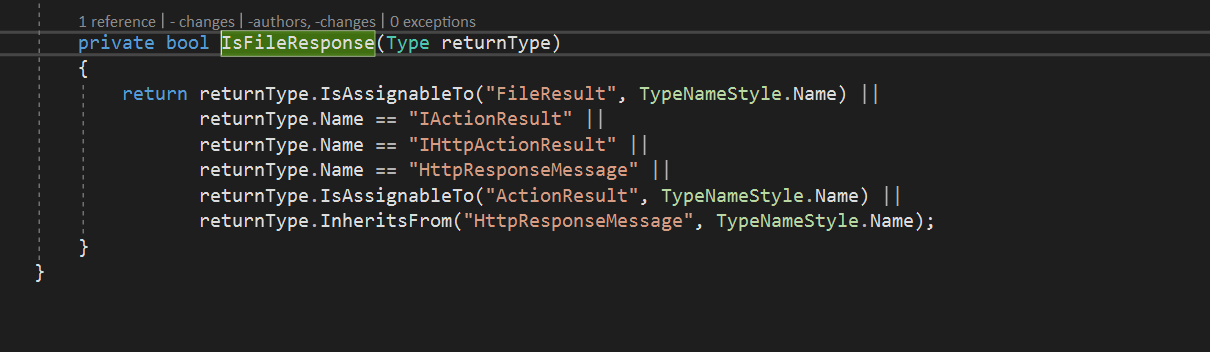
RicoSuter
on 26 Feb 2018
Hi,
It doesn't work.
Indeed NSwaf says that the returned type is a FileResult, but when executing the call, JSON.NET throws an exception with the following message: "Unexpected character encountered while parsing value: %. Path '', line 0, position 0.".
The new code looks like this:
[HttpPost]
[Produces(@"application/json", @"application/pdf")]
[ProducesResponseType(typeof(FileResult), 200)]
[ProducesResponseType(typeof(void), 400)]
[ProducesResponseType(typeof(void), 401)]
[Route(@"api/[controller]/Report")]
public async Task<IActionResult> GenerateReport([FromBody]Request request)
{
        Stream stream = await this.pdfProvider.Createreport(...).ConfigureAwait(false);
    return this.File(stream, @"application/pdf", @"report.pdf");
}
Thanks in advance for any help.
rliberoff
on 27 Feb 2018
Can you post the generated method for this operation?
RicoSuter
on 27 Feb 2018
Hi,
Sure.
        public async System.Threading.Tasks.Task<FileResult> ApiProjectReportPostAsync(ProjectReportRequest request, System.Threading.CancellationToken cancellationToken)
        {
            var urlBuilder_ = new System.Text.StringBuilder();
            urlBuilder_.Append(BaseUrl != null ? BaseUrl.TrimEnd('/') : "").Append("/api/Project/Report?");
            urlBuilder_.Length--;

            var client_ = new System.Net.Http.HttpClient();
            try
            {
                using (var request_ = new System.Net.Http.HttpRequestMessage())
                {
                    var content_ = new System.Net.Http.StringContent(Newtonsoft.Json.JsonConvert.SerializeObject(request, _settings.Value));
                    content_.Headers.ContentType = System.Net.Http.Headers.MediaTypeHeaderValue.Parse("application/json");
                    request_.Content = content_;
                    request_.Method = new System.Net.Http.HttpMethod("POST");
                    request_.Headers.Accept.Add(new System.Net.Http.Headers.MediaTypeWithQualityHeaderValue("application/pdf"));

                    PrepareRequest(client_, request_, urlBuilder_);
                    var url_ = urlBuilder_.ToString();
                    request_.RequestUri = new System.Uri(url_, System.UriKind.RelativeOrAbsolute);
                    PrepareRequest(client_, request_, url_);

                    var response_ = await client_.SendAsync(request_, System.Net.Http.HttpCompletionOption.ResponseHeadersRead, cancellationToken).ConfigureAwait(false);
                    try
                    {
                        var headers_ = System.Linq.Enumerable.ToDictionary(response_.Headers, h_ => h_.Key, h_ => h_.Value);
                        foreach (var item_ in response_.Content.Headers)
                            headers_[item_.Key] = item_.Value;

                        ProcessResponse(client_, response_);

                        var status_ = ((int)response_.StatusCode).ToString();
                        if (status_ == "200")
                        {
                            var responseData_ = await response_.Content.ReadAsStringAsync().ConfigureAwait(false);
                            var result_ = default(FileResult);
                            try
                            {
                                result_ = Newtonsoft.Json.JsonConvert.DeserializeObject<FileResult>(responseData_, _settings.Value);
                                return result_;
                            }
                            catch (System.Exception exception_)
                            {
                                throw new SwaggerException("Could not deserialize the response body.", status_, responseData_, headers_, exception_);
                            }
                        }
                        else
                        if (status_ == "400")
                        {
                            var responseData_ = await response_.Content.ReadAsStringAsync().ConfigureAwait(false);
                            throw new SwaggerException("Any of the provided national identification numbers is invalid.", status_, responseData_, headers_, null);
                        }
                        else
                        if (status_ == "401")
                        {
                            var responseData_ = await response_.Content.ReadAsStringAsync().ConfigureAwait(false);
                            throw new SwaggerException("The process does not have authorized access to this resource.", status_, responseData_, headers_, null);
                        }
                        else
                        if (status_ != "200" && status_ != "204")
                        {
                            var responseData_ = await response_.Content.ReadAsStringAsync().ConfigureAwait(false);
                            throw new SwaggerException("The HTTP status code of the response was not expected (" + (int)response_.StatusCode + ").", status_, responseData_, headers_, null);
                        }

                        return default(FileResult);
                    }
                    finally
                    {
                        if (response_ != null)
                            response_.Dispose();
                    }
                }
            }
            finally
            {
                if (client_ != null)
                    client_.Dispose();
            }
        }
Thank you.
Kind regards,
Rodrigo
rliberoff
on 27 Feb 2018
Please take into consideration that I'm returning a Stream that contains a PDF file.
rliberoff
on 27 Feb 2018
It seems that the response type is still recognized as a complex JSON object instead of a file stream... Is it correct that the response type in the generated swagger spec is not type = file?
RicoSuter
on 27 Feb 2018
What is happening is that it seems that Swagger in ASP.NET Core is not generating the type = file, and I'm being forced to create an IOperationFilter to add it in order to make NSwag working.
rliberoff
on 27 Feb 2018
Ok,
So, If I set [ProducesResponseType(typeof(FileResult), 200)] in the service, the NSwag returns a FileResult instead of a FileResponse which contains a Stream property.
If I set a [ProducesResponseType(typeof(byte[]), 200)], then NSwag generates the FileResponse class.
rliberoff
on 27 Feb 2018
Hi,
So, setting the service as follows:
[HttpPost]
[Produces(@"application/json", @"application/pdf")]
[ProducesResponseType(typeof(FileStreamResult), 200)]
[ProducesResponseType(typeof(void), 400)]
[ProducesResponseType(typeof(void), 401)]
[Route(@"api/[controller]/Report")]
public async Task<IActionResult> GenerateReport([FromBody]Request request)
{
        Stream stream = await this.pdfProvider.Createreport(...).ConfigureAwait(false);
    return this.File(stream, @"application/pdf", @"report.pdf");
}
Produces an NSwag client that has a Stream property. However, the type is not file and the JSON.NET exception still happens.
Swagger serialize the schema with type = object
rliberoff
on 27 Feb 2018
Ok, just tried this with the latest master version. This operation
    [HttpPost]
    [Produces(@"application/json", @"application/pdf")]
    [ProducesResponseType(typeof(FileResult), 200)]
    [ProducesResponseType(typeof(void), 400)]
    [ProducesResponseType(typeof(void), 401)]
    [Route(@"api/[controller]/Report")]
    public async Task<IActionResult> GenerateReport()
    {
        Stream stream = new MemoryStream(new byte[] { 1, 2, 3 });
        return this.File(stream, @"application/pdf", @"report.pdf");
    }
gives me this swagger:
"/api/Values/api/Values/Report": {
  "post": {
    "tags": [
      "Values"
    ],
    "operationId": "Values_GenerateReport",
    "parameters": [],
    "responses": {
      "200": {
        "description": "",
        "schema": {
          "type": "file"
        },
        "x-nullable": true
      },
      "400": {
        "description": ""
      },
      "401": {
        "description": ""
      }
    }
  }
}
and this client code:
    public async System.Threading.Tasks.Task<FileResponse> GenerateReportAsync(System.Threading.CancellationToken cancellationToken)
    {
        ...

                    var status_ = ((int)response_.StatusCode).ToString();
                    if (status_ == "200" || status_ == "206")
                    {
                        var responseStream_ = await response_.Content.ReadAsStreamAsync().ConfigureAwait(false);
                        var fileResponse_ = new FileResponse(status_, headers_, responseStream_, client_, response_);
                        client_ = null; response_ = null; // response and client are disposed by FileResponse
                        return fileResponse_;
                    }
                    else
                    if (status_ == "400")
                    {
                        var responseData_ = await response_.Content.ReadAsStringAsync().ConfigureAwait(false);
                        throw new SwaggerException("A server side error occurred.", status_, responseData_, headers_, null);
                    }
                    else
so it looks good to me...
RicoSuter
on 27 Feb 2018
What version of nswag are you using?
RicoSuter
on 27 Feb 2018
HI,
I'm using NSwag.MSBuild 11.15.3
In my case, the Open API (i.e. Swagger JSON) is generated by Swashbuckle.
rliberoff
on 27 Feb 2018
can you check if you also have "type": "file"
  "200": {
    "description": "",
    "schema": {
      "type": "file"
    },
    "x-nullable": true
  },
in your spec?
RicoSuter
on 27 Feb 2018
Hi,
No. Swagger is generating type = object.
rliberoff
on 27 Feb 2018
My feeling is that there that Swashbuckle generates a different Swagger JSON that the one exècted by NSwag.
Sadly I cannot use NSwag to generate the Swagger Specification, only to generate the Client that consumes it,.
rliberoff
on 27 Feb 2018
Ah I understand, the spec is not generated by NSwag!?
Can you post the whole spec for the operation?
RicoSuter
on 27 Feb 2018
Hi,
Sure.
It is a bit long.
{
  "swagger": "2.0",
  "info": {
    "version": "v1",
    "title": "Capital Statement Report Generator"
  },
  "paths": {
    "/api/CapitalStatement/Report": {
      "post": {
        "tags": [
          "CapitalStatement"
        ],
        "summary": "Creates a new \"Capital Statement\" report from provided parameters.",
        "operationId": "ApiCapitalStatementReportPost",
        "consumes": [
          "application/json-patch+json",
          "application/json",
          "text/json",
          "application/*+json"
        ],
        "produces": [
          "application/pdf"
        ],
        "parameters": [
          {
            "name": "capitalStatementReportRequest",
            "in": "body",
            "description": "Payload with parameters to configure and generate the report.",
            "required": false,
            "schema": {
              "$ref": "#/definitions/CapitalStatementReportRequest"
            }
          },
          {
            "name": "psk",
            "in": "query",
            "description": "Security Pre-Shared Key expected to allow access into this action.",
            "required": false,
            "type": "string"
          }
        ],
        "responses": {
          "200": {
            "description": "The report has been successfully created, and delivered as part of the response's body.",
            "schema": {
              "$ref": "#/definitions/FileStreamResult",
              "format": "byte",
              "type": "file"
            }
          },
          "400": {
            "description": "Any of the provided national identification numbers is invalid."
          },
          "401": {
            "description": "The process does not have authorized access to this resource."
          }
        }
      }
    }
  },
  "definitions": {
    "CapitalStatementReportRequest": {
      "description": "Represents a request to generate a report for a \"Capital Statement\".",
      "required": [
        "ordererNationalIdentificationNumber",
        "customerNationalIdentificationNumber"
      ],
      "type": "object",
      "properties": {
        "ordererNationalIdentificationNumber": {
          "description": "Gets or sets the national identification number (a.k.a. social security number) of the person ordering the report.",
          "type": "string"
        },
        "customerNationalIdentificationNumber": {
          "description": "Gets or sets the national identification number (a.k.a. social security number) of the person for whom the report is requested.",
          "type": "string"
        },
        "includeDownsideRisk": {
          "description": "Gets or sets a value indicating whether to include in the report, data and information about risks.",
          "default": true,
          "type": "boolean"
        },
        "showReturnGraph": {
          "description": "Gets or sets a value indicating whether to include in the report, data and information about return of investments.",
          "default": true,
          "type": "boolean"
        },
        "showOverview": {
          "description": "Gets or sets a value indicating whether to include in the report, overview data and information.",
          "default": true,
          "type": "boolean"
        },
        "showPrivateCapital": {
          "description": "Gets or sets a value indicating whether to include in the report, data and information about private capitals.",
          "default": false,
          "type": "boolean"
        },
        "showPensionCapital": {
          "description": "Gets or sets a value indicating whether to include in the report, data and information about pensions.",
          "default": false,
          "type": "boolean"
        },
        "showFundSuggestions": {
          "description": "Gets or sets a value indicating whether to include fund suggestions in the report.",
          "default": false,
          "type": "boolean"
        },
        "riskLevelId": {
          "format": "int32",
          "description": "Gets or sets the unqiue identifier of the risk level for the report.",
          "type": "integer"
        }
      }
    },
    "FileStreamResult": {
      "type": "object",
      "properties": {
        "fileStream": {
          "$ref": "#/definitions/Stream"
        },
        "contentType": {
          "type": "string",
          "readOnly": true
        },
        "fileDownloadName": {
          "type": "string"
        },
        "lastModified": {
          "format": "date-time",
          "type": "string"
        },
        "entityTag": {
          "$ref": "#/definitions/EntityTagHeaderValue"
        }
      }
    },
    "Stream": {
      "type": "object",
      "properties": {
        "canRead": {
          "type": "boolean",
          "readOnly": true
        },
        "canSeek": {
          "type": "boolean",
          "readOnly": true
        },
        "canTimeout": {
          "type": "boolean",
          "readOnly": true
        },
        "canWrite": {
          "type": "boolean",
          "readOnly": true
        },
        "length": {
          "format": "int64",
          "type": "integer",
          "readOnly": true
        },
        "position": {
          "format": "int64",
          "type": "integer"
        },
        "readTimeout": {
          "format": "int32",
          "type": "integer"
        },
        "writeTimeout": {
          "format": "int32",
          "type": "integer"
        }
      }
    },
    "EntityTagHeaderValue": {
      "type": "object",
      "properties": {
        "tag": {
          "$ref": "#/definitions/StringSegment",
          "readOnly": true
        },
        "isWeak": {
          "type": "boolean",
          "readOnly": true
        }
      }
    },
    "StringSegment": {
      "type": "object",
      "properties": {
        "buffer": {
          "type": "string",
          "readOnly": true
        },
        "offset": {
          "format": "int32",
          "type": "integer",
          "readOnly": true
        },
        "length": {
          "format": "int32",
          "type": "integer",
          "readOnly": true
        },
        "value": {
          "type": "string",
          "readOnly": true
        },
        "hasValue": {
          "type": "boolean",
          "readOnly": true
        }
      }
    }
  },
  "securityDefinitions": {}
}
Hi,
As you will see, I'm forcing to set type = file, but because there is a $ref, it is not working:
"responses": {
          "200": {
            "description": "The report has been successfully created, and delivered as part of the response's body.",
            "schema": {
              "$ref": "#/definitions/FileStreamResult",
              "format": "byte",
              "type": "file"
            }
          },
Yes, why does swashbuckle even generate FileStreamResult? Does not make really sense. Also $ref is not allowed with other properties (if you have strict JSON (Schema) rules) and NSwag automatically resolves refs and thus does not see this type: file property...
RicoSuter
on 27 Feb 2018
I'm manually adding the type = file.
By default Swashbuckle generates the following specification:
"responses": {
          "200": {
            "description": "The report has been successfully created, and delivered as part of the response's body.",
            "schema": {
              "$ref": "#/definitions/FileStreamResult"
            }
          },
And Swashbuckle uses "[ProducesResponseType(typeof(FileStreamResult), 200)]" to generate it.
rliberoff
on 27 Feb 2018
Ah but this is completely wrong as it treats the response as JSON object instead of a file/byte stream... I think Swashbuckle does not support this out of the box, so it seems that you need to add an operation filter, https://github.com/domaindrivendev/Swashbuckle/issues/324 or transform the spec after its generation (i.e. just remove this $ref and add type: file)
RicoSuter
on 27 Feb 2018
Hi,
Yes, I'm doing exactly that, but then the Swagger UI looks terrible:

Thanks anyways...
rliberoff
on 27 Feb 2018
Why is this terrible? I think this is exactly what it is supposed to look like...
RicoSuter
on 27 Feb 2018
Hi,
Just the word "file" is a sad description (it seems it is getting it from the type property). It is not getting the value from the description property (which would be bug of Swashbuckle in this case) that says something more meaningful like "The report file has been successfully created, and delivered as part of the response's body."
rliberoff
on 27 Feb 2018
Ah so it doesnt show the description if type = file?
RicoSuter
on 27 Feb 2018
Correct...
rliberoff
on 27 Feb 2018
Ok then it is essentially a "bug" in Swagger UI, have you tried Swagger UI 3 (latest)?
RicoSuter
on 27 Feb 2018
Sadly by project requirements I can't :(
rliberoff
on 27 Feb 2018
OK, too bad...
@Boriszn and @rliberoff can we close this issue?
RicoSuter
on 27 Feb 2018
Yes from my side.
I really appreciate the help!
rliberoff
on 27 Feb 2018
@rliberoff just FYI: NSwag can also generate specs, and also provides ASP.NET middlewares like UseSwaggerUi, UseSwaggerUi3, UseReDoc, etc...
RicoSuter
on 27 Feb 2018
@RicoSuter I'm dealing with the same issue right now. For the following action I get "type": "file" in Swagger:
[HttpPost, Route("api/test")]
public IHttpActionResult Test()
{
    return Ok();
}
"responses": {
    "200": {
        "x-nullable": true,
        "description": "",
        "schema": {
            "type": "file"
        }
    }
}
I'm using .NET Framework 4.6.2 with OWIN pipeline.
 arutkowski00
on 29 Aug 2019
arutkowski00
on 29 Aug 2019
@arutkowski00 If you use IHttpActionResult then the generator cannot know the response type and assumes file (anything), you need to specify the respnse response type (typeof(void)) manually with OpenApiResponse/SwaggerResponse/ProducesResponseType attributes manually:
https://github.com/RicoSuter/NSwag/wiki/WebApiOpenApiDocumentGenerator#specify-the-response-type-of-an-action
RicoSuter
on 29 Aug 2019
Related issues
 blackbaud-GavinNicol
·
3Comments
blackbaud-GavinNicol
·
3Comments
 Rui90
·
3Comments
Rui90
·
3Comments
 jjohs
·
3Comments
jjohs
·
3Comments
 akamyshanov
·
4Comments
akamyshanov
·
4Comments
 Peter554
·
3Comments
Peter554
·
3Comments