Npm-check-updates: FetchError: network timeout
- [X] I have read the list of known issues before filing this issue.
[X] I have searched for similiar issues before filing this issue.
node version: 12.15.0
- npm version: 6.13.4
- npm-check-updates version: 4.0.3
Even with a huge global timeout npm-check-updates fails with a network timeout. The timeout isn't always at the same package and happens even though the reource can be retrieved without issue with curl.
npm-check-updates --timeout 600000
Checking /mnt/c/Users/me/Documents/plazi/synospecies/package.json
[==================--] 46/50 92%/usr/local/lib/node_modules/npm-check-updates/lib/npm-check-updates.js:412
    throw err;
    ^

FetchError: network timeout at: https://registry.npmjs.org/mustache
    at Timeout.<anonymous> (/usr/local/lib/node_modules/npm-check-updates/node_modules/minipass-fetch/lib/index.js:89:18)
    at listOnTimeout (internal/timers.js:531:17)
    at processTimers (internal/timers.js:475:7) {
  code: 'FETCH_ERROR',
  errno: 'FETCH_ERROR',
  type: 'request-timeout'
}
 retog
retog
All 31 comments
Looks like pacote is timing out:
$ npm ls minipass-fetch
[email protected] /Users/raine/projects/npm-check-updates
└─┬ [email protected]
├── [email protected]
└─┬ [email protected]
├─┬ [email protected]
│ └── [email protected] deduped
└── [email protected] deduped
Maybe npm-check-updates is not setting the timeout on pacote properly?
 raineorshine
on 5 Mar 2020
raineorshine
on 5 Mar 2020
Published in v4.0.4.
raineorshine
on 5 Mar 2020
Thanks @raineorshine for acting so quickly. Unfortunately I'm still getting the errror:
$ npm-check-updates -v
4.0.4
$ npm-check-updates --timeout 600000
Checking /mnt/c/Users/me/Documents/plazi/synospecies/package.json
[==================--] 46/50 92%/usr/local/lib/node_modules/npm-check-updates/lib/npm-check-updates.js:412
    throw err;
    ^

FetchError: network timeout at: https://registry.npmjs.org/mustache
    at Timeout.<anonymous> (/usr/local/lib/node_modules/npm-check-updates/node_modules/minipass-fetch/lib/index.js:89:18)
    at listOnTimeout (internal/timers.js:531:17)
    at processTimers (internal/timers.js:475:7) {
  code: 'FETCH_ERROR',
  errno: 'FETCH_ERROR',
  type: 'request-timeout'
}
@retog Bummer. How much time elapsed?
raineorshine
on 5 Mar 2020
@raineorshine It terminates after 39s.
retog
on 5 Mar 2020
~npm-check-updates is definitely passing timeout to pacote now.~ I tested it by setting a high timeout on npm-check-updates and overriding the timeout passed to pacote with a very small value, causing it to fail with the FETCH_ERROR. Then I tested that npm-check-updates was passing the timeout argument correctly down the stack and passed that to pacote instead.
It's hard to tell from the stack trace, but it is possible that that is a different call to minipass-fetch, one that does not have the timeout set properly. But if that's the case I'm not sure where it is. There is only one pacote.packument call in npm-check-updates.
If you can provide exact steps to reproduce or are able to insert some console.logs yourself to investigate more maybe we can figure out what's happening.
raineorshine
on 5 Mar 2020
I'm having the issue when running npm-check-updates in wsl o any project I've tried. I've notices that I don't have a problem when running npm-check-updates in windows without the linux subsystem.
retog
on 5 Mar 2020
I'm having the same issue here, it seems the problem comes from versionManager.js file under lib folder in this code:
function getPackageVersionProtected(dep) {
    return getPackageVersion(dep, packageMap[dep], Object.assign(
        {},
        options,
        // upgrade prereleases to newer prereleases by default
        {
            pre: options.pre != null ? options.pre : versionUtil.isPre(packageMap[dep])
        }
    )).catch(err => {
        if (err && (err.message || err).toString().match(/E404|ENOTFOUND|404 Not Found/i)) {
            return null;
        } else {
            throw err; \\ this is the line which throws FetchError
        }
    }).then(result => {
        if (bar) {
            bar.tick();
        }
        return result;
    });
}
so this means that getPackageVersion function rejects, getPackageVersion will be one of the npm functions depending on versionTarget so I think the issue is with npm itself.
By the way, my npm version is 6.14.2.
 abnud1
on 18 Mar 2020
abnud1
on 18 Mar 2020
Ok, I found the issue, it is in lib/npm.js in this function:
/**
 * Returns an object of specified values retrieved by npm view.
 * @param {string} packageName   Name of the package
 * @param {string[]} fields      Array of fields like versions, time, version
 * @param {string} currentVersion
 * @returns {Promise}            Promised result
 */
function viewMany(packageName, fields, currentVersion, {timeout} = {}) {
    if (currentVersion && (!semver.validRange(currentVersion) || versionUtil.isWildCard(currentVersion))) {
        return Promise.resolve({});
    }

    npmConfig.fullMetadata = _.includes(fields, 'time');
    return pacote.packument(packageName, Object.assign({}, npmConfig, timeout)).then(result =>
        fields.reduce((accum, field) => Object.assign(
            accum,
            {
                [field]: field.startsWith('dist-tags.') && result.versions ?
                    result.versions[_.get(result, field)] :
                    result[field]
            }
        ), {})
    );
}
I did console.log(Object.assign({}, npmConfig, timeout) and indeed timeout is undefined, changing this line:
function viewMany(packageName, fields, currentVersion, {timeout} = {})
to this:
function viewMany(packageName, fields, currentVersion, timeout = {})
made console.log(Object.assign({}, npmConfig, timeout) prints the timeout and so the timeout is passed to pacote.
Now I pass --timeout 600000, I don't see timeout error anymore.
But In my opinion increasing timeout for error to go is not an ideal solution, The real problem, in my opinion, is here:
return Promise.all(packageList.map(getPackageVersionProtected))
        .then(zipVersions)
        .then(_.partialRight(_.pickBy, _.identity));
Which is the last statement in queryVersions function in versionManager.js file, by using Promise.all we issue an HTTP request for every dependency in the project, My project has 86 dependencies so we're talking 86 requests. Hitting the default 30s timeout is logical considering those many requests, Maybe we could issue requests one batch at a time instead of issuing all of them at Once?
Maybe using something like this: https://github.com/Nicktho/batch-promises?
abnud1
on 18 Mar 2020
Same issue here, even adding the highest timeout does not work
ncu -u --timeout=2000000000
Upgrading /Users/zup/Desktop/code/ACTIVE/coinhexa_v3_argon/package.json
[====================] 54/55 98%/Users/zup/.nvm/versions/node/v10.16.3/lib/node_modules/npm-check-updates/lib/npm-check-updates.js:412
    throw err;
    ^

FetchError: Response timeout while trying to fetch https://registry.npmjs.org/ccxt (over 30000ms)
    at Timeout.resTimeout.timeout.setTimeout [as _onTimeout] (/Users/zup/.nvm/versions/node/v10.16.3/lib/node_modules/npm-check-updates/node_modules/minipass-fetch/lib/body.js:128:28)
    at ontimeout (timers.js:436:11)
    at tryOnTimeout (timers.js:300:5)
    at listOnTimeout (timers.js:263:5)
    at Timer.processTimers (timers.js:223:10)
 slidenerd
on 18 Mar 2020
slidenerd
on 18 Mar 2020
@abnud1 Great work, thanks for tracking that down!
Maybe using something like this: https://github.com/Nicktho/batch-promises?
raineorshine
on 19 Mar 2020
@raineorshine I go for p-map as it seems more maintained than p-all and it's exactly what we need per their readme.
abnud1
on 19 Mar 2020
@abnud1 Are you able to help out with a PR for this?
raineorshine
on 19 Mar 2020
function viewMany(packageName, fields, currentVersion, {timeout} = {})
to this:
function viewMany(packageName, fields, currentVersion, timeout = {})
madeconsole.log(Object.assign({}, npmConfig, timeout)prints the timeout and so the timeout is passed to pacote.
timeout is an integer (or string that can be parsed to an integer), so timeout = {} does not make sense. The intention is to pass an options object with an option single key timeout.
It appears that every call to viewMany passes an object containing timeout:
Searching 36 files for "viewMany"

/Users/raine/projects/npm-check-updates/lib/package-managers/npm.js:

   54  function viewOne(packageName, field, currentVersion, {timeout} = {}) {
   55:     return viewMany(packageName, [field], currentVersion, {timeout})
   56          .then(result => result && result[field]);
   57  }

  ...

   66: function viewMany(packageName, fields, currentVersion, {timeout} = {}) {
   67      if (currentVersion && (!semver.validRange(currentVersion) || versionUtil.isWildCard(currentVersion))) {
   68          return Promise.resolve({});

  ...

  215      newest(packageName, currentVersion, options = {}) {
  216:         return viewMany(packageName, ['time', 'versions'], currentVersion, {timeout: options.timeout})
  217              .then(result => {
  218                  const versions = doesSatisfyEnginesNode(result.versions, options.enginesNode);

3 matches in 1 file
I also faced this issue when working from home on a slow internet. This was constantly happening for Next.js because it has a huge number of versions and therefore the manifest file was always downloading for over 30000 ms. Getting the timeout argument passed down to the fetch function would be a great improvement!
 kachkaev
on 20 Mar 2020
kachkaev
on 20 Mar 2020
@raineorshine I would help in batching those requests, for timeout are you suggesting we pass integer instead of options object?
abnud1
on 22 Mar 2020
@abnud1 Thanks! That would be very helpful. I think p-map will be a great improvement. The global timeout should constrain the total time, not each batch.
I prefer optional arguments be passed in an options object rather than as separate arguments.
raineorshine
on 22 Mar 2020
I suggest a concurrency limit of 10, but that's pretty arbitrary, so let me know if anybody else has a reasoned alternative suggestion.
raineorshine
on 25 Mar 2020
@retog @abnud1 @slidenerd Can you try out v4.1.0 and let me know if the timeout works now? Thanks!
raineorshine
on 26 Mar 2020
Max number of HTTP registry requests can now be set with --concurrency 8.
raineorshine
on 26 Mar 2020
@raineorshine I tried updating ncu to v4.1.0 but still the issue persists. Screenshot below.
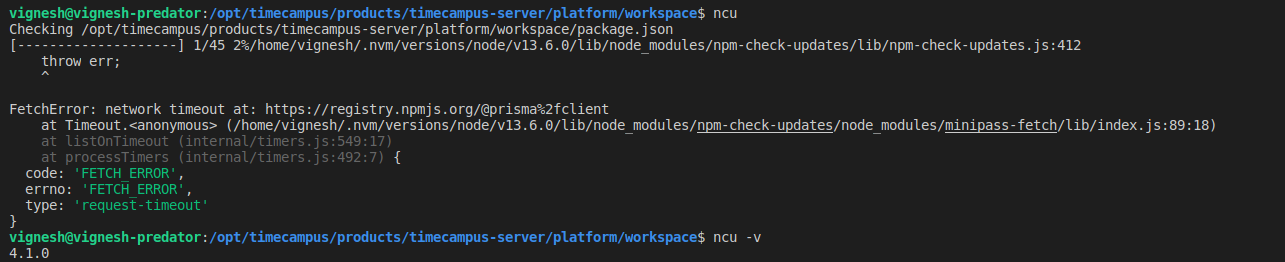
Used to work well before today (The only main change I remember doing today is that I updated npm to its latest version.)
 tvvignesh
on 27 Mar 2020
tvvignesh
on 27 Mar 2020
@tvvignesh
- How long is the task taking before it times out?
- Do you get the same timeout error when you run
ncuon a small sample package-json? - If not, can you identify whether it is a specific dependency that is causing the error or simply the overall time?
raineorshine
on 27 Mar 2020
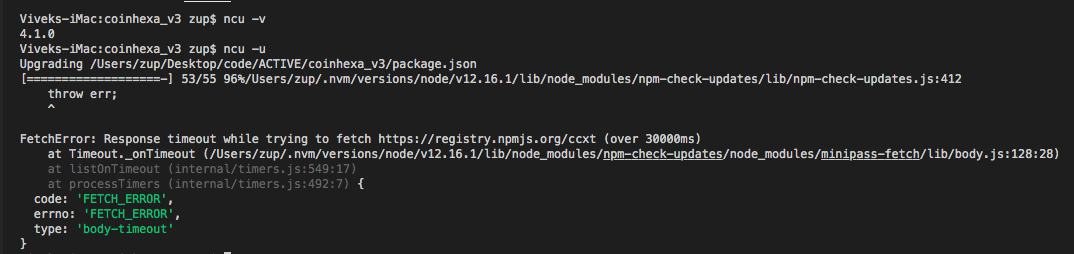
Still having the issue on 4.1
try installing and updating the CCXT package https://www.npmjs.com/package/ccxt
slidenerd
on 27 Mar 2020
@tvvignesh
- How long is the task taking before it times out?
- Do you get the same timeout error when you run
ncuon a small sample package-json?- If not, can you identify whether it is a specific dependency that is causing the error or simply the overall time?
@raineorshine To find that out, I ran ncu multiple times on the same project without changing anything and the behavior was quite inconsitent. It times out randomly after 45 seconds or so. You can see it from the percent completion and the package it is trying to fetch from the screenshot below. But all 3 tries failed.

tvvignesh
on 27 Mar 2020
Same issue here, tried three times, two with the timeout flag set to 200000.
Output (In this case, i get a "Fetch error" when requesting for the @angular/animations package):
$ ncu --timeout 200000
[==------------------] 5/57 8%/home/~/.nvm/versions/node/v13.11.0/lib/node_modules/npm-check-updates/lib/npm-check-updates.js:412
    throw err;
    ^

FetchError: Response timeout while trying to fetch https://registry.npmjs.org/@angular%2fanimations (over 30000ms)
    at Timeout._onTimeout (/home/~/.nvm/versions/node/v13.11.0/lib/node_modules/npm-check-updates/node_modules/minipass-fetch/lib/body.js:128:28)
    at listOnTimeout (internal/timers.js:549:17)
    at processTimers (internal/timers.js:492:7) {
  code: 'FETCH_ERROR',
  errno: 'FETCH_ERROR',
  type: 'body-timeout'
}
 KBeDevel
on 27 Mar 2020
KBeDevel
on 27 Mar 2020
@tvvignesh @slidenerd That's the default timeout on npm-registry-fetch which is expected. You have to pass --timeout 999999 to override it.
@KBeDevel I'm not sure why you are getting a fetch error. ncu v4.1.0 with an explicit --timeout works well for me on a simulated low-bandwidth network.
raineorshine
on 27 Mar 2020
Ok, I now know that the issue is with pacote.
The problem, in summary, is: we batch requests 8 at a time when one request finishes another one is made, so 8 is a maximum and we sure don't wait until all 8 requests finish to issue next batch, that would hinder performance a lot.
But pacote seems to let old requests holding in favor of new ones resulting in a request waiting for so long the timeout is exceeded.
I verified this by a simple example, code:
const pacote = require('pacote');
const fs = require('fs');
const pMap = require('p-map');
fs.readFile('/home/abd/أحمد/package.json',{encoding: 'utf-8'},(err,data) => {
    const packageJson = JSON.parse(data);
    pMap(Object.keys(packageJson.devDependencies),(packageName) => {
        return pacote.packument(packageName).then((result) => {
            console.log(result);
        });
    },{concurrency: 8});
});
you can put the code above in some index.js file and execute it with node, it will result FetchError sooner or later.
Unfortunately, I can't come up with a solution, we could handle the promise rejection here:
function getPackageVersionProtected(dep) {
        return getPackageVersion(dep, packageMap[dep], Object.assign(
            {},
            options,
            // upgrade prereleases to newer prereleases by default
            {
                pre: options.pre != null ? options.pre : versionUtil.isPre(packageMap[dep])
            }
        )).catch(err => {
            if (err && (err.message || err).toString().match(/E404|ENOTFOUND|404 Not Found/i)) {
                return null;
            } else {
                throw err; // in here instead of throwing, we put another else if and retry the request maybe ?!!!
            }
        }).then(result => {
            if (bar) {
                bar.tick();
            }
            return result;
        });
    }
at file versionManager.js.
Or we could do this: simply don't pass a timeout to pacote(or pass some very big number if they have a default) since we're already handling timeout in here:
if (options.timeout) {
        const timeoutMs = _.isString(options.timeout) ? parseInt(options.timeout, 10) : options.timeout;
        timeoutPromise = new Promise((resolve, reject) => {
            timeout = setTimeout(() => {
                // must catch the error and reject explicitly since we are in a setTimeout
                const error = `Exceeded global timeout of ${timeoutMs}ms`;
                reject(error);
                try {
                    programError(options, chalk.red(error));
                } catch (e) {/* noop */}
            }, timeoutMs);
        });
    }
at file npm-check-updates.js(we would remove the if and provide a default for timeout option had we gone this route).
All that I said seems fragile to me, the best solution is to open an issue at https://github.com/npm/pacote
abnud1
on 27 Mar 2020
@raineorshine Yes, v4.1.0 is working for me right now (I was using the v4.0.6), Thank you
KBeDevel
on 28 Mar 2020
@abnud1 Thanks for the detailed analysis. If I'm understanding correctly, it seems like pacote.packument maintains some state between calls, which leads to the timeout being exceeded incorrectly. Would you create a new issue on pacote? It looks like your comment includes most of the information that's needed.
Users can pass a large --timeout explicitly, or I can default to something like a 3-minute timeout if you think that would be better. I added a hint in ~d3194053028f8b181dcaf71a20d05ab133b26a98~ 6b3420631f9af55ebb6285f6bf7f8d6b6332e9b5 anyway. Let me know what you think.
raineorshine
on 28 Mar 2020
@raineorshine Adding a higher timeout (set it around 120000) solves the issue. Thanks a lot.
tvvignesh
on 28 Mar 2020
issue created: https://github.com/npm/pacote/issues/38
abnud1
on 28 Mar 2020
Related issues
 eddieedease
·
4Comments
eddieedease
·
4Comments
 Simek
·
5Comments
Simek
·
5Comments
 mriehema
·
7Comments
mriehema
·
7Comments
 benface
·
7Comments
benface
·
7Comments
 dereklin
·
6Comments
dereklin
·
6Comments
Most helpful comment
Thanks @raineorshine for acting so quickly. Unfortunately I'm still getting the errror: