Npm-check-updates: Crashes while fetching latest versions (Windows)
As reported by @mhosman:
The console is crashing running ncu and also running ncu --loglevel verbose --packageFile package.json. The console gets stuck in "Fetching latest versions..." and after a while, crashes (this behaviour is only available with 3.0.2 version).
 raineorshine
All 21 comments
There seems to be a loop somewhere. I'm on Windows and tried 3.0.2 and I see 100% CPU usage (all 4 cores) and multiple node processes spawn.
 XhmikosR
on 8 Mar 2019
XhmikosR
on 8 Mar 2019
Here is a preview gif since GitHub doesn't allow mp4:
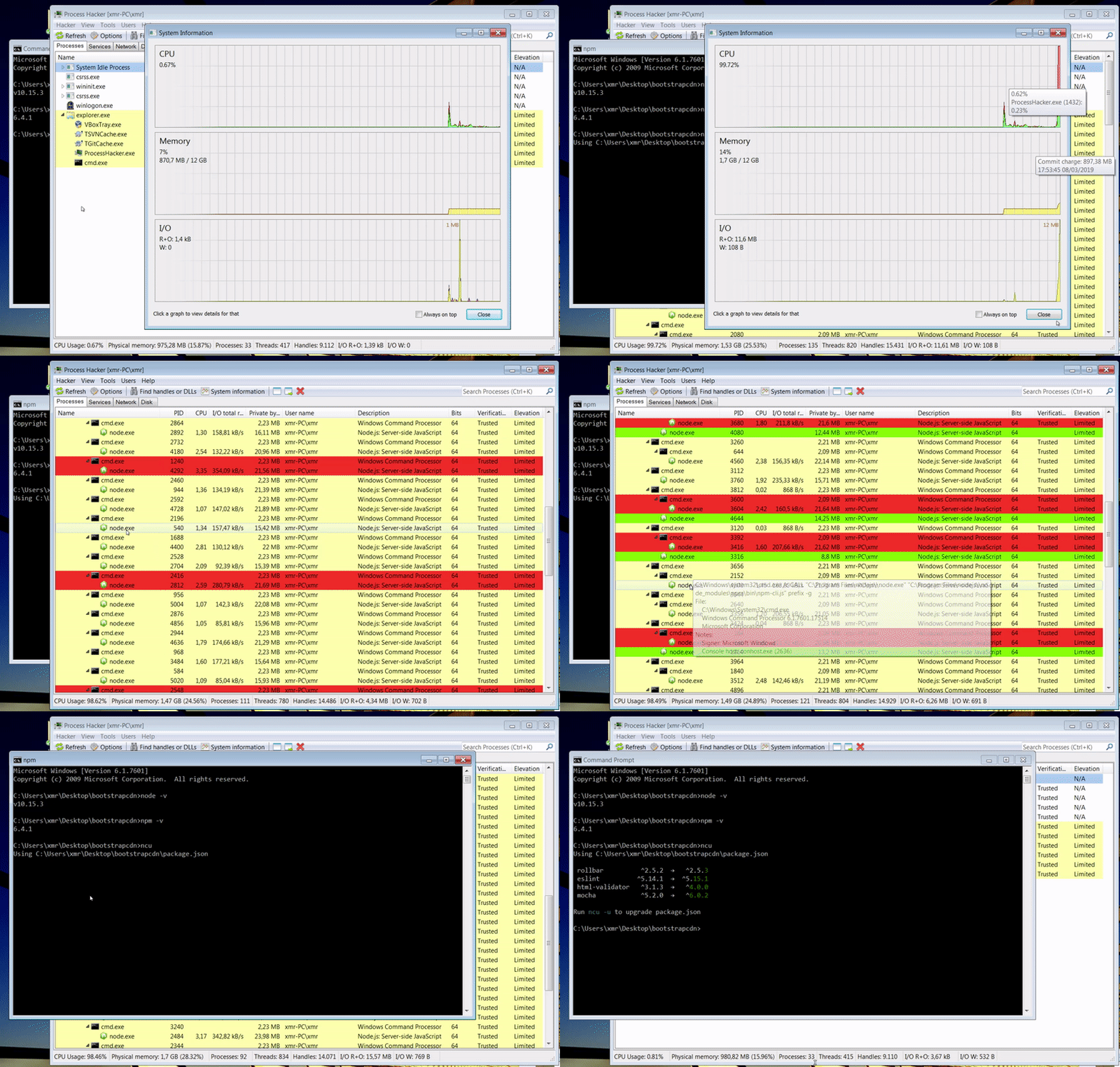
I hope it helps somehow, I also have the video in better quality as mp4 if you need it.
XhmikosR
on 8 Mar 2019
Here is a preview gif since GitHub doesn't allow mp4:
I hope it helps somehow, I also have the video in better quality as mp4 if you need it.
Exactly the same issue here!!!
 mhosman
on 8 Mar 2019
mhosman
on 8 Mar 2019
Thanks for reporting, and sorry this is happening in the new version. What
we need most is someone on Windows to directly troubleshoot the issue. I
handle all of the issues normally but this one I am unable to as I am on
OSX.
On Fri, Mar 8, 2019 at 10:56 AM Martín Hosman notifications@github.com
wrote:
Here is a preview gif since GitHub doesn't allow mp4:
[image: windows302]
https://user-images.githubusercontent.com/349621/54039609-0d131900-41cc-11e9-8a48-6ab7fd98abc3.gifI hope it helps somehow, I also have the video in better quality as mp4 if
you need it.Exactly the same issue here!!!
—
You are receiving this because you authored the thread.
Reply to this email directly, view it on GitHub
https://github.com/tjunnone/npm-check-updates/issues/488#issuecomment-471018363,
or mute the thread
https://github.com/notifications/unsubscribe-auth/AAtyxFT642dtTbGVmK9A6gdIqzvf2zneks5vUqRZgaJpZM4bkG_4
.
raineorshine
on 8 Mar 2019
Just FYI if you used AppVeyor for Windows testing you can actually remote desktop to it, see https://www.appveyor.com/docs/how-to/rdp-to-build-worker/
XhmikosR
on 8 Mar 2019
Hello, Raine, v3.0.3 still hasn't solved the problem on Windows 10!
 LP1994
on 9 Mar 2019
LP1994
on 9 Mar 2019
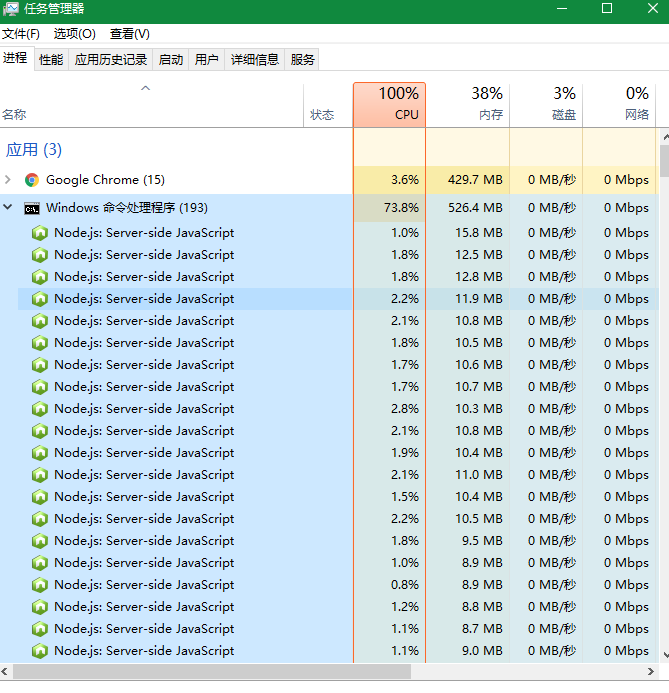
This is the v3.0.3.
LP1994
on 9 Mar 2019
@mhosman Could you please provide the crash-message, your package.json and the specs of the PC you're running ncu on?
@XhmikosR The last thing in your gif is the correct ncu output - so it works as expected for you and doesn't crash as described by OP. Multiple node processes is how ncu 3 works since it now uses spawn-please to execute npm as shell-command to view package information. In ncu 2 npm was defined as dependency and used directly (by require) and so normally no extra node processes were spawned.
@LP1994 Does it crash for you or does it just take a long time? If it crashes, could you please also provide the crash-message, your package.json and the specs of the PC you're running ncu on?
@raineorshine One thing I noticed is that defaultPrefix gets called and spawns npm for every view. If I understood the code correctly it should be enough to call config get prefix only once beforehand - that would relax the amount of spawned processes a little bit.
Another thing to maybe consider might be to call the view promises in series and not concurrently. Would probably slow down the entire process but prevents overloading the system.
Also, just FYI, its possible to download an Windows10 ISO and install+run it in VirtualBox unlimited without a key.
 stoically
on 9 Mar 2019
stoically
on 9 Mar 2019
The fact that it doesn't crash on my machine, does not mean it's not the same issue. Because my VM is quite powerful.
The whole npm switch seems quite unoptimized at the moment. Spawning npm for every thing is a costly operation.
XhmikosR
on 9 Mar 2019
@mhosman你能提供崩溃消息,你的package.json以及你正在运行的PC的规格吗?
@XhmikosR你的gif中的最后一件事是正确的ncu输出 - 所以它按预期工作,并且不会像OP所描述的那样崩溃。多节点进程是ncu 3的工作方式,因为它现在
spawn-please用来执行npmshell-command来查看包信息。在ncu 2中,npm被定义为依赖并直接使用(通过require),因此通常不会产生额外的节点进程。@ LP1994它会让你崩溃还是只需要很长时间?如果它崩溃,你能不能提供崩溃消息,你的package.json和你正在运行的PC的规格?
@raineorshine我注意到的一件事就是
defaultPrefix调用并为每个人生成npmview。如果我正确地理解了代码,那么config get prefix事先只调用一次就足够了- 这会稍微放松一些产生的进程。可能考虑的另一件事可能是串联调用视图promises而不是同时调用。可能会减慢整个过程,但可以防止系统过载。
另外,仅供参考,可以下载Windows10 ISO并在没有密钥的情况下在VirtualBox中安装+运行它。
This is my package.json:
package.zip
This is my PC:
Windows Specification
Version: Windows 10 Professional Edition
Version number: 1809
Operating System Version: 17763.348
CPU: Intel (R) Core (TM) i5-4200M CPU @ 2.50GHz 2.50GHz
System type: 64-bit operating system
That's how I use it:
ncu -u&ncu -a
Problem manifestation:
It just take a long time.And,More than 100 NodeJS processes have emerged.
LP1994
on 9 Mar 2019
它不会在我的机器崩溃的事实,并不能意味着它是不一样的问题。因为我的VM非常强大。
整个npm开关目前似乎没有优化。为每件事产生npm是一项昂贵的操作。
Can you use the latest version v3.0.3 normally?
LP1994
on 9 Mar 2019
@mhosman你能提供崩溃消息,你的package.json以及你正在运行的PC的规格吗?
@XhmikosR你的gif中的最后一件事是正确的ncu输出 - 所以它按预期工作,并且不会像OP所描述的那样崩溃。多节点进程是ncu 3的工作方式,因为它现在
spawn-please用来执行npmshell-command来查看包信息。在ncu 2中,npm被定义为依赖并直接使用(通过require),因此通常不会产生额外的节点进程。@ LP1994它会让你崩溃还是只需要很长时间?如果它崩溃,你能不能提供崩溃消息,你的package.json和你正在运行的PC的规格?
@raineorshine我注意到的一件事就是
defaultPrefix调用并为每个人生成npmview。如果我正确地理解了代码,那么config get prefix事先只调用一次就足够了- 这会稍微放松一些产生的进程。可能考虑的另一件事可能是串联调用视图promises而不是同时调用。可能会减慢整个过程,但可以防止系统过载。
另外,仅供参考,可以下载Windows10 ISO并在没有密钥的情况下在VirtualBox中安装+运行它。
Can you use the latest version v3.0.3 normally?
LP1994
on 9 Mar 2019
@XhmikosR
The fact that it doesn't crash on my machine, does not mean it's not the same issue.
You're right, it's probably related.
@LP1994 Thanks for providing the information. Your devDependencies clock in at over 1500 packages, wow. I've tested with that package.json and can see a peak of over 400 npm processes and always 100% CPU usage on my machine.
Can you use the latest version v3.0.3 normally?
I also see the 100% CPU usage and a lot of npm processes, though I don't have that many dependencies in one package.json, so it still finishes quite fast.
@raineorshine I'm looking into providing a PR using p-queue.
stoically
on 9 Mar 2019
@XhmikosR
The fact that it doesn't crash on my machine, does not mean it's not the same issue.
You're right, it's probably related.
@LP1994 Thanks for providing the information. Your
devDependenciesclock in at over 1500 packages, wow. I've tested with that package.json and can see a peak of over 400 npm processes and always 100% CPU usage on my machine.Can you use the latest version v3.0.3 normally?
I also see the 100% CPU usage and a lot of npm processes, though I don't have that many dependencies in one package.json, so it still finishes quite fast.
@raineorshine I'm looking into providing a PR using p-queue.
It seems to be my problem!!!
I wrote a JS file myself to traverse all the packages in the node_modules folder and update them to package. json, because I'm a person who likes to use the latest version.
So, there will be more than 1500!!!
LP1994
on 9 Mar 2019
@XhmikosR
The fact that it doesn't crash on my machine, does not mean it's not the same issue.
You're right, it's probably related.
@LP1994 Thanks for providing the information. Your
devDependenciesclock in at over 1500 packages, wow. I've tested with that package.json and can see a peak of over 400 npm processes and always 100% CPU usage on my machine.Can you use the latest version v3.0.3 normally?
I also see the 100% CPU usage and a lot of npm processes, though I don't have that many dependencies in one package.json, so it still finishes quite fast.
@raineorshine I'm looking into providing a PR using p-queue.
This explains why [email protected] is available, but the latest version is not.
LP1994
on 9 Mar 2019
Dug into it a bit and it turns out p-queue isn't needed since ncu uses Bluebird and their .map function supports concurrency as third parameter. So I added that with a value of 20 at the appropriate location - this at least helps with the amount of processes and the CPU usage. I've provided that, along with only checking for the prefix once, in PR #493.
However, npm view takes around a second to finish, so in case of a huge dependency list (like the one provided by @LP1994) it will take minutes to finish, whereas with directly requiring npm it takes seconds: just some concurrent HTTP GET requests vs starting the whole node/npm env. Personally I don't see a chance to optimize the shell call of npm to a point where it can compete with ncu 2.
stoically
on 9 Mar 2019
Thanks @stoically for generously offering your time!
The npm commands API (requiring npm directly) was deprecated from ncu due to the official recommendation not to use it: https://github.com/npm/npm/issues/8283#issuecomment-103718763. Work tracked in #350.
However, I did not anticipate the performance issues much less the crashes with too many processes being spawned. It is probably better to live with an unofficial API (which has worked for years) or fetch from the npm registry directly such as with package-json. The latter is what npm-check does.
raineorshine
on 10 Mar 2019
Using package-json sounds like a good way forward to me.
stoically
on 10 Mar 2019
I agree. Would you be interested in helping out?
On Sun, Mar 10, 2019 at 9:25 AM stoically notifications@github.com wrote:
Using package-json sounds like a good way forward to me.
—
You are receiving this because you were mentioned.
Reply to this email directly, view it on GitHub
https://github.com/tjunnone/npm-check-updates/issues/488#issuecomment-471315859,
or mute the thread
https://github.com/notifications/unsubscribe-auth/AAtyxFWKWvqFUgL-fCUmyGZ9rv5JMyZ_ks5vVSPsgaJpZM4bkG_4
.
raineorshine
on 10 Mar 2019
Sure. I'll look into a PR.
stoically
on 11 Mar 2019
Thanks!!
On Mon, Mar 11, 2019 at 4:57 AM stoically notifications@github.com wrote:
Sure. I'll look into a PR.
—
You are receiving this because you were mentioned.
Reply to this email directly, view it on GitHub
https://github.com/tjunnone/npm-check-updates/issues/488#issuecomment-471493775,
or mute the thread
https://github.com/notifications/unsubscribe-auth/AAtyxOW2mKEwdTfCtMakZbVrIOtGvZrtks5vVjZ_gaJpZM4bkG_4
.
raineorshine
on 11 Mar 2019
Related issues
 frankTadlip
·
4Comments
frankTadlip
·
4Comments
 daveisfera
·
7Comments
daveisfera
·
7Comments
 Simek
·
5Comments
Simek
·
5Comments
 SamuelMarks
·
3Comments
SamuelMarks
·
3Comments
 nwoltman
·
4Comments
nwoltman
·
4Comments
Most helpful comment
Here is a preview gif since GitHub doesn't allow mp4:
I hope it helps somehow, I also have the video in better quality as mp4 if you need it.