Np: Package publishing partially fails when running tasks
Hi!
Love this tool. It's been giving me some weird results recently. I tried publishing a brand new version of a scoped package:

After running, it looked like it had succeeded, even though it sat frozen on the version published message. After some seconds, the errors appeared and the application finished. The package was not published to npm.
Here is the package.json that was used.
The tail end of the execution:

Versions:
$ node --version && npm --version
v8.7.0
5.4.2
 perry-mitchell
All 48 comments
After realising that I hadn't allowed public access, and running npm publish --access public, I tried again with a patch:
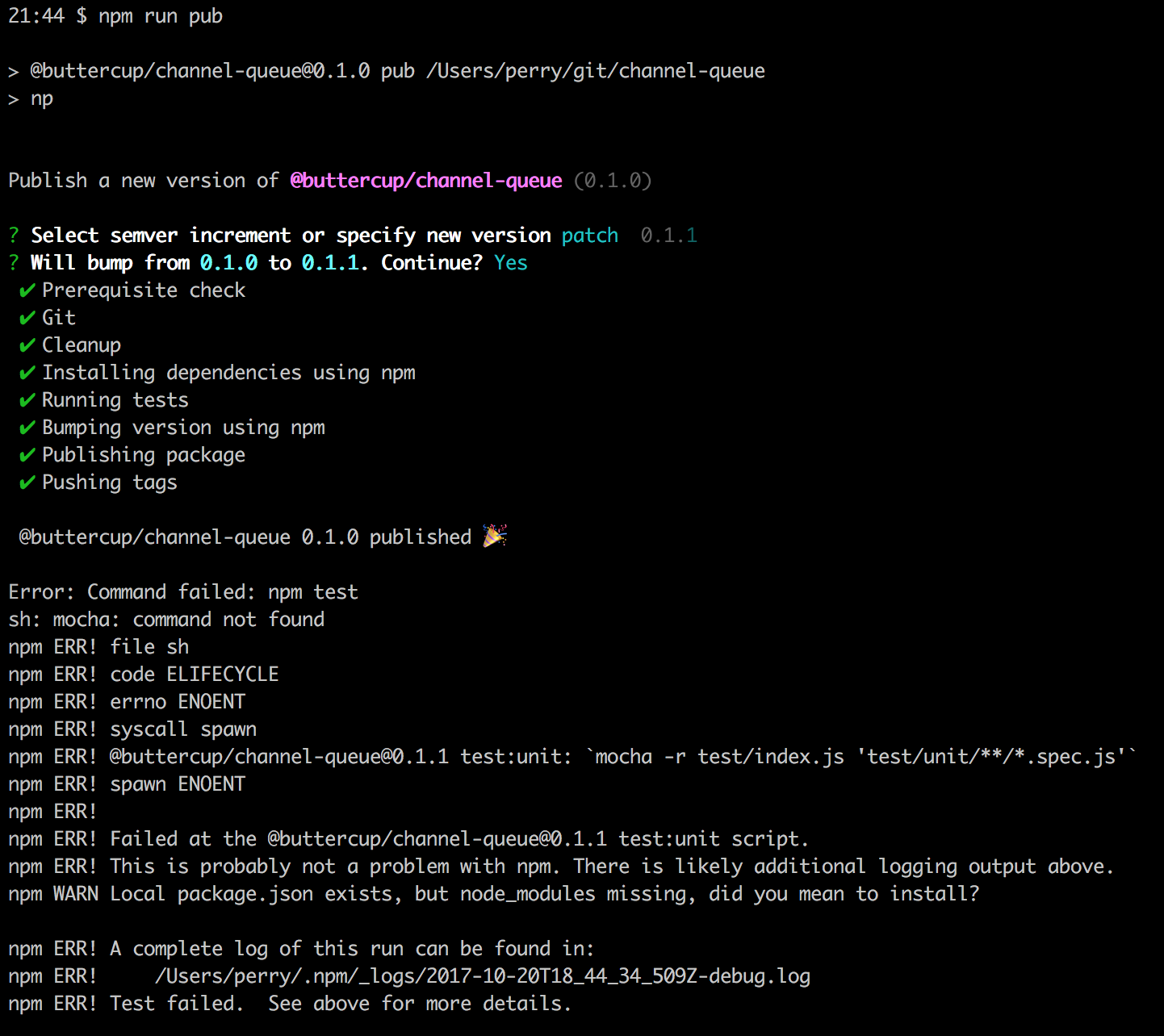
This time, the version 0.1.1 was actually on npm. The change was not pushed to github, nor was the new tag.
perry-mitchell
on 20 Oct 2017
Same problem here.
after changing that version number from
oldtonew, it will still show the successful message asold ver publishedwill
tagbut won'tpublishsince always ends with error because of thepromiseissue which like above, I usejestthough
 Albert-Gao
on 23 Oct 2017
Albert-Gao
on 23 Oct 2017
I get this on other modules as well. I do publish a lot of private/scoped modules, so I wonder if it has something to do with that. The issue is basically that np starts fine, then marks everything as successful, waits some seconds, and then crashes with something like above: sh: mocha: command not found (I guess it failed when trying to run the tests? Something to do with installing packages after cleaning it up?).
perry-mitchell
on 23 Oct 2017
because of the promise issue
@Albert-Gao What do you mean by promise issue?
perry-mitchell
on 23 Oct 2017
Sorry, rechecked my npm log, not the same one.... will start a new issue... It's the EventEmitter rather than the promise..
Albert-Gao
on 23 Oct 2017
I'm having the same issue
Latest version is from the 7th of June and I'm pretty sure I published several modules between now and then so my first thought is that it must come from a dependency that introduced a breaking change
 mastilver
on 23 Oct 2017
mastilver
on 23 Oct 2017
Not sure, but the module execa appears both in my issue and here
And its always the Promise.all.then.arr, it has some issue I suppose.
Check the latest comment I add in my issue.
Albert-Gao
on 24 Oct 2017
Not sure how stable the issue is, in terms of reproduction, but on one of my libraries that was very often showing the problem I locked execa to version 0.7.0 (latest is 0.8.0). Publishing via latest np worked perfectly, at least for the couple of times I tried. Could anyone else confirm this?
I'd also probably suggest changing the dependencies of this package to be tied to patch updates only (right now they're tied to minor updates). np is a vital part of peoples' workflows and would probably benefit from being more strict in terms of dependency version support (imo).
EDIT: Realised that this would only make sense with versions 1.0.0 or higher, due to semver behaviour.
perry-mitchell
on 26 Oct 2017
np should be using [email protected] as np points to ^0.6.3 and 0.6.3is the only one to cover that range, see: https://semver.npmjs.com/
But maybe there is a fix in 0.7 (and 0.8)
mastilver
on 26 Oct 2017
Ah, you're right @mastilver - forgot that 0-prefixed versions behave differently.
perry-mitchell
on 26 Oct 2017
the issue is with rxjs, I will try to find what the issue with it
mastilver
on 26 Oct 2017
https://github.com/sindresorhus/any-observable tests are failing which is I think why np isn't working
EDIT: I think I was testing it the wrong way, will investigate more later
mastilver
on 26 Oct 2017
Hi.
I have a similar issue recently. It was working just fine until today.
Now, all my package fails to publish with np.
I'm on NPM 5 for a while, so I don't think it's the main issue.
In my case, mocha is installed globally so it doesn't fails on mocha. But it fails because all my package are absent.
It looks like that the dependency installation step fails. All the next step run extremly fast as it was doing nothing. Actually, it's fast from git or cleanup step. The second log shows that all my dependency are missing for the tests launched by mocha.
EDIT: I also want to add that I tested all the step manually (npm install, npm test, npm run precommit) and it works just fine.
2017-10-27T13_13_07_618Z-debug.log
2017-10-27T13_13_09_532Z-debug.log
2017-10-27T13_13_17_384Z-debug.log
 nohira
on 27 Oct 2017
nohira
on 27 Oct 2017
with --no-cleanup it works
 hugomrdias
on 27 Oct 2017
hugomrdias
on 27 Oct 2017
I don't think it's very clean to remove cleanup because it validates the installation process in the case you omit to save some dependencies.
Though, I tested it and still don't work.
nohira
on 27 Oct 2017
I tried on bash for Windows 10 and works.
On bash, I have:
[email protected]
[email protected]
[email protected]
[email protected]
I will try to update and test each one
edit
Updated npm and it's still ok.
Updated np to 2.16.0, and it bugs again.
Reverting to 2.13.1 still bug.
It seems some dependecy is broken.
nohira
on 29 Oct 2017
It seems some dependecy is broken.
As I mention earlier, rxjs is 'broken', a quick fix would be to freeze the version, but in the end we need to understand what's happening...
@SamVerschueren @sindresorhus Would you accept a PR that freeze rxjs as a temporary fix?
mastilver
on 29 Oct 2017
As I mention earlier, rxjs is 'broken'
Thanks.
For me, it looked like that all npm exec command was not handled correctly and was not waiting the end of the command.
I've tried to downgrade rxjs dependency to 5.4.3 and it works. Any 5.5 versions don't work.
I have a private registry so I will use it, waiting the fix upstream.
nohira
on 29 Oct 2017
I've tried to downgrade rxjs dependency to 5.4.3 and it works. Any 5.5 versions don't work.
Oh interesting..., I though it was because np was using a beta version with unstable feature, and that it broke once the final version was released...
mastilver
on 29 Oct 2017
@mastilver
@SamVerschueren @sindresorhus Would you accept a PR that freeze rxjs as a temporary fix?
Open a PR, and it will get merged pretty quickly. Make sure to reference this issue in the description.
 jesstelford
on 30 Oct 2017
jesstelford
on 30 Oct 2017
I can confirm this has been fixed in 2.16.1, thanks @mastilver.
 marian-r
on 30 Oct 2017
marian-r
on 30 Oct 2017
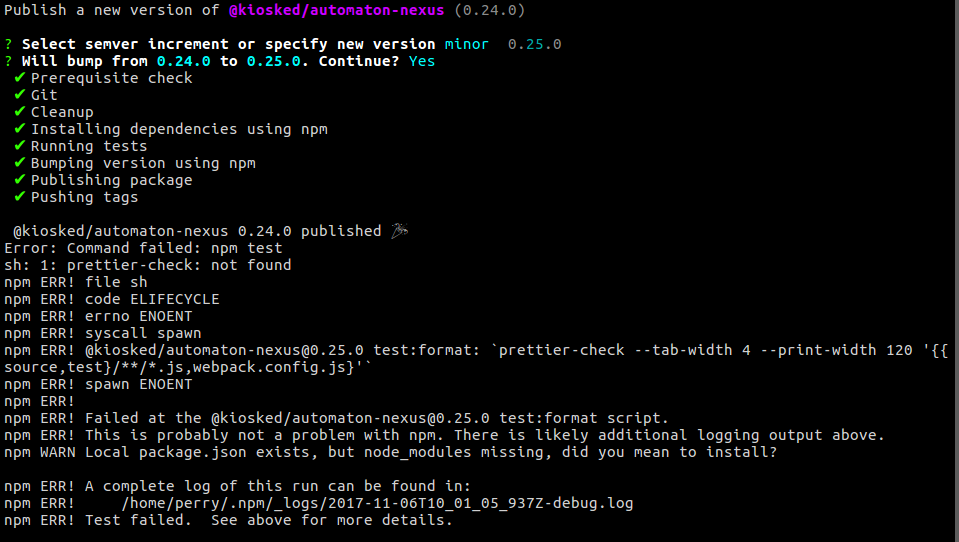
This is still a problem for me, even on 2.16.1. It has not been solved by the latest release:
$ cat node_modules/np/package.json | grep '"version"'
  "version": "2.16.1",
It seems to "complete" immediately, but cleaning, installing and testing still occurs in the background. The only "different" think I'm doing in my npm scripts is perhaps using env-cmd to run tasks:
{
    "test": "npm run test:format && npm run test:unit",
    "test:format": "prettier-check --tab-width 4 --print-width 120 '{{source,test}/**/*.js,webpack.config.js}'",
    "test:unit": "env-cmd testing mocha -r test/index.js 'test/server/**/*.spec.js'"
}
It looks like the tracking of the cleaning/install command gets lost and moves straight on to the testing, which also gets lost, and the process completes prematurely. The installation may be happening in the background, but so is the testing, and so everything dies eventually:
sh: 1: prettier-check: not found

# ...

npm ERR! sh: 1: lint-staged: not found

# ...

Error: Cannot find module 'hipchat-client'
Our entire package.json is here, if it helps. The package is private.
perry-mitchell
on 6 Nov 2017
This is reproducible for me every publish - so if there's something I can try or information I can share, please let me know.
perry-mitchell
on 8 Nov 2017
I think there is an issue with NPM that may be causing this, not 100% sure though: https://github.com/npm/npm/issues/18658
 gonzofish
on 8 Nov 2017
gonzofish
on 8 Nov 2017
@gonzofish I'm not sure how that might be the cause, as it looks like np just _stops watching_ the executed scripts.. The chain of events looks like it breaks and then tries to run everything at the same time, which errors. Publish+Tests will fail if all the dependencies haven't been installed, which is what happens in my case as that's were np seems to fall apart.
perry-mitchell
on 16 Nov 2017
Similar issue here with np showing success and then failing.
➜  medusa-lib git:(master) np

Publish a new version of medusa-lib (0.0.8)

? Select semver increment or specify new version patch  0.0.9
? Will bump from 0.0.8 to 0.0.9. Continue? Yes
 ✔ Prerequisite check
 ✔ Git
 ✔ Cleanup
 ✔ Installing dependencies using Yarn
 ✔ Running tests
 ✔ Bumping version using Yarn
 ✔ Publishing package
 ✔ Pushing tags

 medusa-lib 0.0.8 published 🎉
Error: Command failed: npm test
npm ERR! Test failed.  See above for more details.

> [email protected] test /Users/xo/code/medusa-lib
> xo && nyc ava


  test/index.js:1:22
  ✖  1:22  Unable to resolve path to module ava.       import/no-unresolved

  index.js:1:25
  ✖  1:25  Unable to resolve path to module frisbee.   import/no-unresolved
  ✖  2:23  Unable to resolve path to module debug.     import/no-unresolved
  ✖  3:25  Unable to resolve path to module url-join.  import/no-unresolved
  ✖  4:25  Unable to resolve path to module dot-prop.  import/no-unresolved

  5 errors

    at Promise.all.then.arr (/Users/xo/.config/yarn/global/node_modules/execa/index.js:210:11)
    at <anonymous>
    at process._tickCallback (internal/process/next_tick.js:188:7)
Error: Command failed: npm test
npm ERR! Test failed.  See above for more details.

> [email protected] test /Users/xo/code/medusa-lib
> xo && nyc ava


  test/index.js:1:22
  ✖  1:22  Unable to resolve path to module ava.       import/no-unresolved

  index.js:1:25
  ✖  1:25  Unable to resolve path to module frisbee.   import/no-unresolved
  ✖  2:23  Unable to resolve path to module debug.     import/no-unresolved
  ✖  3:25  Unable to resolve path to module url-join.  import/no-unresolved
  ✖  4:25  Unable to resolve path to module dot-prop.  import/no-unresolved

  5 errors

    at Promise.all.then.arr (/Users/xo/.config/yarn/global/node_modules/execa/index.js:210:11)
    at <anonymous>
    at process._tickCallback (internal/process/next_tick.js:188:7)
Error: Command failed: npm test
npm ERR! Test failed.  See above for more details.

> [email protected] test /Users/xo/code/medusa-lib
> xo && nyc ava


  test/index.js:1:22
  ✖  1:22  Unable to resolve path to module ava.       import/no-unresolved

  index.js:1:25
  ✖  1:25  Unable to resolve path to module frisbee.   import/no-unresolved
  ✖  2:23  Unable to resolve path to module debug.     import/no-unresolved
  ✖  3:25  Unable to resolve path to module url-join.  import/no-unresolved
  ✖  4:25  Unable to resolve path to module dot-prop.  import/no-unresolved

  5 errors

    at Promise.all.then.arr (/Users/xo/.config/yarn/global/node_modules/execa/index.js:210:11)
    at <anonymous>
    at process._tickCallback (internal/process/next_tick.js:188:7)
Error: Command failed: npm test
npm ERR! Test failed.  See above for more details.

> [email protected] test /Users/xo/code/medusa-lib
> xo && nyc ava


  test/index.js:1:22
  ✖  1:22  Unable to resolve path to module ava.       import/no-unresolved

  index.js:1:25
  ✖  1:25  Unable to resolve path to module frisbee.   import/no-unresolved
  ✖  2:23  Unable to resolve path to module debug.     import/no-unresolved
  ✖  3:25  Unable to resolve path to module url-join.  import/no-unresolved
  ✖  4:25  Unable to resolve path to module dot-prop.  import/no-unresolved

  5 errors

    at Promise.all.then.arr (/Users/xo/.config/yarn/global/node_modules/execa/index.js:210:11)
    at <anonymous>
    at process._tickCallback (internal/process/next_tick.js:188:7)
 OmgImAlexis
on 17 Nov 2017
OmgImAlexis
on 17 Nov 2017
@OmgImAlexis - I had a very similar issue to you, try removing in yarn:
yarn global remove np
and installing globally with npm
npm install --global np
That fixed it for me
 jamestalmage
on 9 Dec 2017
jamestalmage
on 9 Dec 2017
I'm noticing that when I'm running np (on Node 8.9.3, NPM 5.5.1) the dependencies install, tests, version bumping, & tagging all seem to immediately complete. However, it seems like the dependencies install is still running in the background so everything is actually failing...am I missing something?
EDIT: to further solidify this point, if I run --no-cleanup it succeeds
gonzofish
on 17 Dec 2017
@gonzofish This is the same thing that I'm experiencing. It definitely seems that the tasks carry on in the background, and crash later (as it seems the tests etc. start before the modules installations are completed).
perry-mitchell
on 17 Dec 2017
@perry-mitchell I just set up a very bare bones project and ran np --no-publish and everything seemed to work as expected (repo here)
The project uses TypeScript for code, Webpack, & Karma...so I guess it's not really bare bones. What kind of project are you working with?
gonzofish
on 18 Dec 2017
@perry-mitchell based on above comments by @mastilver and @nohira I downgraded my project's RxJS to 5.4.3...and it worked. I completely missed their comments the first time around.
Is your project using RxJS?
gonzofish
on 18 Dec 2017
@gonzofish same issue as you but with all my projects and I'm not using RxJS or Typescript.
For example a few comment up is the output of trying to publish this.
OmgImAlexis
on 18 Dec 2017
@gonzofish I'm not using RxJS. That's why I forced np to use the last compatible RxJS. I Can create a PR.
In my case, I'm using verdaccio as internal NodeJS package manager, so I was able to override this dependency issue.
nohira
on 18 Dec 2017
What kind of project are you working with?
A variety of projects, all JavaScript only. Some with webpack, some without. It might just be in my head now, but it seems as though it occurs much more with scoped packages than with those without.
Is your project using RxJS?
None of them are.
perry-mitchell
on 18 Dec 2017
Any updates on this? I'm still constantly getting failures on some projects. I can reproduce every time I run np.
My versions:
{ '@buttercup/locust': '0.4.0',
  npm: '5.4.2',
  ares: '1.10.1-DEV',
  cldr: '31.0.1',
  http_parser: '2.7.0',
  icu: '59.1',
  modules: '57',
  nghttp2: '1.25.0',
  node: '8.7.0',
  openssl: '1.0.2l',
  tz: '2017b',
  unicode: '9.0',
  uv: '1.15.0',
  v8: '6.1.534.42',
  zlib: '1.2.11' }
I'm now using np 2.18.3. I have it as a devDependency and run it as a script. Nothing is published or committed (but items are git add'ed).
perry-mitchell
on 27 Jan 2018
my assumption is that when you run it without --no-cleanup it has to delete np itself which then does some lazy loading somewhere that causes this to happen
 jdxcode
on 28 Jan 2018
jdxcode
on 28 Jan 2018
Thanks @jdxcode - It does indeed work with the --no-cleanup option. I would much prefer that the cleanup worked, however.
On another node, when using the --no-cleanup flag, I noticed that the logged version was wrong:
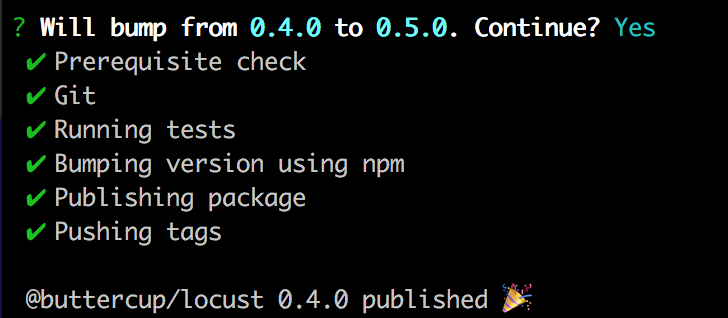
It should have read 0.5.0 on the last line.
Progress, nonetheless.
EDIT: I also noticed that it hadn't run git push or git push --tags. Both the commit and the tag were created but not pushed to origin.
perry-mitchell
on 28 Jan 2018
@perry-mitchell you said you do not have RxJS or any other Observable library in your project?
gonzofish
on 28 Jan 2018
That’s correct. It’s a very simple project anyhow, but there aren’t any dependencies present that are also found in np.
perry-mitchell
on 29 Jan 2018
@perry-mitchell the version issue is being tracked https://github.com/sindresorhus/np/issues/203
OmgImAlexis
on 5 Feb 2018
After testing this some more on other computers with other libraries, it seems that it still doesn't work, even with the --no-cleanup option. Seems to occur with every scoped package (just have a feeling that it occurs more there).
perry-mitchell
on 6 Feb 2018
@perry-mitchell I'm getting it with ALL packages. I haven't found a single thing that they all share so far apart from using np.
Does it work with --yolo?
OmgImAlexis
on 7 Feb 2018
I'm also seeing this issue. Here are the symptoms:
- There's an error having to do with
execathat's printed way afternp"succeeds". - The version printed in the success output is the existing version, not the newly published one.
- The new version doesn't actually get published.
- The steps up to "Cleanup" run normally, but the steps after run all at once instantly.
For me this was due to how np cleans the node_modules folder.
As currently written, you must install np globally.
If you try to use it responsibly like you would for any other binary, you don't install it globally. Instead, you add it in devDependencies and then reference it from there. The issue is that during the "Cleanup" phase I think np is removing itself, so everything after that doesn't actually do anything (even though it says it succeeded).
If I remove it from devDependencies and install it globally with npm install --global np (even though I'm using yarn) it works.
This could be solved by making the cleanup phase smarter than just del('node_modules') to avoid deleting itself instead, which would be nice because things shouldn't require being installed globally.
 ianstormtaylor
on 2 Mar 2018
ianstormtaylor
on 2 Mar 2018
Is anyone able to look into this? Would it be worth creating a new issue instead to look towards supporting local installation rather than global? I won't want np installed globally - I'd like it to be a part of the release process for every project. I usually document some command to run to either publish or deploy: npm run pub, npm run deploy etc. - I wouldn't expect anyone to have to install any global packages.
EDIT: This issue also doesn't seem to have anything to do with the Cleanup phase. Disabling that doesn't fix the issue for me on any of my machines.
perry-mitchell
on 15 Mar 2018
So, I've done some digging on this also and wanted to throw my two cents in.
- I use husky, so I have githooks in my life cycle. Those get totally wacked up when
Cleanupruns because it deletesnode_modulesand the hooks can't run. - It looks like
npexecutes everything viaexeca, which isasyncby default. I am wondering if there is a race condition whereCleanupdeletes necessary dependencies, causing other processes to fail after it looks like it "succeeded". - I can successfully run this without cleanup, but the version that is shown as "being published" is the last version.
It's a shame really, this is a useful tool, but from a high level I can't seem to find a "glaring issue". Maybe @sindresorhus can chime in with some knowledge on what may have changed that caused this issue?
 Aghassi
on 11 Apr 2018
Aghassi
on 11 Apr 2018
@ianstormtaylor I'm also getting this with np installed globally so maybe open another issue in regards to that?
OmgImAlexis
on 12 Apr 2018
I ran into the same issue as well. Tried with np installed globally and it worked fine.
 zellwk
on 5 May 2018
zellwk
on 5 May 2018
Closing as I haven't seen this is ages now. Last message middle of 2018. Happy to reopen if someone else is still seeing these errors.
perry-mitchell
on 9 Oct 2020
Related issues
 ProfessorManhattan
·
4Comments
ProfessorManhattan
·
4Comments
 dotconnor
·
4Comments
dotconnor
·
4Comments
 bennycode
·
4Comments
bennycode
·
4Comments
 fregante
·
5Comments
fregante
·
5Comments
 inker
·
4Comments
inker
·
4Comments
Most helpful comment
Is anyone able to look into this? Would it be worth creating a new issue instead to look towards supporting local installation rather than global? I won't want
npinstalled globally - I'd like it to be a part of the release process for every project. I usually document some command to run to either publish or deploy:npm run pub,npm run deployetc. - I wouldn't expect anyone to have to install any global packages.EDIT: This issue also doesn't seem to have anything to do with the Cleanup phase. Disabling that doesn't fix the issue for me on any of my machines.